
Where Flight Simulation Enthusiasts Gather from Around the World!
AVSIM Library - Search Results

| Category: Flight Simulator 2004 - Miscellaneous Files | |
| FS9 2SF sun mod |

|
File Description:
"FS9_2SF" Package for FS9 contains remarkable sun mod that removes lens flare and is replaced with a stunning glare. Also contains low burn-in universal splash, tattered taxiway (2 styles, light or dark) and markings, life like color spotlight, vector Halo Texture generated from real life. Includes natural color lightning, lightning flash, artistic exhaust flame effect textures with smoke for propeller craft (C182/DC3/D18s/C47) for FS9 and FSX, also contains FX_2 texture with nav light mod resized and Trajectorized for various aircraft lights. Plus breathtaking Dusk ENV Textures and reflection texture for FS9. A must have for hard-core simmers. Intended for and created by HARD-CORE FS ENTHUSIASTS!
| Filename: | FS9_2SF_sun_mod.zip |
| License: | Freeware, limited distribution |
| Added: | 23rd June 2020, 18:50:18 |
| Downloads: | 671 |
| Author: | Brian Neitzel |
| Size: | 10.65 MB |
| Category: Flight Simulator 2004 - Scenery | |
| Barbados International Airport |
|
Images related to this file:
File Description:
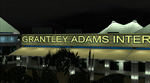
Grantley Adams International Airport for FS2004 (Re-uploaded + 1.1 update included)
This scenery represents a complete redevelopment of the stock FS2004 airport and reflects the state of the airport in 2007/2008. Features 3D models of the main terminals made in GMAX plus cargo area, fire station, Concorde Experience Museum and other ancillary structures in the airport property and beyond, photoreal ground polygons designed in GMax, 3D taxi lighting and approach lighting system for Runway 09, small Landclass update for Bridgetown and surrounding districts to bring in line with real life geography. ** FS2004 ONLY ** See FSX Library for the FSX version. Enjoy your visit to sunny Barbados!
| Filename: | Barbados_International_Airport.zip |
| License: | Freeware, limited distribution |
| Added: | 13th December 2009, 03:31:53 |
| Downloads: | 16,943 |
| Author: | Max Kraus |
| Size: | 66.73 MB |
| Category: Flight Simulator 2004 - Utilities | |
| MRAI FlightPlans Compiler |
|
File Description:
The MRAI FlightPlans Compiler is an AI flightplan generator. It is the program Most Realistic AI has used to make all its AI flightplans. The program can read any real life airline timetable formatted in a special way. Based on the timetable, the compiler finds in a logical way, (dependent on place, time, aircraft and flight number) the best combination of weekly AI flightplans. The compiler calculates the heading and distance between two airports. Based on heading, distance and aircraft type, the compiler calculates the best Reduced Vertical Separation Minima (RVSM) cruise altitude suitable for the flight. The MRAI FlightPlans Compiler is public domanin and the source code is included.
| Filename: | MRAI_FlightPlans_Compiler.zip |
| License: | Freeware |
| Added: | 28th March 2005, 02:33:56 |
| Downloads: | 12,752 |
| Author: | Arnt Helge Haland |
| Size: | 471.71 KB |
| Category: Flight Simulator X - Original Aircraft | |
| C-17 Globemaster III/ER |
|
Images related to this file:
File Description:
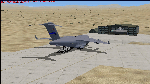
The C-17 Globemaster III/ER is a heavy cargo aircraft used by several foreign militaries, but primarily the U.S. Air Force. She is designed to do many things that other cargo aircraft cannot, based on her unique design. This version incorporates the extended range fuel tanks. The real world aircraft can actually use reverse thrust in flight, up to 100% reverse power, during descents or on the ground. It is also the only heavy aircraft in the world with a wing efficiency factor over 1.0, which is theoretically impossible, but true. All of the dynamics in this model are correct down to the inch, so she does almost everything the real aircraft does. Some things are not possible in FSX, including reverse thrust while in flight, but full flaps/slats employed in a steep descent will adequately simulate this effect without damage to the model while in flight. The landing gear are authentic and capable of heavy loads. The weight and balance is authentic. The fuel tanks are authentic. The aircraft name, tail number, location, and callsign are authentic. The calculated range(s) listed are all authentic, understanding that most public data released is based on average range, at average altitude, and normal payload missions. The sound is authentic. The engine dynamics are authentic. The panel used is the best I could find, is fairly authentic, and requires some pre-flight study before flight. All-in-All the aircraft is very simple to fly, but requires some study to operate correctly, so I recommend all simmers watch as many "You Tube" videos, read as many authentic sites, and study as much as possible about this aircraft before operation. Model by: Bob Chicilo, Sound by: Devyn Silverstein, Panel by: Phillip Wallaert, Auto Smoke Effects by Richard Wisman/Douglas E. Trapp, Real World Aero/Engine Dynamics and modifications by: Douglas E. Trapp, FS Flight Dynamics Engineer, [email protected], July 2018, FOR EDUCATIONAL USE ONLY. This aircraft is designed for educational use protected under the Fair Use Doctrine:
(http://www.expertlaw.com/library/intellectual_property/fair_use.html). It cannot be sold or bundled for sale, and such will never be approved by me or the original authors. FREEWARE DISTRIBUTION ONLY!!! Douglas E. Trapp, [email protected], July 2018
| Filename: | C17_Globemaster_IIIER.zip |
| License: | Freeware |
| Added: | 14th July 2018, 17:41:34 |
| Downloads: | 780 |
| Author: | Dougals E. Trapp |
| Size: | 13.5 MB |
| Category: Prepar3D V1-4 - Aircraft Repaints, Textures and Modifications | |
| Korean Air 1998 AI Package |
|
File Description:
Korean Air was one of only 2 airlines doing domestic Korean flights in 1998, with Korean Air having a much larger market share than Asiana and extensively flying the A300s on many domestic routes. By 1998, Korean Air had converted(to a freighter) or retired most of the 747-200s, 747-300s, MD-11s and A300B4s, but they were still in the fleet in very small numbers. The A330-300 and 777-200 were also starting to join the fleet very slowly with a few examples of each. The MD-80s and Fokker 100s were being used in decent numbers on both domestic flights and flights to Japan and China. The 747SPs were active but only picked up flying as spare airplanes, so they mostly sit in GMP but during the week do GMP-SFO-DEN, GMP-NRT-LAX-GMP, and GMP-HKG flights taken from 747-400s. As is the case with some of these plans, to upkeep 100% of the OAG flight schedule using the limitations of AI in flight simulator, there are a few extra planes(4x MD-80 and 1x Fokker 100) in these plans with fake registration numbers. The user may decided if they'd rather see all real life flights or the real amount of aircraft. Ranmori has painted a 727-200 as a bonus, and I gave these extra 4 MD-80s registration numbers from 727s and segregated them from the flightplans in case you wish to use the 727, but in real life it was retired in late 1996. Note that these plans and all 1998 plans use the Seoul-Gimpo airport(GMP/RKSS) as Incheon(ICN/RKSI) did not open until 2001. Textures by Ranmori Scythe for the AIA MD-80, Fokker 100, FAIB 747-200, 747-300, 747-400, 747SP FSPX 777-200, A330-300, MD-11, TFS A300B4 and A300-600R along with the AIA 727-200 bonus included. Flightplans by Chasen Richardson. Part of the 1998 Flight Simulator Project. Follow us on Facebook at facebook.com/flightsim98 and on instagram as @bayviationsim. For more Retro AI, check out the forums at: http://retroai.proboards.com/
| Filename: | Korean_Air_1998_AI_Package.zip |
| License: | Freeware, limited distribution |
| Added: | 21st November 2019, 19:18:41 |
| Downloads: | 283 |
| Author: | Ranmori Scythe, Chasen Richardson/Bayviation |
| Size: | 32.16 MB |
| Category: Flight Simulator 2004 - Miscellaneous Files | |
| Shoot 1.6.3' Voice Contro File |
|
File Description:
"Shoot 1.6.3" voice control file for use with FS2004. You will need to download the main "freeware" program from http://clans.gameclubcentral.com/shoot/downloads.php which will allow you to make use of this control file for FS2004. The program is brilliant and allows you to control FS2004 by voice and it's totally free! All I have done is made a config file that works very well with FS2004.
It will allow you to; speak to ATC and instead of fighting with the keyboard or yoke/stick so you can fly more like a real pilot and keep your hands on the yoke more of the time. For example a commercial jet pilot calls out to the co-pilot to get the gear up and simply says "gear up". That's just what you will have to do, just like the real thing; the gear will go up when you make the call. When FS2004 ATC controller tells you to reply you can just say "roger" or "hello" or "ATC" or "air traffic" etc, etc, and the ATC window will pop up. Then all you have to do is call out the command instead of pushing buttons that real pilots don't use. Does a real pilot push a button to look out of the window or use a "mouse" to engage the autopilot?
Similarly you can call out "autopilot engage" or "autopilot master" or "autopilot disengage" and that's just what happens; the autopilot comes on/off. The best part though is when you try looking around the cockpit. If you want to move your head up you just say "move up" and presto you are higher up in your seat. You can move to the left or
Right, back or forward. You can say "zoom in" and that's what happens. You can say "reset zoom" and so on. You can say "next view" and then the view may be outside or another panel. Alternatively, you can say "panel 2" and the radio panel will come up in the 737 so you can tune the radios. If you have FS navigator installed all you have to
do is say "navigator" and the map comes up, and then say navigator again and off it goes. Just for once it is easy and possible to make full use of FS2004. Using this program has afforded me the opportunity of making better use of the views available, (and I have CH products yoke so if was never hard) but now it's even easier.
All the panels can be activated in this way, and control of the autopilot and control of FS2004. It's probably the best kept secret. I've made a file so we can all share in this freebie of a program. I've included a readme and instructions of how to make the best use of the program.
Config file for FS2004 only is provided.
| Filename: | Shoot_163_Voice_Contro_File.zip |
| License: | Freeware |
| Added: | 7th January 2004, 19:52:26 |
| Downloads: | 8,796 |
| Author: | Peter Wilding |
| Size: | 21.83 KB |
| Category: Flight Simulator 2004 - Sounds | |
| DC-4 / C-54 / Carvair sound.cfg |
|
File Description:
In my search for sounds that would be (nearly) matching the real sounds of the Douglas C-54/DC-4 and the Aviation Traders ATL.98 Carvair (vehicle ferry conversion of the C-54 and DC-4), I struck on the DC-3 Sound Pack compiled
by Des Braban several years ago. Although intended as a DC-3 sound set, it doesn't quite sound like the Pratt & Whitney Twin Wasp C-series (aka R-1830) engines which powered the majority of the DC-3/C-47/C-53 aircraft. Instead it sounds much more like the Pratt & Whitney Twin Wasp D-series (aka R-2000) engines which powered the C-54/DC-4 and, later on, the Pan American converted Hi-Per DC-3, the EC-47Q, the DHC-4 Caribou and ATL.98 Carvair. In order to make the sound set appropriate for the four engined C-54/DC-4/Carvair, I slightly altered the sound.cfg by just doubling the number of engines and copying some existing lines. Nothing else has been changed. All the wav files remained unaltered and no wav files have been added. The result, however, is a full sound which is very close to that of the real C-54/DC-4/Carvair. In order to get the proper sound, you will require Des Braban's DC-3 Sound Package (dc3sndpk.zip). Original sound.cfg by Des Braban; revised for Douglas DC-4/C-54 and Aviation Traders ATL.98 Carvair by Maarten Brouwer.
| Filename: | DC4__C54__Carvair_soundcfg.zip |
| License: | Freeware, limited distribution |
| Added: | 27th May 2008, 17:20:20 |
| Downloads: | 1,742 |
| Author: | Maarten Brouwer |
| Size: | 1.66 MB |
| Category: Flight Simulator X - Utilities | |
| PJEZFSX |
|
File Description:
PETER JAMES' EZCAM .CAM FILES AS OF 3-25-10. I have made some great cams to share based on the new
Flight1 EZDOK software. Installation is a snap. Just copy these into your EZDOK root directory and you're
ready to go! As a real commercial pilot with over 7500 hours flying time, I can assure you these cams
give you the most realistic virtual cockpit views possible. I base this on proper seat position, as
well as a zoom level I have been fiddling with since the beginning of FSX.
I have here cams for the A319 by Project Airbus, the Default A321, default Beaver, the 739 by Ariane, the LDS 767-300ER,
and the great free biplane (Tigermoth) by ORBIX ...Whether you own the two payware products or not
does not matter. These cams will work well on any similar aircraft. Just use the EZDOK interface to import these cams,
and then you can edit them for any plane you want. The real thing I did was take the default cams that came with EZDOK and dampen
out the touchdown head wobble...but that's about it. I am still learning all the tweaks available
with vibrational effects, but have gotten good at setting up 9 viewpoints for each virtual cockpit
included... when you run the EZDOK interface you'll see the titles and number key for each position.
Enjoy!
Peter James / [email protected]
| Filename: | PJEZFSX.zip |
| License: | Freeware |
| Added: | 25th March 2010, 06:23:33 |
| Downloads: | 2,535 |
| Author: | Peter James |
| Size: | 16.85 KB |
| Category: Flight Simulator X - Scenery | |
| Ireland VFR Small Airports part 1 |
|
File Description:
Ireland VFR Small Airports Part 1.
This scenery includes 5 small airports in Ireland. EIDL Donegal is in the far North West, EIAB Abbeyshrule is located in the centre of Ireland. EIKL Kilkenny is located in the South East and Newcastle can be found on the East coast. EITM is a small grass strip to the north West of Dublin. Donegal and Abbeyshrule have paved runways whilst the others consist of small grass strips.
The scenery includes animals, vegetation and rural objects. It also includes sound effects, animations, some high definition people, and aircraft painted using real Irish aircraft photos. Many of the airports include open hangers and buildings modelled from real photographs. Although Donegal is the only one with ILS, full night textures are included for all the airports.
Many of the files are stand alone and can be switched on or off according to user preference. The scenery can be used as a standalone, however it also uses objects from my other scenery addons.
The scenery has been tested with FSXA only and is designed to complement vfr photographic scenery. It will also work with the FSX default terrain, however all objects have been placed using ordinance survey data and may therefore appear misplaced in the default.
Full installation instructions are included in the Readme file.
I hope you enjoy using the airports as much as I enjoyed making them.
| Filename: | Ireland_VFR_Small_Airports_part_1.zip |
| License: | Freeware |
| Added: | 21st December 2011, 00:18:25 |
| Downloads: | 4,985 |
| Author: | George Keogh |
| Size: | 51.33 MB |
| Category: Flight Simulator X - Scenery | |
| Mid West Victoria v2 for ORBX v2. 14 airports. YARA YSWL YMBU YSTA YDOD YWYF YBIR YHPN YKER YSLK YSWH YNHL YHSM YWKB |
|
Images related to this file:
File Description:
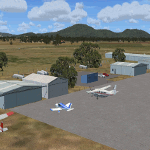
'Mid Western Victoria v2' is made to match ORBX Australia v2 scenery. Use 'Mid West Victoria update' for ORBX v1 or no ORBX. NOTE this is an UPDATE with Horsham replacing Hamilton in the instructions (it is Horsham in the actual scenery). There are 14 airports starting at Ararat and extending up to the Murray at Swan Hill. YARA Ararat YSWL Stawell YMBU Maryborough YSTA Saint Arnaud YDOD Donald YWYF Wycheproof YBIR Birchip YHPN Hopetoun YKER Kerang YSLK Sealake YSWH Swanhill YNHL Nhill YHSM Horsham YWKB Warracknabeal. A lot of airports but this is several hundred hours of effort over many months. ORBX has done these as they have done every airport included with FSX in Australia to a reasonable standard. If I had not already done them for ORBX V1 I would not have bothered. However these are better than ORBX because the surroundings have been modified to match real life. Towns have been added or shifted. Forests cut down or added. Race courses, sewage treatment ponds and other stuff added. Local obstacles (towers etc) added. There are 6 custom terminal buildings accurate to real life. Included is an AI traffic file that covers airports that dont already have AI. These files are for Flight Simulator X. Made using Airport Design Editor using some objects borrowed from Robert Budd's excellent Baccus Marsh and 'Static aircrafts' by Jean-Pierre Fillion. REQUIRED The scenery is designed to interface with ORBX FTX_AU V2 scenery for Australia (payware).
| Filename: | Mid_West_Victoria_v2_for_ORBX_v2_14_airports_YARA_.zip |
| License: | Freeware |
| Added: | 2nd May 2020, 23:11:14 |
| Downloads: | 258 |
| Author: | Colin Jeffery |
| Size: | 10.49 MB |


© 2001-2026 AVSIM Online
All Rights Reserved
Privacy Policy |