
Where Flight Simulation Enthusiasts Gather from Around the World!
AVSIM Library - Search Results

| Category: Flight Simulator 2004 - AI Aircraft | |
| Mikoyan-Gurevich MiG-23 Flogger (Part 5) |

|
Images related to this file:
File Description:

Mikoyan-Gurevich MiG-23 Flogger (Part 5). I present a comprehensive AI traffic model and texture package for this classic (and still-serving) Russian multi-role fighter. The MiG-23, with just over 5,000 built, was Russia's first production of a true multi-role aircraft with a beyond-visual-range air superiority role as its primary function. The aircraft was arguably the direct counterpart of the F-4 Phantom, although it carried about half of the ordnance load. Nevertheless, in capable hands and late versions, the Flogger has been and is a very potent adversary; having served in multiple conflicts in Europe, Asia, Africa, and the Middle East. The MiG-23 entered service in 1970, was eventually operated by 43 countries, and is still in service in 14 of them. An original 8-LOD model brings this aircraft to the flightsim world. This package contains the MiG-23BN ground attack variant; with 10 models and 62 repaints. Original aircraft model, afterburner effects, flight dynamics, and textures by Michael Pearson. Please read included documentation for credits and disclaimers.
| Filename: | MikoyanGurevich_MiG23_Flogger_Part_5.zip |
| License: | Freeware |
| Added: | 31st March 2014, 20:49:58 |
| Downloads: | 552 |
| Author: | Michael Pearson |
| Size: | 19.98 MB |
| Category: Flight Simulator 2004 - AI Aircraft | |
| Mikoyan-Gurevich MiG-23 Flogger (Part 6) |
|
Images related to this file:
File Description:

Mikoyan-Gurevich MiG-23 Flogger (Part 6). I present a comprehensive AI traffic model and texture package for this classic (and still-serving) Russian multi-role fighter. The MiG-23, with just over 5,000 built, was Russia's first production of a true multi-role aircraft with a beyond-visual-range air superiority role as its primary function. The aircraft was arguably the direct counterpart of the F-4 Phantom, although it carried about half of the ordnance load. Nevertheless, in capable hands and late versions, the Flogger has been and is a very potent adversary; having served in multiple conflicts in Europe, Asia, Africa, and the Middle East. The MiG-23 entered service in 1970, was eventually operated by 43 countries, and is still in service in 14 of them. An original 8-LOD model brings this aircraft to the flightsim world. This package contains the MiG-23U/UB two-seat variant; with 4 models and 61 repaints. Original aircraft model, afterburner effects, flight dynamics, and textures by Michael Pearson. Please read included documentation for credits and disclaimers.
| Filename: | MikoyanGurevich_MiG23_Flogger_Part_6.zip |
| License: | Freeware |
| Added: | 5th April 2014, 19:11:38 |
| Downloads: | 597 |
| Author: | Michael Pearson |
| Size: | 17.38 MB |
| Category: Flight Simulator X - Gauges | |
| AP_MultiFuel_Gauges for FIP |
|
Images related to this file:
File Description:
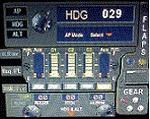
This set of 3 gauges is for use in the Saitek FIP and is an extension to my FIP gauge. That set of 3 gauges was designed to complement the Saitek AP/Multi panel and primarily showed the selected AP Altitude and Vert Spd whilst the Saitek AP/multi panel was displaying HDG. The second main part of those gauges were the Fuel Level displays, each gauge displaying a different combination of fuel tanks to suit the aircraft being flown and thus offered functionality for all types of aircraft.
This set of 3 gauges is designed for the same purpose but now encompasses a working AP that allows you to select HDG, ALT and VS values and activate the HDG and ALT mode (and AP master switch) to enable auto-pilot flight (for those who have a FIP but not an AP/multi panel).
For those who have an AP/multi panel, it gives a backup AP in your build/rig (although it all works off the same FS telemetry, I have found that when the AP/multi-panel freezes, especially the 'Alt' button, then this FIP gauge can de-activate it. The combinations displayed are those that suit my choice of aircraft, however it is easy to re-configure gauge Elements (fuel tank names) and artwork (fuel gauge titles) to suit the combination you prefer.
These gauges also retain the gear, flaps and light indicators, auto rudder on/off button plus rudder and aileron trim capability that were in the previous gauges. An additional feature is the battery switch will now turn off the AP display and fuel levels.
The artwork in these gauges has also been upgraded a bit and a template artwork is included to assist in customising.
| Filename: | AP_MultiFuel_Gauges_for_FIP.zip |
| License: | Freeware |
| Added: | 20th October 2014, 16:00:33 |
| Downloads: | 265 |
| Author: | Robert Budd |
| Size: | 764.26 KB |
| Category: Flight Simulator 2004 - AI Aircraft | |
| Team Aeroshell AT6 Harvard/Texan |
|
Images related to this file:
File Description:

AI Team Aeroshell Flying 4 AT6 Harvard/Texan, Another Multi Lod JAI Model. Package Includes Model And Flight Plan, enjoy.
| Filename: | Team_Aeroshell_AT6_HarvardTexan.zip |
| License: | Freeware |
| Added: | 7th April 2011, 00:01:21 |
| Downloads: | 390 |
| Author: | Ray Parker |
| Size: | 1.33 MB |
| Category: Flight Simulator X - Gauges | |
| Boeing 727-100/200 Various Fixes Ver2.0 |
|
File Description:
NEW for this version: Throttle control via the EPR setting bugs during cruise - Disabling of selected features.
The following are corrections or added enhancements to the Captain Sim B727-100/200/F:
-1 Airspeed Indicator Enhancement
-2 ADI & Flight Director Corrections
-3 A/P Enhancement for Flight Director
-4 Radar Altimeter Fix
-5 TAT Display toggle via DME Indicators
-6 Trim Sensitivity Fix (Optional)
-7 Auto Setting of Altimeter Alert (Optional)
-8 Auto setting of Take-off Elevator Trim (Optional)
-9 GPWS Switch Fixed (Optional)
-10 NAV/GPS toggle via Marker Beacon Sensitivity Switch (Optional)
-11 EPR Bug Setting Knob & Display Fixed
-12 Throttle Control via EPR Bug Setting Knob Fixed (Auto Mode)
-13 Maximum Continuous Thrust (MCT) drives EPR Bugs (Manual Mode)
| Filename: | Boeing_727100200_Various_Fixes_Ver20.zip |
| License: | Freeware, limited distribution |
| Added: | 31st May 2015, 21:04:54 |
| Downloads: | 1,819 |
| Author: | Paul Tally |
| Size: | 5.29 MB |
| Category: Flight Simulator X - Panels | |
| Tom a340 flap status display update |
|
File Description:
The files update the flaps status display on the Tom A340 panel.
ecams_engine_primary_slats_flaps_0.bmp
ecams_engine_primary_slats_flaps_1.bmp
ecams_engine_primary_slats_flaps_2.bmp
ecams_engine_primary_slats_flaps_3.bmp
ecams_engine_primary_slats_flaps_4.bmp
ecams_engine_primary_slats_flaps_5.bmp
| Filename: | Tom_a340_flap_status_display_update.zip |
| License: | Freeware |
| Added: | 11th March 2022, 19:13:11 |
| Downloads: | 117 |
| Author: | Carlton J Smith |
| Size: | 8.27 KB |
| Category: Flight Simulator 2004 - Gauges | |
| Magnetic Compass with selectable DIGITAL display |
|
Images related to this file:
File Description:
A Magnetic Compass gauge with selectable DIGITAL display. When you click on the aircraft outline on the compass, it will change to a Digital display of the heading.
Instructions are included for installing this gauge as a replacement for the default Compass in FS2004 or as an additional pop-up window on panels which do not presently have a magnetic compass. Please unzip to a temporary folder and follow the illustrated instructions which are provided in .Doc and .Pdf formats. Tested in FS2004 only. Gauge programming by Jim Robinson - packaged by David "Opa" Marshall for your flying enjoyment.
| Filename: | Magnetic_Compass_with_selectable_DIGITAL_display.zip |
| License: | Freeware |
| Added: | 5th December 2010, 13:34:37 |
| Downloads: | 717 |
| Author: | Jim Robinson & David "Opa" Marshall |
| Size: | 175.19 KB |
| Category: Flight Simulator X - Gauges | |
| FIP - 5 Gauge Display - 2 Engine |
|
Images related to this file:
File Description:

This set of gauges is for use in the Saitek FIP and has been developed specifically for the Baron 58 and variants but should work with other twin prop aircraft. There are 3 options-
option 1. a pair of gauges for displaying on 2 FIPs (layout is similar to the fsx BB58 layout)
option 2. One gauge for displaying only on 1 FIP (left and right eng needle on each of the 5 main instruments )
option 3. a pair of gauges for displaying on 2 FIPs with larger diameter gauges and more user interaction than in 1. above.
1,2, & 3 all have the 5 main engine instrumentation ( RPM, Manifild Pressure, Fuel Flow rate, Oil Temp and Pressure, CHT/EGT Temp.) Additional features are added .e.g Marker Beacon indicators plus indicator of left / right fuel tank selected for each engine, NAV 1 & NAV 2 with DME data.
Option 1 & 3 also has fuel pump switches, alternator switches, starter buttons, cowl flaps and Amps (total load) gauge, and Battery volts gauge.
Option 3 also has additional avionics data and avionics and battery switch buttons. All this enables the aircraft to be started from cold and shut down to cold. The avionics data is useful if you only have one Saitek radio panel. i.e. dont have to keep clicking / rotating switches all the time. This option also gives user ability to alter NAV 1 standby frequency and swap to active.
With the 2 gauges in option 3 above plus my earlier FIP gauge containing a working Auto pilot and fuel levels / flaps and landing gear indicators (refer "FIP-AP Multi Fuel Gauges") there is everything required (not the primary flight display instruments) for flying a single or twin prop aircraft displayed across either 2 or 3 FIPs.
| Filename: | FIP__5_Gauge_Display__2_Engine.zip |
| License: | Freeware |
| Added: | 30th October 2014, 06:24:58 |
| Downloads: | 250 |
| Author: | Robert Budd |
| Size: | 2.4 MB |
| Category: Fly! II - Navigation | |
| Glass Cockpit Navigation Display Demo V1.3 |
|
File Description:
This 'demo' navigation display gauge, installed in the a IFR Malibu panel, is intended to introduce a freeware gauge that can be easily installed in any glass cockpit type aircraft or in any additional window.
The files included are an exaple how to install this gauge in more sophisticated panels ... Fell free to install it in any plane you wish.
| Filename: | Glass_Cockpit_Navigation_Display_Demo_V13.zip |
| License: | Freeware |
| Added: | 4th September 2004, 05:20:41 |
| Downloads: | 257 |
| Author: | laurent and TJ (rotw) |
| Size: | 2.04 MB |
| Category: Flight Simulator 2004 - Aircraft Repaints, Textures and Modifications | |
| Avro Arrow Snow Birds Display Team |
|
File Description:
Repaint of Alphasim's Avro Arrow Mk 2 in a fictional Snow Birds display team paint. Requires payware Alphasim Avro Arrow Mk 2.
| Filename: | Avro_Arrow_Snow_Birds_Display_Team.zip |
| License: | Freeware, limited distribution |
| Added: | 11th August 2007, 22:42:43 |
| Downloads: | 235 |
| Author: | Richard Dorr / Alphasim |
| Size: | 1.75 MB |


© 2001-2026 AVSIM Online
All Rights Reserved
Privacy Policy |