
Where Flight Simulation Enthusiasts Gather from Around the World!
AVSIM Library - Search Results

| Category: Flight Simulator 2004 - Gauges | |
| KediGau 1940's era German Metric Gauges |

|
File Description:
This is an updated copy of Hauke Keitel's original KeDIgau.zip. This file included many excellent 1940's era German avionics. This file was expanded by Michaeö "Pappi" Vader in late 2005 to include gauges from many of Hauke's newest aircraft. Many thanks to him for this consolidation. For my small part, I have added a few minor corrections to some variables/popup texts of a handful of gauges. Please enjoy Hauke's great work.
Note: Some planes in the file library require "KeDIgau.zip" package for panels or planes to function. I will also be uploading some panels that use this package as well very soon. This package will install correctly for all older planes and panels that used original KedIgau.zip.
| Filename: | KediGau_1940s_era_German_Metric_Gauges.zip |
| License: | Freeware, limited distribution |
| Added: | 25th May 2006, 02:41:34 |
| Downloads: | 2,182 |
| Author: | Hauke Keitel (Original Author) Michael "Pappi" Vader /Dwight Furleigh (updates) |
| Size: | 7.36 MB |
| Category: Flight Simulator 2004 - Original Aircraft | |
| Delta Airlines Boeing 767-332 2007 Colors v2 |
|
File Description:
About 7000+ downloads later, I decided it was time to update my flagship repaint--the Boeing 767-300 in the '2007 Colors' of Delta Airlines.The aircraft is in the config of a 767-332 with the GE engines [as was the original]. The paintjob features photoreal windows and tail. Everything else is handpainted (minus the logo)... Model features: Dynamic flexing wings that respond to turbulence. Drooping control surfaces when engines are shut off, pushback truck, RAT, opening doors, cargodoors, Flight attendant, opening cockpit window with animated flag, and many more. Soundset can be downloaded seperately. WORKS ONLY IN FS2004. Refer to the included readme file for credits. FAQ included. ***HIGH-RES Previews are also included-use the ZIPDIVE function***
| Filename: | Delta_Airlines_Boeing_767332_2007_Colors_v2.zip |
| License: | Freeware, limited distribution |
| Added: | 11th July 2008, 15:16:57 |
| Downloads: | 1,789 |
| Author: | Brandon D. Henry | Project Opensky |
| Size: | 8.3 MB |
| Category: Flight Simulator X - Scenery | |
| Project American Samoa |
|
File Description:
Smith Graphics is proud to give you our new Project American Samoa! This package will completely re-model every airport in the American Samoa Islands, this includes NSTU, Z08, FAQ, and HI36, but primarily the main Pago Pago International Airport. Each private airfield on this beautiful chain of Islands are now AI-Ready, and have enough parking to accommodate any reasonable amount of AI-traffic. Pago Pago Airport now has more than double the amount of parking that it had before, Parking to Takeoff time has been reduced drastically, so the airport will function at maximum efficiency. This has not been designed for FS2004, however you are free to test it if you wish.
| Filename: | Project_American_Samoa.zip |
| License: | Freeware, limited distribution |
| Added: | 18th October 2008, 17:30:53 |
| Downloads: | 2,674 |
| Author: | Dakota Smith / Smith Graphics |
| Size: | 102.33 KB |
| Category: Flight Simulator X - Utilities | |
| FSX/P3D Quick ILS Utility Ver 3.1.5 **UPDATE ** |
|
Images related to this file:
File Description:
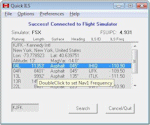
This utility was written to simplify the process of finding the ILS frequency when ATC assigns an ILS approach. Operation is simple. Enter the ICAO, click the Search button and a list of all runways, runway lengths and runway ILS frequencies for that ICAO are displayed. Here's the quick part... Just double click on a runway and the ILS frequency will instantly be set in the Nav1 radio. You can also start Flight Simulator, load a flightplan and then start Quick ILS. It will automatically read the flightplan and then display the destination airport's runway data. Again, just double click on the assigned runway to set the Nav1 radio for the ILS approach. ILS data aside, General Aviation fans may want to use Quick ILS to get information about possible destination airports. Enter an ICAO and you can quickly view the runways available, their length, the surface (ie grass, gravel, paved...) and the runway headings. Version 3.1.5 adds the ILS ID to the display. Freeware by Dave Westbury.
| Filename: | FSXP3D_Quick_ILS_Utility_Ver_315_UPDATE_.zip |
| License: | Freeware |
| Added: | 12th August 2014, 10:25:51 |
| Downloads: | 3,577 |
| Author: | Dave Westbury |
| Size: | 457.35 KB |
| Category: Flight Simulator X - Utilities | |
| TweakFS ScreenShot ToolBox |
|
Images related to this file:
File Description:
The ScreenShot ToolBox is a utility that will bring out the artist in you! Screenshots are a great way to immortalize your FS flight adventures, moments that can be shared with your FS buddies and uploaded to forums for all the world to enjoy. Some screenshot artists are very skilled, applying similar techniques used by real-world photographers in their use of angles, lighting and shot composition. With the TweakFS ScreenShot ToolBox you can easily display, create, manage, edit, uploaded, download and email FS screenshots. The major feature is the Apple "Coverflow" style 3D display system. The built-in ScreenShot Creator supports automatically adding a logo, a banner and standard text (either separately or simultaneously) at the same time the snapshot is take, or can be added later. The logo and banner adding feature supports the use of images with transparent backgrounds and objects with shadows, such as PNG (Portable Network Graphics) and PSD (Adobe Photoshop) files. The logo/banner and text feature all support alpha-blending or transparency.
| Filename: | TweakFS_ScreenShot_ToolBox.zip |
| License: | Shareware, time limited |
| Added: | 5th March 2010, 10:55:10 |
| Downloads: | 577 |
| Author: | TweakFS (Fermin Fernandez) |
| Size: | 11.36 MB |
| Category: Flight Simulator X - Gauges | |
| PFD for Flight Instrument Panel |
|
Images related to this file:
File Description:
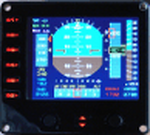
For Saitek Pro Flight Instrument Panel.
This Primary Flight Display (PFD) Glass type gauge provides following utilities:
1. Artificial horizon with sliding bug (yellow).
2. Moving tapes for: Air speed, Altitude, Heading.
3. Detail window for altitude.
4. Needle for vertical speed.
5. Glide slope and Localizer bars, they appear when in range of ILS only.
6. Digital values for: Total Air Temperature (TAT), QNH, Mach number, VOR 1 selected course, VOR 1 bearing, DME 1 range, Radio height altitude up to 2000 feet, above a bar go through the window, vertical speed, a minus sign appears when vertical speed is negative.
7. Autopilot bugs for: Selected altitude, Selected speed, Selected heading. Rmk: Bugs appear only when autopilot ALT, SPD or HDG functions are selected.
8. Display Autopilot functions with Text acronysm in yellow: AP, Autopilot Master On, THR, auto throttle mode engaged, SPD, air speed mode selected, HDG, heading mode selected, NAV, navigation mode selected (VOR 1), APR, approach mode selected, BC, back course mode selected.
9. Knobs functions: Right, allows to change QNH value. Left, allows to move VOR 1 course.
| Filename: | PFD_for_Flight_Instrument_Panel.zip |
| License: | Freeware |
| Added: | 23rd May 2011, 22:37:18 |
| Downloads: | 1,096 |
| Author: | Philippe Verhaege |
| Size: | 249.48 KB |
| Category: Flight Simulator 2004 - Scenery Design | |
| EZ-RWYand TAXI LIGHTS |
|
File Description:
These lights you place by yourself for those private airstirps at home or un-monitored airfields at night. This download contains two libraries. Both are indentical except one is controlled by nav2; the other one is controlled by ADF. Nav2 2 will light up day or night. ADF will light up at night only, no dusk\dawn. ADF just appears at night. Nav2 is animated... pops up out of the ground. Turn them off and they disappear into the ground, leaving only the day version (lamps out). No texutre files are needed except for the display I included. For that all is included here. This display shows all lights together and shows how they work. Please read the mustreadme file completely as well as the readme file in one of the included folders. Thanks to David (Opa) Marshall for his inspiration in this and his beta testing and John B. Loney's help as well, who, btw is working on a couple of nice sceneries in CA. One will have a 18 hole golf course with it. Have fun and enjoy. Bob
| Filename: | EZRWYand_TAXI_LIGHTS.zip |
| License: | Freeware |
| Added: | 11th August 2007, 22:47:38 |
| Downloads: | 2,020 |
| Author: | Robert Lacy |
| Size: | 300.19 KB |
| Category: Flight Simulator X - Aircraft Repaints, Textures and Modifications | |
| Upgrade pack - Airbus A318 FD Special Version from V2 to V3 (update pack only) |
|
Images related to this file:
File Description:

This Pack is only to update my aircraft "Airbus A318 FD Special Version V2" (pa318fd_v2_299527.zip) with a new ehanced panel that I have created with the Airbus A321.
This new panel version (v3.05) provides many new features to the version V2 of the aircraft: New fuel system management gauge like the real Airbus, full manual engines startup procedure, with all new BLEED circuit (with new Bleed page on ECAM with animations), all fuel valves, pumps, crossfeed work. All bleed valves work. Engines failure procedure management, ehanded Navigation display with TCAS on ARC or NAV mode, gps Approach procedure sheme on the navigation display, corrected electrical circuit, and many other features (too long to describe here).
There is a user manual in English and in French. Very important to read it (for the manual engines startup procedure). You must have the orignal aircraft installed on your computer (Aribus A318 FD Special version V2) because this pack is only an update. Please, read the pdf installation file (English and French version) for full information on installing this update.
| Filename: | Upgrade_pack__Airbus_A318_FD_Special_Version_from_V2_to_V3_update_pack_only.zip |
| License: | Freeware, limited distribution |
| Added: | 17th June 2012, 13:21:38 |
| Downloads: | 2,931 |
| Author: | Francois Dore |
| Size: | 19.29 MB |
| Category: Prepar3D V1-4 - Scenery | |
| ZLHZ - Hanzhong Chenggu Airport (Part 2/3) |
|
File Description:
Hanzhong Chenggu Airport (IATA: HZG, ICAO: ZLHZ), or Chenggu Air Base, is a dual-use military and civil airport serving the city of Hanzhong in Shaanxi province, China. Located in Chenggu County northeast of Hanzhong, it replaced the old Hanzhong Xiguan Airport, which could not be expanded due to its proximity to the city center. Construction commenced in late December 2011 with an estimated total investment of 580 million yuan, and the airport was opened on 13 August 2014.
This package contains the first part of the airport. You need the merger, first part and second part of a multi-part zip to install the scenery.
| Filename: | ZLHZ__Hanzhong_Chenggu_Airport_Part_23.zip |
| License: | Freeware, limited distribution |
| Added: | 2nd April 2019, 01:41:40 |
| Downloads: | 929 |
| Author: | An Xin / Skysoft Simulation |
| Size: | 480 MB |
| Category: Prepar3D V1-4 - Original Aircraft | |
| ZLHZ - Hanzhong Chenggu Airport (Part 3/3) |
|
File Description:
Hanzhong Chenggu Airport (IATA: HZG, ICAO: ZLHZ), or Chenggu Air Base, is a dual-use military and civil airport serving the city of Hanzhong in Shaanxi province, China. Located in Chenggu County northeast of Hanzhong, it replaced the old Hanzhong Xiguan Airport, which could not be expanded due to its proximity to the city center. Construction commenced in late December 2011 with an estimated total investment of 580 million yuan, and the airport was opened on 13 August 2014.
This package contains the second part of the airport. You need the merger, first part and second part of a multi-part zip to install the scenery.
| Filename: | ZLHZ__Hanzhong_Chenggu_Airport_Part_33.zip |
| License: | Freeware |
| Added: | 2nd April 2019, 01:41:47 |
| Downloads: | 1,641 |
| Author: | An Xin / Skysoft Simulation |
| Size: | 471.64 MB |


© 2001-2026 AVSIM Online
All Rights Reserved
Privacy Policy |