
Where Flight Simulation Enthusiasts Gather from Around the World!
AVSIM Library - Search Results

| Category: Flight Simulator 2004 - Aircraft Repaints, Textures and Modifications | |
| Swiss Piper Cherokee "Oscar flying club" 180 HB-OKD, Bern Belp |

|
File Description:
"Swiss hangar" is a large repaint collection for payware and freeware aircraft that will give you the opportunity to fly over the FS 2004 swiss and european sky with aircrafts in original swiss livery. Every aircraft is perfectly reproduced like the original one. Drawing are based on the author photo documentation or from photos available on internet (Airliners.net, MyAviation.net etc.).
For the "payware" Piper Cherokee of CARENADO (www.carenado.com) I have painted several livery of real life Pipers from the major clubs and flying school of Switzerland.
This aircraft, Piper Cherokee HB-OKD belongs to "Oscar flying club", and is based on the regional Bern-Belp airport(BRN/LSZB),Switzerland.
| Filename: | Swiss_Piper_Cherokee_Oscar_flying_club_180_HBOKD_B.zip |
| License: | Freeware |
| Added: | 28th April 2007, 12:21:32 |
| Downloads: | 492 |
| Author: | Antonio Iozzi / Carenado |
| Size: | 3.67 MB |
| Category: Flight Simulator 2004 - Miscellaneous Files | |
| Shoot 1.6.3' Voice Contro File |
|
File Description:
"Shoot 1.6.3" voice control file for use with FS2004. You will need to download the main "freeware" program from http://clans.gameclubcentral.com/shoot/downloads.php which will allow you to make use of this control file for FS2004. The program is brilliant and allows you to control FS2004 by voice and it's totally free! All I have done is made a config file that works very well with FS2004.
It will allow you to; speak to ATC and instead of fighting with the keyboard or yoke/stick so you can fly more like a real pilot and keep your hands on the yoke more of the time. For example a commercial jet pilot calls out to the co-pilot to get the gear up and simply says "gear up". That's just what you will have to do, just like the real thing; the gear will go up when you make the call. When FS2004 ATC controller tells you to reply you can just say "roger" or "hello" or "ATC" or "air traffic" etc, etc, and the ATC window will pop up. Then all you have to do is call out the command instead of pushing buttons that real pilots don't use. Does a real pilot push a button to look out of the window or use a "mouse" to engage the autopilot?
Similarly you can call out "autopilot engage" or "autopilot master" or "autopilot disengage" and that's just what happens; the autopilot comes on/off. The best part though is when you try looking around the cockpit. If you want to move your head up you just say "move up" and presto you are higher up in your seat. You can move to the left or
Right, back or forward. You can say "zoom in" and that's what happens. You can say "reset zoom" and so on. You can say "next view" and then the view may be outside or another panel. Alternatively, you can say "panel 2" and the radio panel will come up in the 737 so you can tune the radios. If you have FS navigator installed all you have to
do is say "navigator" and the map comes up, and then say navigator again and off it goes. Just for once it is easy and possible to make full use of FS2004. Using this program has afforded me the opportunity of making better use of the views available, (and I have CH products yoke so if was never hard) but now it's even easier.
All the panels can be activated in this way, and control of the autopilot and control of FS2004. It's probably the best kept secret. I've made a file so we can all share in this freebie of a program. I've included a readme and instructions of how to make the best use of the program.
Config file for FS2004 only is provided.
| Filename: | Shoot_163_Voice_Contro_File.zip |
| License: | Freeware |
| Added: | 7th January 2004, 19:52:26 |
| Downloads: | 8,795 |
| Author: | Peter Wilding |
| Size: | 21.83 KB |
| Category: Orbiter - Miscellaneous Files | |
| Venus Atmosphere and Surface Enhancement 1.0 |
|
File Description:
This addon gives Venus a facelift. As it stands in the current Venus in Orbiter, there is no actual clouds on the planet. In fact, the clouds are actually painted on the surface! If you ever wanted to fly a space probe to explore the surface of Venus, you would be dissapointed. It looks bland with no clouds (in fact, you get perpetual sunshine and clear, stary nights!) and landing on an orange surface with no features at all. This enhancement pack adds the actual cloud layers to the planet and also gives surface features and texture. So now, you get to see what it looks like from underneith the clouds, instead of just landing on them.
The real planet is covered with a perpetual cloud cover of carbon dioxide, amonia, and sulfuric acid. Quit inhospitable to both human life and equiptment. This addon also gives a realistic starless nighttime. The amount of light that reaches the surface of Venus is shown to be that of Earth on a heavy overcast day. This addon looks pretty much like it would be if you were actually decending to the surface of Venus. These clouds in the addon are not just "static", they actually drift in about the same speed as on the real planet. If on the surface or looking out in space, accellerate your time to 10,000 or 100,000 and you will see the clouds move!
| Filename: | Venus_Atmosphere_and_Surface_Enhancement_10.zip |
| License: | Freeware |
| Added: | 7th May 2003, 20:22:18 |
| Downloads: | 1,502 |
| Author: | Jim Williams |
| Size: | 4.43 MB |
| Category: Flight Simulator 2002 - Miscellaneous Files | |
| Reality XP GPS Navigation Tutorial |
|
File Description:
This is a higly illustrated 40 pages GPS Navigation Tutorial that will take you from Meigs Parking 8 to Oshkosh! With this guide, you will be able to understand and master all the rich features presented in the Reality XP's Flight Line Avionics GPS and Radios!
Flight Line Avionics v1.2 is the latest edition of our Flight Simulator 2002 add-on, with 29 new features added to the other 25 new of v1.10, an extended User’s Manual, an improved Navigation Database tool and the support for third party developers through a new SDK. Our customers will welcome the addition of our EZConfig tool to add Flight Line Avionics to any aircraft with a simple point-and-click!
Reality XP Flight Line Avionics gives you a fully interactive avionics stack featuring the UPS-AT advanced GPS GX 50 with moving map, SL30 next-generation Nav/Comm, SL70 Mode A/C transponder with altitude alerting feature and a full audio panel. With Flight Line Avionics you'll be flying a simulated avionics package capable of providing the same features and benefits as the real avionics package. The Reality XP Flight Line Avionics package is so realistic that pilots can use it as a training tool to familiarize themselves with the workings of the actual equipment. Each button and knob is fully functional and performs identically to its real-world counterpart. The system even creates audio and visual alerts, like the actual avionics. For more information, fly direct to www.reality-xp.com.
| Filename: | Reality_XP_GPS_Navigation_Tutorial.zip |
| License: | Freeware, limited distribution |
| Added: | 26th June 2002, 18:01:06 |
| Downloads: | 1,446 |
| Author: | Reality XP |
| Size: | 1.91 MB |
| Category: Flight Simulator 2004 - Aircraft Repaints, Textures and Modifications | |
| Olympic Airlines Airbus A340-300 'Olympia' |
|
File Description:
This is a Project Opensky Airbus A340-300 painted in Olympic Airlines livery. The aircraft is named Olympia Registration: SX-DFA, cn235. It is painted by the use of real photos, the official paint kit and hand painted with dirt effects, photorealistic windows, light/shade effects. Features (in depth): Fully animated control surfaces, Fully independent suspension, Dynamic flexing wings that respond to turbulence (Thanks to Fraser Turner) Thrust reversers that open fully on idle reverser thrust. (Thanks to Fraser Turner), Drooping ailerons on elevators when engines are shut off (Thanks to Bill Leaming), fully reflective textures (each part has different degree of reflection based on material), Accurate flight dynamics (accurate FDE with full profiles for wheels, tires, struts, leading/trailing struts, engine types). Tested by real pilots) Detailed textures, Interchanging 2D and 3D engine fans, Full night lighting, Visible landing lights from the cockpit, Reflective cockpit windows, Crash effects, Transparent nav light lenses Virtual Cockpit with clickable buttons. Optimized for FS2004 (VC version only) Rain effects on windshield (VC mode), Wingview (Wingview version only), Dynamic Shine, Opening Passenger and Cargo Doors (fully independent) Shift+E = left door Shift+T = right door, Shift+E+2 = Cargo doors, More detail to landing gear and flaps, more textures to add realism (landing gear, leading edge flaps, fan blades), Animated vent scoops under belly ( Shift+W), New lighting and condensation effects, Even more 3D parts added to this A340 over the A330.
| Filename: | Olympic_Airlines_Airbus_A340300_Olympia.zip |
| License: | Freeware |
| Added: | 1st May 2005, 21:08:16 |
| Downloads: | 4,961 |
| Author: | Kotsios Stamatis |
| Size: | 12.12 MB |
| Category: Flight Simulator X - Utilities | |
| PJEZFSX |
|
File Description:
PETER JAMES' EZCAM .CAM FILES AS OF 3-25-10. I have made some great cams to share based on the new
Flight1 EZDOK software. Installation is a snap. Just copy these into your EZDOK root directory and you're
ready to go! As a real commercial pilot with over 7500 hours flying time, I can assure you these cams
give you the most realistic virtual cockpit views possible. I base this on proper seat position, as
well as a zoom level I have been fiddling with since the beginning of FSX.
I have here cams for the A319 by Project Airbus, the Default A321, default Beaver, the 739 by Ariane, the LDS 767-300ER,
and the great free biplane (Tigermoth) by ORBIX ...Whether you own the two payware products or not
does not matter. These cams will work well on any similar aircraft. Just use the EZDOK interface to import these cams,
and then you can edit them for any plane you want. The real thing I did was take the default cams that came with EZDOK and dampen
out the touchdown head wobble...but that's about it. I am still learning all the tweaks available
with vibrational effects, but have gotten good at setting up 9 viewpoints for each virtual cockpit
included... when you run the EZDOK interface you'll see the titles and number key for each position.
Enjoy!
Peter James / [email protected]
| Filename: | PJEZFSX.zip |
| License: | Freeware |
| Added: | 25th March 2010, 06:23:33 |
| Downloads: | 2,533 |
| Author: | Peter James |
| Size: | 16.85 KB |
| Category: Combat Flight Simulator 1 and 2 - Missions | |
| Missions for the USAF F-51D of Flight1 'Sabre Vs MiG' (CFS2) |
|
File Description:
Five missions for the USAF F-51D of the "Sabre Vs MiG"add-on of Fligh1.Included Scenery of the main Mustangs base in the Korean war: K-10 Chinhae and a revision of the DP file for the Yak-9.
The missions were acomplished in the first days of November 1950 and are quite veridical; geographical,coordinates, units, dates, airfield bases,meteo,squadrons, pilots,etc.
No real is the standard Yak-9 supplied by Fligh1. The aircraft paint represent a V-VS(Russian Air Force)
fighter with the typical Russian camouflage; actually no Yak-9 were operated with Russian insignias in
Korea. The planes, models Yak-9P and Yak-9U, were assigned to the KPAFAC(North Korean Air Force) and
flew by crews of this nacionality, his painting scheme was a Russian post-war light blue grey with the
KPAFAC roundels under of the wings and in fuselage sides.The pilots were rookies but some success was achieved: one USAF F-80C of the 36 FBS,was shot down the 19-Jul-1950 by one Yak-9(Actually the first Korean war victory of a one piston fighter over a Jet);B-29s,F-51s,F-82s, were others victories of the Yaks in the early phase of the Korean war.V-VS had operated with a few LA-11.I have planned a repaint of the Yak-9 with the real colours of the KPAFAC and eventually convert to flight.
| Filename: | Missions_for_the_USAF_F51D_of_Flight1_Sabre_Vs_MiG.zip |
| License: | Freeware |
| Added: | 6th February 2004, 15:01:51 |
| Downloads: | 360 |
| Author: | Daniel Nole |
| Size: | 116.29 KB |
| Category: Flight Simulator X - Scenery | |
| Mid West Victoria v2 for ORBX v2. 14 airports. YARA YSWL YMBU YSTA YDOD YWYF YBIR YHPN YKER YSLK YSWH YNHL YHSM YWKB |
|
Images related to this file:
File Description:
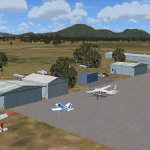
'Mid Western Victoria v2' is made to match ORBX Australia v2 scenery. Use 'Mid West Victoria update' for ORBX v1 or no ORBX. NOTE this is an UPDATE with Horsham replacing Hamilton in the instructions (it is Horsham in the actual scenery). There are 14 airports starting at Ararat and extending up to the Murray at Swan Hill. YARA Ararat YSWL Stawell YMBU Maryborough YSTA Saint Arnaud YDOD Donald YWYF Wycheproof YBIR Birchip YHPN Hopetoun YKER Kerang YSLK Sealake YSWH Swanhill YNHL Nhill YHSM Horsham YWKB Warracknabeal. A lot of airports but this is several hundred hours of effort over many months. ORBX has done these as they have done every airport included with FSX in Australia to a reasonable standard. If I had not already done them for ORBX V1 I would not have bothered. However these are better than ORBX because the surroundings have been modified to match real life. Towns have been added or shifted. Forests cut down or added. Race courses, sewage treatment ponds and other stuff added. Local obstacles (towers etc) added. There are 6 custom terminal buildings accurate to real life. Included is an AI traffic file that covers airports that dont already have AI. These files are for Flight Simulator X. Made using Airport Design Editor using some objects borrowed from Robert Budd's excellent Baccus Marsh and 'Static aircrafts' by Jean-Pierre Fillion. REQUIRED The scenery is designed to interface with ORBX FTX_AU V2 scenery for Australia (payware).
| Filename: | Mid_West_Victoria_v2_for_ORBX_v2_14_airports_YARA_.zip |
| License: | Freeware |
| Added: | 2nd May 2020, 23:11:14 |
| Downloads: | 255 |
| Author: | Colin Jeffery |
| Size: | 10.49 MB |
| Category: Flight Simulator 2004 - Scenery | |
| HCMM - Mogadishu International Airport, Mogadishu/Petrella, Somalia |
|
Images related to this file:
File Description:
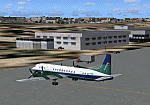
Googly scenery for HCMM Mogadishu/Petrella, the capital airport of Somalia.
Astonishingly, in Flight Simulator 2004 this international airport is depicted as little
more than a runway! Whilst in the real world the airport can hardly be
described as busy, it is served by the country's sole airline - Jubba
Airways, with their wonderful Ilyushin IL-18, and many African and Eastern
European operators call by with cargo flights. In fact, the vast proportion of
the aircraft seen here are Russian-built.
These scenery files add aprons, taxiways, buildings and other airport features to Flight Simulator's limited representation and allow "AI" traffic to land, taxi, park and take off in a realistic manner. But do watch out for cars on the runway and taxiways as they
appear to be regularly used as a by-pass to the perils of driving through the city!
The scenery does not purport to be ultra-accurate. Based on high-detail satellite
imagery from Google Earth, the layout is proportionally correct but the added
airport features, such as buildings, are built from default Microsoft objects
and add-on libraries so will not look exactly like the real thing.
You are not obliged to download and install any additional scenery libraries,
but to enjoy this scenery in its entirety, you may wish to. It will work fine,
with or without. [File re-uploaded at request of AVSIM]
| Filename: | HCMM__Mogadishu_International_Airport_MogadishuPet.zip |
| License: | Freeware |
| Added: | 28th May 2010, 20:46:31 |
| Downloads: | 2,790 |
| Author: | John Hinson |
| Size: | 61.51 KB |
| Category: Flight Simulator 2004 - Scenery | |
| CYKF – Kitchener / Waterloo, Ontario, Canada Version 3.0 |
|
File Description: I have now overhauled the CYKF Airport and made it the lively place it is today. I used the Canada Flight Supplement and my real life knowledge of the airport as this is where I do my flight training.
After seeing the traffic in my Southwestern Ontario addon, CYKF 2.1 looked a little bare in comparison, so added more parking and traffic. There are now 35 parking spots and 2 gates. All parking spots and gates have been assigned codes, which like the airline codes for the larger airports will tell the GA aircraft where to park. I organized the different aprons into parking areas. The Waterloo Wellington flight centre is referred to as “North” parking. There are 3 other parking areas as well as the gates. Traffic includes weekly scheduled aircraft that will fly up to the cottage or down south on the weekend etc.
• 35 parking spots, 2 gates
• Extended runway 25/07 and added the new taxiway and renamed the others
• Changed the landclass for the runway 25/07 extension
• Updated the airport in AFCAD for AI to use the runway 25/07 extension
• Added 22 AI flightplans to the 3 already there. AI will model real life training and commercial operations of the airport
• AI use proper Canadian registration codes
• Tested the files to make sure it operates correctly including AI
| Filename: | CYKF__Kitchener__Waterloo_Ontario_Canada_Version_3.zip |
| License: | Freeware, limited distribution |
| Added: | 14th November 2003, 19:39:31 |
| Downloads: | 2,750 |
| Author: | David Voogd |
| Size: | 1.06 MB |


© 2001-2026 AVSIM Online
All Rights Reserved
Privacy Policy |