
Where Flight Simulation Enthusiasts Gather from Around the World!
AVSIM Library - Search Results

| Category: Flight Simulator X - Aircraft Repaints, Textures and Modifications | |
| Air India Boeing 777-200LR GE (VT-ALC) |

|
Images related to this file:
File Description:

This is a repaint of a Boeing 777-200LR, registration code VT-ALC, operated by Air India, the flag carrier airline of India, serving Asia, the United States, and Europe from two major domestic hubs at Indira Gandhi International Airport and Chhatrapati Shivaji International Airport. The airline's logo, featured prominently on the tail of the aircraft, is a red Flying Swan with the orange Konark Chakra placed inside it. The colors signify vigour and advancement. Running parallel to each other is the Orange and Red speed lines from front door to the rear door. The brand name "Air India" runs across the tail of the aircraft in Hindi. Air India currently operates 8 B777-200LRs and 12 B777-300ERs.
This repaint has plenty of clear markings so if you enjoy exterior detail, then you will love this repaint. You can see (and read): Door opening instructions; Static port directions; Air vent warnings; Engine hazard area; No Step warnings; RAT caution; APU intake warning; Stabilizer compartment access; Ground power supply; Forward and aft access door instructions; Pitot, ADA probe, Ice detector and TAT probe markings; Visible rivets; Enhanced window frames; Authentic Air India logo; Bold, colorful Air India livery and authentic flags; Lovely Air India flight attendant; No frame rate hit.
To use this repaint, the Captain Sim B777-200 v1.0 is required. Repainted by Garrett Rowley.
| Filename: | Air_India_Boeing_777200LR_GE_VTALC.zip |
| License: | Freeware |
| Added: | 7th March 2014, 12:37:23 |
| Downloads: | 1,163 |
| Author: | Garrett Rowley, Captain Sim |
| Size: | 26.38 MB |
| Category: Flight Simulator X - Original Aircraft | |
| Avia BH-5 & Avia Bk.11 |
|
File Description:
The plane was constructed according to the type BH-1, the first successful plane produced by the Avia Works. It was an all-wooden two-seat training, sports and messenger plane, which was bigger than BH-1, more solid and more sophisticated, in its aerodynamics and technology. It was designed for flying basic acrobatics. The BH-5 was the first Czechoslovak plane to win an international contest and thus received the King of Belgium‘s Prize and the prize of the Belgian Tourist Aircraft Contest in 1923. The pilot, Zdenìk Lhota, flew to Brussels and back with a layover in Mayence at an average speed of 138 km/h. In 1923 this was a remarkable performance, not only in the sport-plane category. In 1923, the type BH-5 also won the “D“ category in the President of the Republic’s Contest. The Walter NZ-60, a radial five-cylinder engine, was installed in the BH-5 plane; it was the very first and a very successful engine designed by the Walter Company. Based on the results of military tests of the BH-5s, the Ministry of Defense placed an order for a series of slightly improved BH-9, BH-10 and later also BH-11 Avias, which had been successful in many national, as well as international contests and also in record and promotion flights. The BH-5 Avia plane was marked L-BOSA; thanks to this mark, all the planes of this very successful series were nicknamed “boska“. This addon has detailed 3D model and VC, original sounds, real flight dynamics and manual.
| Filename: | Avia_BH5__Avia_Bk11.zip |
| License: | Freeware, limited distribution |
| Added: | 8th December 2007, 23:10:17 |
| Downloads: | 3,730 |
| Author: | Štìpán Obrovský, Czechoslovak Historic Flight www.hictoricflight.cz |
| Size: | 31.66 MB |
| Category: Microsoft Flight Simulator (2020) - Scenery | |
| UGAM Ambrolauri Airport, Georgia [MSFS] |
|
Images related to this file:
File Description:
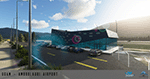
Ambrolauri Ambrolauri (Georgian: áƒáƒ›áƒ‘რáƒáƒšáƒáƒ£áƒ ი) is a city in Georgia, located in the western part of the country, on both banks of the Rioni river, at the elevation of 550 m above sea level. It is a self-governing city. At the same time, the city serves as the seat of the Racha-Lechkhumi and Kvemo Svaneti regional administration and the Ambrolauri Municipality. According to the 2014 census, the city had a population of 2,047. Its area is 1.6 km². Ambrolauri is first recorded in the 17th century as a place, where one of the palaces of the kings of Imereti was located. It acquired the city status in 1966 and became a self-governing city with its own municipal government in 2014. The Airport The airport is nestled into the Caucasus mountains right at the bank of the river Rioni. It has a single runway of 1100 m length and caters small propeller aeroplanes. The apron has space for two planes at a time and caters up to 50 passengers at one time. In the Simulator The virtual airport is very close to its real-world counterpart. All the buildings at and near the airport are modelled and the terminal even has an interior that can be seen from outside. The look and feel from a trip to the Racha region is definitely there. In real life, only small planes fly to the airport but that shouldn't stop you to bring planes from the size of the Dash 8.
| Filename: | UGAM_Ambrolauri_Airport_Georgia_MSFS.zip |
| License: | Freeware, limited distribution |
| Added: | 30th December 2020, 18:16:07 |
| Downloads: | 180 |
| Author: | David Hilker |
| Size: | 72.32 MB |
| Category: Flight Simulator 2004 - Panels | |
| New Vickers VC10 Panel, Part 4 - Missing bmp files |
|
File Description:
There were 2 missing bmps relating to Nav_Info from my 'New Vickers VC10 Panel, Part 4' (new_vc10_panel_project_4_maintenance_2.zip). In order for it to work correctly you need these files.
This project is based on David Maltby's panel. This update the first in the 50th Anniversary year of the VC10 (there are currently nine still flying) brings to fruition a number of extensive works in progress that have involved almost every gauge! The aircraft now has a fully integrated pressurisation and oxygen delivery system that conforms not only to the Flight Manual but also to ICAO regulations. Therefore cockpit mismanagement can potentially result in hypoxia! Besides this there are also a large number of new additions both in conformity with the Flight Manual and as extra visuals. It's now possible to "see" the Marshaller - There are new speed calls - and whilst you are preoccupied with your checklists the ground staff can be heard going about their business preparing for the flight as indicated also on the Ignition Panel. For a full list of changes view the VC10 Panel Update 4.doc
For this latest update thanks must go to Edi Hirsch for his excellent NavInfo gauges and again to the Gurus at FSDeveloper.com for their advice. To install make sure you have installed the previous (linked) files beforehand.
| Filename: | New_Vickers_VC10_Panel_Part_4__Missing_bmp_files.zip |
| License: | Freeware |
| Added: | 11th April 2012, 18:28:42 |
| Downloads: | 1,352 |
| Author: | Nicholas Weber |
| Size: | 10.5 KB |
| Category: Flight Simulator 2004 - Miscellaneous Files | |
| Nick's Prop Dust with Control Gauges |
|
File Description:
Prop aircraft users are in for a real treat. This gauge/effects package automatically senses the terrain the aircraft is in contact with or flying over and changes the dust and water effects for the aircrafts prop/rotor wash based on dirt, dry mud or clay, snow, rain, water, ice, sand, gravel and short grass. In addition the real time surface conditions are also sensed. In example, a dry asphalt or concrete runway will produce no dust, however, the same runway with snow conditions present will automatically produce a throttle controlled snow blowing effect. The 25 included effects files and 5 gauges have been tuned to reflect a realistic representation of the dust/mist produced by different types of aircraft taking off or touching down on different terrains and surface conditions. The effects are properly influenced by cross wind conditions and reverse pitch is also supported. Effects files and gauges are included for large and small, single engine, multi-engine, amphibians, helicopters and massive scale military and commercial transports. It requires editing/adding lines in the aircraft.cfg and panel.cfg files. The README files include very complete and comprehensive instructions including a quick and easy copy/paste file for all the Microsoft prop aircraft and tutorial on making custom gauges from the ones provided.
By Nick Needham
| Filename: | Nicks_Prop_Dust_with_Control_Gauges.zip |
| License: | Freeware |
| Added: | 8th December 2003, 17:07:07 |
| Downloads: | 7,298 |
| Author: | Nick Needham |
| Size: | 1.22 MB |
| Category: Flight Simulator X - Panels | |
| F-111A |
|
File Description:
The purpose of this up date is because of the restore issue at the AVSIM lib. Secondly, this version V1.01 includes a bug fix for the compass gauge and the logic of the sonic sound. This panel has been designed according to the �F-111 Aardvark Pilot's Flight Operating Instructions� document published by the USAF. The design goal was to develop a panel and gauges
as close as possible to the original aircraft. It was not possible to program all the functionsand sub-panels, because of the complexity of the system and because of limitations in FSX.
The panel is a 2D panel. The panel has been developed from scratch as well as all the gauges.
All gauges are programmed in XML with the ACE tool from the MS SDK SP2 package.
The aircraft model, development by Mike Stone, has been used as the model for this panel. The model is part of the package. Other models may by used as well. However, the Light section and Flaps section in the aircraft.cfg may be modified accordingly in order to meet the requirements of this panel. There is an SP1 and SP2 Version. There are no tooltips in the SP1 Version. For installation and functional instructions, please read the PDF-Document
�F-111A-Panel-Documentation" which is included in the ZIP-File.
| Filename: | F111A.zip |
| License: | Freeware |
| Added: | 1st November 2009, 22:18:36 |
| Downloads: | 335 |
| Author: | Dietmar Loleit |
| Size: | 12.95 MB |
| Category: Flight Simulator X - Aircraft Repaints, Textures and Modifications | |
| Republic P-47D-20 365th FG (B4-J) "the Madam" |
|
Images related to this file:
File Description:
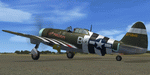
This folder contains a repaint for the A2A Wings of Power III P-47D Thunderbolt, representing P-47D-15-RE 42-75845 B4-J "The Madam". It was the assigned aircraft of Lieutenant John H. Fetzer, from Shreveport Louisiana, of the 387th FS/ 365th FG during D-Day. He was flying as wingman of Capt. Arlo Henry on 6 June 1944, D-Day, when they spotted a number of Tiger tanks trying to hide in a castle. Capt Henry blew up the castle with his bombs, while Lt Fetzer attacked a Tiger with his 1000 lb bombs. His first bomb exploded harmlessly in a field, but his second "my contribution to D-Day" exploded right behind the Tiger, flipping it over 3 times. As for 42-75845, she proved to be a very strong lady. It began its career with the initial start of operations of the 365h FG, with Lt. Fetzer as its original pilot. He named the aircraft after his future wife, Helen. It flew its 200th mission in March 1945, and continued right to the end of the war, as the only remaining original Thunderbolt of the 365th. She was shot up several times, had wings and engines replaced and countless holes patched, but its crew chief, Joe DiMaio remarked that as long as 'the Madam' came back, he would keep her flying, and he did. Repaint by Jan Kees Blom, based on the paintkit by Martin Catney.
| Filename: | Republic_P47D20_365th_FG_B4J_the_Madam.zip |
| License: | Freeware |
| Added: | 30th November 2019, 18:25:19 |
| Downloads: | 53 |
| Author: | Jan Kees Blom |
| Size: | 10.2 MB |
| Category: Flight Simulator X - Aircraft Repaints, Textures and Modifications | |
| Air China (B-2059) B777-200ER (PW) **UPDATE** |
|
Images related to this file:
File Description:

REPAINT UPDATED FOR - new Captain Sim v1.0 folders, improved wear pattern on wings, correction to engine paint issues, converted to Pratt & Whitney engines.
This is a repaint of a Boeing 777-200ER, registration code B-2059, operated by Air China, operated by Air China, the flag carrier of the People's Republic of China. The airline's flight operations are based from out of Beijing Capital International Airport and is the world's 10th largest airline by fleet size. The Air China logo is an artistic phoenix pattern. According to the Air China website, "The Phoenix is a beautiful and lucky magic bird. The beautiful phoenix flies over towering Kun Lun Mountain and hovers around the whole world. Wherever this magic bird appears, there will be happiness and peace. When the phoenix flies in the sky, thousands of birds will follow.
This repaint has plenty of clear markings so if you enjoy exterior detail, then you will love this repaint. You can see (and read): Door opening instructions; Static port directions; Air vent warnings; Engine hazard area; No Step warnings; RAT caution; APU intake warning; Stabilizer compartment access; Ground power supply; Forward and aft access door instructions; Pitot, ADA probe, Ice detector and TAT probe markings; Visible rivets; Enhanced window frames; Authentic Air China logo; Bold, colorful Air China livery and authentic flags; Lovely Air China flight attendant; No frame rate hit.
To use this repaint, the Captain Sim B777-200 v1.0 is required. Repainted by Garrett Rowley, [email protected]
| Filename: | Air_China_B2059_B777200ER_PW_UPDATE.zip |
| License: | Freeware |
| Added: | 27th February 2013, 14:31:34 |
| Downloads: | 1,418 |
| Author: | Garrett Rowley, Captain Sim |
| Size: | 28.69 MB |
| Category: Flight Simulator X - Aircraft Repaints, Textures and Modifications | |
| Air China B777-200ER (PW) (B-2060) **UPDATE ** |
|
Images related to this file:
File Description:

REPAINT UPDATED FOR - new Captain Sim v1.0 folders, improved wear pattern on wings, correction to engine paint issues, converted to Pratt & Whitney engines.
This is a repaint of a Boeing 777-200ER, registration code B-2060, operated by Air China, operated by Air China, the flag carrier of the People's Republic of China. The airline's flight operations are based from out of Beijing Capital International Airport and is the world's 10th largest airline by fleet size. The Air China logo is an artistic phoenix pattern. According to the Air China website, "The Phoenix is a beautiful and lucky magic bird. The beautiful phoenix flies over towering Kun Lun Mountain and hovers around the whole world. Wherever this magic bird appears, there will be happiness and peace. When the phoenix flies in the sky, thousands of birds will follow.
This repaint has plenty of clear markings so if you enjoy exterior detail, then you will love this repaint. You can see (and read): Door opening instructions; Static port directions; Air vent warnings; Engine hazard area; No Step warnings; RAT caution; APU intake warning; Stabilizer compartment access; Ground power supply; Forward and aft access door instructions; Pitot, ADA probe, Ice detector and TAT probe markings; Visible rivets; Enhanced window frames; Authentic Air China logo; Bold, colorful Air China livery and authentic flags; Lovely Air China flight attendant; No frame rate hit.
To use this repaint, the Captain Sim B777-200 v1.0 is required. Repainted by Garrett Rowley, [email protected]
| Filename: | Air_China___B777200ER_PW____B2060___UPDATE_.zip |
| License: | Freeware |
| Added: | 27th February 2013, 14:34:26 |
| Downloads: | 2,076 |
| Author: | Garrett Rowley, Captain Sim |
| Size: | 28.71 MB |
| Category: Flight Simulator X - AFCAD Files | |
| Stallone Airport (9NJ5), NJ |
|
File Description:
Located 01 miles SE of Harrisonville, New Jersey, Stallone Airport is a private turf strip 1350' in length. However it should be noted that the actual length from the road to the trees on the opposite end of the runway is actually only around 900'. It is tightly hemmed in by trees so if you are landing on Runway 29 you may want to use Slew to turn your plane around to remove the risk of bumping into a tree instead. If you land on Runway 11 you can cross the road to turn around in the field opposite the runway. The windsock can be seen from both runways. Power lines run along the heights of the trees as well for the Runway 29 approach, on the same side as the trees though so not really any additional worry there. No transient services are available. There is no hard surface runway so make sure your terrain mesh slider is set as high as possible for a suitably bumpy ground experience.
Scenery constructed with use of satellite images/streetview/aerial photos - the author has not been there in person.
This scenery is meant to be used in conjunction with MegaScenery Earth New Jersey/Delaware 004. It is not required, but apron use is minimized to allow satellite scenery to show through as much as possible, and objects are placed based on the MSE textures - lack of it may make scenery look out of place.
| Filename: | Stallone_Airport_9NJ5_NJ.zip |
| License: | Freeware |
| Added: | 5th April 2011, 07:34:54 |
| Downloads: | 170 |
| Author: | Drew Sikora |
| Size: | 332.91 KB |


© 2001-2026 AVSIM Online
All Rights Reserved
Privacy Policy |