
Where Flight Simulation Enthusiasts Gather from Around the World!
AVSIM Library - Search Results

| Category: Flight Simulator 2004 - Aircraft Repaints, Textures and Modifications | |
| Update for b73brnc.zip |

|
File Description:
Updates the missing fuselage textures on the Boeing 737-200 in the newer colors of Braathens (b73brnc.zip)
| Filename: | Update_for_b73brnczip.zip |
| License: | Freeware |
| Added: | 8th October 2006, 23:30:22 |
| Downloads: | 177 |
| Author: | Henry William |
| Size: | 929.79 KB |
| Category: Flight Simulator 2004 - Utilities | |
| EZadd for repaints |
|
File Description:
EZadd allows people using your repaint to quickly and conveniently add the necessary extra "fltsim.*" entry to aircraft.cfg. With one click your customisable pre-defined fltsim section will be added to the existing aircaft.cfg in the correct location and with the proper fltsim.* number automatically added.
| Filename: | EZadd_for_repaints.zip |
| License: | Freeware |
| Added: | 26th April 2007, 00:14:36 |
| Downloads: | 839 |
| Author: | Richard Slater |
| Size: | 132.15 KB |
| Category: Flight Simulator 2004 - AI Aircraft | |
| Microlights for AI |
|
File Description:
A couple of low-polygon count models for AI use in F2004, one a basic flex-wing aircraft similar to a Cosmos Chaser, the other a three-axis machine similar to a Quicksilver MX. I've only included one texture set for each aircraft, but I have included basic repaint templates for each model, so you can generate a multitude of brightly-coloured aircraft to your own taste in a few minutes.
| Filename: | Microlights_for_AI.zip |
| License: | Freeware, limited distribution |
| Added: | 3rd June 2007, 01:10:24 |
| Downloads: | 653 |
| Author: | Chris Eve |
| Size: | 181.83 KB |
| Category: Flight Simulator 2004 - AI Aircraft | |
| KR2 for AI |
|
File Description:
Ken Rand's lightweight two-seater for AI use in FS2004. Built with FSDS v3.51, there is a relatively low polygon-count main model, with several LOD models and a reduced-detail shadow for optimal fps. Not a short-field aircraft, it's quite streamlined and there are no flaps, so the stall speed is quite high for a small 'plane, 45kts. An interesting feature of this aircraft (and it's predecessor, the KR1), is that the undercarraige is only about 17" tall, so the aircraft sits very close to the ground. Sorry, the model does bounce a little on touchdown ... put it down to an inexperienced pilot ;-)
Another slightly unusual shape for your taxiways and runways ... enjoy.
| Filename: | KR2_for_AI.zip |
| License: | Freeware, limited distribution |
| Added: | 6th October 2007, 13:55:16 |
| Downloads: | 235 |
| Author: | Chris Eve |
| Size: | 171.01 KB |
| Category: Flight Simulator 2004 - AI Aircraft | |
| KR1 for AI |
|
File Description:
Ken Rand's small, single-seat, retractable-gear homebuilt, built using Styrofoam and Dynel/epoxy model aircraft techniques. This model was designed using FSDS v3.51, principally for ai use, so there is a relatively low polygon-count main model, with several LOD models and a reduced-detail shadow for optimal fps. Not a short-field aircraft, it's quite streamlined and there are no flaps, so the stall speed is quite high for a small 'plane, 45kts., but as it's such fun to fly I fitted a basic VC with a functional panel using mostly default gauges. This is a "slippery" little aircraft, needing rather more runway to land than you might expect, so line up early and get your speed down if you don't want to have to go around. The flight dynamics were prepared with Gerry Beckwith's AirWrench, but, as is the way with many homebuilt aircraft, the figures I worked from, hence my final result, will probably vary from other published data. Please see the enclosed text file for further details.
| Filename: | KR1_for_AI.zip |
| License: | Freeware, limited distribution |
| Added: | 6th October 2007, 19:28:31 |
| Downloads: | 360 |
| Author: | Chris Eve |
| Size: | 289.84 KB |
| Category: Flight Simulator X - Scenery | |
| Correction for EDHN |
|
File Description:
Correction for FSX Scenery EDHN_FSX
(Neumuenster/N-Germany)
by Uwe Schweitzer
Correction of the autumn season underground.
Removes the ugly white area above the original
scenery. Just overwrite the EDHN.bgl with this
one. Needs EDHN_FSX
| Filename: | Correction_for_EDHN.zip |
| License: | Freeware |
| Added: | 1st November 2007, 21:33:17 |
| Downloads: | 1,250 |
| Author: | Uwe Schweitzer |
| Size: | 2 MB |
| Category: Flight Simulator X - Sounds | |
| Callsign for Venezolana |
|
File Description:
This is a EditVoicePack X callsign for Venezolana.
Comes with Readme.txt
| Filename: | Callsign_for_Venezolana.zip |
| License: | Freeware |
| Added: | 7th April 2012, 18:40:46 |
| Downloads: | 413 |
| Author: | Christian Andersson |
| Size: | 8.14 KB |
| Category: Flight Simulator 2004 - Sounds | |
| Callsign for Venezolana |
|
File Description:
This is an EditVoicePack callsign for Venezolana Airlines.
Comes with Readme.txt
| Filename: | Callsign_for_Venezolana.zip |
| License: | Freeware |
| Added: | 7th April 2012, 21:44:32 |
| Downloads: | 328 |
| Author: | Christian Andersson |
| Size: | 8.14 KB |
| Category: Miscellaneous Files - Demos from Commercial Vendors | |
| QuickPlan for Windows |
|
Images related to this file:
File Description:

QuickPlan for Windows is a visual point and click flight planner that makes it easy to generate flight plans in native FSX, FS2004 or X-Plane formats.
The entire route is generated visually, by tapping the map to add the departure airport, intermediate waypoints and arrival airport in the same order that you intend flying the plan.
During plan creation and after adding the final arrival waypoint you also have the opportunity to remove any of the intermediate waypoints before saving the plan in your preferred format.
QuickPlan utilises a new mapping engine and includes 12 world-wide map styles and has support for FSWidgets Cloud Based Aero Charts (free Cuba/Puerto Rico WAC Cloud Based Chart included) and FSWidgets Cloud Based World Nav Data (Free KSFO - San Francisco Bay area Nav Data included).
QuickPlan can be used in Freeform Mode, Advanced Mode, or a combination of both.
FREEFORM MODE: Simply click anywhere on the map and QuickPlan will allow you to add it as a generic waypoint. VFR pilots often use towns, lakes and other unique geographic features and with QuickPlan you can add any geographical location shown on the base map. Plans created this way label the waypoints automatically with generic names (e.g. DEP, WP1, WP2, ARR).
If desired, the entire route from departure to arrival can be created without reference to any navigational aids or official airports. This is handy for bush pilots who often use unlicensed airfields and small landing strips (or seaplane landing areas). Helicopter pilots can also quickly create plans that depart from off-airport locations like building rooftops or land on a road.
ADVANCED MODE: If you own the FSWidgets Cloud Based World Nav Data product you can create more advanced flight plans by clicking on any of the icons displayed on the map to add them as waypoints - airports, VOR's, NDB's and intersections (data for the KSFO area is included free). Plans created this way label the waypoints automatically with airport and navigational aid identifiers taken from the Nav Data (e.g. KSFO, OSI, LV, FABLA). FEATURE LIST:
- Generates native FSX (.pln), FS2004 (.pln) and X-Plane (.fms) format flight plans
- Saves flight plans to any folder (preferred folder set in Preferences)
- Search for airport by ICAO identifier
- Map powered by CloudMade Leaflet API (using OpenStreetMap data)
- Includes 12 world-wide maps styles
- Supports FSWidgets Cloud Based AERO CHARTS
- Free Cuba/Puerto Rico WAC Cloud Based Chart included
- Supports FSWidgets Cloud Based WORLD NAV DATA
- Free KSFO (San Francisco Bay) area Nav Data included
- World-wide Metar and TAF Data icons
- US Nexrad (Next-Gen Radar) Data
| Filename: | QuickPlan_for_Windows.zip |
| License: | Commercial demo |
| Added: | 27th October 2012, 09:22:33 |
| Downloads: | 523 |
| Author: | Fermin Fernandez - FSWidgets |
| Size: | 1.95 MB |
| Category: Flight Simulator X - Gauges | |
| AP_MultiFuel_Gauges for FIP |
|
Images related to this file:
File Description:
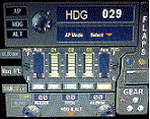
This set of 3 gauges is for use in the Saitek FIP and is an extension to my FIP gauge. That set of 3 gauges was designed to complement the Saitek AP/Multi panel and primarily showed the selected AP Altitude and Vert Spd whilst the Saitek AP/multi panel was displaying HDG. The second main part of those gauges were the Fuel Level displays, each gauge displaying a different combination of fuel tanks to suit the aircraft being flown and thus offered functionality for all types of aircraft.
This set of 3 gauges is designed for the same purpose but now encompasses a working AP that allows you to select HDG, ALT and VS values and activate the HDG and ALT mode (and AP master switch) to enable auto-pilot flight (for those who have a FIP but not an AP/multi panel).
For those who have an AP/multi panel, it gives a backup AP in your build/rig (although it all works off the same FS telemetry, I have found that when the AP/multi-panel freezes, especially the 'Alt' button, then this FIP gauge can de-activate it. The combinations displayed are those that suit my choice of aircraft, however it is easy to re-configure gauge Elements (fuel tank names) and artwork (fuel gauge titles) to suit the combination you prefer.
These gauges also retain the gear, flaps and light indicators, auto rudder on/off button plus rudder and aileron trim capability that were in the previous gauges. An additional feature is the battery switch will now turn off the AP display and fuel levels.
The artwork in these gauges has also been upgraded a bit and a template artwork is included to assist in customising.
| Filename: | AP_MultiFuel_Gauges_for_FIP.zip |
| License: | Freeware |
| Added: | 20th October 2014, 16:00:33 |
| Downloads: | 266 |
| Author: | Robert Budd |
| Size: | 764.26 KB |


© 2001-2026 AVSIM Online
All Rights Reserved
Privacy Policy |