
Where Flight Simulation Enthusiasts Gather from Around the World!
AVSIM Library - Search Results

| Category: Combat Flight Simulators - Digital Combat Simulator | |
| DCS World - Bin 5 |

|
Images related to this file:
File Description:
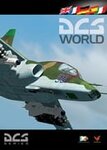
Bin 5 file for DCS World installer. Part 7 of 13. Installation:
1- Download the exe setup file and all 12 bin files (all files are stored here as .zip files)
2- Place all files in a single folder and unzip them.
3- Run the exe and follow the on-screen directions.
Support:
http://forums.eagle.ru/index.php
http://support.digitalcombatsimulator.com/en/
Digital Combat Simulator World (DCS World) is a free-to-play digital battlefield game, focusing on a military aircraft simulation. It includes a FREE Su-25T attack aircraft and it is extendible through additional DCS modules as well as user-made add-ons and mods.
DCS World includes:
-A vast mission area of the Caucasus region
-Powerful mission and campaign editors
-Multiplayer
-Massive inventory of air, land and sea combat units and weapons
-Advanced AI
-Fast mission generator
-Dynamic weather and seasons
-Training missions
-Mission replay system
-Pilot log book
DCS is a true "sandbox" simulation that can and will cover multiple time periods covering many types of combat and civilian units. Modules that can plug into DCS World can include aircraft, maps, ground units, campaigns, etc. This includes modules developed internally by Eagle Dynamics, and by certified third party developers.
DCS World video overview.
| Filename: | DCS_World__Bin_5.zip |
| License: | Freeware |
| Added: | 9th March 2013, 20:22:46 |
| Downloads: | 258 |
| Author: | Matt Wagner |
| Size: | 499.7 MB |
| Category: Flight Simulator X - Aircraft Repaints, Textures and Modifications | |
| North American P-51D Mustang "Hell-er Bust" |
|
Images related to this file:
File Description:
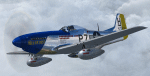
A repaint only for the payware Warbirdsim product 'Mustang Tales'. This repaint depicts the restored P-51D-20-NA 44-72438, "Hell-er Bust", registered N7551T. This specific aircraft is known to have been delivered to the 8th Air Force in England in late January 1945, however no available records indicate any combat time or what, if any, Fighter Group the aircraft was assigned. Following the end of WWII the aircraft served with the Swedish AF as Fv26131, and then with the Dominican AF as FAD 1920. After being imported back into the U.S. in the 1980's, the aircraft was purchased by Selby Burch and given a ground-up restoration. Finished in 118th TRS markings, the aircraft won the Grand Champion WWII Warbird award at Sun 'N Fun 1997. The aircraft was later purchased by Bob Jepson/Lady Alice Corporation and first repainted as 'Lady Alice' and then as 'Hell-er Bust'. In 2006 the aircraft was obtained by the Historic Aircraft Foundation and based at Paine Field, near Seattle, WA. Since 2009, the aircraft has been owned by Mark Peterson/Mustang High Flight LLC, based at Boise, Idaho, and remains finished as 'Hell-er Bust'. The markings depict an original wartime mount of Lt. Col. Edwin L. 'Ed' Heller, a P-51D-10-NA (44-14696) of the 486th FS, 352nd FG. This repaint features new bump maps, wheel well, gun bay, and cockpit textures.
| Filename: | North_American_P51D_Mustang_Heller_Bust.zip |
| License: | Freeware |
| Added: | 14th April 2013, 21:42:25 |
| Downloads: | 215 |
| Author: | John Terrell |
| Size: | 25.84 MB |
| Category: Flight Simulator 2004 - AFCAD Files | |
| RFS New improved and realistic Afcads for TNCM,TFFJ, and SABA/TNCS |
|
File Description:
Make the three FlyTampas airports even more realistic. These Files are for Flight simulator enthusiasts, who prefer realism. These Afcads are optimized for AI Traffic. FlyTampas FlyMarten is very realistic yet, but these files even optimize this very good scenery addon.
These files are improved afcads for the three FlyTampa FlyMarten airports St. Marten (TNCM), St. Barthélemy (TFFJ) and Saba (SABA/TNCS). They are on the basis of the three original afcads from Flytampa, but there are a few differences between the old and the new version: 1. AI Traffic does not make the u-turns in the grass, but they make the u-turns on the provided u-turn areas at the ends of the runways 9 in TNCM, 10 in TFFJ and 12 und 30 SABA. 2. Landing and Takeoff on runway 27 in TNCM and Takeoff on runway 28 in TFFJ is forbidden; it is not possible to prohibit landing, but allow takeoff. So I compound, that all flight movements in TNCM will be performed on RWY 9. 3. At all of the three airports tower frequencies replace AFT, e. g. "Saba Traffic". 4. In SABA and TFFJ I removed few gates, because the pushbacking aircrafts taxied into each other when using the old file. Important: These Files are functional only if FlyTampa-Marten is installed on your computer. There are also the original files in the backup folder.
RFS Real Flight Simulation
| Filename: | RFS_New_improved_and_realistic_Afcads_for_TNCMTFFJ.zip |
| License: | Freeware |
| Added: | 13th August 2008, 19:39:19 |
| Downloads: | 1,801 |
| Author: | Ernst Kamuschke |
| Size: | 1.8 MB |
| Category: Flight Simulator 2004 - Original Aircraft | |
| Heinkel P-1079A Night-Fighter |
|
File Description:
Heinkel P-1079, a new twin-jet fighter project of the Heinkel Aircraft Construction Corp. was designed in five variations, all under the same designation.
The first of these advanced designs, the Heinkel P-1078A was basically developed as a two-seated nightfighter. The pilot and the gunner/navigator were sitting in tandem position. The wings were swept back 35 degrees, mounted to mid-fuselage. The tail had a V-shaped rudder. The armament were three Rheinmetall-Borsig MK 108 30mm cannons in the nose and 24 R4-M 'Orkan' high explosive rockets on two racks mounted under the wings. Another feature of armament was the so-called 'schraege musik' with four upward-firing 20 mm Mauser MG 151/20 autocannons, mounted in the back of the aircraft. Therefore, the nightfighter had to approach and attack bombers from below, guided into position by commands from the navigator.
The aircraft should be equipped with the new FUG 228 radar unit. This sophisticated radar would have empowered the aircraft with an almost all-weather ability.
The engines were located in the wing roots. This version should be fitted with two Junkers Jumo 004D turbojet engines with two-stage fuel injector, each with 8.8 kN of power.
The max. speed was about Mach 0.89 = 950kph
The Range 1079.22nm = 1241.9 sm = 2000 km
The max. Service Ceiling was up to 51,000 ft = 15,545m
| Filename: | Heinkel_P1079A_NightFighter.zip |
| License: | Freeware |
| Added: | 8th May 2012, 13:09:01 |
| Downloads: | 697 |
| Author: | Andreas Becker |
| Size: | 21.43 MB |
| Category: Orbiter - Orbital Stations | |
| Skylab 2 Mission |
|
File Description:
The Skylab space station was launched May 14, 1973, from the NASA
Kennedy Space Center by a huge Saturn V launch vehicle, the moon
rocket of the Apollo Space Program. Sixty-three seconds after liftoff,
the meteoroid shield--designed also to shade Skylab's workshop
--deployed inadvertently. It was torn from the space station by
atmospheric drag. This event and its effects started a ten-day period
in which Skylab was beset with problems that had to be conquered
before the space station would be safe and habitable for the three
manned periods of its planned eight-month mission.
skylab 2
25 May 1973 13:00 GMT. Duration: 28.03 days. Call Sign: Skylab. Backup
Crew: McCandless, Musgrave, Schweickart. Nation: USA. Agency: NASA.
Launch Site: Cape Canaveral . Launch Complex: LC39B. Launch Vehicle:
Saturn IB . LV Configuration: Saturn IB s/n SA-206. Program: Skylab.
Class: Manned. Type: Lunar spacecraft. Spacecraft: Apollo CSM. Payload
: Apollo CSM 116. Mass: 19,979 kg. Location of Spacecraft: Naval
Aviation Museum, Pensacola, FL. Perigee: 427 km. Apogee: 439 km.
Inclination: 50.0 deg. Period: 93.2 min.
Epic repair mission which brought Skylab into working order. Included
such great moments as Conrad being flung through space by the whiplash
after heaving on the solar wing just as the debris constraining it
gave way; deployment of a lightweight solar shield, developed in
Houston in one week, which brought the temperatures down to tolerable
levels. With this flight US again took manned spaceflight duration
record.
| Filename: | Skylab_2_Mission.zip |
| License: | Freeware |
| Added: | 7th January 2003, 04:31:25 |
| Downloads: | 907 |
| Author: | Ronald Dandurand |
| Size: | 3.76 KB |
| Category: Flight Simulator X - AFCAD Files | |
| Stallone Airport (9NJ5), NJ |
|
File Description:
Located 01 miles SE of Harrisonville, New Jersey, Stallone Airport is a private turf strip 1350' in length. However it should be noted that the actual length from the road to the trees on the opposite end of the runway is actually only around 900'. It is tightly hemmed in by trees so if you are landing on Runway 29 you may want to use Slew to turn your plane around to remove the risk of bumping into a tree instead. If you land on Runway 11 you can cross the road to turn around in the field opposite the runway. The windsock can be seen from both runways. Power lines run along the heights of the trees as well for the Runway 29 approach, on the same side as the trees though so not really any additional worry there. No transient services are available. There is no hard surface runway so make sure your terrain mesh slider is set as high as possible for a suitably bumpy ground experience.
Scenery constructed with use of satellite images/streetview/aerial photos - the author has not been there in person.
This scenery is meant to be used in conjunction with MegaScenery Earth New Jersey/Delaware 004. It is not required, but apron use is minimized to allow satellite scenery to show through as much as possible, and objects are placed based on the MSE textures - lack of it may make scenery look out of place.
| Filename: | Stallone_Airport_9NJ5_NJ.zip |
| License: | Freeware |
| Added: | 5th April 2011, 07:34:54 |
| Downloads: | 170 |
| Author: | Drew Sikora |
| Size: | 332.91 KB |
| Category: Civil Flight Simulators - Looking Glass Flight Unlimited 3 | |
| FU3 Outer Terrain GTL Tile Editor v2.0 |
|
Images related to this file:
File Description:
This spreadsheet allows you to view, edit and save changes to the outer terrain's GTL tiles. Tiles are loaded into a 256x256 grid and the 13 default terrain textures are represented by cell background colours, i.e. the Mesa texture is represented by a reddish-brown background colour. The controls for loading and saving tiles are deliberately located on a separate worksheet. When loading and saving tiles I recommend that you do NOT select the main FU3 GTL Editor worksheet until a message box informs you that the load/save has finished. Otherwise, load/saves times (approx. 30 seconds for an average tile) will increase dramatically if you watch the tile while it is being populated or saved.
This 2.0 version also allows you to load a tile's terrain elevation. This is useful because the rules-based approach to modifying the OT was based on altitude constraints and it helps to be able to view the elevation (on the same scale as the tile itself) when modifying the terrain. However, in order to load the elevation you must first load the corresponding GTL tile. There is no provision to modify or save the elevation, because we already have Andre's excellent tools for that.
A complete map of the outer terrain's 2296 GTL files (plus Andre's 164 tile extension to the north) is provided in a separate worksheet. This includes a search facility you can use to identify tiles based on FU3 world co-ordinates.
| Filename: | FU3_Outer_Terrain_GTL_Tile_Editor_v20.zip |
| License: | Freeware |
| Added: | 26th December 2009, 02:11:13 |
| Downloads: | 49 |
| Author: | Jonathan Stonehouse |
| Size: | 103.36 KB |
| Category: Flight Simulator X - Utilities | |
| PJEZFSX |
|
File Description:
PETER JAMES' EZCAM .CAM FILES AS OF 3-25-10. I have made some great cams to share based on the new
Flight1 EZDOK software. Installation is a snap. Just copy these into your EZDOK root directory and you're
ready to go! As a real commercial pilot with over 7500 hours flying time, I can assure you these cams
give you the most realistic virtual cockpit views possible. I base this on proper seat position, as
well as a zoom level I have been fiddling with since the beginning of FSX.
I have here cams for the A319 by Project Airbus, the Default A321, default Beaver, the 739 by Ariane, the LDS 767-300ER,
and the great free biplane (Tigermoth) by ORBIX ...Whether you own the two payware products or not
does not matter. These cams will work well on any similar aircraft. Just use the EZDOK interface to import these cams,
and then you can edit them for any plane you want. The real thing I did was take the default cams that came with EZDOK and dampen
out the touchdown head wobble...but that's about it. I am still learning all the tweaks available
with vibrational effects, but have gotten good at setting up 9 viewpoints for each virtual cockpit
included... when you run the EZDOK interface you'll see the titles and number key for each position.
Enjoy!
Peter James / [email protected]
| Filename: | PJEZFSX.zip |
| License: | Freeware |
| Added: | 25th March 2010, 06:23:33 |
| Downloads: | 2,533 |
| Author: | Peter James |
| Size: | 16.85 KB |
| Category: Combat Flight Simulators - Digital Combat Simulator | |
| DCS World - Installation Directions |
|
Images related to this file:
File Description:
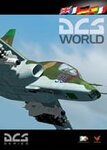
DCS World Installation Directions. Part 2 of 13. Installation:
1- Download the exe setup file and all 12 bin files (all files are stored here as .zip files)
2- Place all files in a single folder and unzip them.
3- Run the exe and follow the on-screen directions.
Support:
http://forums.eagle.ru/index.php
http://support.digitalcombatsimulator.com/en/
Digital Combat Simulator World (DCS World) is a free-to-play digital battlefield game, focusing on a military aircraft simulation. It includes a FREE Su-25T attack aircraft and it is extendible through additional DCS modules as well as user-made add-ons and mods.
DCS World includes:
-A vast mission area of the Caucasus region
-Powerful mission and campaign editors
-Multiplayer
-Massive inventory of air, land and sea combat units and weapons
-Advanced AI
-Fast mission generator
-Dynamic weather and seasons
-Training missions
-Mission replay system
-Pilot log book
DCS is a true "sandbox" simulation that can and will cover multiple time periods covering many types of combat and civilian units. Modules that can plug into DCS World can include aircraft, maps, ground units, campaigns, etc. This includes modules developed internally by Eagle Dynamics, and by certified third party developers.
DCS World video overview.
| Filename: | DCS_World__Installation_Directions.zip |
| License: | Freeware |
| Added: | 9th March 2013, 20:22:17 |
| Downloads: | 332 |
| Author: | Matt Wagner |
| Size: | 741 B |
| Category: Flight Simulator 2004 - Scenery | |
| LIMN Cameri, Italy (v2) - closed Army area Babini |
|
Images related to this file:
File Description:

This scenery is complementary to the Cameri_V2's main one. It has been revised with complete new ground that solves the previous flickering problems, built up mainly with existing objects and through Generic Building system.
Historical Infos: the 31th Armored Brigade 'Curtatone' that was born after the reorganization of the Italian Army on 21th October 1975 and was incorporated into the 131th Armored Division 'Centauro', part of the 3th Corpo d'Armata of Milan, that also regiment the Mechanized Brigades 'Goito' e 'Legnano'. It got his name in honour of the Curtatone's historical battle, fought on 29th May 1848, during the first independent war between the royal Italian army and the Austrian one. The 'Curtatone' Brigade was placed with all their units in Piemonte area, as Novara, Vercelli and Bellinzago Novarese (this scenery place). On the November 1st 1986, the Curtatone Brigade was dissolved following the cleaning of the divisional level, and in its place the 31th Armored Brigade 'Centauro' was created.
Contents: several buildings by Generic Building system, few others by existing objects, one GMax custom made; military vehicles inside the area, as trucks, jeeps, cars and an armored cars patrol; lights on patrol zone and all over the boundaries; entrance gates by GMax, boundary by fences for the complete areas, connecting with the airport one; several trees all over the scenery. You can find separate further Cameri complementary scenery as airport Museum
| Filename: | LIMN_Cameri_Italy_v2__closed_Army_area_Babini.zip |
| License: | Freeware |
| Added: | 20th October 2011, 00:24:43 |
| Downloads: | 1,698 |
| Author: | Aldo Della Vedova, Daniele Lanfranchi |
| Size: | 4.46 MB |


© 2001-2026 AVSIM Online
All Rights Reserved
Privacy Policy |