
Where Flight Simulation Enthusiasts Gather from Around the World!
AVSIM Library - Search Results

| Category: Flight Simulator X - Aircraft Repaints, Textures and Modifications | |
| P-51D Mustang "Frenesi" (N357FG) |

|
Images related to this file:
File Description:
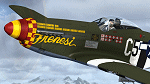
This is a repaint for the payware Warbirdsim P-51D "Mustang Tales" product. This repaint depicts the latest Mustang restoration to emerge from Midwest Aero Restorations, completely stock, which just had its first test flight from Danville, Illinois on January 30th. The aircraft is F-6K 44-12852 (restored as a P-51D), owned/operated by Dan Friedkin/Comanche Fighters, based in Texas. Sold surplus immediately following WWII, registered as NX66111, the aircraft was entered into the 1946 Cleveland Air Races as racer #80 "Full House", but its engine blew and was forced to crash-land. Later, the aircraft was sold to Jack Hardwick in the early 50's and crudely rebuilt, with a jump seat and rudimentary dual controls installed in the back of the cockpit, and would soon be sold onto the Dominican Air Force in 1954, becoming FAD 1900 (#2). The aircraft served with the Dominican AF until it was sold and imported back into the US by Brian O'Farrell in 1984. Made serviceable, the aircraft flew again on the US register as N21023 by 1990, and was sold to Jim Beasley Sr. and later owned/operated by Jim Beasley Jr., of Coatesville, PA (sharing hangar space with their P-51D "Bald Eagle"). During this time the aircraft was painted as "Frenesi", the personal mount of WWII 357th Fighter Group ace Gen. Tommy Hayes (the name inspired from a 1940 Artie Shaw tune). By the early 2000's, showing the effects of poor-quality work done on repairing/restoring the aircraft in the past, a complete rebuild of the airframe began. By 2009, the project was sold to Dan Friedkin, now registered as N357FG, and the restoration was continued at Midwest Aero Restorations, known for their award-winning authentic Mustang rebuilds. The aircraft has now emerged in early 2017, resplendent and flying again in the markings of "Frenesi".
| Filename: | P51D_Mustang_Frenesi_N357FG.zip |
| License: | Freeware |
| Added: | 5th February 2017, 19:56:49 |
| Downloads: | 84 |
| Author: | John Terrell |
| Size: | 24.84 MB |
| Category: Flight Simulator 2004 - Scenery | |
| Ballina, New South Wales, Australia (YBNA) |
|
File Description:
A very attractive small airport approximately 120 nautical miles from Coffs Harbour and a slightly shorter distance to Grafton and Lismore. This makes a good stopover for hopping down the east coast of Australia. The airport handles around 11 flight a day from Sydney and is also a busy GA aiport. Airlines REX and Qantas link fly into Ballina. The size of the airport has allowed me to put in that extra detail which makes to terminal and surrounds very much "as in real life". Photographic textures are used throughout for the buildings and even the trees and shrubs are hand made macros from photographs at the airport. Thanks to the cooperation of Northern Airline Services - Mr Bruce Beesley the MD and Graeme from Ballina Council the relative position of all of the buildings are exactly to scale as shown on scale drawings of the airport. AFCAD and Traffic Tools files are included to add extra AI traffic. For that reason and because of limited apron space no static planes have been used. In addition a landclass is included to make the airport ground texture resemble the real thing and also to widen the river behind runway 24. The scenery concentrates on adding a realistic terminal to the airport and hangars which are as close as possible to the real thing. Many other details have been added all authentically Ballina. The default runway detail remain unchanged with the exception of VASI placement. Other than that the airport merges into the default scenery without the usual "green oasis" effect. Full night lighting is included plus a rather dubious attempt to model the inside of the terminal (strictly not to be taken too seriously)
| Filename: | Ballina_New_South_Wales_Australia_YBNA.zip |
| License: | Freeware |
| Added: | 25th January 2004, 19:16:25 |
| Downloads: | 5,909 |
| Author: | John Ross |
| Size: | 6.8 MB |
| Category: Flight Simulator X - Aircraft Repaints, Textures and Modifications | |
| Global 7000 for "iris_easter_eggs_2013_fsx" |
|
File Description:
Repaint for "iris_easter_eggs_2013_fsx" by "IRIS Flight Simulation Software" "Bombardier's Global 7000 and the Global 8000 were launched together at NBAA in October 2010 as derivatives of the Global 6000 program. The aircraft completed its first flight Nov. 4, 2016, marking the start of a rigorous flight-testing program. Entry-into-service of the large jet was scheduled in the second half of 2018. The Global 7000 has a four-zone cabin and will carry up to 12 passengers. It features 14 windows on each side of the fuselage - One more than the legacy Global Express and one less than the 6000. The Global 7000 also features the high swept supercritical wing with winglets and a high swept T-tail. As far as performance, the Global 7000 is powered by GE Aviation Passport engines and has a range of 7,400 nm and a top speed of 530 knots. The two GE Passport engines are side mounted at the rear of the aircraft. The Global 7000, which was priced at about $73 million is indeed large. The cabin (not including the baggage compartment) is 54 feet, seven inches long; six feet, three inches tall; and eight feet, two inches wide. Aft of the galley, the passenger area is divided into four distinct living areas. Depending on the layout, they can include a seating area, a dining or meeting area, a cinema room, and a bedroom. In April 2018, the Global 7000 and its cabin won a Red Dot in the Ships, Trains and Planes category of this year’s Red Dot Design Award, ainternational competition conducted annually since 1955 by Design Zentrum Nordrhein Westfalen in Essen, Germany. As judging criteria, the 39-member jury looked at each product’s levels of innovation, functionality, formal quality, ergonomics, and durability."
| Filename: | Global_7000__for_iris_easter_eggs_2013_fsx.zip |
| License: | Freeware |
| Added: | 16th November 2019, 18:49:23 |
| Downloads: | 377 |
| Author: | David Robles |
| Size: | 25.09 MB |
| Category: Flight Simulator X - Aircraft Repaints, Textures and Modifications | |
| Consolidated PBY-5 RNZAF 6 Sqn XX-W |
|
Images related to this file:
File Description:
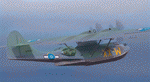
A repaint for the Aerosoft PBY-5 Catalina in the colors of NZ4020 XX-W of the RNZAF. Bu08435, it flew with 6 Flying Boat Squadron. Following Japan's entry into the war in December 1941, the RNZAF had to switch from primarily training pilots to Europe into a combat force. No. 6 Squadron RNZAF was formed as an army co-operation unit at Milson in February 1942 flying Vickers Vildebeest and Hawker Hind aircraft. At the same time, No. 5 Squadron RNZAF moved to Fiji with Short Singapores and Vickers Vildebeest and Vincent biplanes. Modern maritime patrol flying boats (and more Hudson light bombers) were requested under Lend Lease and when the first Consolidated Catalinas arrived a detachment of men from No. 5 Squadron was assigned to convert to these types as No. 6 Squadron. Before the squadron was officially formed these men successfully completed their first air-sea rescue of a downed US aircrew. From May 1943 No. 6 squadron undertook action against the Japanese. The Squadron also conducted search and rescue missions for allied aircrew and seamen, and undertook many open sea rescues. XX-W arrived in Fiji on 21 October 1943. On February 18, 1944 it took off on a dumbo rescue mission to north Buka Island and landed to rescue two crew members and pick up a dead body from the crash of B-25, and successfully returned them to Halavo. On 26 May 1945, it stalled on landing at Hobsonville and was towed to its mooring by a crash boat. The induced damage resulted in the aircraft being written off charge on 18 June 1945.
Repaint by Jan Kees Blom, based on the paintkit by Aerosoft
| Filename: | Consolidated_PBY5_RNZAF_6_Sqn_XXW.zip |
| License: | Freeware |
| Added: | 13th July 2018, 20:40:22 |
| Downloads: | 138 |
| Author: | Jan Kees Blom |
| Size: | 8.74 MB |
| Category: Flight Simulator X - Scenery | |
| FSX-LIEO-Olbia-Sardinien |
|
File Description:
Now, after a long construction period and many hours of free time,
the new FSX airport LIEO-Olbia-Sardinia is finally finished, of
course as always with lots of details and a few extras.........
So off we go, off to Sardinia to the Costa Smeralda, preferably
with an A 321 or a Boeing 737, where you switch to a helicopter or
a smaller aircraft and explore the landscape in detail, including
the port, which has a heli pad for them VIP guests or you can take
a fire-fighting plane and help put out the fire. Of course, in the
direction of the hot air balloons, please first fill up with water
in the sea.............
Installation:
Unpack the zip folder: then copy the FSX-LIEO-Olbia folder into
the FSX addon folder, start the FSX, go to settings, scenery
library, add area, press OK, then you can start.
Extras:
! If you already have one of these files activated in your scenery
library, you do not need to install it again.
For all extras, the respective file must be copied individually
into the Addon Scenery folder and activated individually in FSX as
described during installation.
File: 3DPeople_Lib............ (to see people)
File: ObjLib-Large-Car-Parking-FSX.............(parking spaces and
vehicles)
File: PKP...........(to see trains and wagons)
File: Cobus.........(to see buses)
File: FSX_LTS......(lights and light poles)
File: EZ object Library.......(! Most important file for numerous
accessories + buildings)
! Note whoever installed the old EZ Object Library from me before
October 25th, 2023 should install this new one here and delete the
old one in FSX because I have completely revised it!
Candy:
As a treat, I'll give you the Canadair CL215 firefighting plane
that is stationed in Olbia 1x as AI traffic + 1x for flying
yourself..............
You can find more information on my YouTube channel
https://www.youtube.com/channel/UC7vHXQMa3hhU2iGtODXlkHw/videos
| Filename: | FSXLIEOOlbiaSardinien.zip |
| License: | Freeware |
| Added: | 29th October 2023, 12:01:15 |
| Downloads: | 592 |
| Author: | Ewald Wagner alias Jamaika |
| Size: | 251 MB |
| Category: Flight Simulator 2004 - Scenery | |
| Knight Inlet CF36 float base in British Columbia, Canada |
|
Images related to this file:
File Description:
Knight Inlet is a floating lodge that organises "nature experiences", ranging from close encounters with local grizzly bears to fishing. Knight Inlet is to the north of "the narrows" where the Inside Passage gets squeezed between the mainland and Vancouver Island, and there is a chart section attached with a pointer to the location. At the bottom of the chart is Campbell River floatbase, and to the west is Port Hardy. Knight Inlet initially runs east-west, and the lodge is tucked into a smaller north-south offshoot, close to where the main inlet turns north. The water runway here is in the middle of the north-south offshoot, though of course in reality the "runway" is wherever the wind dictates it to be. The names highlighted in green on the chart are float bases to be renovated and posted with working AI. The buoyed log boom next to the lodge is to keep escaped logs from drifting in and colliding with boats; float plane pilots keep their eyes peeled too. Because of large hills adjacent to the lodge the landing of the AI may or may not take place, depending on wind direction and whether or not they fly into rock before landing. Take off and departure are far more reliable, particularly if the wind is from the south. Most of the AI is from Vancouver Harbour, Harbour Air Otters and West Coast Air Beavers, plus a SeAir Beaver from Campbell River and a private Cessna from the nearby Minstrel Island. This is the second in a series of new and renovated float bases in BC (the first being Sproat Lake) and to cope with the AI demands FSAddon have authorised the inclusion here of a bunch of AI Otters and Beavers that were originally part of a payware scenery for the area. Thanks are due there.
| Filename: | Knight_Inlet_CF36_float_base_in_British_Columbia_C.zip |
| License: | Freeware, limited distribution |
| Added: | 23rd December 2016, 08:16:24 |
| Downloads: | 219 |
| Author: | Roger Wensley |
| Size: | 16.95 MB |
| Category: Flight Simulator X - Aircraft Repaints, Textures and Modifications | |
| Baron B55 (Serial 12685) |
|
Images related to this file:
File Description:
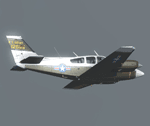
This is an original Army T-42A, off-the-shelf Beech B55, that served as the Army's primary fixed wing instrument and multi-engine trainer from the mid-60's through the mid-80's. This aircraft went into the Army inventory in 1966 where it served as a flight instrument and multi-engine trainer at the Army Aviation Flight School at Fort Rucker, Alabama until 1971.
The aircraft was then assigned to the Army's Aviation Systems Command Flight Operation Detachment at St. Louis until 1980. In 1980, the aircraft was transferred to the Ohio Army National Guard where it served until released from Army service in 1990. In 1997, the aircraft was acquired by Vanderwall Aircraft, LLC.
If you haven't paid for your copy of Milviz's B55 the MPs will be round to take you to the stockade!
| Filename: | Baron_B55__Serial_12685.zip |
| License: | Freeware |
| Added: | 23rd December 2013, 00:06:52 |
| Downloads: | 859 |
| Author: | Ron Attwood |
| Size: | 4.55 MB |
| Category: Flight Simulator X - Aircraft Repaints, Textures and Modifications | |
| Pacific Western Airlines L-188 'Silver Bullet' |
|
Images related to this file:
File Description:

This is a repaint of the L-188 in Pacific Western Airlines colors. The freeware L-188 by Libardo Guzman is needed for this repaint. PWA operated a total of 4 L-188s from 1971 to 1976. This aircraft is the most intersting of the four. They nicknamed it the "Silver Bullet". It was a fuel tanker and was used to support the arctic oil exploration projects. It was unique in that fuel tankers were rare and this aircraft had the name and logo painted over the shiny unpainted aircraft.
I have included DXT3 textures, which will enable the FS2004 users to fly this plane. Just copy the DXT3 textures in the enclosed folder, then paste them into the main L-188 folder, overwriting the files there.
This repaint was tested on FSX-SE. It should work on FSX boxed & FS 2004.
| Filename: | Pacific_Western_Airlines_L188_Silver_Bullet.zip |
| License: | Freeware |
| Added: | 15th June 2018, 13:14:26 |
| Downloads: | 54 |
| Author: | Ted Giana |
| Size: | 2.66 MB |
| Category: Flight Simulator X - Missions | |
| Flying the 320 |
|
Images related to this file:
File Description:
Learn to fly the next generation aircraft A 320 of Wilco/Feelthere. A guiding copilot will be on your side, going through all procedures with you and giving all important hints during the flight, so that you are able to bring the jet straight into the air and in the end safely back to the ground. The mission based on the real flight of Jet Blue Airlines 241 between Oakland International and Long Beach in Los Angele's. An additional tutorial-document is including, that shows you all gauges, switches and buttons you need for this mission and it shows you all indications of the flight management system appearing on the PFD- and SD-display, sorted by the different phases of the flight. Please notice, that this mission requires the commercial add on of Airbus Volume 1 from Wilco/Feelthere.
| Filename: | Flying_the_320.zip |
| License: | Freeware |
| Added: | 1st May 2010, 00:35:06 |
| Downloads: | 2,453 |
| Author: | Carsten Wanzelius |
| Size: | 24.93 MB |
| Category: Flight Simulator 2004 - Original Aircraft | |
| Grumman Albatross version 2.1 FDE Landing Lights |
|
File Description:
Grumman HU-16 Albatross 2.1
Greg Pepper, Michael Verlin
revised FDE with landing lights
This package contains revised aircraft.cfg and air files.
I've modified the contact points for the hull and nose gear and retractable landing lights
The contact points for the landing lights were omitted in previous uploads.
The lights are tied to the water rudder (Shift+W). It has been 5 years since version 2.0 was released.
Fortunately, I kept copies of my correspondence with Greg Pepper, which had the information for the missing contact points. They are now included.
My apologies for the error. This should finish matters for version 2.1
Instructions
unzip this file into the Grumman Albatross G64 section of your FS9 Aircraft folder.
overwrite the existing aircraft.cfg and HU16.air files with the files in this package.
Michael Verlin
[email protected]
May 24, 2012
| Filename: | Grumman_Albatross_version_21__FDE_Landing_Lights.zip |
| License: | Freeware, limited distribution |
| Added: | 24th May 2012, 23:01:05 |
| Downloads: | 1,363 |
| Author: | Greg Pepper Michael Verlin |
| Size: | 12.84 KB |


© 2001-2026 AVSIM Online
All Rights Reserved
Privacy Policy |