
Where Flight Simulation Enthusiasts Gather from Around the World!
AVSIM Library - Search Results

| Category: Flight Simulator X - Flight Plans | |
| ALbanian Wings Ltd..... |

|
File Description:
Durrës (Italian Durazzo), city and seaport in western Albania, capital of Durrës District, on the Adriatic Sea near Tirana is the home base of Albanian Wings Ltd. The Company is presently hiring pilots which will, if they pass the exams, fly passengers and freight to small and medium
cities in Albania. It is flying one Jet, three Turbos and several small aircraft which are good for the medium and small airfields of the country. You have applied for a Captain position and will take their test early next week. Capt. Damilov Gigko, chief of operations will give you the complete round and some:*Examples} A flight from the base field to Peshkopi up in the mountains
near what use to be Yugoslavia, a bad weather flight to the company´s Test Field 1, a very short one by the sea. Copilot to Sarande, Korce and the Lake Resorts near Greece. You will notice that many fields have been "built" by AWL since it agresively wants these markets. Pay is very good so you must do your best to pass these tests........This is DeLuxe FSAdventureSky Adventure flight with many new airfields, much eyecandy, complete PDF manual and a lot of fun!!!
This is Chapter One of Three which end on Christmas day 2008......You need the job man!!! so do some short take offs and landings before you go applying for it and mess everything up!!!! Now that money and credit is tight this is your Bonanza or Bust!!!!!
OH...yes, all your examiners are Captains and women!!!!!...Great!!!
| Filename: | ALbanian_Wings_Ltd.zip |
| License: | Freeware, limited distribution |
| Added: | 9th November 2008, 08:10:34 |
| Downloads: | 702 |
| Author: | Gera Godoy Canova |
| Size: | 3.58 MB |
| Category: Flight Simulator X - AFCAD Files | |
| Vineland-Downstown Airport (28N), NJ |
|
File Description:
Located 04 miles NE of Vineland, New Jersey on 45 acres of land, Vineland-Downstown Airport is a turf field that mainly services crop dusting operations for the surrounding farms. It also can serve firefighting aircraft - in fact the second runway (12/30) is specifically for that purpose along with agricultural use. This airport as modeled in FSX is kind of inbetween the current layout and the past layout. Based on various images both satellite and other, it seems 28N has undergone some serious expansion since the MSE textures were created. A large paved area to the west of the airport has been built and has parking aprons for up to around 25 aircraft. If you use an add-on traffic program you might want to think about reconfiguring it to assign more flights to this airport because it can certainly handle them now. You can fuel up in your plane by stopping near the fuel tank on the north end of the west tarmac or in your helicopter by landing on the concrete patch north of the runway.
Scenery constructed with use of satellite images/streetview, the author has not been there in person.
This scenery is meant to be used in conjunction with MegaScenery Earth New Jersey/Delaware 004. It is not required, but apron use is minimized to allow satellite scenery to show through as much as possible, and objects are placed based on the MSE textures - lack of it may make scenery look out of place.
| Filename: | VinelandDownstown_Airport_28N_NJ.zip |
| License: | Freeware |
| Added: | 11th October 2010, 06:13:42 |
| Downloads: | 206 |
| Author: | Drew Sikora |
| Size: | 324.96 KB |
| Category: Flight Simulator X - AFCAD Files | |
| Mount Pleasant Landing Strip Airport (67NJ), NJ |
|
File Description:
Located 01 miles S of Hainesburg, New Jersey on 192 acres of land, Mount Pleasant Landing Strip Airport is a private turf field. The strip itself is 2100 feet in length over fairly level ground. There is no hard-surfaced grass runway in place, so setting your mesh to the highest resolution is recommended as you will be landing on bare terrain. Next to Runway 06 is a path through the trees you can taxi along to get to a hangar - although it is not available for transient aircraft and is closed. Collision with the trees along the path near the hangar and the static aircraft parked near it is disabled to make it easier to move through this relatively tight area. Immediately beyond the hangar is a clearing with ample room to turn around to taxi back out. You can also start parked in front of the hangar. The windsock is located a few feet west of the hangar and is not lit. The runway also has no edge lighting so daytime VFR operations only are recommended for this airfield.
Scenery constructed with use of satellite images/streetview/aerial photos - the author has not been there in person.
This scenery is meant to be used in conjunction with MegaScenery Earth New York 007. It is not required, but apron use is minimized to allow satellite scenery to show through as much as possible, and objects are placed based on the MSE textures - lack of it may make scenery look out of place.
| Filename: | Mount_Pleasant_Landing_Strip_Airport_67NJ_NJ.zip |
| License: | Freeware |
| Added: | 7th February 2011, 23:49:26 |
| Downloads: | 198 |
| Author: | Drew Sikora |
| Size: | 468.64 KB |
| Category: Flight Simulator X - Aircraft Repaints, Textures and Modifications | |
| FSX/P3D Aloha Airlines DC-3 circa 1958 |
|
Images related to this file:
File Description:
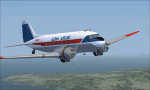
This is a repaint of the DC-3 in Aloha Airlines colors. The freeware DC-3/C-47 v3 by Manfred Jahn is needed for this repaint. Aloha was founded in 1946 under the name of Trans Pacific Airways. With a single DC-3, they offered passenger charter and cargo services between the islands of Oahu, Maui and Hawaii. On February 11 1949 they officially became a scheduled service airline. Their main rival was Hawaiian Airlines, and in 1957 they changed their name to Aloha Airline to better compete against Hawaiian. In 1959 a modern F-27 joined the fleet, which forced the retirement of Aloha's aging DC-3 fleet by the mid 1960s. They also introduced the Viscount 745D in June 1961. BAC-111s were acquired in 1966. However, the British made airliners had limitations in the very humid environment of Hawaii, and in 1967 Aloha ordered 2 Boeing 737-200s with a further 6 in 1968 to replace the BAC-111s. The 737s were destined to become the workhorse of the airline, with over 60 being used by Aloha over the years. Their iconic "Flower Power" livery was unveiled in 1969, and was reintroduced in 2006 on one of their 737 as a retro livery. Due to heavy financial problems caused by various factors, Aloha unfortunately ceased operations on March 31 2008. This DC-3, N2804D, was leased by Aloha in the late 1950s. Textures are DDS DXT5. This repaint was tested on FSX-SE and should work on FSX & P3D v1-3.
| Filename: | FSXP3D_Aloha_Airlines_DC3_circa_1958.zip |
| License: | Freeware |
| Added: | 19th December 2018, 22:31:48 |
| Downloads: | 214 |
| Author: | Ted Giana |
| Size: | 7.43 MB |
| Category: Flight Simulator X - Scenery | |
| KAFW Fort Worth Alliance Airport - Texas, US |
|
Images related to this file:
File Description:
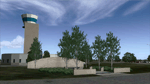
Ft. Worth Alliance Airport opened in 1989 and was billed as the world's first purely industrial airport. It is located around 14 miles North of the central business district of Ft. Worth and is also nearby the Dallas/Ft. Worth International Airport (KDFW). The airport serves general aviation, corporate jet, cargo, and military air traffic on a daily basis and it's proximity to the Texas Motor Speedway (only a few miles) brings extra dense traffic on race weekends. The airport is home to the American Airlines 777 and 767 maintenance base, FedEx Southwest Regional Sort Hub, Bell-Helicopter Training Center, DEA Air Operations Center and DynCorp International. Sadly the American Airlines maintenance base is set to close at the end of 2012 but is being kept alive in FSX!
This scenery features custom 3d buildings and objects bringing you a very accurate rendition of Ft. Worth Alliance Airport. Requires FSX Acceleration for the all scenery objects to display correctly.
Note: These files MUST be installed for the scenery to work correctly (otherwise there will be missing scenery objects at the airport):
-Filename: fsx_lts.zip - Ramp Lighting for FSX by Jim Dhaenens
-Filename: dlfcorelibraries2fsx.zip - Dan French Core Library Vol. 2
-Filename: lightstoo.zip - Jim Dhaenens Airfield Lighting
-Filename: objlib-jgse-fsx.zip - John Stinstrom JGSE Yellow Objects - this newer file replaces the older FS9 libraries with FSX versions
-Filename: objlib-ggse-fsx.zip - John Stinstrom GGSE Green Objects - this file also replaces FS9 libraries with FSX versions
| Filename: | KAFW_Fort_Worth_Alliance_Airport__Texas_US.zip |
| License: | Freeware, limited distribution |
| Added: | 12th December 2012, 16:56:36 |
| Downloads: | 2,934 |
| Author: | Brandon Thetford |
| Size: | 439.24 MB |
| Category: Microsoft Flight Simulator (2020) - Utilities | |
| Flightplan Visualizer 1.18 |
|
Images related to this file:
File Description:
Flightplan Visualizer (FV) version 1.18.0. Copyright 2018-2020 by Pelle F. S. Liljendal ([email protected]), all rights reserved.
FV comes with 787 pre-imported Commercial AI flightplans (+380 BizJet flightplans are available as a separate download). However you are able to import additional (AI) flightplans yourself. Once imported these (AI) flightplans can be visualized on a map-view, and the user will be able to search accross all these. Hence you can use the program as inspiration as to which routes to fly. E.g. you can search across all imported flightplans to find all flights in an A321 flying into/out from LDDU, or simply to look for all flights in a Boeing 747-8F.
Simply run the included installer to install the software. The program will be installed into "C:\Program Files (x86)\Flightplan Visualizer" and all datafiles will be installed into: "C:\Users\[UserName]\AppData\Roaming\FlightplanVisualizer". The program comes with a full manual explaining everything, and a 3 page quick manual to get you started. The first 3 times you run the program the quick manual will automatically open. The forum is hosted here: https://forum.aerosoft.com/index.php?/forum/919-flightplan-visualizer/
Version 1.18 Contains the following changes:
- GREATLY improved the search-legs feature (by a factor of +50).
- In the past the application was forced to 32 bit. This is no longer the case, hence if needed its able to allocate more memory than before. I have never heard of anyone getting an "out of memory" exception, buy anyway.
- In the settings form, the field for entering the path to where to look for the Make Runways -files, have been replaced with a (MRU) combo-box, remembering the last 5 paths entered. So now you don't need to remember these paths each time you want to change it (e.g. if you switch between a set of files generated for P3D and another generated for MSFS). Remark that when this path is changed, FV will automatically restart when saving the settings, as the MkRwy-data are only loaded at startup.
- Added new command-line argument /MkRwy="G:\FS\MakeRunways". If this argument is set, FV will try to locate the files generated by Pete Dowson's MakeRunway in the specified folder, no matter the value of the MkRwy-path set in the settings-form.
- Added new command-line argument /FilePrefix=XXX. If this prefix is set (in the short-cut starting FV) it will look for files in the UserData-folder using this prefix and an underscore (e.g. open "XXX_UserAirportInfo.xml" in stead of "UserAirportInfo.xml"). If FV is started with this argument it will be displayed in the caption of the main-form to notify the user "which prefix is in use".
- Added new command-line argument /ForceReprocessFlightplans which forces all flightplans to be reprocessed on startup (e.g. process all airport redirections according to loaded redirection file).
- Added new command-line argument /? or /help. Using either of these, or having specified a wrong command-line argument will show a small example of the correct way to use these arguments.
- Added a new "Auto-activation prefixes" entry field to the "Edit owned aircraft" form where you can now enter a comma separated list of prefixes for which each aircraft should set to active. If entered, the aircraft will automatically be set active when FV have been started with the /FilePrefix argument set to the entered value (e.g. P3D). If one or more prefixes have been entered into this field, and FV have been started with another prefix, those aircraft will be set to not-active.
- Added new setting to reprocess all loaded flightplans on startup if FV was started with another /FilePrefix argument than used the previous time FV was started (e.g. if you switch between two different simulators).
- Improved how pseudo-airports tries to look-up airport data from the bundled airport-database. So there is now a higher chance that: name, country/state, and time-zone will be populated with useful data for the pseudo airports.
- In previous versions when opening the airport-info form, the checkbox "Exclude small/grass/dirt" (runways) was always checked, meaning you had to uncheck this checkbox before being able to see any runway-information for small airports. In this version a new setting have been added where you can chose if this checkbox should default to being: Checked, Unchecked or (default) Automatic. if choosing "Automatic", this checkbox will default to un-checked for airports only having few/small runways.
- Redesigned the settings-form so things are less "cluttered", and it will be more easy for me to add additional items in the future.
- The Search Airport form now contains fields that lets you specify min/max criteria for rwy-length and airport elevation, and min/max distance to a specified airport (e.g. find all airports within 20-50 Nm of XXXX). Also you can specify required rwy-type (e.g. "All Hard", "Have Soft" ...).
- Added an "Edit" menu-item to the context menu in the Search Airport form, which opens the Airport Info form, and returns back to the Search Airport form (e.g. see details for a few found airports before chooing one of them).
- If Transition Altitude (TA) is not known for a particular airport, the program will now try to estimate TA based on nearby airports in the same country, where those nearby are weighted more than those further away (its not perfect, but "better" than 0). An estimated TA will be postfixed by a asterisk to mark that it is estimated.
- Minor (internal) changes to the automatic version-check.
- Fixed: Issue importing some AigFP flightplans where airports were being redirected (e.g. "AIG_AviaTrafficCompany_Winter_2019-2020v2").
- Fixed: Using the context menu in the list-view showing all owned aircraft, the changes were sometimes not saved.
- Fixed: In the conversion-form when converting weight/volume into US-Gal, the calcuation was wrong (converting from US-Gal was not an issue).
- Fixed: In the leg-info report the value of Transition Altitude was in some cases used in stead of the length of the longest runway.
- Fixed: Leg-info report only contained taxi-out time for all airports. Now it only contains the taxi-out time for the departure airport, but both departure- and destination airports contains a taxi-in time.
- Fixed: In some cases an airport that was currently being edited, could be edited in another window at the same time (opening multiple Airport Info forms).
- Data: The bundled airport-database had a MAJOR face-lift. Various data were corrected, and it have more than doubled in number of airports/helipads contained within the database.
- Data: Improved detection of aircraft-type "IAI 1126 Galaxy" (as "Gulfstream G200"). Thanks to Bruce Nicholson for notifying me of the issue when importing a particular AIG flight-plan.
- Flightplans: All new/updated flightplans have been added to the installer, and all obsolete/defunct have been marked/removed. A total of 787 active flightplans are bundled with the installer.
Pelle
| Filename: | Flightplan_Visualizer_118.zip |
| License: | Freeware, limited distribution |
| Added: | 9th November 2020, 20:09:24 |
| Downloads: | 479 |
| Author: | Pelle Liljendal |
| Size: | 34.48 MB |
| Category: Flight Simulator X - Aircraft Repaints, Textures and Modifications | |
| Centurion Cargo "Petete" McDonnell-Douglas MD-11F (N701GC) |
|
Images related to this file:
File Description:
Centurion Cargo is a privately owned company founded in 2001. Based at
Miami International Airport, it currently operates a fleet of ten MD-11F,
and has an impressive 550,000 square foot warehouse, divided into two
different sections, a 159,000 square foot cooler and 391,000 square foot
Dry Cargo Area. The Centurion Cargo Center is by far the largest privately
owned all cargo airline facility in North America.
Centurion is one of the leading cargo airlines operating to and from
Latin America and is No. 1 in the handling of live animals and perishable
goods. Centurion has recently expanded its network to include 4 weekly flights
from Amsterdam, The Netherlands. We also offer worldwide charter, handling, and
security services among others.
FSX McDonnell-Douglas MD-11F repaint textures for the real world
Centurion Cargo N701GC, named "Petete", but with the freeware version's Pratt
and Whitney engines. For the freeware SMS Overland MD-11 with P&W 4460 engines,
which you must have previously installed in FSX. I installed the freeware
(SMS-MD-11_Dutch_Package.zip) with VC which works well with this repaint.
Also includes engine exhaust smoke coordinates which you can add to
your "aircraft.cfg" if you wish. Screenshots enclosed. Easy installation.
Repaint by Tom Tiedman.
| Filename: | Centurion_Cargo_Petete_McDonnellDouglas_MD11F_N701.zip |
| License: | Freeware |
| Added: | 20th July 2013, 07:14:54 |
| Downloads: | 160 |
| Author: | Tom Tiedman / SMS Overland |
| Size: | 7.86 MB |
| Category: Flight Simulator X - Aircraft Repaints, Textures and Modifications | |
| "Fantasy of Flight" AT-6 Texan (N3931Y) |
|
Images related to this file:
File Description:
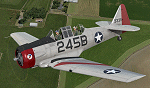
This is a repaint for the payware A2A Simulations AT-6 Texan. This repaint depicts AT-6D/AT-6G 49-3311, registered as N3931Y, which is owned/operated by Kermit Weeks at "Fantasy of Flight" in Polk City, FL. This aircraft was originally manufactured as an AT-6D in WWII for the USAAF, but was rebuilt to AT-6G standard in 1949 for the USAF. The aircraft served in the Spanish AF as a "Caza 6", C.6-167, from around 1962 all the way until 1982, serving as both a trainer and a frontline ground support aircraft, with machine guns mounted in the wings and rocket launchers under the wings. Imported into the US in the 80's, and flying on the civil register, the aircraft is painted as a tribute to the Women Airforce Service Pilots (WASP), with the markings of Avenger Field in Sweetwater, Texas, where they trained. The WASP insignia "Fifinella" is applied to the cowling, which was designed by Disney during the war. This aircraft is one of those which have been covered by Kermit Weeks in his popular "Kermie Cam" flight video series on Youtube. The repaint was created using the A2A product paintkit.
| Filename: | Fantasy_of_Flight_AT6_Texan_N3931Y.zip |
| License: | Freeware |
| Added: | 2nd April 2016, 11:43:15 |
| Downloads: | 265 |
| Author: | John Terrell |
| Size: | 33.24 MB |
| Category: Flight Simulator X - Aircraft Repaints, Textures and Modifications | |
| NIGAT & KNILM Douglas C-54A **UPDATED VERSION** |
|
Images related to this file:
File Description:
This package contains three repaints for Jens B. Kristensen's FSX Douglas DC-4 & C-54 V3.0. In 1946 four ex-USAAF C-54A's were delivered by the USA to the Netherlands Indies Government Air Transport service (NIGAT) and based at Kemayoran near Batavia (now Indonesia's capital Jakarta). Initially they wore military serials, but soon civil registrations were allotted (PK-DSA, PK-DSB, PK-DSC and PK-DSD). Very soon they were chartered by the "reborn" KNILM Royal Netherlands Indies Airways for the weekly service between Batavia and Los Angeles. However, this service lasted only a very few months. By August 1947, when KNILM ceased to exist and was integrated into KLM, the C-54A's were taken over by KLM as PH-TSA through PH-TSD. Their career with KLM was shortlived, as they were sold to airlines elsewhere. Featured are the C-54A's PK-DSB with KNILM titles, PK-DSC with Netherlands Government Air Transport titles, and PK-DSD with NIGAT titles. These are textures only. They replace the textures released in 2013 which have turned out to be in the wrong colour, a problem if one only had a very few, bad quality b/w pictures as a source. You will need the FSX Douglas DC-4 & C-54 (DC4_V30X.ZIP). Repaints by Maarten Brouwer.
| Filename: | NIGAT__KNILM_Douglas_C54A_UPDATED_VERSION.zip |
| License: | Freeware, limited distribution |
| Added: | 13th July 2015, 15:30:11 |
| Downloads: | 165 |
| Author: | Maarten Brouwer |
| Size: | 3.48 MB |
| Category: Flight Simulator X - Aircraft Repaints, Textures and Modifications | |
| Fairchild 24 (2/96) Swedish Air Force |
|
Images related to this file:
File Description:

This folder contains a repaint for the Lionheart Fairchild 24, in the colors of 2/96, a civilian Fairchild 24 that was impressed into the Swedish Air Force. At the outbreak of war, many civilian aircraft were mobilized. Most of them was larger aircraft, but lighter aircraft for liaison work were also used. The Naval Aviation Wing of F 2 at Hägernäs needed smaller aircraft for transport of personnel and liaison in their co-operation with the Navy.
For this reason, one Fairchild 24-C8CS-De Luxe was mobilized between May of 1940 and February of 1943. Its earlier civil registration was SE-AIR (in the USA ex NC15926). It was powered with a Warner Super Scarab S50 air-cooled radial engine delivering 145 hk. The aircraft was designated Tp 6 and got the Air Force number 912. At the delivery of the Tp 6 in May of 1940 to the Air Force, it crashed. But it was repaired and in service again in October the same year. After its time in the Air Force, the Fairchild went back to the civil register, where it was written off in 1951 after another crash.
Repaint by Jan Kees Blom, based on the paintkit by Lionheart Creations.
| Filename: | Fairchild_24_296_Swedish_Air_Force.zip |
| License: | Freeware |
| Added: | 21st July 2018, 14:10:02 |
| Downloads: | 55 |
| Author: | Jan Kees Blom |
| Size: | 17.6 MB |


© 2001-2026 AVSIM Online
All Rights Reserved
Privacy Policy |