
Where Flight Simulation Enthusiasts Gather from Around the World!
AVSIM Library - Search Results

| Category: Flight Simulator X - Scenery | |
| Victoria, Canada including US Southern Gulf Islands and San Juan Islands - Part 1 of 2 |

|
Images related to this file:
File Description:
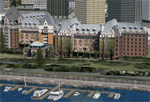
FSX-only version of Victoria, Canada area scenery including the Southern Gulf Islands and the San Juan Islands of the US. Includes automated installer and configurator by Scot Fraser.
Features:
-accurate shorelines, lakes and streams;
-landclass;
-FSX multi-LOD mesh with 10m maximum resolution;
-complete road network with moving traffic;
-railroads;
-utility corridors;
-marinas and ferry terminals;
-many static boats, including a custom model of the Canada Coast Guard ship Sir Wilfred Laurier;
-detailed models of major buildings and the Ogden Point Terminal;
-many bridges;
-nearly 300 marine lights; and corrected antennae locations.
Facilities include Don Grovestine's famous CYYJ (Victoria International Airport); 12 other Canadian land-based airports: Butler Field, Duncan (CAM3), Gaines, Hastings, Hudson Island, James Island, Thomas, Village Bay, Raven Field (CML2), Saltspring, Sidney Island, Whiskey Point; 20 US airports Blakely (38WA), Burden (61WA), Center Island (79WA), Clam Harbor (WA35), Crane Island, Decatur Shores (WN07), Decatur-Jones (WA18), Waldronaire (90WA), Orcas Island (KORS), Friday Harbour (KFHR), Lopez Island (S31), Pile Point, Roche Harbor (WA09), Shaw Island, Stuart Island Airpark (7WA5), Stuart Island West (2WA3), Wilding (6WA5), Windsock (4WA4); 12 floatplane facilities: Bedwell (CAB3), Fisherman's Bay (WA81), Friday Harbor (W33), Ganges (CAX6), Maple Bay, Mayne (CAW7), Port Washington (CAP8), Roche Harbor (W39), Rosario (W49), Shawnigan Lake (CAV8), Victoria Harbour (CYWH), Victoria International (CAP5) and Westsound, Orcas (WA83) - many with AI traffic; 9 heliports: Ganges (CAL7), Mayne (CBF5), Camel Point (CBF7), Jubilee (CBK8), Victoria General (CBW7) Madrona Bay (CBW9), Shoal Point (CBZ7), Mount Belcher (CMBH).
AI models include the DHC-2 floatplane in local liveries, a cruise ship model (by Mitsuya Hamaguchi) and two repaints, pilot boat, and small boats (by Larry Silsbee).
Ultimate Terrain X compatible (not required). Users of Vancouver+ for FSX will also get additional cruise ship traffic and additional floatplane and helicopter traffic. Full documentation. By Don Grovestine, Jon Patch and Holger Sandmann. Many other contributors: see documentation. Part 1 of 2 - you also need file vicenh7b.zip
| Filename: | Victoria_Canada_including_US_Southern_Gulf_Islands.zip |
| License: | Check within download |
| Added: | 29th January 2010, 21:23:17 |
| Downloads: | 23,162 |
| Author: | Don Grovestine, Jon Patch and Holger Sandmann |
| Size: | 56.8 MB |
| Category: Flight Simulator 2004 - Scenery | |
| LIMN Cameri, Italy (UPDATED v2) |
|
Images related to this file:
File Description:
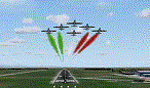
This scenery is a homage to the great military airport of Cameri NO, Italy; it has been revised with complete new ground that solves the previous flickering problems; it is builded-up with ownmade GMax objects and other existing ones; some buildings by GMax, remainder by others and by Generic Building system.
Information: Built during 1910 close to Novara, it became a prestigious Flight School where a lot of pilots of WWI where trained. Later, Gabardini/CANSA entered by promoting and developing aviation activities, mainly establishing a military flight school. On 27th July 1914, first of story's time, a flight from Cameri crossed the Alps (Camery - Viege, over Monte Rosa) with a Gabardini 80HP aircraft and pilot Achille Landini together with Giuseppe Lampugnani passenger. On 1930 the school closed, but the field still remained as aviation workshop. During the WWII the airport was quite destroyed by the german army, during their retreat. After the war, the rebuild operations carried on to Cameri several details, of which the acrobatic patrol of "Lancieri Neri" and, 1967-1999, the great 53th "Stormo Caccia". On 1998 the storm was moved to Gioia del Colle airport and the base was restructured as Comand Airport, where some technical departments still works (the 453th Operative Technical Services Group, the 553th Logistic Operative Services Group and, mainly the 1st Aircrafts Maintenance Dep.nt)
Contents: all around new great terrain for about 4.5 x 3.5 km; static aircraft inside hangar as Tornado, Eurofighter and historic monoliths at admittance and inside airport; ground equipments, cars outside and inside airport, bus, tankers, emergency trucks; military shelters (10) and workshop ones (5); buildings outside/inside airport, control tower, VOR, radar tower and some other navaids; lights at hangars, admittance and all over the boundaries; more then 10 km boundary by walls and fences of the complete areas; thousands trees all over the scenery. This scenery includes the airport scenery content only. You can find separate further sceneries for Babini Army station and Museum
| Filename: | LIMN_Cameri_Italy_UPDATED_v2.zip |
| License: | Freeware |
| Added: | 20th October 2011, 00:20:05 |
| Downloads: | 2,358 |
| Author: | Aldo Della Vedova, Daniele Lanfranchi |
| Size: | 25.08 MB |
| Category: Flight Simulator X - Aircraft Repaints, Textures and Modifications | |
| Airbus A318 FD Special Version V3 - Complete Pack |
|
Images related to this file:
File Description:

This is the new version of my Airbus A318 with the Panel in V3 opened on the A321. I remind you that this aircraft is based on the Project Airbis A318, with an ehanced panel based on the work of stefan Liebe.
This latest development can see the more realistic Airbus available as freeware. With a new version of the panel, the aircraft has a 100% cold & dark Status at the start of a flight, a real fuel system management with all valves, piumps and crossfeed work, the complete Bleed circuit with X-bleed, a real engines manual startup procedure like the real aircraft. I have also ehanced the navigation display with TCAS function in ARC and NAV mode; There is also the engines failure procedure to work (fire, oil leaks....) and many improved function that I cannot describe here. The aircraft comes with user manual in English and in French, and it is essantial to read it before you fly.
All the functions of the V2 have been kept and improved, like the vertical navigation gauge, the terrain radar map on the navigation display, the autolanding function, the SFCC. Aircraft comes with 6 liveries (Air France and 5 Frontier liveries realized by Project Airbus Team). This version is only in CFm engines, but with real engine data (CFM56-5B9). Now, the Fly By wire works in 2 modes: "Normal Law" and "Direct Law". I put 300 hours into the development of this panel and I hope that you will like it. In the coming weeks, I will adapt this panel to the A319 V2 and A320 V2, that are the these are the last aircrafts that I must update with this new panel. Please, note that this panel is the v3.05 version, witch fixes the bugs of the first version that came with the A321 (there is an update panel for the A321). Francois Dore
| Filename: | Airbus_A318_FD_Special_Version_V3__Complete_Pack.zip |
| License: | Freeware, limited distribution |
| Added: | 17th June 2012, 13:18:21 |
| Downloads: | 19,607 |
| Author: | Francois Dore, Project Airbus |
| Size: | 110.04 MB |
| Category: Flight Simulator X - Scenery | |
| RAF East Moor |
|
File Description:
RAF East Moor was opened in 1942 and was originally a 4 Group facility and first hosted No. 158 Squadron RAF which had moved from RAF Driffield on 6 June 1942. The squadron flew the Handley Page Halifax Mk. II with detachments at RAF Beaulieu and RAF Manston before moving to RAF Rufforth on 6 November 1942.
Royal Canadian Air Force use
The first squadron was No. 429 Squadron RCAF which formed at the airfield on 7 November 1942 initially only flying the Vickers Wellington Mk.III until January 1943 when the Wellington Mk. X was added. The squadron left on 13 August 1943 going to RAF Leeming where the unit re-equipped with Halifaxes. On 19 September 1943 the next squadron arrived being 432 Squadron which initially used the Avro Lancaster Mk.II before being re-equipped with the Halifax Mk. III in February 1944 and the Mk. VII Halifax in July 1944. The squadron disbanded on 15 May 1945 at the airfield.
The last Canadian squadron to use the airfield was 415 Squadron which flew the Halifax III from 26 July 1944. The unit inherited the additional Mk.VII versions during March 1945 but disbanded shortly after on 15 May 1945 at the airfield.
Royal Air Force use
Not long after the last Canadian squadron disbanded the airfield was handed back to the Royal Air Force (RAF). The first RAF unit to use the airfield was No. 54 Operational Training Unit (OTU) which had moved in during November 1945 flying the de Havilland Mosquito. By May 1946 No. 288 Squadron RAF joined with their Supermarine Spitfire IX's and their Vultee Vengeance Mk. IV's with a detachment at RAF Acklington. The squadron disbanded on 15 June 1946. No. 54 OTU stayed until June 1946 when the unit moved to RAF Leeming but a detachment stayed until 15 November 1946.
The airfield closed to flying in November 1946. Most of the buildings were taken down and the land has reverted largely to agricultural use.
| Filename: | RAF_East_Moor.zip |
| License: | Freeware |
| Added: | 14th March 2017, 19:41:08 |
| Downloads: | 128 |
| Author: | Terry Boissel |
| Size: | 154.38 KB |
| Category: Flight Simulator 2004 - Aircraft Repaints, Textures and Modifications | |
| Royal Air Force 101Sqn Douglas DC10-30 (Fictional) |
|
Images related to this file:
File Description:

SGA/FFX DC10-30 Royal Air Force 101 Squadron: This is a fictional repaint based on the paint scheme used on the Lockheed Tristar of Transport Command. To the best of my knowledge, 101 Squadron has never used DC10-30's. SGA DC-10 model included - This is a complete package containing the aircraft, panel, gauges & sounds. Credit for the work is contained within the readme file.
Number 101 Squadron was formed at South Farnborough on 12 July 1917, and two weeks later went to St Andre-aux Bois, France with FE2s as a night bomber squadron. It main tasks involved attacking enemy communications and aerodromes in Northern France and Belgium, with occasional strafing attacks on troops aimed at drowning the noise of tanks and soldiers positioning for battle in the trenches. In March 1919, the squadron was reduced to a cadre and returned to the UK before disbandment at the end of the year. It remained dormant until March 1928, when it reformed at Bircham Newton and flew Sidestrands in the day-bomber role until these were replaced by Overstrands in early 1935.
At the outbreak of World War II, the squadron was equipped with Blenheim IVs and was involved in attacks against enemy barge concentrations in the Channel Ports. In mid-1941, No. 101 Sqn became part of Bomber Command's medium-bomber force with Wellingtons and flew many night sorties against Germany and Italy. These aircraft were replaced barely 18 months later by the Lancaster and became specialised in airborne radar jamming to disrupt German night-fighters interceptions. After the war, Lincolns replaced the Lancasters and the unit moved to Binbrook. In June 1951, No. 101 became the RAF's first jet-bomber squadron when it received Canberras, and it was with this aircraft that the squadron was involved in operations in both Malaya and Suez before once again disbanding on 1 Feb 1957.
A brief period of inactivity ended on 15 Oct 1957, when No. 101 Sqn joined the V-bomber force with Vulcans as part of the Finningley Wing before moving to Waddington four years later. The squadron became synonymous with the type, and took part in Operation Corporate, the Falklands Conflict, operating from Ascension Island. Shortly after the conflict, the squadron relinquished its Vulcans and disbanded again, until it reformed on 1 May 1984 to operate VC10s in the air-to-air-refuelling role, and has since demonstrated the flexibility the aerial refuelling offers to combat aircraft in such operations as the Gulf War and Operation Allied Force.
Following the disbanding of sister VC10 squadron, No 10, 101 became the sole operator of the type in October 2005.
| Filename: | Royal_Air_Force_101Sqn_Douglas_DC1030_Fictional.zip |
| License: | Freeware |
| Added: | 18th August 2013, 15:04:44 |
| Downloads: | 392 |
| Author: | Andy Kewley, SGA |
| Size: | 36.36 MB |
| Category: Flight Simulator X - Scenery | |
| Albany International Airport (KALB) Albany, New York |
|
Images related to this file:
File Description:
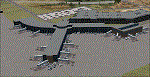
This airport was made using Airport Design Editor, Google Sketchup, and Instant Scenery 2. Albany International Airport, Is an airport located near Albany, New York. The airport has scheduled airline flights. Almost all of the buildings are custom made with photo textures to make it closer to real life. At the main terminal, I added more gates and put moving jetways. The gates have assigned parking codes. There is a parking lot next to the terminal full of cars. I put the airport access road in between the parking lot and the terminal. At the southwest ramp, I put hangars and some you can taxi inside of. If you choose to start off from the southwest DOCK gate, You will start off inside the Million Air Aviation FBO. I also put static aircraft on the ramp too. To the northwest, I put the New York Police hangar. You can start off inside this hangar by choosing the Northwest DOCK gate. Taxiing into or starting off inside a hangar will not cause a crash unless you touch the sides. To the Northeast, I put the cargo terminal with trucks. At the cargo section, I put three FedEx Cessna Caravans. I also put the control tower and the buildings. Tower views are from the roof of the control tower. To the southeast, I put small hangars and the Air National Guard Section with UH-60 helicopters. I extended runway 1/19 to the correct length of 8,500 feet. I also put red, blue, green, and purple Cessna 172s in different places around the airport. There will be more objects if your scenery complexity is set to normal (such as jetways, aircraft, and vehicles). This was all made based on Google Earth Imagery and Bing Maps. There are no night textures for the buildings. This will be added in a future version. An installer program is included to install the airport for you. There will be more versions of this that include night textures and static business jets. This is for Flight Simulator X only. By Tyler Lawrence.
| Filename: | Albany_International_Airport_KALB_Albany_New_York.zip |
| License: | Freeware |
| Added: | 2nd June 2012, 08:14:12 |
| Downloads: | 4,347 |
| Author: | Tyler Lawrence |
| Size: | 47.69 MB |
| Category: Flight Simulator X - Panels | |
| Eurofighter Typhoon Panel |
|
Images related to this file:
File Description:
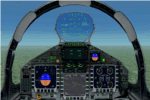
The panel has been developed for FSX Flight Simulator SP1 or SP2. It has also been tested with Microsoft Acceleration, but compatibility is not guaranteed by the author.
This panel has been designed according to a large number of technical documents, descriptions, and pictures out of the Internet. The design goal was to develop a panel and gauges as close as possible to the original aircraft. It was, however by far not possible to programming all the functions and displays, because of the complexity of the real Eurofighter panel, and also because of limitations in FSX.
However, I believe, that the panel with the MFD screen displays gives a good impression on how the real Eurofighter cockpit looks inside.The aircraft model, development by ALPHA/VIRTAVIA, has been used as the base for this panel development. The aim was to go with one model version only , the two seater air to air model. A number of parameter of the aircraft.cfg have been modified to achieve a best possible result of the flight dynamics for the model. It is up to the user to use any other model as this one, and use this panel for it.
For this package, panel and model, I decided to call it the X -Version which shall be seen as an experimental military test version, or if you like, a " Proof of Concept " version. So, you will see a neutral paint with just the Typhoon letters on the aircraft tail. This approach allows to go with deviations and differences to the current technical implementations for the cockpit displays and functions for the Eurofighter.
The panel includes gauges for the afterburner effects, sonic sound effect, callout sounds, weapon explosions effects, and a full functioning TCAS gauge (A future requirement for the Eurofighter), A2A fuel functions, target radar tracking functions and more. The panel has been developed for widescreen monitors only. No VC panel is part of this package.
This is not a load and fly package. Please take your time to read the included panel documentation carefully. Do not skip chapters because you may think, they are not important for you.
For copyrights and credits please look at the documentation for this panel.
| Filename: | Eurofighter_Typhoon_Panel.zip |
| License: | Freeware, limited distribution |
| Added: | 13th April 2016, 20:37:48 |
| Downloads: | 394 |
| Author: | Dietmar Loleit |
| Size: | 24.77 MB |
| Category: Flight Simulator X - Utilities | |
| Graphic Realism and FSX Optimization |
|
File Description:
The add-ons configuration step by step
Not configured FSX is a pain in the neck for many people. A small number of fps and frequent CTD (crash to desktop) can be extremely annoying or even depressing to some users. A lot of you probably came to a conclusion that it was going to be a losing battle and you gave up after a few fruitless days or you spent money on the FSPS-XTREME FSX PC V2 program, which can automatically do practically everything for us. But what's the point of spending money on something that we can do by ourselves with the help of this handbook?
I myself was dealing with the FSX platform three times before I gave up FS9. Microsoft gave out the engine to us, but in order to make sense, our passion involves radical tuning of the device. On the ground of one's own experience and thousands of hours devoted by people to diving into the core of the platform, I'll present a way of installation, add-ons selection and their configuration starting from the installation of the system. Having done the procedures described below, FSX will look beautiful and it'll work smoothly even with challenging sceneries. The entirety is based on quite a popular hardware configuration, which will let us use 85% of the graphic potential of Microsoft Flight Simulator X. We want t to achieve the goal of minimum 25 fps in VC B738 PMDG NGX, with challenging sceneries, flying in the window mode. For the mode the full screen efficiency should reach 33 fps.
In this handbook, I'm neither going to describe each and every change made in cfg nor explain what the alterations are to conduce. You will be given a simple and ready recipe which I use myself. I can't guarantee a 100% satisfaction for the poorer equipment computers. I can assure you, however, that FSX will definitely work so much better and playing with FSX sliders or with the size of textures in REX you will be able to obtain the desired effect.
| Filename: | Graphic_Realism_and_FSX_Optimization.zip |
| License: | Freeware, limited distribution |
| Added: | 15th November 2013, 20:33:26 |
| Downloads: | 5,745 |
| Author: | Grzegorz Trzoch |
| Size: | 3.96 MB |
| Category: Flight Simulator X - Aircraft Repaints, Textures and Modifications | |
| FSX/P3D Thomas Ruth Air Leisure Egypt SU-GBM Airbus A340-212 |
|
Images related to this file:
File Description:

(TEXTURES ONLY)
(ONLY TESTED IN FSX: STEAM EDITION)
This was requested by Ahmed Fouad on the Facebook as well as in Flightsim. This has been requested by him for a while so I decided to do it.
Happy New Years guys! This is my first livery for the year. Sadly, as of writing this, Flightsim just went offline for renovation and may stay like that for who knows how long. Could be days, weeks, or even months.
I used the placards from Joey_C's Dragonair A330-300 Livery for the Bulk Cargo Doors as well as the Cargo Door Levers. He is the same user I asked permission from to use his decals and door placards for my Dragonair Cargo 747-300SF Livery, so thanks to him again for letting me borrow his textures with his permission! You should also check out his page if you like flying with X-Plane!
I spent a few hours on this livery just by doing the logo alone. Since I needed a high quality photo of the tail logo, I used OpenAI's ChatGPT to upscale the logo and it did, though the edges still look very pixelated. So I spent a few hours trying to re-draw every line so it could be the highest quality as possible.
I further spent the entire day trying to find photos of the cargo door placards, specifically the "CARGO DOOR OPERATIONS" Instructions text. In real life, it included both in English and Arabic. I tried looking for a photo of the instructions for hours until I found it on a YouTube Shorts video. Then I used that as a reference which also took me a few hours trying to make lines, outlines, and text for it. I didn't want to spend more time doing the same thing for the Arabic text, so I used ChatGPT to translate all of the text and I just remove the background using DXTBMP.
Instructions and more information are included in the readme file.
| Filename: | FSXP3D_Thomas_Ruth_Air_Leisure_Egypt_SUGBM_Airbus_.zip |
| License: | Freeware |
| Added: | 3rd January 2026, 14:44:37 |
| Downloads: | 37 |
| Author: | Ryubunao |
| Size: | 79.81 MB |
| Category: Microsoft Flight Simulator (2020) - Utilities | |
| Flightplan Visualizer 1.19 |
|
Images related to this file:
File Description:
Flightplan Visualizer (FV) version 1.19.0. Copyright 2018-2021 by Pelle F. S. Liljendal ([email protected]), all rights reserved.
FV comes with 1164 pre-imported AI flightplans (of which +380 are BizJet flightplans, the rest are commercial). However you are able to import additional (AI) flightplans yourself. Once imported these (AI) flightplans can be visualized on a map-view, and the user will be able to search accross all these. Hence you can use the program as inspiration as to which routes to fly. E.g. you can search across all imported flightplans to find all flights in an A321 flying into/out from LDDU, or simply to look for all flights in a Boeing 747-8F.
Simply run the included installer to install the software. The program will be installed into "C:\Program Files (x86)\Flightplan Visualizer" and all datafiles will be installed into: "C:\Users\[UserName]\AppData\Roaming\FlightplanVisualizer". The program comes with a full manual explaining everything, and a 3 page quick manual to get you started. The first 3 times you run the program the quick manual will automatically open. The forum is hosted here: https://forum.aerosoft.com/index.php?/forum/919-flightplan-visualizer/
Version 1.19 Contains the following changes:
- The release-version of the application is now aimed at 64-bit (granting access to more memory if needed). Enabling 64-bit adds a memory overhead of approx 50% compared to 32-bit, but its the "price to pay" to have access to more memory (for those of you with many active flightplans loaded into memory at the same time).
- FV can now connect to your simulator using FSUIPC (tested both with P3D and MSFS). By default you will have to manually connect/disconnect (using new menu-items in the File-menu). However in settings you can choose to do it automatic. When automatic-connection is selected the connect/disconnect menu-items becomes inactive.
- When connected to a sim, the location/heading of your aircraft can be displayed on the map, using an orange aircraft-marker, and hoovering the mouse over this marker will display some key data (GPS-location, altitude, heading, speed and so on).
- Added abillity to playback audio-files. In settings you can choose which audio-device to use, and set the volume at which these files are played (defaults to 50%). If volume>0 these files will automatically be played back whenever FV connects to/disconnects from the Sim.
- Added additional icons that are automatically selected to indicate when the program is connected to the simulator. Hence the icon in the main-form will indicate if FV is connected to a simulator or not.
- In the form for editing (user)-airlines and in the form for searching airlines the context menu now have a menu-item called "Show usage". When selected, it will generate a report showing all the (active) flightplans in which the airline is used.
- Added a new "Manual" check-box next to the load-factor when editing user-airlines. This check-box needs to be checked if you want to manually enter a load-factor. When not checked (default) the load-factor will automatically be set to the default value of the selected country.
- When editing user-airlines, the airline just added/edited will be visible and selected in the list-view. Likewise when deleting an airline, the previous item will be be visible/selected (in stead of always scrolling to the top afterwards, as in previous versions).
- The Insert/Delete keyboard-keys can now be used as shortcuts adding/deleting user-airlines and user-aircraft (both owned and types).
- The gate-map context-menu (Airport Info), now allows you to re-center the map (in case your have been panning the map, and can't locate the airport again).
- Added a new menu-item/form to calculate head/cross-wind from manually entered flight/runway-heading and wind-direction/speed. Don't forget the runways tab-page in the Airport-info form already calculates this for each runway (and wind-direction/speed is automatically obtained from METAR).
- Added a new menu-item/form to convert plain-text into morse-code. There is also a button that lets you listen to the generated morse-code, so you can practice your morse-code listening skills (e.g. entering an ILS/VOR-ident, to know which morse-code to listen for in the aircraft, to verify the correct ident is reqeived).
- The "Cruise speed" column have been removed from the aircraft tab-page of the Edit Flightplan form to make more room for the Carrier/Operator-columns. In the past these simply contained the ICAO for the airlines. Now it both contains: ICAO, IATA (if not blank) and Name.
- The criteria in the leg-search window now allows you to filter on departure/arrival week-days (e.g. only include flights departing a particular airport on a Saturday or Sunday).
- When using the flightplan-filter on the main-form, it will favour the current active flightplan (as in previous versions), however if not able to, it will select the first flightplan included in the filtered list (in stead of choosing "[None]").
- Improved import of AIGFP-flightplans where the airport is not contained within the embedded airport.txt file and is using a different ICAO-code in route-files (observed for "AIG_UTair_Summer2018v6" and "AIG_S7Airlines_Winter2019-2020v3").
- Added runway-info (for both Departure/Destination-airports) to the flightplan leg-report. For ILS-eqiupped runways its lists the ID (both as text, as morse-code), frequency and ils-slope.
- Morse-code also added to ILS-ID column on the "Runways" tab-page of the airport-info form. Above the list-view there is also a label showing the morse-code (using a larger font), and next to it there is a button that lets you listen to the morse-code.
- Traffic-pattern direction (for take-off and landing) are now displayed for each runway. These data are extracted from the scenery by MakeRunways, hence the info can't be "better" than the info in the scenery (hence most default airports simly shows 'Left').
- Current/peak- memory usage is now logged at various stages while running, and when closing the program. These values can also be observed opening the about-box, which will also forcefully append these values to the log.
- When using MkRwy with MSFS it can't obtain the country-name, hence these are taken from the airport-database embedded with FV. However the name for USA ("United States of America") is too long to be shown together with state-name, hence code have beed added it to shorten it to "United States" (which was the default country-name used in FSX/P3D).
- Changed font in Comments-box for user-aircraft to a fixed font, in case some users what to enter text "in columns" (e.g. if you make "tables" with speed-restrictions).
- Changed the color of the splitter-bars in the Airport-info and leg-search forms to a draker color, to better indicate where it is.
- The build-part of the version-number can now be ignored when performing the automatic version-check at start-up. This new setting is by default disabled. If enabled it will ignore changes from version 1.x.0 to 1.x.1 (e.g. an update from 1.19.0 to 1.19.1). However major/minor versions-updates (e.g. from 1.19.x to 1.20.x) will not be ignored.
- Fixed: Excessive logging while importing AIGFP flightplans removed (leftover from fixing a bug before the release of version 1.18).
- Fixed: When using kg in the leg-info report, the weight of Luggage incl. pax weight (shown in parentees) was wrong.
- Fixed: Button to open filter-manual on Gate-page of the Airport-info form was not visible/position was not fixed.
- Fixed: The wind-speed obtained from the METAR and used to calc head/tail-wind on the Runway tab-page of the Airport-info form, did not considder the unit (e.g. Khp or meters-per-second).
- Data: A VERY BIG THANK YOU to Bruce Nicholson for assistance updating the Airline-database, both with new/missing entries and marking defunct airlines as such.
- Data: A lot of "fictios airlines" was added as well. These are used for companies without official ICAO/IATA codes. To indicate they are fictios the ICAO-code is set to "---" and the IATA-code is used to indicate the kind of traffic (e.g. the combination "---/BZ" is used for biz-jet flights).
- Data: Also thanks to Bruce for pointing out that a few aircraft were not being detected as they should. So this version should do a better job with Cessna T206H, Cessna Citation SII/S550 and Global 7500.
- Flightplans: The bundled AIG flightplans have been updated to the latests versions/revisions available from AIG (there were a few defunct that was removed, a few new versions that was added, and a lot of new revisions being updated).
- Flightplans: Eric Steinmetz's Bizjet (AI) flightplans that have previously been available as a separate download are once again bundled with the installer (they are only installed if you choose the option during installation). These have all been updated to use the new "---/BZ" airlines (for companies without official ICAO/IATA-codes), and the Author/Provider have been set to "Eric Steinmetz"/"ESAI" (the previous/separate download was created before adding author/provider to the software).
Pelle
| Filename: | Flightplan_Visualizer_119.zip |
| License: | Freeware, limited distribution |
| Added: | 2nd May 2021, 00:02:01 |
| Downloads: | 280 |
| Author: | Pelle Liljendal |
| Size: | 35.71 MB |


© 2001-2026 AVSIM Online
All Rights Reserved
Privacy Policy |