
Where Flight Simulation Enthusiasts Gather from Around the World!
AVSIM Library - Search Results

| Category: Flight Simulator X - AI Flight Plans | |
| FS x Aloha Airlines 1950's AI Fokker F27 Flights |

|
Images related to this file:
File Description:
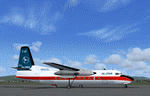
FS x Aloha Airlines 1950's AI Fokker F27 Flights. Flights programmed according to a schedule of 1953, but here assured by a Fokker F-27. File required avaiable
in the web site California Classic.By Jean-Jacques Parel
| Filename: | FS_x_Aloha_Airlines_1950s_AI_Fokker_F27_Flights.zip |
| License: | Freeware |
| Added: | 28th August 2017, 20:02:01 |
| Downloads: | 75 |
| Author: | Jean-Jacques Parel |
| Size: | 465.37 KB |
| Category: Prepar3D V5 - Aircraft Repaints, Textures and Modifications | |
| Leonardo Fly the Maddog X MD82 (ZipAir | G-ZIPD P3DV5) |
|
Images related to this file:
File Description:
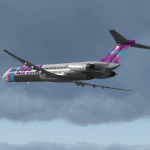
ZipAir Silver allows ZipAir Pilots to fly modern routes with classic aircraft. Why not substitute a Boeing 737 or A320 route for a more hands on experience with the outstanding Fly the Maddog X by Leonardo. Visit Zipair.uk to join us today. You must have a legal copy of the MaddogX installed.
| Filename: | Leonardo_Fly_the_Maddog_X_MD82_ZipAir__GZIPD_P3DV5.zip |
| License: | Freeware |
| Added: | 20th October 2020, 23:20:34 |
| Downloads: | 85 |
| Author: | Alex Letch |
| Size: | 42.39 MB |
| Category: Prepar3D V5 - Aircraft Repaints, Textures and Modifications | |
| PMDG 737-800 NGXu BW Transavia X Gol PH-GUA |
|
File Description:
This livery Transavia X Gol PH-GUA has been made for the PMDG 737 NGXu BW. To install it you just have to open the PMDG Operations Center, go to livery utilities, install from PTP file and select the file you just downloaded. This livery has been made by Air Bing, here are some links if you have any problem :
My YouTube channel : https://www.youtube.com/c/AirBing
Our Discord AeroHUB: https://discord.gg/sC228UkS8G .
My friend's Discord TropicalGroup (who helped me a lot) : https://discord.gg/SxsES899cT
My email if you have something to tell me : [email protected]
| Filename: | PMDG_737800_NGXu_BW_Transavia_X_Gol_PHGUA.zip |
| License: | Freeware |
| Added: | 17th April 2021, 18:49:27 |
| Downloads: | 569 |
| Author: | Air Bing |
| Size: | 119.75 MB |
| Category: Flight Simulator 2004 - Flight Plans | |
| IR644 Military Training Route Flight Plan for FSNav 4.x |
|
File Description:
FSNav flight plan of Military Training Route IR644, a low-level route in North Dakota. It is substantially the same as the Strategic Air Command's OB-24 West, Bismarck bomb plot.
| Filename: | IR644_Military_Training_Route_Flight_Plan_for_FSNa.zip |
| License: | Freeware |
| Added: | 24th February 2005, 05:01:22 |
| Downloads: | 354 |
| Author: | Mark P. Gutis |
| Size: | 171.2 KB |
| Category: Flight Simulator X - Utilities | |
| FSTramp v8.84 for MSFS, FSX(-SE), Prepart3D, X-Plane (Win) |
|
Images related to this file:
File Description:
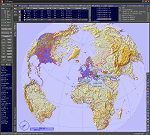
This add-on is an EXE application for Microsoft Flight Simulator and a DLL module for all other simulators. The DLL variant is activated via hotkeys or the simulator menu add-ons or plugins. Window size and layout are configurable for one or more screens. To avoid dazzling, the brightness of the entire application is customizable. Primarily it is a flight management system (FMS) with automatic control from start to landing. This also includes the observance of SID, STAR and Approaches in unmatched quality. The flight plan required for the FMS can be created manually or automatically, interactive changes and additions during the flight are possible. The basis of the flight planner is the 3D world map and the search function for airfields and navigation aids. The FMS by FSTramp relies on the autopilot of the aircraft. In case of incompatibility, the autopilot integrated in FSTramp will be used. This allows FSTramp to control almost all aircraft from airport to airport. The altitude profile of the flight plan, SID, STAR and approach is taken into account. This means that FSTramp extends the often incomplete airport procedures to and from the runway so that they can be flown completely automatically. During the fully automatic flight, the autopilot values ​​for HDG, ALT, VSPEED, SPD and MACH can be manually overridden. This is e.g. useful for being able to react to the instructions of the tower in the final approach without completely stopping the automatic flight. The rotating or north pointing 3D world map with numeric display of the terrain elevation under the mouse arrow is another special feature. It does not need an internet but is synthesized from included height profiles of the globe. The Data of continents, mountains and rivers are included in the setup. Airspaces, Airways, Waypoints and SID, STAR and Approaches are also included in the setup, but can be updated by installing additional AIRAC cycles. Airfields and navigation stations are taken from the simulator. NVIDIA: If the frame rate of the simulator drops sharply about 20 seconds after FSTramp's visibility, the power management of the GPU slows down prematurely. In the NVIDIA Control Panel, change the 'Manage 3D settings - Power management mode' option to 'Adaptive'.
| Filename: | FSTramp_v884_for_MSFS_FSXSE_Prepart3D_XPlane_Win.zip |
| License: | Shareware, time limited |
| Added: | 7th July 2023, 04:35:43 |
| Downloads: | 130 |
| Author: | Helge Schroeder |
| Size: | 358.21 MB |
| Category: Microsoft Flight Simulator (2020) - Utilities | |
| FSTramp v8.84 for MSFS, FSX(-SE), Prepart3D, X-Plane (Win) |
|
Images related to this file:
File Description:
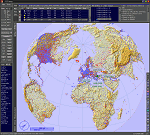
This add-on is an EXE application for Microsoft Flight Simulator and a DLL module for all other simulators. The DLL variant is activated via hotkeys or the simulator menu add-ons or plugins. Window size and layout are configurable for one or more screens. To avoid dazzling, the brightness of the entire application is customizable. Primarily it is a flight management system (FMS) with automatic control from start to landing. This also includes the observance of SID, STAR and Approaches in unmatched quality. The flight plan required for the FMS can be created manually or automatically, interactive changes and additions during the flight are possible. The basis of the flight planner is the 3D world map and the search function for airfields and navigation aids. The FMS by FSTramp relies on the autopilot of the aircraft. In case of incompatibility, the autopilot integrated in FSTramp will be used. This allows FSTramp to control almost all aircraft from airport to airport. The altitude profile of the flight plan, SID, STAR and approach is taken into account. This means that FSTramp extends the often incomplete airport procedures to and from the runway so that they can be flown completely automatically. During the fully automatic flight, the autopilot values ​​for HDG, ALT, VSPEED, SPD and MACH can be manually overridden. This is e.g. useful for being able to react to the instructions of the tower in the final approach without completely stopping the automatic flight. The rotating or north pointing 3D world map with numeric display of the terrain elevation under the mouse arrow is another special feature. It does not need an internet but is synthesized from included height profiles of the globe. The Data of continents, mountains and rivers are included in the setup. Airspaces, Airways, Waypoints and SID, STAR and Approaches are also included in the setup, but can be updated by installing additional AIRAC cycles. Airfields and navigation stations are taken from the simulator. NVIDIA: If the frame rate of the simulator drops sharply about 20 seconds after FSTramp's visibility, the power management of the GPU slows down prematurely. In the NVIDIA Control Panel, change the 'Manage 3D settings - Power management mode' option to 'Adaptive'.
| Filename: | FSTramp_v884_for_MSFS_FSXSE_Prepart3D_XPlane_Win.zip |
| License: | Shareware, time limited |
| Added: | 7th July 2023, 04:35:12 |
| Downloads: | 112 |
| Author: | Helge Schroeder |
| Size: | 358.21 MB |
| Category: Prepar3D V1-4 - Utilities | |
| FSTrampFree v7.26 for Prepart3D, FSX(-SE), X-Plane 11 (Win) |
|
Images related to this file:
File Description:
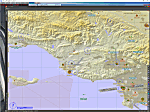
The FSTrampFree addon is a decoupling from the commercial product FSTramp. It shows a 3D world map and the real time moving AI or online aircraft. Due to the integration in the simulator, the map can also be used very well with just one display. Via the context menu of the world map, the aircraft can be moved to any runways or gates. With pressed Ctrl key even to every point on the ground or on the water. During the flight, jumps to other points in the air or on the ground are possible. The AIRAC data can be updated via an additional purchase from Navigraph.
| Filename: | FSTrampFree_v726_for_Prepart3D_FSXSE_XPlane_11_Win.zip |
| License: | Freeware |
| Added: | 27th June 2019, 04:11:25 |
| Downloads: | 1,972 |
| Author: | Helge Schroeder |
| Size: | 347.67 MB |
| Category: Prepar3D V1-4 - Aircraft Repaints, Textures and Modifications | |
| Leonardo Fly the Maddog X MD82 (ZipAir | G-ZIPD P3DV4) |
|
Images related to this file:
File Description:
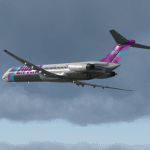
ZipAir Silver allows ZipAir Pilots to fly modern routes with classic aircraft. Why not substitute a Boeing 737 or A320 route for a more hands on experience with the outstanding Fly the Maddog X by Leonardo. Visit Zipair.uk to join us today. You must have a legal copy of the MaddogX installed.
| Filename: | Leonardo_Fly_the_Maddog_X_MD82_ZipAir__GZIPD_P3DV4.zip |
| License: | Freeware |
| Added: | 20th October 2020, 23:20:59 |
| Downloads: | 152 |
| Author: | Alex LetchMD82-ZIP-GZIPD |
| Size: | 42.39 MB |
| Category: X-Plane - Scenery | |
| WX15 Susi Air Apowo Airstrip v1.0.0 |
|
Images related to this file:
File Description:

This is an X-Plane 11 scenery for Apowo Airstrip (WX15) in Apowo, Papua, Indonesia.
It is said to be home to the world shortest commercial flight, between Kegata Airstrip (WZ38) and Apowo Airstrip (WX15), duration of 1min and 15sec from take off to landing, and operated by Susi Air. This is one of the destinations for "PT ASI Pujiastuti Aviation", operating as Susi Air, an Indonesia airlines established in late 2004 by Mrs. Susi Pudjiastuti. This scenery was tested and is operational (as of January 07, 2017) in "X-Plane 11 Public Beta #5 64 bit", Windows 10 Home. It was also tested but is NOT operational (as of January 07, 2017) in "X-Plane 10.51 64 bit", Windows 10 Home (terrain mesh issues + exclusion areas from XP11 do not work in XP10 = scenery with quite bad mesh). Sorry, XP11 only.
| Filename: | WX15_Susi_Air_Apowo_Airstrip_v100.zip |
| License: | Freeware |
| Added: | 8th January 2017, 23:37:40 |
| Downloads: | 59 |
| Author: | Rui Mesquita |
| Size: | 1.95 MB |
| Category: X-Plane - Scenery | |
| WXAR Susi Air Armopa Road Airstrip v1.0.0 |
|
Images related to this file:
File Description:

This is an X-Plane 11 scenery for Armopa Road Airstrip (WXAR) in the Armopa, Papua, Indonesia. This is a fictitious airfield, located in an active road. This fictitious airfield may serve as a road challenge while flying the airstrips in Papua, as one of the destinations for "PT ASI Pujiastuti Aviation", operating as Susi Air, an Indonesia airlines established in late 2004 by Mrs. Susi Pudjiastuti. This scenery was tested and is operational (as of January 19, 2017) in "X-Plane 11 Public Beta #6 64 bit", Windows 10 Home. It was also tested and is partially operational (as of January 19, 2017) in "X-Plane 10.51 64 bit", Windows 10 Home. The issue with XP10 is the mesh again: there is no road in XP10, and no traffic, while the road and the traffic is there in XP11.
| Filename: | WXAR_Susi_Air_Armopa_Road_Airstrip_v100.zip |
| License: | Freeware |
| Added: | 20th January 2017, 07:11:16 |
| Downloads: | 53 |
| Author: | Rui Mesquita |
| Size: | 2.06 MB |


© 2001-2026 AVSIM Online
All Rights Reserved
Privacy Policy |