
Where Flight Simulation Enthusiasts Gather from Around the World!
AVSIM Library - Search Results

| Category: Flight Simulator 2004 - Scenery | |
| FWKI-Kamuzu International Airport V1 |

|
Images related to this file:
File Description:
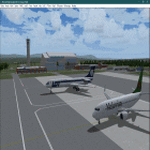
Hello FS9 sim fans who love flying in Africa, In my quest to bring you more African airports, I bring you Kamuzu International Airport (IATA: LLW, ICAO: FWKI). This is the International airport of the Republic of Malawi. Scenery was built using Sketchup, ADE,AFLT, SbuilderFs9, Tropical trees API by Bill Melichar. Needs RWY12 object library for airport objects to show up. You can get RWY12 object library in AVSIM/Flightsim.
ICAO has been changed from FWLI to FWKI, so you might need to update your AI plans and direct the planes to go to FWKI
| Filename: | FWKIKamuzu_International_Airport_V1.zip |
| License: | Freeware |
| Added: | 26th January 2025, 23:53:11 |
| Downloads: | 148 |
| Author: | Emmanuel Mwandosya |
| Size: | 10.31 MB |
| Category: Flight Simulator 2004 - Scenery | |
| Shark bay (YSHK) - Western Australia |
|
File Description:
Shark Bay (YSHK) is situated on the west coast of Western Australia just S.W. of Carnarvon. The strip is 3.5nm N.E. of Denham. It can be a very dusty place during high winds. Shark Bay has a very country, outback feel about it.
This scenery was created with Rwy12 Object Placer. The Rwy12 Static Object Library is required for the scenery appear correctly and is avail on Avsim.
| Filename: | Shark_bay_YSHK___Western_Australia.zip |
| License: | Freeware |
| Added: | 8th October 2005, 15:06:20 |
| Downloads: | 1,054 |
| Author: | Derek Froud |
| Size: | 1.61 MB |
| Category: Flight Simulator 2004 - Scenery | |
| Ceduna (YCDU) - South Australia |
|
File Description:
Ceduna (YCDU) - South Australia.
In this version of Ceduna, runway 17/35 is closed due works in progress resurfacing. Operations are restricted to runway 11/29 and taxyways 'A' and 'B'.
Rwy12 Static Object Library must be installed in FS9. See readme.
| Filename: | Ceduna_YCDU__South_Australia.zip |
| License: | Freeware |
| Added: | 19th October 2005, 05:48:47 |
| Downloads: | 751 |
| Author: | Derek Froud |
| Size: | 146.03 KB |
| Category: Flight Simulator 2004 - Scenery Design | |
| EZ-Skylaunch 2 FS9 scenery object |
|
File Description:
A winch for launching your sailplanes. Based on photos from the Skylaunch brochure. This is a standard FS9 object library and can be used with EZ-Scenery or any other program that allows you to place such objects in your FS9 scenery.
| Filename: | EZSkylaunch_2_FS9_scenery_object.zip |
| License: | Freeware |
| Added: | 7th August 2006, 19:54:36 |
| Downloads: | 1,560 |
| Author: | Sidney Schwartz |
| Size: | 169.01 KB |
| Category: Flight Simulator X - Scenery | |
| Hungarian VFR Airports - vol 2 |
|
File Description:
This pack is contains 3 small grass airports of Hungary:
- LHNK - Nagykanizsa (Only VFR flight allowed)
- LHTP - Taploca (Only day VFR flight allowed)
- LHZK - Zalakaros (Only day VFR flight allowed)
The Scenerey uses the default FSX object library.
| Filename: | Hungarian_VFR_Airports__vol_2.zip |
| License: | Freeware |
| Added: | 25th November 2012, 20:57:46 |
| Downloads: | 1,628 |
| Author: | Zoltan Meszaros |
| Size: | 2.81 MB |
| Category: Flight Simulator 2004 - Utilities | |
| FlightSim Manager 2.7.2 |
|
File Description:
Compatible with both FS2002 and FS2004
FlightSim Manager is a great tool for managing add-ons to Microsoft Flight Simulator. Using easy to Wizard - FSM can install various addins from distribution ZIP files that you may have downloaded, with easy uninstaller. FSM has lots of feature to offer, from an easy to use Aircraft editor to add/edit aircraft variants, to an comprehensive Hangar management that allows you to manage and configure your add-ons off your live FS installation. You can create Virtual Fleets, and enable/disable the complete fleet with ease. For serious pilots, there is also a complete Logbook.
If you have access to networked PCs, you can use FSM Lan View feature to create virtual cockpits with as many different views as you like. FSM also make it very easy to control Flight Simulator with speech commands, with additional support for auto-saving flight, warning system, and your own custom event sounds.
Using a powerful Editor, you can now edit your AI Flight Plans - plans can be saved as sets, which then in turn can be enabled in Flight Simulator. With FSM, you can create Texture Sets ( your own custom texture installer ) - capture screenshots, complete Benchmark with log, launching Flight Simulator with Random Screens, and fly from anywhere in the world using an map view.
Finally with a comprehensive Diagnostic Tools and Repository feature, FSM keeps your FS installation clean. Apart from the usual Missing and unused gauges, FSM can also locate Aircraft problems, Missing and unused effects, and Scenery Problems with a LandClass File relocate feature - say bye-bye to all the memory leaks.
There are still a lot more features that you will need to discover by yourself.
You can find the latest version from: http://www.ranainside.com/
| Filename: | FlightSim_Manager_272.zip |
| License: | Freeware |
| Added: | 18th December 2004, 21:56:49 |
| Downloads: | 20,537 |
| Author: | Rana Hossain |
| Size: | 5.45 MB |
| Category: Flight Simulator 2004 - Utilities | |
| FlightSim Manager 2.7.0 |
|
File Description:
FlightSim Manager 2.7.0
Compatible with both FS2002 and FS2004. FlightSim Manager is a great tool for managing add-ons to Microsoft Flight Simulator. Using easy to Wizard - FSM can install various addins from distribution ZIP files you may have downloaded, with uninstallation when applicable. From an easy to use Aircraft editor to add/edit aircraft variants, to an comprehensive Hangar management that allows you to manage and configure your add-ons off your live FS installation
You can now create Virtual Fleets, and enable/disable the complete fleet with ease. For serious pilots, FSM also offers a complete Logbook.
Lan View feature allows you to create virtual cockpits with multiple monitor support, using networked PCs.
You can also control Flight Simulator with speech commands using FSM. It also supports auto-saving flight, warning sytem, and custom event sounds.
Using a powerful Editor, you can now edit your AI Flight Plans - plans can be saved as sets, which then in turn can be enabled in Flight Simulator.
With FSM, you can create Texture Sets - i.e.. different Tree Sets, and you can install any set with a single click, capture screenshots from Flight Simulator, Benchmark with log, launch it with Random Splash Screens, and fly from anywhere in the world using an map view.
Finally with a comprehensive Diagnostic Tools and Repository feature, FSM keeps your FS installation clean. Apart from the usual Missing and unused gauges, FSM can also locate Aircraft problems, Missing and unused effects, Scenery Problems with a LandClass File relocate feature - say bye-bye to all the memory leaks.
You can find the latest version from: http://www.ranainside.com/
| Filename: | FlightSim_Manager_270.zip |
| License: | End User License Agreement |
| Added: | 10th December 2004, 14:05:30 |
| Downloads: | 7,055 |
| Author: | Rana Hossain |
| Size: | 5.41 MB |
| Category: Flight Simulator 2004 - Utilities | |
| FlightSim Manager v2.8 |
|
File Description:
FlightSim Manager 2.8
Compatible with both FS2002 and FS2004
FSM is a great tool for managing add-ons to Microsoft Flight Simulator. From a Install Wizard, hangar option, aircraft editor, to complete diagnostic - this manager does it all. FSM can also run FS over networked PCs with many other features.
| Filename: | FlightSim_Manager_v28.zip |
| License: | Check within download |
| Added: | 29th March 2005, 18:16:22 |
| Downloads: | 55,384 |
| Author: | Rana Hossain |
| Size: | 5.7 MB |
| Category: Flight Simulator 2004 - Utilities | |
| FlightSim Manager 2.4.0 |
|
File Description:
Compatible with both FS2002 and FS2004
Please ensure you are downloading the very latest version by doing a search on my name first.
FlightSim Manager is a great tool for managing add-ons to Microsoft Flight Simulator. Using easy to Wizard - FSM can install aircraft, panels, textures and scenery directly from distribution ZIP files you may have downloaded, with proper uninstallation of add-ons. From an easy to use Aircraft editor to add or remove aircraft variants, to an comprehensive Hangar management allows you to manage and configure your add-ons off your live FS installation.
Using FSM, you can create Texture Sets - i.e.. different Tree Sets, and you can install the texture with a single click, capture screenshots from Flight Simulator, and launch it with random Splash Screens, and fly from anywhere in the world using an map view.
You can also control Flight Simulator with speech commands using FSM. Other features include Benchmark Flight Simulator, Repository support and set of diagnostics tools.
Version 2.4 also enhaces the Pilot-mode, with auto-saving flight, warning sytem, and voice recognition.
Installation -
Please use the setup.exe file. If you wish to uninstall the software, you can do so from Control Panel - Uninstall software.
You can find the latest version from -
http://www.ranainside.com/
To request any new feature, or to submit bugs, please visit our forum at
http://softwares.ranainside.com/
| Filename: | FlightSim_Manager_240.zip |
| License: | Freeware |
| Added: | 4th August 2004, 20:55:28 |
| Downloads: | 2,978 |
| Author: | Rana Hossain |
| Size: | 3.77 MB |
| Category: Miscellaneous Files - Demos from Commercial Vendors | |
| Space Station Manager |
|
File Description:
Realize your dream of building a space station with this relaxing game. Enabled with an intuitive interface you will be building your dream station withing minutes. Let your creativity flow and apply you problem solving skills to master higher levels of station building lore. If you feel like taking a break you can just sit back and watch the earth flow slowly below.
| Filename: | Space_Station_Manager.zip |
| License: | Commercial demo |
| Added: | 14th November 2003, 00:02:09 |
| Downloads: | 261 |
| Author: | Mistaril |
| Size: | 4.3 MB |


© 2001-2026 AVSIM Online
All Rights Reserved
Privacy Policy |