
Where Flight Simulation Enthusiasts Gather from Around the World!
AVSIM Library - Search Results

| Category: Flight Simulator 2004 - Aircraft Repaints, Textures and Modifications | |
| Piaggio P-166 All Versions New Flight Dynamics + HTML Handbook Reference |

|
File Description:
Thanks to Andrew Spring of www.p166.com!!
This is a massive update for the Piaggio P-166 Series aircraft. This Package contains a whole update for ALL the models,(P-166A\M\S\BL2\CL2\DL3\DL3-SEM\DP1) and a pilot handbook in html format. You can read it in the full large version or in the reduced size version re-adapted for the electronic FS2004 kneeeboard as "Reference". All aircraft refer to the same file, so after the introdution to the P-166 and her main characteristics, individual links to the single P-166 versions are included (only "Kneeboard" version). The main improvements in the FDEs are a nice stability making the plane just fly strigght-and-leveled easily, re-calibrated flap and fuselage drags, wich makes for better max speed and landing characteristics. Also flaps and landing gear pitch moments are lots reduced. Now the plane respects the Specs of the real thing completly, even matching the changes from version to version!! in newer versions, engine power output has been recalculated, as well as new payloads and fuel capacities: you can litterally load the passangers and baggage you wish...but don't try to exaggerate, going overweight is not that complex...for instance, try placing a 9999 pounds copilot and guess what happens...
Happy Flights!!
| Filename: | Piaggio_P166_All_Versions_New_Flight_Dynamics__HTM.zip |
| License: | Freeware |
| Added: | 5th August 2004, 16:57:33 |
| Downloads: | 1,725 |
| Author: | Mario Noriega |
| Size: | 3.14 MB |
| Category: Flight Simulator X - Original Aircraft | |
| Piaggio P-180 v2.0 |
|
File Description:
www.mariopilot.6x.to
What's new in version 2.0:
1) gMAX re-formatted model: FS-X compatibility, and new animations.
2) Completely new Avionics 100% XML formatted
3) new ultra-fine tuned flight dynamics
4) Hi-res virtual cockpit with 3-D throttles and 3-D virtual cabin.
5) Lots more...
Thanks to Andrew Spring of www.p166.com!! The Piaggio P-180 Avanti is a Luxury Jetprop. Its design is the result of a "thinking outside the box" project philosophy. It means that building techniques are standard while aerodynamics are unique for it's kind. It features a three lifting surface design, laminar flow wing and twin pusher turboprop configuration. Passenger comfort features the possiiblity of standing in feet inside the plane, low noise due to pusher propellers and "Pininfarina" designed arrangement. Performances are unique too, cruising at 395 KTAS (260 KIAS) at 28000 ft, a jet-like speed, being the P-180 a twin turboprop. The result is a 40% reduced operational cost respect to a jet of similar size, and 30% less respect to a similar size turboprop, all at same price of a small Jet. This model is 804 Kbs with c.a. 19000 polygons in c.a.170 assemblies. Features Clickable Dynamic Photortreal VC with Night Lighting, night lighted internals, Photoreal 2D Cockpit, Engine start Effect, advanced FDE, Customizable Payloads. **READ NOTES BEFORE FLYING**(README.TXT, P180_REF.HTM AND P180_CHECK.HTM, also available as reference and checklist in FS kneeboard...) WORKS IN FS9
| Filename: | Piaggio_P180_v20.zip |
| License: | Freeware |
| Added: | 21st February 2007, 15:27:11 |
| Downloads: | 31,068 |
| Author: | Mario Noriega |
| Size: | 21.43 MB |
| Category: Flight Simulator 2004 - Original Aircraft | |
| Piaggio P-166 Collection |
|
Images related to this file:
File Description:
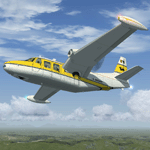
This package contains an updated re-release of all my original Piaggio P-166 models developed for FS-2002/2004. All versions are included in a single package: P-166A, P-166BL-2, P-166CL-2, P-166M, P-166S, P-166DL-3 and P-166DP-1. The 3D models are the same, so these are fairly simple models. Yet they come with a VC (no 2D panel this time!). With respect to the original releases, they come with very much improved panels, in two flavors: Piston and Turboprop. Gauges developed by Milton Shupe & Scott Thomas for the Aero Commander / Turbo Commander Aircraft series, and Edgar Guinart López of Aeroproyecto for the Embraer 110. Other Gauges from my own Piaggio P-180 & PD-808. Also Included is a brand-new flight model redeveloped from scratch. Please refer to the Reference and Checklist pages provided via the FS Kneeboard for flying and operating instructions.
The Piaggio P-166 is a light small twin. An Exotic twin-engine prop that sold all over the world including America, UK, and Australia. Its origin is traced Back to the Piaggio P-136, a light amphibian, which the P-166 keeps the wings, the engines and the tail planes. The first P-166A flew in November 1957. The aircraft was still in production in the early 21st century in an improved turboprop version, the P-166DP-1.
| Filename: | Piaggio_P166_Collection.zip |
| License: | Freeware |
| Added: | 2nd April 2020, 17:50:35 |
| Downloads: | 518 |
| Author: | Mario Noriega |
| Size: | 40.89 MB |
| Category: Flight Simulator X - Original Aircraft | |
| Piaggio P-166 Collection |
|
Images related to this file:
File Description:
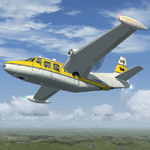
This package contains a FS-X native conversion of all my original Piaggio P-166 models developed for FS-2002/2004. All versions are included: P-166A, P-166BL-2, P-166CL-2, P-166M, P-166S, P-166DL-3 and P-166DP-1. The 3D models are virtually the same, so these are fairly simple models. Yet they come with a VC (no 2D panel this time!). With respect to the FS-2002/2004 releases, they come with very much improved panels, in two flavors: Piston and Turboprop. Gauges developed by Milton Shupe & Scott Thomas for the Aero Commander / Turbo Commander Aircraft series, and Edgar Guinart López of Aeroproyecto for the Embraer 110. Other Gauges from my own Piaggio P-180 & PD-808. Also Included is a brand-new flight model redeveloped from scratch. The 3D models are mildly improved, with a proper pilot figure, main panel backlighting and bump-mapping. Please refer to the Reference and Checklist pages provided via the FS Kneeboard for flying and operating instructions. Models converted with Arno Gerretsen’s Model Converter X.
The Piaggio P-166 is a light small twin. An Exotic twin-engine prop that sold all over the world including America, UK, and Australia. Its origin is traced Back to the Piaggio P-136, a light amphibian, which the P-166 keeps the wings, the engines and the tail planes. The first P-166A flew in November 1957. The aircraft was still in production in the early 21st century in an improved turboprop version, the P-166DP-1.
| Filename: | Piaggio_P166_Collection.zip |
| License: | Freeware |
| Added: | 2nd April 2020, 17:49:58 |
| Downloads: | 703 |
| Author: | Mario Noriega |
| Size: | 56.4 MB |
| Category: Flight Simulator 2004 - Original Aircraft | |
| Nick's Space Shuttle Landing Challenge FINAL RELEASE |
|
File Description:
Featuring the Space Shuttle Discovery and celebrating NASA's return to space!
This package contains the most up to date version of my Space Shuttle Landing Challenge (v1.2). I am providing it as a FINAL single installation package to eliminate the need for multiple update files. This package includes the Space Shuttle Discovery redesigned using actual NASA-Boeing mechanical/aeronautical engineering data, a panel, sounds and shuttle landing FX. The space shuttle in the sim (like the real shuttle) has the ability to water 'ditch' and belly land in an emergency or if improperly landed on the suspension system. You can select the sensitivity of the main landing gear struts (less crashes) for those who are novice to flying critical tolerances. This package includes a CHALLENGE FLIGHT ADVENTURE PACKAGE and features a reference list of the flights along with approach/landing procedure tips to the kneeboard (F-10) for you to refer to while in flight. The adventure pack will provide a set of 11 challenge flights spanning the globe for the space shuttle re-entry simulation. A Bonus PACK of CrashBar effects including smoke, fire, explosions and other nasty reminders of landing mistakes is included as an optional installation. The original .mdl file is by Matthew Moxon and a modified for FS9 panel byTom Kellner. Model repaint, flight dynamics, air file, sound.cfg, adventure flights and shuttle landing\crash FX by Nick Needham. Includes NASA's description of the entire landing process which you can now experience in Flight Simulator! This package includes an install for FS2002 as well and supersedes all other update packages.
ENJOY! Nick Needham, [email protected]
| Filename: | Nicks_Space_Shuttle_Landing_Challenge_FINAL_RELEAS.zip |
| License: | Freeware, limited distribution |
| Added: | 26th August 2005, 22:25:23 |
| Downloads: | 43,523 |
| Author: | Nick Needham |
| Size: | 27 MB |
| Category: Flight Simulator 2004 - Aircraft Repaints, Textures and Modifications | |
| NHL "Chicago Blackhawks" Beechcraft Twin Bonanza" |
|
File Description:
Simmers,and Hockey fans,
This aircraft includes my Twin Bonanza Panel_ V3, and for you FSX users it also includes "Camera Definitions" so ***BE SURE YOU COPY aircraft.cfg file to your main Twinstar_ Twin_ Bonanza folder.NOTE!(Camera Definitions will have no effect in FS9)***These 1951 D Model Beechcraft Twin Bonanzas are pristine,no dirt,grease or oil leaks on these babies!Just fresh out of the paint booth, these are the 27th repaint of my in progress NHL collection.All repaints are of "Eric Dantes" Beechcraft Twin Bonanza. All NHL teams will be represented.These repaints are not layered so each one has to be redrawn in its offical colors.All repaints will have two liveries,one with team logos and one without logos.All NHL team names were put in two hats, Eastern Conference and Western Conference, they are drawn one from each hat at random.The next repaint will be the Washington Capitals .(Look for it soon. :)I hope you have as much fun collecting all 30 liveries as I will have painting them!
This file includes the texture.Blackhawks"(The Chicago Blackhawks Edition)",texture.NHL Chicago,
"(The NHL Chicago Edition....NOLOGOS)",panel.Blackhawks and the panel.NHL Chicago folders and the aircraft.cfg file.It also includes two files to correct the kneeboard,they are the beech_baron_58_check.htm and the beech_baron_58_ref.htm,just copy these two files to your main Twinstar_ Twin_ Bonanza folder.
The following additional file is required.--------------twinstar__twin__bonanza.zip--------------
This file can be downloaded @ http://www.avsim.com/
Go to the file library and just use the Quick Search: type: Chris Tuinstra and you should see the twinstar__twin__bonanza.zip,along with my other NHL and NFL repaints.Again I thank each of you for your downloads.
This file includes a complete matching interior for both liveries".
| Filename: | NHL_Chicago_Blackhawks_Beechcraft_Twin_Bonanza.zip |
| License: | Freeware |
| Added: | 15th June 2008, 14:52:59 |
| Downloads: | 246 |
| Author: | Chris Tuinstra |
| Size: | 6.75 MB |
| Category: Microsoft Flight Simulator (2020) - Utilities | |
| Flightplan Visualizer 1.22 |
|
Images related to this file:
File Description:
Flightplan Visualizer (FV) version 1.22. Copyright 2018-2022 by Pelle F. S. Liljendal ([email protected]), all rights reserved.
FV comes with 1599 pre-imported AI flightplans (of which +726 are BizJet flightplans, the rest are commercial, government and military). However you are able to import additional (AI) flightplans yourself. Once imported these (AI) flightplans can be visualized on a map-view, and the user will be able to search accross all these. Hence you can use the program as inspiration as to which routes to fly. E.g. you can search across all imported flightplans to find all flights in an A321 flying into/out from LDDU, or simply to look for all flights in a Boeing 747-8F.
Simply run the included installer to install the software. The program will be installed into "C:\Program Files (x86)\Flightplan Visualizer" and all datafiles will be installed into: "C:\Users\[UserName]\AppData\Roaming\FlightplanVisualizer". The program comes with a full manual explaining everything, and a 3 page quick manual to get you started. The first 3 times you run the program the quick manual will automatically open. The forum is hosted here: https://forum.aerosoft.com/index.php?/forum/919-flightplan-visualizer/
Version 1.22 Contains the following changes:
- I had initially added a feature to download AIG airline-logos, however a later change in AIG's server setup rendered this feature useless. In stead you can now specify the local folder holding AIG's airline logo's (if/when you are using AIG AIM on your computer for AI-traffic). If specified, airline-logo's will be obtained from this folder.
- On the same note, I had to remove the menu-item to download AIG flightplans, as this program no longer have directly access to the AIG servers. For the same reason the menu-item to access the index with flightplans (up to summer 2021) was re-enabled.
- In the past when opening the Airport-Info form it defaulted to show in-/out-going traffic for the selected flightplan or active leg-search only. Now there is a new setting where you can set it up to in stead default to showing all traffic in/out of the airport (the Airport-info form still contains a combobox where you maually can choose what to see).
- "Owned aircraft" was renamed into "Simulator-aircraft", as these are the (flyable) aircraft you have available within your simulator of choise.
- When choosing to use calculated flight-times in a leg-search, you can now specify a percentage-difference (between leg-time and calculated-time). Only when the difference between leg-time and calculated-time exceeds this specified value will the calculated time be used during leg-search (e.g. "only use calc-times if diff. exceeds 50%, otherwise use leg-times").
- Began using (aircraft) short-names many places where the program in the past used IATA/ICAO-code (e.g. when hovering the mouse over a route, or list of aircraft servicing specific airports when editing flightplans). Also added short-name columns to aircraft browser and when choosing favorites (these stil contains columns for IATA/ICAO-codes).
- Pressing the "Usage" button when editing/viewing an aircraft-type or right-clicking an aircraft-type in the browser and choosing "View usage-report..." from the context menu, you will be shown a report that inform you how that aircraft-type is used: which simulator-aircraft are based on that type, which owned aircraft that have been marked as substitute for that type, which airlines are using that type (as carrier/operator), and finally in which (active) flightplans that type is used.
- Items in airline-browser are now by default sorted by (airline) name, and the usage-column shows the size of the airline if its in use. If available a logo for the selected airline is displayed in the upper/right corner.
- Improved performance when searching for ICAO-codes in the airport-browser. Also improved priority of the default selected item, in cases when an airport had a 3 letter ICAO-code, and another was using the same 3 leters for its IATA code.
- When searching for ICAO/IATA-codes in the airline-browser, it will now prioritize non-defunct airlines, if multiple airlines share the same ICAO/IATA-code.
- When enabling/disabling flightplans, you can now select all BizJet flightplans (those prefixed with "Bz_"), all Military (prefixed with "Ml_") or all Goverment (prefixed with "Gv_").
- Individual FP sub-folders can now be setup to leave (not move) defunct- and/or obsolete FP, even if the settings to automatic move these to the disabled folder is set.
- Performing "Search legs" you can now filter on aircrafts you are allowed to fly via type-ratings ("Must be type-rated").
- Performing a substitute of a user-airline, that airline will remain selected (previously the list scrolled to the top, and selected the 1st item).
- Added new check-box to "Search legs" that can exclude round-trips (legs taking-off and landing at same airport).
- Airline/Aircraft-repaint -filter can now filter on size of airline (e.g. "size=major"). Size is determined from usage as carrier/operator in active flightplans. Airlines not in use by active flightplans are listed with a size of "unknown").
- Added GPS-conversion (deg deg,min,sec) to the conversion-form, as requested by a colleague. You can either manually enter lat/lon or look-up an airport to get it. There is both a primary lat/lon and a secondary, and the form will show the (GC)distance between these and the initial/final course.
- Added new "Max airport-distance" for airport-redirections. At the same time added new feature when importing/editing airports to permanent change an airport. If used, it is not saved/handled as a redirection (can't be restored) but rather as a perpament change.
- Reordered- and renamed some of the tab-pages in the Airport-info form.
- Reordered the length/distance-fields in the unit-conversion form.
- The Wind-calculator have been removed from the main-menu, in stead wind-calcuations can now be performed using the unit-conversion form. Also now the speed of the wind is always displayed as a positive value, and in stead the label will either say "Head-wind" or "Tail-wind".
- Added new "Country list" menu-item in the misc-menu. Will list all countries twice (sorted by names, and sorted by ISO3-codes).
- Showing airport-marker tool-tips on the main-map is now prioritized over showing route tool-tips.
- Added "Min take-off fuel ("MTFL") field to user-aircraft weight-fields. As of now its not set for any aircraft in the database, however it can be estimated as 60 minutes of flight at cruise.
- Moved several group-boxes of the settings-form to the 2nd tab-page, and added new fields for defalt simulator/logging-environment based on the File-prefix used when starting the program.
- Also now the header-names that was previous fixed to "Rank" and "Traffic-density" can be changed, so the selectable 6 values can be used for something entirely different, if anyone have the need for this. If/when changed, these new names are shown when editing an airport, or when performing a leg-search (as the leg-search can filter on these fields).
- MakeRunways (MkRwy) by Pete Dowson is challenged handling unicode in the scenery it scans/writes to XML. E.g. the Icelandic airport (BIFL) "Flúðir Airport" is exported by MkRwy as "Flúðir Airport". In this version FV will try to identify when this happens, and then it will fall back using the airport/city-names from the databases bundled with FV. This is not a perfect solution, but at least it improves the result.
- Various minor changes and tweaks to multiple forms (e.g. Unit conversion form can now be closed with ESC, renamed log-archives and so on).
- Fixed: If the main-form had an active flightplan filter when using the search-legs feature the flightplan combo-box still only contained the filtered context. Pressing the Clear button did not resolve the issue.
- Fixed: Since adding support for the AIGFP file-format, there could be flights departing from- and arriving at the same airport (e.g. helicopter flights). In previous versions the calculated flights-time would only consist of taxi-out/in times. In this version the flightplan leg-time will now also be uses for the calculated time, when the same airport is used both for departure and destination.
- Fixed: In some cases re-processing flightplans (resetting and performing redirection) could corrupt the flightplans and remove airport-data from the flightplans. This version will also try to add any missing airport-data to flightplans when re-processing them.
- Fixed: Selecting "only show favorites" in the Search aircraft-type form would filter out all aircraft (including those marked as favories).
- Fixed: In the leg-info form the fields to show times (Out, Off, On, In) were too narrow for multi-week flights, when showing the week-number (e.g. "TH7/14:37").
- Fixed: Issues when estimating cruise/taxi fuel-burn for user-aircraft, where in some cases some fields were not saved, and wrong calcuation if setup to show weight in Kg.
- Fixed: In some cases wrong TimeZone was used when calculating local time for OUT, OFF, ON, IN-times.
- Data: The airport redirection file ("UserAirportRedirect.xml") in the UserData folder have been updated to match the latest MSFS world update. However this new file is only installed by the installer if it does not already exists (in case you made your own changes), hence you need to delete this file manually prior to running the version 1.22 installer.
- Data: Quite a few airports in the airport-database were updated (had wrong names due to issues with unicode-letters). Also some additional airports were added.
- Data: The installer comes bundled with +300 airline-logos (optional install), and a separat package of +1400 airline-logos are avilable for download from AVSIM (in both cases these are encoded into a propriotary format using the ".CAL" extension).
- Data: Added the P2F (Passenger-to-Freighter) versions of the Airbus A320, A321 and A330. Also added the package freighter versions of CRJ100 and CRJ200.
- Data: Improved detection of Boeing 737-700/800 BCF/BDSF when importing flightplans utilizing these (passenger aircraft converted into freighters). Also improved a few other freighter detections.
- Data: Changed a few (aircraft) short-names to either shorten them a bit, or make them "more readable".
- Flightplans: All new/updated flightplans have been added to the installer, and all obsolete/defunct have been marked/removed. A total of 1599 active flightplans are bundled with the installer.
| Filename: | Flightplan_Visualizer_122.zip |
| License: | Freeware, limited distribution |
| Added: | 18th October 2022, 23:31:28 |
| Downloads: | 398 |
| Author: | Pelle Liljendal |
| Size: | 45.57 MB |
| Category: Prepar3D V1-4 - Utilities | |
| Flightplan Visualizer 1.10 |
|
Images related to this file:
File Description:
Flightplan Visualizer (FV) version 1.10.0. Copyright 2018-2019 by Pelle F. S. Liljendal ([email protected]), all rights reserved.
FV comes with 300 Commercial-, and +380 BizJet AI pre-imported flightplans which the creators of those flightplans have gracefully allowed me to include with the installer, however you are able to import additional (AI) flightplans if you want to. Once imported these (AI) flightplans can be visualized on a map-view, and the user will be able to search accross all these. Hence you can use the program as inspiration as to which routes to fly. E.g. you can search across all imported flightplans to find all flights in an A321 flying into/out from LDDU, or simply to look for all flights in a Boeing 747-8F.
Simply run the included installer to install the software. The program will be installed into "C:\Program Files (x86)\Flightplan Visualizer" and all datafiles will be installed into: "C:\Users\[UserName]\AppData\Roaming\FlightplanVisualizer". The program comes with a full manual explaining everything, and a 3 page quick manual to get you started. The first 3 times you run the program the quick manual will automatically open. The forum is hosted here: https://forum.aerosoft.com/index.php?/forum/919-flightplan-visualizer/
Version 1.10 Contains the following changes: In the flightplan combo-box at the bottom of the main-form, "Active Search" have been renamed into "Last Search". Picking "Last Search" from the flightplan combo-box, will re-execute the last performed search, and populate the map accordingly. A new entry called "None", have been added flightplan combo-box (at the top of the list). Chosing this item will "deselect" the otherwise current search or selected flightplan, and clear the map of routes. A form have been added to assist enabling/disabling flightplans. Gate-letters/numbers are now by default written using a (5x7) Matrix-"font". If you want to revert to the segment-"font", used in previous versions, simply set the value of the "UseMatrixGateChars" tag in the settings-file to false. changed how the Gate-letters/numbers are written in the round gate-markers on the map. Previously all "chars" had the same width. Now the width is dependant on which sub-elements are in use by each "char" (e.g. a "1" is not as wide as an "8"), as a result the gate letter/number are more easy to read. Zulu- and local-time added to the "Selected airport" group-box in the upper/right corner of the main form. If no airport is selected, or no time-zone is registred for the selected airport, only zulu-time will be displayed. Selections of favorite aircraft can now be saved and loaded.⦠This selection of aircraft can be loaded as a selection of aircraft in the "Search leg" form. Video tutorials can now be accessed from the "Help" menu. These are simply "links" to the actual videos on YouTube, hence will launch the default browser. If you hold SHIFT the url will in stead be copied to the clipboard (e.g. in case you want to upen the link in another browser). In the same manner the "Help" menu now contains a link to the forum. The form with decoded METAR/TAF-messages now shows: name, city, and country/state for the selected station in the caption. This text will also be embedded when copying the content to the clipboard. Likewise UTC/Local-time is also embedded when copying the content to the clipboard as it can be used to show the "age" of the report and convert between UTC and Local -times (based on the difference of UTC- and local-time). The info presented when pressing the "Show Scenery Gates" button on the Airport Info form, can now be copied to the clipboard. Various minor "behind the scenes" changes and optimizations. Added support for additional aircraft: Airbus A220-100 (CS100), Airbus A220-300 (CS300), Boeing 777-8 and Boeing 777-9. Listviews containing both (aircraft) IATA and ICAO-codes now all list them in the following order: IATA, ICAO (both individual sortable). Hovering the mouse over gate-markers the hint window will no show the radius both in meters and feet. Editing gate-info you will now see more info for the gate being edited: Type, Size (meters and feet) and if applicable: airlines. Fixed: Minor bug in relation to how the airport size was calculated. Fixed: IATA/ICAO columns were swapped when choosing Favorite Aircraft. Fixed: Typo on the METAR/TAF-decoder form.
| Filename: | Flightplan_Visualizer_110.zip |
| License: | Freeware, limited distribution |
| Added: | 5th June 2019, 21:20:51 |
| Downloads: | 320 |
| Author: | Pelle Liljendal |
| Size: | 24.81 MB |
| Category: Prepar3D V1-4 - Utilities | |
| FS Flight Builder |
|
Images related to this file:
File Description:
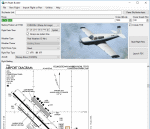
New version: Updated installer and auto-update functionality along with chart downloaded changes to support browser updated security measures.
FS Flight Builder is a utility for general aviation flying that will build flight files for FSX (flt), FSX Steam Edition (flt), and Prepar3D (fxml) based on waypoints and other data either entered manually or imported from SkyVector using the Plain Text Link information. Among other things, you can select your starting position, aircraft, and VFR or IFR flight plan.
One of the most interesting features of the application is that it will include a Briefing file, added to the aircraft's built-in kneedboard, that will include departure and destination airport information (runways, frequencies, weather, and charts) as well as navigation frequencies along the route.
Have you ever started up flight simulator and wondered “where do I want to go today� The new Destination Chooser functionality can help to solve that problem. The screen allows you to enter your departure airport and choose various parameters for your destination (like min and max distance, tower availability, ILS availability, runway length requirements, etc.).
How to install:
***************
Run Setup.exe and simply follow the installation wizard.
When you run the application for the first time (make sure your flight simulator is not running), it will build the database from your flight sim data. Be patient. It could take a few minutes.
It will attempt to locate your flight sim folder and flight plan folders automatically. If it can't find them, however, you'll need to select them from the options menu.
IMPORTANT!
Because FS Flight Builder saves to your Flight Sim directories, it MUST be run in Administrator mode. To do this, right-click on the desktop icon, select the Compatibility tab, and check the Run as administrator checkbox.
IMPORTANT!
The airport and navaid databases for FS Flight Builder are built using Peter Dowson's excellent Make Runway utility and the equally excellent BGL2XML utility from ScruffyDuck Software. The links to these utilities are below. They must be added to the main FSX or Prepar3D folder.
Peter Dowson's website: http://www.schiratti.com/dowson.html
ScruffyDick Software website: http://www.scruffyduck.org/bgl2xml/4584282773
It's also important to note that Version 1.7 of BGL2XML is required for Prepar3D V3 and higher.
Author:
*******
Tom Arduini
The latest installer can always be found at
http://www.arduiniwebdevelopment.com/fsflightbuilder/fsflightbuilder.zip
| Filename: | FS_Flight_Builder.zip |
| License: | Freeware |
| Added: | 24th December 2018, 02:41:36 |
| Downloads: | 409 |
| Author: | Tom Arduini |
| Size: | 69.56 MB |
| Category: Flight Simulator X - Aircraft Repaints, Textures and Modifications | |
| Boeing 747-8i Delta Northwest |
|
File Description:
FSX Boeing 747-8i Delta Northwest with advanced VC by Alejandro Rojas Lucena and VC Texture Upgrade by Enrique Cornejo. This gives the b747 a payware Virtual Cockpit look! It even has a pilot jacket hanged in the rear of the cockpit (besides the right jumpseat).
The panel.cfg and the aircraft.cfg have been assembled and edited by the Flightsim Workshop Team. Now you can pop up "My icons" window in the Virtual Cockpit to easily reach the following windows: GPS, avionics, map, ATC, Climb/Radio Altimeter/Spoiler switch, auto-break switch, throttle quadrant, clock, descentometer, kneeboard and overhead panel.
The aircraft has new engine views (from both wings) and new Virtual Cockpit interior views from the left, right and central jump seats.
The Delta Northwest texture is wonderful and it has a unique paintscheme by Mcphat Studios with a repaint by Enrique Cornejo which also includes details such as some stains caused by humidity and other details just like a real aircraft.
This aircraft uses the Project Opensky FSX Boeing B747-800 Model OSX748V4_GENX(MDL), and includes the gauge window Posky Utility to view the main stairs, ground cargo servicing, etc. The engine sounds are edited like the real ones with cockpit ambient, so you can enjoy a pleasant flight. The Flight Management Computer (FMC) is fixed and looks like a payware instrument. The VC includes FMC, Primary Flight Display (PFD) and Multi-Function Display (MDF) displayed in the correct size.
The virtual cockpit also has an Engine-Indicating and Crew-Alerting System also known as EICAS, Ground Proximity Warning System (GPWS), working wipers, cabin lights, fire suppression, avionics switch, fuel crossfeed, and you can identify those intruments in the overhead panel because they are bordered with color lines. You can also find landing lights switches, taxi light switch, engine generators, APU generator, battery switch, starter switches, de-ice switch, general lights switches which are a great work of Alejandro. So now the whole cockpit and texture upgrade with all these improvements looks better than a payware version. The clock numbers are now in orange which makes them look better and easily recognizable.
Assembled and edited for FSX by Enrique Cornejo.
| Filename: | Boeing_7478i_Delta_Northwest.zip |
| License: | Freeware |
| Added: | 13th January 2013, 01:02:31 |
| Downloads: | 990 |
| Author: | Enrique Cornejo |
| Size: | 78.26 MB |


© 2001-2026 AVSIM Online
All Rights Reserved
Privacy Policy |