
Where Flight Simulation Enthusiasts Gather from Around the World!
AVSIM Library - Search Results

| Category: Flight Simulator 2004 - Aircraft Repaints, Textures and Modifications | |
| Golden Age Simulations Stearman Model 4 Version 2.1 |

|
File Description:
Golden Age Simulations Stearman Model 4 Speedmail Version 2.1 for FS9. This upgrade updates
the VC to include a new gauge package, 2D cockpit, improved textures, Nav/Com radio with VOR head, updated pilot figure, exhaust effects and reflective glass textures. Requirements: Microsoft FS 2004 and an installed copy of the Golden Age Simulations Model 4 Speedmail package. Package available at the Golden Age Simulations website.
goldenagesimulations.com
| Filename: | Golden_Age_Simulations_Stearman_Model_4_Version_21.zip |
| License: | Freeware |
| Added: | 23rd November 2007, 22:14:35 |
| Downloads: | 544 |
| Author: | Paul Corish, Gil Halpin, Jim Douglas |
| Size: | 14.17 MB |
| Category: Flight Simulator 2004 - Gauges | |
| Crosswind Correction and Ground Speed calculator |
|
Images related to this file:
File Description:
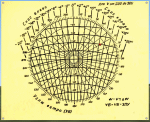
FS2004 gauge: Crosswind correction and ground speed calculator
Crosswind correction and ground speed calculator is a simple and easy-to-use instrument, usable for any aircraft developing airspeed from 200 to 500 kph (125 to 312 mph). It allows to calculate crosswind correction and ground speed using known values of aircraft speed and desired track angle, and wind velocity and wind direction.
| Filename: | Crosswind_Correction_and_Ground_Speed_calculator.zip |
| License: | Freeware, limited distribution |
| Added: | 15th July 2010, 09:40:33 |
| Downloads: | 418 |
| Author: | Alexander Belov |
| Size: | 1.2 MB |
| Category: Flight Simulator X - Gauges | |
| Integrated Standby Flight Display V2 for Saitek Pro Flight Inst Panel |
|
Images related to this file:
File Description:
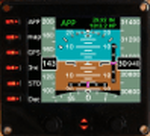
This is a second version of the ISFD for FIP. It was resized to let the left side empty to allow some text through the SaiFlightSimX.xml file to identify the buttons.
The gauge provides indicated air speed, altitude, heading, aircraft attitude and QNH. When in range of an ILS the ILS bars appear. When the autopilot mode approach is selected the text APP in green colour appears.
| Filename: | Integrated_Standby_Flight_Display_V2_for_Saitek_Pr.zip |
| License: | Freeware |
| Added: | 4th July 2013, 06:59:07 |
| Downloads: | 380 |
| Author: | Philippe Verhaege |
| Size: | 243.17 KB |
| Category: Flight Simulator 2002 - Panels | |
| Boeing 727 Minipanel |
|
File Description:
Minipanel created for the FFX 727-200, can likely be used for other models as well. Most gauge knobs work in the minipanel mode however some are inactive. Using keyboard shortcuts such as CTL-Shift-[ Z ], CTL-Shift-[ H ], CTL-Shift-[ R ], and the [ - ], [ = ], and [ Backspace ] keys should provide good functionlity. Suitable for takeoffs and landings, [ W ] key easily cycles from Full, to Mini, to No-panel.
| Filename: | Boeing_727_Minipanel.zip |
| License: | Freeware, limited distribution |
| Added: | 26th September 2003, 01:39:30 |
| Downloads: | 592 |
| Author: | Gregory Abbey |
| Size: | 1.36 MB |
| Category: Flight Simulator 2002 - Panels | |
| Panel Package for DHC2 Beaver |
|
File Description:
This DHC2 Beaver panel was created to use with the FS2002 Steven Grant Beaver Series, however, it will work fine with any Beaver that you are using. It is created from an actual photograph, and has accurate gauge placement. This version of the panel includes the panel fix released earlier, as well as changing the night lighting of the panel to get rid of the "bright" panel.
| Filename: | Panel_Package_for_DHC2_Beaver.zip |
| License: | Freeware, limited distribution |
| Added: | 1st December 2002, 20:34:29 |
| Downloads: | 2,249 |
| Author: | Fred Choate |
| Size: | 1.15 MB |
| Category: Flight Simulator 2002 - Miscellaneous Files | |
| SDK Example Supplement Using GDI+ |
|
File Description:
This is the basic amount of code you need to get a gauge with GDI+ as the rendering agent working. Use this as a supplement to the Panel SDK, and more specifially the part where they mention Vector Gauges. Please visit the MSDN site and view the GDI+ developer pages to understand the GDI+ present in my guage. This is not something for non-developers to download!
| Filename: | SDK_Example_Supplement_Using_GDI.zip |
| License: | Check within download |
| Added: | 18th May 2003, 21:28:30 |
| Downloads: | 570 |
| Author: | Fred Clausen, 2FD Design |
| Size: | 395.76 KB |
| Category: Flight Simulator 2002 - Gauges | |
| Bendix/King KT 76C Transponder |
|
File Description:
Almost full functional copy of the real-world Bendix/King KT 76C Transponder, version 1.1b. Problem was fixed with zero squawk code (“0000”) appearing after flight was saved while transponder at OFF, SBY, or TST mode, or not warmed. Updated User Manual. Full package replacing previous versions of presented gauge. FSSound.dll module is required to be installed for sound of Mode Selector Knob switching.
| Filename: | BendixKing_KT_76C_Transponder.zip |
| License: | Freeware, limited distribution |
| Added: | 21st May 2003, 12:22:55 |
| Downloads: | 928 |
| Author: | Serguei Gorelik |
| Size: | 319.64 KB |
| Category: Flight Simulator X - Gauges | |
| Inertial Navigation System V3 |
|
Images related to this file:
File Description:
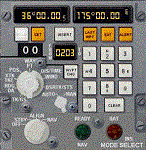
An Inertial Navigation System for FS2004 and FSX. Especially designed for classic airliners, but will work in most aircraft. Allows automatic entry of FS2004 and FSX plans. Easy to use. Stores up to 99 waypoints. Waypoints are saved to a data file which is then loaded by the gauge. Follows flight plans faithfully on autopilot. Has great accuracy. Alignment unit included. Full instructions. Simplified installation.
| Filename: | Inertial_Navigation_System_V3.zip |
| License: | Freeware, limited distribution |
| Added: | 18th September 2014, 16:55:23 |
| Downloads: | 1,083 |
| Author: | Julian Avisenis |
| Size: | 807.6 KB |
| Category: Flight Simulator 2004 - Miscellaneous Files | |
| Reverser Spray effect for FS2004 only. |
|
File Description:
This new effect will simulate water or snow being blown when the reverser is deployed, elevating the landing experience on a wet runway.
This effect comes with a gauge will automatically activate the effect only work when the reversers are deployed and if it is raining or snowing.
This is easy to install and is not limited to POSKY planes.
Installation instructions are included.
| Filename: | Reverser_Spray_effect_for_FS2004_only.zip |
| License: | Freeware, limited distribution |
| Added: | 20th August 2007, 15:53:45 |
| Downloads: | 40,721 |
| Author: | Edward Cox / Project Opensky |
| Size: | 3.25 KB |
| Category: Flight Simulator 2004 - Aircraft Repaints, Textures and Modifications | |
| Lear45 Gama Aviation |
|
File Description:
GAMA AVIATION repaint and mods of the default fs9 Lear45,repaint was done using a paintkit by Joao Paz,which i modified,to add a bare metal leading edge,to the tailwing,and extended the fin bare metal leading edge,to the top of the fin,like some of the pics i saw on airliners.net.
Logo lights and mainwing LE ice lights have been added,the 2d main panel as been reworked,to look more life like,and some switches added.
Also included is a brief manual,to show the new switch positions,the mainwing ice & logo lights are set by default to ms standard,but there are alternate lines,that you can activate,in the aircraft & panel.cfg files,if you have the AFG kingair b300 for the lights and project fokker 10070 for a nav/gps switch,in your fs9 system,both aircraft can be found on avsim.
I have played around with the flight dynamics,which make it more flyable than the standard out of the box version,also the default lear fin strobe did not come on using the 2d panel light switch,it only came on if you pressed the l key,that i have fixed.
Also included are the two modified default schemes,to update the bare metal leading edges and panel lines and alpha channels.
All these paints are saved in 32bit for a sharper image,i have not noticed any drop in frame rates,due to these paints.
| Filename: | Lear45_Gama_Aviation.zip |
| License: | Freeware |
| Added: | 4th October 2007, 22:13:43 |
| Downloads: | 909 |
| Author: | Alan Cottrill |
| Size: | 17.45 MB |


© 2001-2026 AVSIM Online
All Rights Reserved
Privacy Policy |