
Where Flight Simulation Enthusiasts Gather from Around the World!
AVSIM Library - Search Results

| Category: Flight Simulator 2004 - Scenery | |
| Hellas Scenery Project (HSP) - All in One scenery package 1 of 2 |

|
Images related to this file:
File Description:
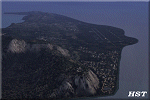
First of the two files needed. The package includes all freeware scenery created by the HSP team for Greece in FS9 up to June 2009. The package bundles all HSP released scenery in one pack which was necessary following the loss of several files after avsim's file library crash.
By using this scenery you do not need to download anything else from HSP. Included are detailed airport sceneries of LGAL Alexandroupolis, LGAV Athens Venizelos, LGIR Iraklion, LGKO Kos, LGMK Mikonos, LGSA Chania, LGSO Syros, LGSR Santorini as well as HSP base scenery with essential improvements to other airports and finally the detailed mesh terrain for all Hellenic territory.
| Filename: | Hellas_Scenery_Project_HSP__All_in_One_scenery_pac.zip |
| License: | Freeware, limited distribution |
| Added: | 20th May 2010, 13:12:04 |
| Downloads: | 165,096 |
| Author: | Hellas Scenery Team (HST) |
| Size: | 59.32 MB |
| Category: Flight Simulator 2004 - Sounds | |
| ATC Voices -Airport names set 10 |
|
File Description:
A collection of 14 additional or corrected airport names, for use with
Flight Simulator 2004 and FS2002. Installation requires the
EditVoicepack software (see
http://bevelstone.xs4all.nl/FlightSimulator/EditVoicepack) by Lars
Møllebjerg which is also available free download from the usual Flight
Simulator download sites such as Avsim.
The airports represented here are:
EDEL: Langenlonsheim (Germany),
EFMI: Mikkeli (Finland),
EFSI: Seinajoki (Finland),
EFTS: Teisko (Finland),
KOT: Kotlik (USA),
LFQN: St Omer/Wizernes (France),
LSZF: Birrfeld (Switzerland),
MPLP: Cap Ramon Xatruch (Panama),
MRAO: Turtuguero (Costa Rica),
OEGT: Guriat (Saudi Arabia),
SKEM: San Pedro de Uraba/La Esmeralda (Colombia),
SKNQ: Nuqui (Colombia),
WMBI: Taiping (Malaysia), and
Z11F: Alavus Highway Strip (Finland).
| Filename: | ATC_Voices_Airport_names_set_10.zip |
| License: | Freeware |
| Added: | 25th September 2007, 17:13:50 |
| Downloads: | 1,693 |
| Author: | John Hinson |
| Size: | 11.46 KB |
| Category: Flight Simulator X - Utilities | |
| FS2004/FSX Flight Analyzer, Logbook Utility V4.09 |
|
Images related to this file:
File Description:
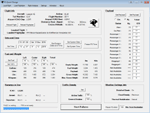
FS2004/FSX Flight Analyzer Utility V4.09
Flight Data Recorder - Logbook.
NOW WITH STATISTICS TOP 5 AIRPORTS, CITIES AND COUNTRIES.
Very easy to use, just make a flight plan in the simulator or in this utility.
What this program do:
- quickly change the settings of FSX/Fs2004, such as time, date, fuel, weight, traffic etc.
- start a failure sytem, such as gear, flaps, engine, etc.
- freeze the time, so you can fly in a for everlasting sunset.
- runway detecting system to see wich runways are in use.
- flight analyzing/data recording from departure to parking at the gate.
- When flight analysis is finished you can print a report, the report is automaticly saved as pdf File.
- graphical landingchart.
- record all your flights
- quickly look to your FSX display settings (only FSX) and change them even before the flight simulator is running.
- After a flight is finished FsQC saves your flight automaticly as 'FsQC last Flight', so you can continue the next day or hour.
Flight analysis start recording at the moment when you begin taxiing.
It gives you huge information such as:
- takeoff- and landing-weight.
- takeoff- and landing-roll in m. and ft.
- separate fuel consumption in taxi, climb, cruise and descent.
- maximum banking in flight.
- which speed you using the flaps and gear.
- when autopilot on or off.
- vertical speed on touchdown.
- reverser set after landing.
- wich speed you cancel reverser.
- bouncing at landing.
- graphical landingchart.
- and lots of more.
You can better look the example of the pdf document located in the 'Flight Reports' folder.
Logbook records:
- fuel consumption.
- payload.
- distance.
- number of different airports.
- flight hours.
- landings.
- flaps.
- speed.
- and lots of more.
- quickly show touchdown wind information in a picture.
- quickly show the graphical landing chart.
- Now with statistics: top 5 Countries, Cities and Airports
Requirements:
Computer with vista or higher and internet access.
Microsoft .net framework 4.6 or higher.(free download on microsft.com)
Flightsimulator FSX or 2004 and FSUIPC installed.
Note: requires paid activation for full use.
Register and you have 1 month free.
Program fully works without registration at airport Athens and Iraklion (Greece)
| Filename: | FS2004FSX_Flight_Analyzer_Logbook_Utility_V409.zip |
| License: | Shareware, time limited |
| Added: | 3rd March 2019, 00:20:37 |
| Downloads: | 251 |
| Author: | Evander Tholen |
| Size: | 3.35 MB |
| Category: Flight Simulator 2004 - Aircraft Repaints, Textures and Modifications | |
| Aerochago S.A. Lockheed C-121C |
|
Images related to this file:
File Description:
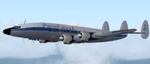
Textures for Lockheed C-121C by Team 1049 - Roland Berger, Volker Boehme, Manfred Jahn, Luis Pallas, Bill Tyne and Stefan Werner. Repainted by Manfred Meyer.
A working installation of the G and H Super Constellation packs (L1049H.ZIP, L1049GZIP and r7v-1.ZIP)is required, use the 1049vc_rf model for this textures!
This aircraft (c/n 4202) was built 1956 as 54-0183 for the USAF and served with the MATS Atlantic Div. as "City of Manchester". After retire in 1977 it eas stored at Davis Monthan until 1983 were the Connie was bought by Hangar 10 Inc. and reg. as N515AC. In 1984 she was leased to Air Cargo Intl. Aerochago S.A., Dominican Republic bought the aircraft in September 1988 and used it mainly on freight flights from Santo Domingo or Santiago in Dom. Rep. to Borinqen or San Juan in Puerto Rico and Miami FL. 1992 after the FAA banned Dominican propliners to fly into US airspace, the Connie was stored at Santo Domingo. Hurrican "George" 1988 blew a C-46 (HI-503CT) into it and caused severly damage. After scrapping in 1999 the bow section was shipped to Switzerland and used to built a simulator for Swiss Constellation Flyer Association, SCFA.
| Filename: | Aerochago_SA_Lockheed_C121C.zip |
| License: | Freeware |
| Added: | 21st November 2014, 17:53:46 |
| Downloads: | 223 |
| Author: | Manfred Meyer |
| Size: | 3.64 MB |
| Category: Flight Simulator 2004 - AI Aircraft | |
| 26 Needed AI Repaints |
|
File Description:
Twenty six repaints that are missing from the AI skies for flight simulator 2004. Or 2002, whatever one you use! The list of repaints is as follows:
AAS Lifeflight Beechcraft 200 -- Mike Hill
Ada Air Embraer 110 (Operated for DHL) -- Dee Waldron
Ada Air Yakovlev Yak-40 -- Project AI
Ada Air Yakovlev Yak-42D -- Samdim
Aerosvit Boeing 767-300 -- AI Aardvark
Albanian Airlines BAe 146-200 (2 Variations) -- Project AI
Albanian Airlines BAe 146-300 -- OSS AI
Arberia Airways Tupolev Tu-134 -- George Sukhyev
Balkh Airlines BAC 1-11-200 -- Dee Waldron
Balkh Airlines Boeing 727-100 -- AI Aardvark
Carib Aviation DHC-6-300 (2 Variations including a VistaLiner) -- Henry Tomkiewicz
Ecoair International Beechcraft 1900D -- Charles Dayhuff
Ecoair International Boeing 737-200 (2 Variations) -- AI Aardvark
Ecoair International Boeing 737-300 -- AI Aardvark
Ecoair International Boeing 737-400 -- AI Aardvark
Icaro Airlines Fokker F-28 -- Fernando Martinez
Icaro Express Beechcraft 1900D -- Charles Dayhuff
Kam Air Antonov An-24 -- Samdim
Libyan Arab Airbus A320-200 -- FSPainter
Phillipines Airbus A320-200 -- FSPainter
Sahara Airlines Boeing 737-400 -- AI Aardvark
Sahara Airlines Boeing 737-700 -- Tsutomu Urukawa
Sahara Airlines Boeing 737-800 -- Tsutomu Urukawa
I hope this can fill a small gap in at least a few people's AI skies.
| Filename: | 26_Needed_AI_Repaints.zip |
| License: | Freeware |
| Added: | 17th July 2004, 01:09:32 |
| Downloads: | 13,821 |
| Author: | Andrew Jarvis |
| Size: | 9.14 MB |
| Category: Flight Simulator 2004 - Scenery | |
| New York City Default Bridges and Objects v2.0 |
|
File Description:
I originally planned on "fixing" the George Washington Bridge, which was inadvertantly "sunk" by FSG's 38m mesh, and ended up repositioning and scaling a whole bunch of other default bridges and objects within about 50 miles of NYC. This addon was designed and tested for use with FS 9.1, FSG 38m mesh (available here at AVSIM), and Freeflow NE, UT/USA and USA Roads. It should also work with other road and water packages. I did not create any new scenery, I only repositioned default objects to their correct locations.
This should be the final version for a while. This version was tested with and adds compatibility for Megascenery NY and Aerosoft's Manhattan scenery. I also removed a few more objects that were placed in the water, and moved back to land a bunch of cranes around KEWR that were in the water.
Fixed stuff: All inappropriately placed NYC and Newark bridges (major, not autogen) up to Bear Mountain in the north and south to about the Verrazanno; Belmont Racing track; Shea Stadium; Meadowlands Stadium; World's Fair Tower; US Open Stadium. Added Meadowlands Race track and a few bridges around Newark, moved cranes around KEWR back to land, removed several objects in the water.
| Filename: | New_York_City_Default_Bridges_and_Objects_v20.zip |
| License: | Freeware |
| Added: | 10th November 2005, 16:48:46 |
| Downloads: | 6,562 |
| Author: | Thomas Perry |
| Size: | 558.69 KB |
| Category: Flight Simulator 2004 - AI Aircraft | |
| Elvis Sikorsky S-76C AI Model |
|
File Description:
AI Sikorsky S-76C Helicopter Featuring 8 Levels of Detail. Based on Source files by Lasse Lindh.
Not to be uploaded to any other sites.
| Filename: | Elvis_Sikorsky_S76C_AI_Model.zip |
| License: | Freeware, limited distribution |
| Added: | 2nd January 2006, 01:14:56 |
| Downloads: | 6,415 |
| Author: | Chris Jones/Paintkit by Mal Lloyd Flight Dynamics by George Davison |
| Size: | 1.98 MB |
| Category: Prepar3D V1-4 - Aircraft Repaints, Textures and Modifications | |
| Asiana Airlines 1998 AI Package |
|
File Description:
Asiana and Korean Air had full control of the Korean domestic market in 1998 as South Korea's only 2 scheduled airlines, making them appear at the vast majority of Korean airports. 737-500s were exiting the fleet, with only 3 remaining, and the first A321 had just come online. International routes were flown by 747-400 Combis or 767-300s, with several "tag on" routes onward from Seoul. Asiana served many commercial airports in Japan with 737-400s at the time, and is an important part of the Japanese traffic as well. The carrier had 2 737-500s and it's first A321 painted in a special "Experimental Color Scheme"(EC), and this is represented in the flightplans. One 737-500 also remained in a slightly different older livery dubbed as the "1994" colors, while the rest of the fleet had been modified to the "1998" colors. As a BONUS, ranmori has painted the 747-400, 747-400M and 737-400 in the 1994 livery for use with those flightplans, though there is no use for them in these 1998 plans. Repaints included for the FAIB 737-400, 737-500, 767-300, 747-400, and A321. All repaints were done by the very talented Ranmori Scythe, flightplans done by the not-so-talented Chasen Richardson. Part of the 1998 Flight Simulator Project. Follow us on Facebook at facebook.com/flightsim98 and on instagram as @bayviationsim. For more Retro AI, check out the forums at: http://retroai.proboards.com/
| Filename: | Asiana_Airlines_1998_AI_Package.zip |
| License: | Freeware, limited distribution |
| Added: | 21st November 2019, 19:17:55 |
| Downloads: | 235 |
| Author: | Ranmori Scythe, Chasen Richardson/Bayviation |
| Size: | 27.13 MB |
| Category: Flight Simulator 2004 - Miscellaneous Files | |
| Active Approach - LOWI (Innsbruck, Austria) |
|
File Description:
As most know the Approach and Final (VMC) for AI Traffic in FS9 is a straight in type landing and does not always consider high terrain at airports. This is do to the way that the coding is written in FS9 and it puts limits on IFR arriving aircraft. If you open runways at certain airports the AI Traffic will fly directly through a mountain once it is established on Final for a runway. What you will see with my file is a different type approach used for the way I control AI Traffic in FS9. No longer do the AI Planes use a straight in approach when landing at LOWI. My new AI Aircraft Approach coding for FS9 now uses a base leg approach so AI Traffic does not fly through the mountains. The Innsbruck Control Tower will clear all AI Traffic (IFR FP) landing either on 08 and 26 as a straight in landing even though the offset to final is 30 degrees from the runway center line. My testing shows excellent behavior of the FS9 default models, PAI models and the Aardvark planes of all sizes to execute this new type of visual approach. Read the text file for all the default enhancements added to LOWI along with a full understanding of how the new Approaches work *** Full set of Approach Charts included plus a FS2004 Default Scenery AFCAD ***
| Filename: | Active_Approach__LOWI_Innsbruck_Austria.zip |
| License: | Freeware, limited distribution |
| Added: | 10th April 2005, 05:16:39 |
| Downloads: | 9,147 |
| Author: | Jim Vile |
| Size: | 800.49 KB |
| Category: Flight Simulator 2002 - Utilities | |
| Royal Europe Airlines v1.1 Virtual Airlines Business Edition |
|
File Description:
A must have for all viritual commercial Pilots:
Royal Europe Airlines v1.1 Business Edition
Works with all flightsimulators!
Get a flight assignment at REA and see how many passengers you'll get this flight.
After gate arrival report at REA and log your flight.
Check out how much money you can make in a week by flying for Royal Europe Airlines.
Then look at the total profit of REA and see if you can improve it next week!(all data can be checked whenever you want)
New in v 1.1:
* Bugfixes
* Memmoryfix
* Clear documentation
* Multiple players
* A random number of passengers will fly with you each flight
* Each flight will now have ticketprices!
* REA finances including profit for this flight, fuelcosts, landingfee, etc..
* You can now enter a comment on your flight
* All data, wages, finances, flight, comments will be saved
* more.. (check it out)
Destination Airports:
Munich
Brussels
London Gatwick
Copenhagen
Berlin
London Heathrow
Paris
Maastricht Aachen Airport
Frankfurt
Zurich
Madrid
Dusseldorf
Salzburg
John F Kennedy New-York
Rome
(see documentation if you would like your personal airports in this game!).
* Viritual ticket prices (made from REAL ticket prices)
* Viritual passengers (more passengers more $$, less passengers, no good!!)
* Viritual money
* All saved, every time you fly. Total overview always availible...
tested on
WinXP home edition
1700MHz
256 mb memmory
64 MB 3dfx video
Min syst. requirements:
Win 98, 233 Mhz, 128 MB memmory, 16mb video
REA version 1.0 required
(to download you need REA version 1.0)
| Filename: | Royal_Europe_Airlines_v11_Virtual_Airlines_Busines.zip |
| License: | Freeware |
| Added: | 17th December 2002, 17:16:19 |
| Downloads: | 841 |
| Author: | M.Heuts |
| Size: | 341.76 KB |


© 2001-2026 AVSIM Online
All Rights Reserved
Privacy Policy |