
Where Flight Simulation Enthusiasts Gather from Around the World!
AVSIM Library - Search Results

| Category: Flight Simulator X - Sounds | |
| Boeing 767 General Electric CF6-80C2 |

|
File Description:
SkyHigh Audio Simulations and Audio Sim are proud to present our brand new Boeing 767 GE CF6 sound pack for FSX! This is our second joint collaboration. This add-on features configurations for three interior POV options such as cockpit, front cabin, and rear cabin. FSX's sound cone technology has been extensively used to provide as much of a realistic sound experience as possible in the exterior view. Along with these features, SkyHigh Audio Simulations' usual touches have been added such as using audio recordings only from 767 GE and other CF6-powered aircraft as source files to provide a fully authentic sound experience for the simmer. For more information regarding this sound and our many other sound releases please visit our website at: www.skyhighflightsim.webs.com!
| Filename: | Boeing_767_General_Electric_CF680C2.zip |
| License: | Freeware |
| Added: | 17th March 2014, 05:24:19 |
| Downloads: | 6,711 |
| Author: | Adam Murphy, Jesse Casserly, and Maxime Cosette - Skyhigh Audio Simulations and Audiosim |
| Size: | 122.27 MB |
| Category: Flight Simulator X - Original Aircraft | |
| Bombardier Learjet 60 |
|
File Description:
FSX Bombardier Learjet 60. A twin fanjet, 8 place business aircraft. This release contains five complete aircraft in real world liveries from USA(2), Canada, Great Britain and Germany. Each model is a complete package of aircraft, panel with internal views, DVC (Dynamic Virtual Cockpit) and fully modeled luxury passenger cabin. Default Learjet sound, full ground handling module with push back and taxi speed control also included. The visual model includes opening doors and all the usual control surface animations. A comprehensive set of html documents (Check List & Ref List) are included for in-flight information. A separate Panel_Docs folder accompanies this release with panel and systems help files and pilot's notes. The model has been created from scratch in FSDS2.4 & FSDS 3.0
| Filename: | Bombardier_Learjet_60.zip |
| License: | Freeware, limited distribution |
| Added: | 18th January 2007, 05:17:05 |
| Downloads: | 24,727 |
| Author: | Jean-Pierre Brisard, Barry Blaisdell, Bob May, and Kevin Pardy - Premier Aircraft Design |
| Size: | 9.84 MB |
| Category: Flight Simulator 2004 - Original Aircraft | |
| Bombardier Learjet 60 |
|
File Description:
FS9 Bombardier Learjet 60. A twin fanjet, 8 place business aircraft. This release contains five complete aircraft in real world liveries from USA(2), Canada, Great Britain and Germany. Each model is a complete package of aircraft, panel with internal views, DVC (Dynamic Virtual Cockpit) and fully modelled luxury passenger cabin. Default Learjet sound, full ground handling module with push back and taxi speed control also included. The visual model includes opening doors and all the usual control surface animations. A comprehensive set of html documents (Check List & Ref List) are included for in-flight information. A separate Panel_Docs folder accompanies this release with panel and systems help files and pilot's notes. The model has been created from scratch in FSDS2.4 & FSDS 3.0
| Filename: | Bombardier_Learjet_60.zip |
| License: | Freeware, limited distribution |
| Added: | 18th January 2007, 05:18:44 |
| Downloads: | 15,666 |
| Author: | Jean-Pierre Brisard, Barry Blaisdell, Bob May, and Kevin Pardy - Premier Aircraft Design |
| Size: | 9.08 MB |
| Category: Flight Simulator X - Aircraft Repaints, Textures and Modifications | |
| Boeing B-17G 91st BG (LG-O) "Roxy's Special" |
|
Images related to this file:
File Description:
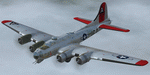
This folder contains a repaint for the A2A WoP2 B-17G in the colors of B-17G-85-BO #43-38348 LG-O "Roxy's Special" of the 322 BS/ 91st BG based in Bassingbourne UK. #348 arrived in Bassingbourne on 18 August 1944, and very quickly received her nose art, by Corporal Tony Starcer. By 5 September, it had flown four missions to Germany. The next mission, on the 8th of September, was to the I.G. Farben Chemical Plant in Ludwigshafen, Germany. On board this mission was David McCarty, pilot, Neil M. Mylin, co-pilot, Donald L. Brazones, navigator, Frank S. Bolen, bombardier, John Cangemi, top turret, Frank F. Trim, Jr., ball turret, Charles E. Beebe, waist guns, Floyd Z. Dillon, tail gun, and Henry R. Schuls, radio operator. Around 11.35 hours, short of the bomb drop near Ludwigshafen, “Roxy’s Special†took a hit ripping off a wing. A spin ensued pinning Bolen and navigator Don Brazones in their nose bubble followed almost immediately by an explosion blowing them free of the aircraft. Bolen and Brazones were the only two survivors of “Roxy’s Special.†They both parachuted down, but not together, therefore neither knew the fate of the other until later. Bolen eluded capture for 7 days before being picked up and carted off to Stalag Luft 1 near Barth, Germany after interrogations. Brazones had been picked up before Bolen and processed through the channels to Stalag Luft 1. The two were reunited at Stalag Luft 1 where they spent the remainder of the war. On Sept. 14, 1944, the day Bolen was captured, his wife Frances gave birth to their first child, Linda, in Selma - a child Bolen would not see until returning from imprisonment and the war. The “Roxy’s Special†crash site was near a Lutheran Church in Ludwigshafen. A very respectful group of Germans removed the remains of the air crew and buried them in the local cemetery. After the war, the remains were turned over to American authorities and they moved them to a National Cemetery in Northern France. In 1947, Bolen served as casket bearer for David McCarty when he was brought home to rest in Birmingham.
Repaint by Jan Kees Blom, based on the paintkit by A2A.
| Filename: | Boeing_B17G_91st_BG_LGO_Roxys_Special.zip |
| License: | Freeware |
| Added: | 7th October 2019, 18:21:26 |
| Downloads: | 108 |
| Author: | Jan Kees Blom |
| Size: | 18.33 MB |
| Category: Flight Simulator 2004 - Gauges | |
| Integrated Simavionics: Dreamfleet 727 GNS Edition 1.0 |
|
File Description:
Here's probably the best addition to your favorite Trijet! The Dreamfleet 727 sure is one of the best simulated classic airliners out there for Flight Simulator, but being a classic, it also brings some problems when flown in a modern air traffic environment. Radio navigation alone just won't do it anymore, especially if you fly online with real controlers. A "go direct XXX" instruction can easily turn into a nightmare - nowadays technology offers some things to ease the workload and increase safety, and it's time to use these means wherever possible.
Boeing 727 jets are still being flown in almost all parts of the world, mostly as freighters, and almost all of them have been updated with modern avionics, ranging from small GPS devices up to full blown glass cockpits with flight management computers.
Thanks to Ernie Alston and his "Integrated Simavionics", you will now be able to equip your fleet of Dreamfleet 727 aircraft with a GNS, allowing not only detailed flight planning but also access to many informations that will very useful during your flights. In case you haven't already done so, now would be a good time to pick up the manuals that came with the "Integrated Simavionics Package" to learn about the many new possibilities you will gain by adding the GNS to your cockpit. The gauges will be added both to the 2D and 3D cockpits!
Another benefit you get with this package: the Virtual Cockpit textures will now appear in a much higher resolution, providing crisp and clear instruments and a much better look! Note that this is only enabled with the GNS-equipped cockpits.
| Filename: | Integrated_Simavionics_Dreamfleet_727_GNS_Edition_.zip |
| License: | Freeware |
| Added: | 6th December 2007, 16:08:58 |
| Downloads: | 3,618 |
| Author: | Nick "MeatWater" Schreger |
| Size: | 793.25 KB |
| Category: Flight Simulator 2004 - Utilities | |
| F1 View Module |
|
File Description:
The F1_View module is a very basic tool that implements mouse-based zooming, panning, and eyepoint adjustments, including the ability to move your eyepoint beyond the limits imposed by Flight Simulator (this feature is good to stroll about virtual cabins of larger aircraft).
This module requires a wheel-mouse (a center wheel that also acts as a center mouse button).
/QUOTE
This application is provided for free by Flight1 and can even be placed on your own website for download providing you follow the guide lines set down in the agreement.
For those who are interested, you can find it HERE http://atr.flight1.net/ , look under:
Quick Links to our ATR Project Areas...
• Accessory Downloads
which can be found about half way down the page you are initially viewing.
and a bit more info from the readme:
Modes of Operation:
Rolling the mouse wheel forward means rolling the wheel away from the user.
Rolling the mouse wheel backward means rolling the wheel towards the user.
Virtual-cockpit:
Wheel forward moves you forward and wheel backward moves you back.
CTRL+forward moves right and CTRL+backward moves left.
SHIFT+forward moves up and SHIFT+backward moves down.
CTRL+SHIFT+forward zooms out and CTRL+SHIFT+backward zooms in.
While in Pan Mode (when mouse wheel is pressed and held down) inside the Virtual Cockpit:
Moving the mouse to the left rotates the view to the left.
Moving the mouse to the right rotates the view to the right.
Moving the mouse forward, away from the user, rotates the view up.
Moving the mouse backward, towards the user, rotates the view down.
Cockpit view:
CTRL+SHIFT+forward zooms the exterior view out and CTRL+SHIFT+backward zooms it in.
Tower view:
CTRL+SHIFT+forward zooms the view out and CTRL+SHIFT+backward zooms it in.
Spot view:
Wheel forward moves the view distance forward, and wheel backward moves the distance back.
CTRL+forward rotates the eyepoint right, and CTRL+backward rotates the eyepoint left.
SHIFT+forward moves the eyepoint down, and SHIFT+backward moves the eyepoint up.
CTRL+SHIFT+forward zooms out and CTRL+SHIFT+backward zooms in.
Note: View distance is different from view zoom.
While in Pan Mode (when mouse wheel is pressed and held down) in spot view:
Mouse left/right rotates the eyepoint right/left.
Mouse up/down moves the eyepoint up/down.
Top-down view:
CTRL+SHIFT+forward moves the view distance out and CTRL+SHIFT+backward moves it in.
Note: In this mode you can move your view all the way to outer space and back in.
| Filename: | F1_View_Module.zip |
| License: | Freeware |
| Added: | 8th May 2005, 04:27:45 |
| Downloads: | 15,464 |
| Author: | Flight1 |
| Size: | 725.3 KB |
| Category: Flight Simulator X - Utilities | |
| NpC - Numpad Control for FSX v2.2.1 |
|
File Description:
NpC v2.21 - some small changes from v2.2 including a script you can use to switch autopilot input from Nav to GPS and instructions on moving and re-sizing and re-positioning the NpC message window.
NumPad Control (NpC) is a program for entering Com, Nav and ADF radio frequencies, Transponder codes, VOR OBS/CRS settings, Auto-throttle airspeed, and Autopilot altitude, vertical speed, and heading values in FSX using the keyboard number-pad instead of mouse click spots. NpC is programmed primarily for aircraft with default FSX avionics (radios, transponders, and autopilots that were developed within standard FSX programming guidelines). However, this updated version of NpC also supports a number of third party add-on aircraft such as the PMDG 737NGX / B777, Flight1 King Air B200 and the A2A Cherokee 180. NpC is a set of Lua scripts and thus requires a registered copy of FSUIPC4 to work.
An installation and configuration manual is also included in the file set.
For a video that gives an overview of NpC function see: https://www.youtube.com/watch?v=P2p6CHxMOl8&list=PL_NnG_PN8zwnEI59uGxlhgp11rJQbQ_gJ&index=2
| Filename: | NpC__Numpad_Control_for_FSX_v221.zip |
| License: | Freeware |
| Added: | 4th December 2015, 20:03:34 |
| Downloads: | 698 |
| Author: | Al Klayton, Dan Sullivan |
| Size: | 801.63 KB |
| Category: Flight Simulator X - Gauges | |
| Advanced Radar System 4 (ARS4) |
|
Images related to this file:
File Description:
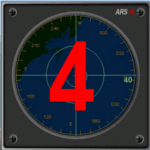
This gauge has been developed for FSX Flight Simulator SP1 or SP2. It
has also been tested with Microsoft Acceleration also, but compatibility is not guaranteed by the author.
This new Advanced Radar System (ARS 4) includes significant new features,
functions and displays for FSX AI traffic. The new key features are:
1)AI traffic display for air targets and boat/ship targets.
2)Auto landing on carrier if the carrier is part of the scenery MECOPS.
3)Allows switching between air target display and boat target display.
4) Provides for air and boat display to optionally insert airport and/or basic terrain display on the screen.
5)Different screen presentations for air and boat targets.
6)Simplified installation procedure.
7)The A2A re-fuel function remains the same as in the ARS2 version.
8)The auto tracking function remains the same as well as in the ARS2 version.
All displays for air, or boat/ship traffic, can be selected in a range of 5, 10, 20, and 40 miles.
For installation and additional information look at the ARS4 documentation inside the zip file. For copyrights and credits please look at the documentation for this gauge.
| Filename: | Advanced_Radar_System_4__ARS4.zip |
| License: | Freeware |
| Added: | 5th March 2013, 15:53:52 |
| Downloads: | 3,810 |
| Author: | Dietmar Loleit |
| Size: | 1.18 MB |
| Category: Flight Simulator X - Original Aircraft | |
| Airbus A318 FD Special Version V3 - Light Pack |
|
Images related to this file:
File Description:

This is the new version of my Airbus A318 with the Panel in V3 opened on the A321 - here in a light pack version, included is 1 livery only (Frontier Airlines NR807 Painted by Derek Mayer & Steve Mac Bee of PA Team).
This light pack contains only the user manual in english version (and low resolution). If you want the french version of this manual, use the "zipdrive" function with the complete pack of this aircraft (search by name file "pa318fd_v3.zip"). This light version has been made by request for all those with low download speeds and limits.
The original complete pack is available HERE (filename: pa318fd_v3.zip)
I remind you that this aircraft is based on the Project Airbus A318, with an ehanced panel based on the work of stefan Liebe.
This latest development can see the more realistic Airbus available as freeware. With a new version of the panel, the aircraft has a 100% cold & dark Status at the start of a flight, a real fuel system management with all valves, piumps and crossfeed work, the complete Bleed circuit with X-bleed, a real engines manual startup procedure like the real aircraft. I have also ehanced the navigation display with TCAS function in ARC and NAV mode; There is also the engines failure procedure to work (fire, oil leaks....) and many improved function that I cannot describe here. The aircraft comes with user manual in English and in French, and it is essantial to read it before you fly.
All the functions of the V2 have been kept and improved, like the vertical navigation gauge, the terrain radar map on the navigation display, the autolanding function, the SFCC.
This version is only in CFm engines, but with real engine data (CFM56-5B9) and custom HD sounds. Now, the Fly By wire works in 2 modes: "Normal Law" and "Direct Law". I put 300 hours into the development of this panel and I hope that you will like it.
Please, note that this panel is the v3.05 version, witch fixes the bugs of the first version that came with the A321 (there is an update panel for the A321).
So, It seems that this aircraft works with PREPAR3D
Francois Dore
| Filename: | Airbus_A318_FD_Special_Version_V3__Light_Pack.zip |
| License: | Freeware, limited distribution |
| Added: | 14th July 2012, 15:34:06 |
| Downloads: | 6,726 |
| Author: | Francois Dore, Project Airbus |
| Size: | 64.88 MB |
| Category: Flight Simulator X - Aircraft Repaints, Textures and Modifications | |
| Lufthansa Boeing 747-8i (D-ABYL) v2 |
|
Images related to this file:
File Description:
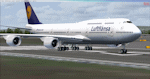
This update now adds the aircraft name Hessen to the fuselage and adds further texture improvements including more accurate engine textures as per real-world aircraft. It is based on D-ABYL, tenth aircraft of the Lufthansa fleet to be delivered to Lufthansa in early Feb 2014. D-ABYL is the first aircraft of the fleet to receive the Performance Improvement Package (PIP) that delivers additional improvements including a 1.8% improvement in fuel burn.
This package hosts DDS DXT5 textures, updated specular textures, custom night lighting with increased illumination and custom cockpit views. The aircraft was hand painted using the PMDG paint kit and features and includes
PMDG 747-400X for FSX and 747-8i/8F add-on packages are BOTH required. See readme for important installation instructions and enjoy the repaint.
| Filename: | Lufthansa_Boeing_7478i_DABYL_v2.zip |
| License: | Freeware |
| Added: | 18th April 2014, 12:42:46 |
| Downloads: | 113 |
| Author: | Mark Aldridge |
| Size: | 2.69 MB |


© 2001-2026 AVSIM Online
All Rights Reserved
Privacy Policy |