
Where Flight Simulation Enthusiasts Gather from Around the World!
AVSIM Library - Search Results

| Category: Flight Simulator 2004 - Miscellaneous Files | |
| UK FS Flight Guide Vol 1 (A - C) |

|
File Description:
Part of a complete UK & Ireland airport
and helipads flight guide by Alan Trussell
(Consists of 5 parts)
UK FS Flight Guide Vol 1 (A - C)
UK FS Flight Guide Vol 2 (D - K)
UK FS Flight Guide Vol 3 (L - R)
UK FS Flight Guide Vol 4 (S - Z)
Plus - UK Flight Guide Needed Additional Files.
(For use with any photographic scenery for the uk).
(Compatible with FS9 & FSX)
Includes flight cards for 1521 airports & helipads,
Comprehensive airport information for pilots,designers
and enthusiasts.
Also some scenery and placemaker AFCADS
maps,airport lists,flight plan plus nav aids info,
imajes of each airport from the air and ground
plus screenshots by Dennis Williams.
**Please note Microsoft has a max length for file names,but for no good reason also includes the complete file extension path words in this maximum!
For this reason, please download each Zip file directly to your(My Computer/(C) Drive -(In my case),unzip and view from here as well - thus keeping the file extension length as short as possible. Anywhere else and it increases the file extension length such that some files cannot be opened or viewed.
More modern computers may have corrected this problem.**
| Filename: | UK_FS_Flight_Guide_Vol_1_A__C.zip |
| License: | Freeware |
| Added: | 7th January 2017, 17:54:12 |
| Downloads: | 340 |
| Author: | Alan Trussell |
| Size: | 354.05 MB |
| Category: Flight Simulator 2004 - Miscellaneous Files | |
| UK FS Flight Guide Vol 2 (D - K) |
|
File Description:
UK FS Flight Guide Vol 2 (D - K)
Part of a complete UK & Ireland airport
and helipads flight guide by Alan Trussell
(Consists of 5 parts)
UK FS Flight Guide Vol 1 (A - C)
UK FS Flight Guide Vol 2 (D - K)
UK FS Flight Guide Vol 3 (L - R)
UK FS Flight Guide Vol 4 (S - Z)
Plus - UK Flight Guide Needed Additional Files.
(For use with any photographic scenery for the uk).
(Compatible with FS9 & FSX)
Includes flight cards for 1521 airports & helipads,
Comprehensive airport information for pilots,designers
and enthusiasts.
Also some scenery and placemaker AFCADS
maps,airport lists,flight plan plus nav aids info,
imajes of each airport from the air and ground
plus screenshots by Dennis Williams.
**Please note Microsoft has a max length for file names,but for no good reason also includes the complete file extension path words in this maximum!
For this reason, please download each Zip file directly to your(My Computer/(C) Drive -(In my case),unzip and view from here as well - thus keeping the file extension length as short as possible. Anywhere else and it increases the file extension length such that some files cannot be opened or viewed.
More modern computers may have corrected this problem.**
| Filename: | UK_FS_Flight_Guide_Vol_2_D__K.zip |
| License: | Freeware |
| Added: | 7th January 2017, 17:54:37 |
| Downloads: | 217 |
| Author: | Alan Trussell |
| Size: | 358.36 MB |
| Category: Flight Simulator 2004 - Miscellaneous Files | |
| UK Flight Guide Needed Additional Files |
|
Images related to this file:
File Description:
UK Flight Guide Needed Additional Files
Part of a complete UK & Ireland airport
and helipads flight guide by Alan Trussell
(Consists of 5 parts)
UK FS Flight Guide Vol 1 (A - C)
UK FS Flight Guide Vol 2 (D - K)
UK FS Flight Guide Vol 3 (L - R)
UK FS Flight Guide Vol 4 (S - Z)
Plus - UK Flight Guide Needed Additional Files.
(For use with any photographic scenery for the uk).
(Compatible with FS9 & FSX)
Includes flight cards for 1521 airports & helipads,
Comprehensive airport information for pilots,designers
and enthusiasts.
Also some scenery and placemaker AFCADS
maps,airport lists,flight plan plus nav aids info,
imajes of each airport from the air and ground
plus screenshots by Dennis Williams.
**Please note Microsoft has a max length for file names,but for no good reason also includes the complete file extension path words in this maximum!
For this reason, please download each Zip file directly to your(My Computer/(C) Drive -(In my case),unzip and view from here as well - thus keeping the file extension length as short as possible. Anywhere else and it increases the file extension length such that some files cannot be opened or viewed.
More modern computers may have corrected this problem.**
| Filename: | UK_Flight_Guide_Needed_Additional_Files.zip |
| License: | Freeware |
| Added: | 8th January 2017, 07:19:37 |
| Downloads: | 204 |
| Author: | Alan Trussell |
| Size: | 288.65 MB |
| Category: Flight Simulator 2004 - Miscellaneous Files | |
| UK FS Flight Guide Vol 3 (L - R) |
|
File Description:
UK FS Flight Guide Vol 3 (L - R)
Part of a complete UK & Ireland airport
and helipads flight guide by Alan Trussell
(Consists of 5 parts)
UK FS Flight Guide Vol 1 (A - C)
UK FS Flight Guide Vol 2 (D - K)
UK FS Flight Guide Vol 3 (L - R)
UK FS Flight Guide Vol 4 (S - Z)
Plus - UK Flight Guide Needed Additional Files.
(For use with any photographic scenery for the uk).
(Compatible with FS9 & FSX)
Includes flight cards for 1521 airports & helipads,
Comprehensive airport information for pilots,designers
and enthusiasts.
Also some scenery and placemaker AFCADS
maps,airport lists,flight plan plus nav aids info,
imajes of each airport from the air and ground
plus screenshots by Dennis Williams.
**Please note Microsoft has a max length for file names,but for no good reason also includes the complete file extension path words in this maximum!
For this reason, please download each Zip file directly to your(My Computer/(C) Drive -(In my case),unzip and view from here as well - thus keeping the file extension length as short as possible. Anywhere else and it increases the file extension length such that some files cannot be opened or viewed.
More modern computers may have corrected this problem.**
| Filename: | UK_FS_Flight_Guide_Vol_3_L__R.zip |
| License: | Freeware |
| Added: | 8th January 2017, 07:35:56 |
| Downloads: | 257 |
| Author: | Alan Trussell |
| Size: | 359.03 MB |
| Category: Flight Simulator X - Aircraft Repaints, Textures and Modifications | |
| Boeing B-17G 91st BG (LG-O) "Roxy's Special" |
|
Images related to this file:
File Description:
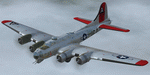
This folder contains a repaint for the A2A WoP2 B-17G in the colors of B-17G-85-BO #43-38348 LG-O "Roxy's Special" of the 322 BS/ 91st BG based in Bassingbourne UK. #348 arrived in Bassingbourne on 18 August 1944, and very quickly received her nose art, by Corporal Tony Starcer. By 5 September, it had flown four missions to Germany. The next mission, on the 8th of September, was to the I.G. Farben Chemical Plant in Ludwigshafen, Germany. On board this mission was David McCarty, pilot, Neil M. Mylin, co-pilot, Donald L. Brazones, navigator, Frank S. Bolen, bombardier, John Cangemi, top turret, Frank F. Trim, Jr., ball turret, Charles E. Beebe, waist guns, Floyd Z. Dillon, tail gun, and Henry R. Schuls, radio operator. Around 11.35 hours, short of the bomb drop near Ludwigshafen, “Roxy’s Special†took a hit ripping off a wing. A spin ensued pinning Bolen and navigator Don Brazones in their nose bubble followed almost immediately by an explosion blowing them free of the aircraft. Bolen and Brazones were the only two survivors of “Roxy’s Special.†They both parachuted down, but not together, therefore neither knew the fate of the other until later. Bolen eluded capture for 7 days before being picked up and carted off to Stalag Luft 1 near Barth, Germany after interrogations. Brazones had been picked up before Bolen and processed through the channels to Stalag Luft 1. The two were reunited at Stalag Luft 1 where they spent the remainder of the war. On Sept. 14, 1944, the day Bolen was captured, his wife Frances gave birth to their first child, Linda, in Selma - a child Bolen would not see until returning from imprisonment and the war. The “Roxy’s Special†crash site was near a Lutheran Church in Ludwigshafen. A very respectful group of Germans removed the remains of the air crew and buried them in the local cemetery. After the war, the remains were turned over to American authorities and they moved them to a National Cemetery in Northern France. In 1947, Bolen served as casket bearer for David McCarty when he was brought home to rest in Birmingham.
Repaint by Jan Kees Blom, based on the paintkit by A2A.
| Filename: | Boeing_B17G_91st_BG_LGO_Roxys_Special.zip |
| License: | Freeware |
| Added: | 7th October 2019, 18:21:26 |
| Downloads: | 109 |
| Author: | Jan Kees Blom |
| Size: | 18.33 MB |
| Category: X-Plane - Utilities | |
| X-Camera 2.2.1 |
|
Images related to this file:
File Description:
The X-Camera 2.1.1 plugin for X-Plane 9 and 10 is a replacement camera system that lets you define multiple view categories and multiple views within those categories that are associated with specific aircraft. X-Camera is similar to EzDok for FSX only for X-Plane. Watch this short X-Camera demo on YouTube: https://www.youtube.com/watch?v=PgOxG8ejq9A
Each view can have options:
- TrackIR:
Each view can enable or disable the TrackIR input. If the view is out the cockpit window having TrackIR enabled is desirable. However, if the view is a close-up of an instrument panel then having TrackIR disabled is probably the better choice since the view will be stable making it easy to click on cockpit controls with the mouse. We also support LinuxTrack on Linux and Mac systems.
- HeadShake:
If the HeadShake plugin from SimCoders is installed then the view can accept input from HeadShake. Similar to the TrackIR feature you will likely want this enabled for certain views but disabled for views on instrument panel close-ups where a stable camera makes it easier to use a mouse to control cockpit knobs and switches. The HeadShake plugin must be at version 1.3 or higher for the integration to work.
- Scenic Flyer:
If the Scenic Flyer plugin from Digital Avionics is installed then the view can choose to display either the Scenic Flyer Glass panel or GA panel.
- Smooth Transition:
When this option is enabled the camera with smoothly transition from one view to another over approximately half a second. When the option is off the view will transition immediately.
- Views can be controlled in a number of ways:
> Each view can be positioned by using keyboard keys or a control panel
> The camera'™s X, Y, Z, Heading, and Pitch can all be adjusted for each view
> Views can be assigned to a HotKey or JoyStick button for easy selection
> HotKey or JoyStick button can be used to navigate to next or previous views
> The views for a specific aircraft can be saved to a CSV file for easy editing
- Walk Mode:
Any view'™s camera can be placed in Walk Mode. While in this mode the camera can be walked or floated around using keyboard input. If you ever played the video game asteroid that is what walk mode is like. The mode is particularly useful for pre-flight inspections of your aircraft. You can create a external view and after selecting that view you can "Walk" the camera around checking out your landing gear, props, etc.
- Linear Transitions and Auto Advance:
Linear transitions allows you to define a transition between two adjacent cameras in category. This capability, in conjunction with the auto advance feature, allows you define fairly sophisticated animations that can be used for automated Pre-flight inspections, scenery viewing, and cool transitions affects that can be used when creating flight videos. All the transitions in our YouTube video were done with X-Camera.
- Bezier Curve Transitions:
Bezier curve transitions allows you to define a transition between three or more adjacent cameras in a category. This capability, in conjunction with the auto advance feature, allows you define fairly sophisticated animations that have an ultra smooth movement between the curve control points.
- Many Unique Camera Attributes:
Tracking Cameras - Camera Leveling - Smooth Camera Joining - Auto Advance to the Next Camera - Individual Zoom and Field of View Setting - External Cameras - Free Cameras - Target Following Cameras - Cineflex Cameras - Automatically Generate Unique Orbit and Fly-By Animations
X-Camera can create unique orbit and fly-by camera sequences by providing a few key parameters
- Airport Cameras:
You can define a set of free cameras associated with an airport. You can create up to 2,000 cameras per airport. X-Camera can also automatically populate airport cameras by reading the airport scenery files and creating cameras at runways, starting locations, taxiway signs, and airport viewpoints. You can map a joystick button to quickly switch between your aircraft camera set and the nearest camera at the nearest airport.
- Target Following Cameras:
Targets are locations defined by a latitude, longitude, and elevation in meters. Target following cameras are a special type of external camera that is attached to your plane and it has the ability to track a selected target. You can also view the target reciprocal which as a view from the target back to you plane.
X-Camera Tutorial Videos: There is also a four part series of tutorial videos that will help you get started with X-Camera. You can access them from the X-Camera Tutorial Page: https://www.stickandrudderstudios.com/x-camera-tutorial-videos/
The full manual is included in the zip file you can also view it here: https://www.stickandrudderstudios.com/downloads/User_Guide.pdf
| Filename: | XCamera_221.zip |
| License: | Shareware, limited functionality |
| Added: | 27th January 2017, 15:14:21 |
| Downloads: | 478 |
| Author: | Mark Ellis |
| Size: | 4.61 MB |
| Category: Prepar3D V1-4 - Utilities | |
| Flightplan Visualizer 1.16 |
|
Images related to this file:
File Description:
Flightplan Visualizer (FV) version 1.16.0. Copyright 2018-2020 by Pelle F. S. Liljendal ([email protected]), all rights reserved.
FV comes with 765 pre-imported Commercial AI flightplans (+380 BizJet flightplans are available as a separate download). However you are able to import additional (AI) flightplans yourself. Once imported these (AI) flightplans can be visualized on a map-view, and the user will be able to search accross all these. Hence you can use the program as inspiration as to which routes to fly. E.g. you can search across all imported flightplans to find all flights in an A321 flying into/out from LDDU, or simply to look for all flights in a Boeing 747-8F.
Simply run the included installer to install the software. The program will be installed into "C:\Program Files (x86)\Flightplan Visualizer" and all datafiles will be installed into: "C:\Users\[UserName]\AppData\Roaming\FlightplanVisualizer". The program comes with a full manual explaining everything, and a 3 page quick manual to get you started. The first 3 times you run the program the quick manual will automatically open. The forum is hosted here: https://forum.aerosoft.com/index.php?/forum/919-flightplan-visualizer/
Version 1.16 Contains the following changes:
- First of all a big THANK YOU to AIG (Alpha India Group) for allowing me to add features to both download their flight-plans (actually a feature suggested by Kai Kamjunke who is one of the developers of AIG AIM and other AIG tools) and access their list of defunct/renamed flightplans. While giving thanks, I also want to thank all (AI) aircraft-model creators, repainters and those who create all the flightplans ... our virtual sky would not be the same without your hard and dedicated work.
- Added new form to download or install AIG flightplans (downloaded directly from the AIG-servers). The form will identify all flightplans that are newer than those already installed or flightplans that are not currently installed. You can simply double-click a flightplan and it will be directly installed without the need to first download the file, and then choose to import this file.
- Both the new flightplan download- and the enable/disable flightplan- form contains a button which download- and show a list of defunct/renamed flightplans (obtained directly from the AIG forum).
- If you create a user-Airline while importing a flight-plan, when you return to the import-form you will be asked if you want to use that newly created flightplan (saves you from having to open the airline-browser and search-for/select that user-airline).
- Added Flightplan-, Airline- and Aircraft-filter to the top of the leg-search form to filter the items shown in the listviews.
- The "Select All" and "Select None" buttons now only (de)select visible items (if a filter is active there might be more items not displayed). However holding SHIFT while pressing these buttons, ALL items will be (de)selected no matter if they are shown or not.
- Replaced the two airport entry fields (in the leg-search form) with filter combo-boxes (MRU) so you can now enter a filter-text to filter which airports to include (the default filter is usign ICAO-codes so the old functionallity is preserved).
- Added filters to search for legs with specific flight-numbers and/or served by aircraft with specific registrations.
- When setting up a filter, sub-elements of the same type can now be separated by "/" so you only have to enter the type-name once (e.g. "country=dnk/nor/swe"). The pipe-char ("|") can be uses in stead if you prefer (e.g. "country=dnk|nor|swe").
- Now both "?" and "%" can be used as a single char wildcard in the filters ("?" is a DOS wildcard, whereas "%" is a SQL-wildcard).
- Added "#" as a wildcard for a single numeric value (0-9) in filters.
- Added "@" as a wildcard for a single alpha value (A-Z) in filters.
- Improved detection of invalid filter-text, which changes the text-color into red, to indicatet that the filter is invalid.
- The ISO3 country-code is now visible in the country combo-boxes in the leg-search form (these codes can be used in the airline- and airport- filters).
- Likewise 3-char Region- and Sub-region -codes have been added to their respective combo-boxes (these codes can also be used in the airline- and airport- filters).
- Saving the leg-search criteria will no longer require the input to be validated. E.g. you can now save the criteria where no aircraft have been selected. If you want to make sure that the criteria is valid for a search, please perform a search before you save the criteria.
- Flightplan-filter added to the "Re-process flightplans" form.
- Aircraft-filter added to the "Choose favorite aircraft-types" form. Also a few extra columns were added to the aicraft list-view.
- The Decode-METAR/TAF form now allows the user to manually enter METAR/TAF messages, and the form can now be opened directly from the main-menu (in case you optain METAR/TAF from other sources and need to decode it).
- Added a new button to the Randomizer form which lets you pick a random route (there is already a button to pick a random flight). The difference is the statistical chance of the chosen route.
- Added 2 columns to the runways listview in the Airport-info form showing head/cross-wind based on selected wind-direction/speed (automatically updated from the obtained METAR report).
- When accepting the result of a leg-search the previous used criteria (if different) are now archived. So you are able to load the 5 last used search criteria.
- The Result-viewer form now have a "Top-most" check-box. When checked that form will be shown on top of all other windows. This allows you to have this form shown on top of other forms (e.g. if you need to enter data from a metar-message into the FMC in the simulator).
- Many of the result-viewer forms now opens non-modal, meaning it can be displayed next to the window form where it was opened and you can switch between the two (you might need to use the new "Top-most" check-box for the best result). When closing the form from where the result-viewer was opened, the result-viewer will be closed as well.
- Likewise the Unit Conversion form also got the "Top-most" check-box in case you want to display this window on top of another program (e.g. if you have paper-work with weight based on kg and you need to enter the weights into a FMC/MCDU that only accepts lbs (or vice versa).
- The "Copy to clipboard" buttons on the METAR/TAF-decode form, and the Leg-Info form have been replaced by a "Show Report" button in stead. This new button will in stead show the text in the Result-viewer form (if you need to, it can be clipped to the clipboard from there).
- Below the (left/right) list-views in the "Enable/disable flightplans" form you now find a label showing two numbers. The 1st number shows the number of items (flightplans) shown in the list-view, and the 2nd number (in the parentheses) shows the number of selected items.
- When importing a flightplan where the aircraft-type can not be detected, the "lines" assigned to the "DUMMY AIRCRAFT" are now all automatically selected. So it is easy to just hit the "Change Aircraft type" button in case there is just a single, or multiple that should have the same type assigned.
- Hoovering the mouse over the gate-markers in the Airport-info form, the tool-tip now contains the GPS-position of the gate. Likewise editing the gate the caption of the edit window contains the GPS-position.
- Added airport size to "FS Comment" column in the "Nearby Airports" form.
- Added line-breaks to the METAR/TAF tool-tips displayed in the Leg-info form (line-breaks also included in the report).
- Fixed: There was a nasty bug in the "Legs" tab-page of the Airport-Info form where the same time-zone was used for both departure- and destination-airport when showing the departure-/destination-times as local times, even if departure- and destination-airports were in different time-zones.
- Fixed: The value of the "Calculated flighttime" check-box in the leg-search form was not set to the loaded value.
- Fixed: If one of your user-airlines had a blank callsign, it would list all airlines with a blank callsign as alternatives. Now it will only try to match non-blank callsigns.
- Fixed: The METAR/TAF decoder was not able to correctly detect a fraction visibility if following variable wind (e.g. "210V290 3/8SM").
- Fixed: Some of the combo-boxes in the leg-search form were enabled for text-entry, where the user should only be able to pick a value.
- Fixed: If "[None]" was selected and you executed a leg-search the "Edit" button remained disabled when you returned to the main form.
- Data: While testing some of the new filters I saw a few erros in the aircraft data (e.g. a few freight aircraft had a non-zero passenger count and other minor issues like that), which were fixed.
- Data: Thanks to Bruce Nicholson for bringing it to my attention that DC-9-15F was not being detected in version 1.15. Now all the DC-9 sub-variants should be detected correctly (e.g. 9-11/12/13/14...51 both pax and freight). The same better sub-variant detection was added to the DC-8's and DC-10's as well.
- Data: Thanks to Aucery for bringing it to my attension that some of the (BizJet) aircraft were not being detected, or not being detected correctly. The King Air 250/300 should now be detected correctly as are Hawker-700/1000, Mitsubishi MU-300, IAI Astra Jet 1125, Cessna T210/T303, and Dornier 328JET/PROP.
- Flightplans: All new/updated flightplans have been added to the installer, and all obsolete have been removed. A total of 765 active flightplans are bundled with the installer.
Pelle
| Filename: | Flightplan_Visualizer_116.zip |
| License: | Freeware, limited distribution |
| Added: | 2nd May 2020, 23:15:38 |
| Downloads: | 318 |
| Author: | Pelle Liljendal |
| Size: | 29.27 MB |


© 2001-2026 AVSIM Online
All Rights Reserved
Privacy Policy |