
Where Flight Simulation Enthusiasts Gather from Around the World!
AVSIM Library - Search Results

| Category: Fly! II - TerraScene | |
| Huntington (Ohio Project) TerraScene Project Pack |

|
File Description:
Re-upload. This is a TerraScene 2.1 Project pack for southern Ohio and portions of adjoining states. It covers all of global tile 197,157 with Ashland, KY in the west and Charleston, WV in the east. Above the Ohio River, you will find a portion of southern Ohio, with rolling hills and small towns like Oak Hill and Gallipolis. This pack includes updated Tiger Census (2000) shapefile data, adding new water areas, new highways, and other details. All scenery data files are included: USGS data, shapefiles, and a complete water mask. Requires TerraScene 2.1 and Fly!II patched to v230 or later.
| Filename: | Huntington_Ohio_Project_TerraScene_Project_Pack.zip |
| License: | Freeware |
| Added: | 13th June 2010, 02:08:20 |
| Downloads: | 181 |
| Author: | Randall Rocke |
| Size: | 55.88 MB |
| Category: Flight Simulator X - Utilities | |
| FSX/FS2004 Flight Analyzer Utility |
|
Images related to this file:
File Description:
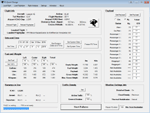
This utility can do the following:
- analyzing your flight from departure to your destination, and the landing with a graphical landingchart.
- when flight analysis is finished you can print a report, the report is automaticly saved as pdf File.
- quickly change the settings of FSX, such as time, date, fuel, weight, traffic etc.
- start a failure sytem, such as gear, flaps, engine, etc.
- runway detecting system to see wich runways are in use.
- load a existing flight or flightplan.
- quickly look to your CFG (settings) files and change them even before the flight simulator is running.
- after a flight is finished FsQC saves your flight automaticly as 'FsQC last Flight', so you can continue the next day or hour.
- and lots of more.
- see also http://www.fsqc.eu for more info.
- FSUIPC required
| Filename: | FSXFS2004_Flight_Analyzer_Utility.zip |
| License: | Check within download |
| Added: | 15th February 2018, 00:57:20 |
| Downloads: | 178 |
| Author: | Evander Tholen |
| Size: | 831 KB |
| Category: Flight Simulator X - Aircraft Repaints, Textures and Modifications | |
| Thai airways "Pride of the Thai simulator" Boeing 777-300ER *Updated* |
|
Images related to this file:
File Description:
Textures only for PMDG B777-300ER. This plane texture had been design for Thai IVAO and VATSIM. Plane design is out of the box from the original Thai airways plane.
| Filename: | Thai_airways_Pride_of_the_Thai_simulator_Boeing_77.zip |
| License: | Freeware |
| Added: | 17th September 2014, 00:20:58 |
| Downloads: | 384 |
| Author: | Por Por Tapatt |
| Size: | 11.28 MB |
| Category: Microsoft Flight Simulator (2020) - Utilities | |
| FSTramp v8.84 for MSFS, FSX(-SE), Prepart3D, X-Plane (Win) |
|
Images related to this file:
File Description:

This add-on is an EXE application for Microsoft Flight Simulator and a DLL module for all other simulators. The DLL variant is activated via hotkeys or the simulator menu add-ons or plugins. Window size and layout are configurable for one or more screens. To avoid dazzling, the brightness of the entire application is customizable. Primarily it is a flight management system (FMS) with automatic control from start to landing. This also includes the observance of SID, STAR and Approaches in unmatched quality. The flight plan required for the FMS can be created manually or automatically, interactive changes and additions during the flight are possible. The basis of the flight planner is the 3D world map and the search function for airfields and navigation aids. The FMS by FSTramp relies on the autopilot of the aircraft. In case of incompatibility, the autopilot integrated in FSTramp will be used. This allows FSTramp to control almost all aircraft from airport to airport. The altitude profile of the flight plan, SID, STAR and approach is taken into account. This means that FSTramp extends the often incomplete airport procedures to and from the runway so that they can be flown completely automatically. During the fully automatic flight, the autopilot values ​​for HDG, ALT, VSPEED, SPD and MACH can be manually overridden. This is e.g. useful for being able to react to the instructions of the tower in the final approach without completely stopping the automatic flight. The rotating or north pointing 3D world map with numeric display of the terrain elevation under the mouse arrow is another special feature. It does not need an internet but is synthesized from included height profiles of the globe. The Data of continents, mountains and rivers are included in the setup. Airspaces, Airways, Waypoints and SID, STAR and Approaches are also included in the setup, but can be updated by installing additional AIRAC cycles. Airfields and navigation stations are taken from the simulator. NVIDIA: If the frame rate of the simulator drops sharply about 20 seconds after FSTramp's visibility, the power management of the GPU slows down prematurely. In the NVIDIA Control Panel, change the 'Manage 3D settings - Power management mode' option to 'Adaptive'.
| Filename: | FSTramp_v884_for_MSFS_FSXSE_Prepart3D_XPlane_Win.zip |
| License: | Shareware, time limited |
| Added: | 7th July 2023, 04:35:12 |
| Downloads: | 111 |
| Author: | Helge Schroeder |
| Size: | 358.21 MB |
| Category: Prepar3D V5 - Utilities | |
| FSTramp v8.84 for Prepart3D 2-6, MSFS, FSX(-SE), X-Plane (Win) |
|
Images related to this file:
File Description:
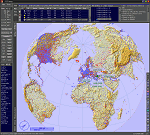
This add-on is an EXE application for Microsoft Flight Simulator and a DLL module for all other simulators. The DLL variant is activated via hotkeys or the simulator menu add-ons or plugins. Window size and layout are configurable for one or more screens. To avoid dazzling, the brightness of the entire application is customizable. Primarily it is a flight management system (FMS) with automatic control from start to landing. This also includes the observance of SID, STAR and Approaches in unmatched quality. The flight plan required for the FMS can be created manually or automatically, interactive changes and additions during the flight are possible. The basis of the flight planner is the 3D world map and the search function for airfields and navigation aids. The FMS by FSTramp relies on the autopilot of the aircraft. In case of incompatibility, the autopilot integrated in FSTramp will be used. This allows FSTramp to control almost all aircraft from airport to airport. The altitude profile of the flight plan, SID, STAR and approach is taken into account. This means that FSTramp extends the often incomplete airport procedures to and from the runway so that they can be flown completely automatically. During the fully automatic flight, the autopilot values ​​for HDG, ALT, VSPEED, SPD and MACH can be manually overridden. This is e.g. useful for being able to react to the instructions of the tower in the final approach without completely stopping the automatic flight. The rotating or north pointing 3D world map with numeric display of the terrain elevation under the mouse arrow is another special feature. It does not need an internet but is synthesized from included height profiles of the globe. The Data of continents, mountains and rivers are included in the setup. Airspaces, Airways, Waypoints and SID, STAR and Approaches are also included in the setup, but can be updated by installing additional AIRAC cycles. Airfields and navigation stations are taken from the simulator. NVIDIA: If the frame rate of the simulator drops sharply about 20 seconds after FSTramp's visibility, the power management of the GPU slows down prematurely. In the NVIDIA Control Panel, change the 'Manage 3D settings - Power management mode' option to 'Adaptive'.
| Filename: | FSTramp_v884_for_Prepart3D_26_MSFS_FSXSE_XPlane_Wi.zip |
| License: | Shareware, time limited |
| Added: | 7th July 2023, 04:35:26 |
| Downloads: | 43 |
| Author: | Helge Schroeder |
| Size: | 358.21 MB |
| Category: Flight Simulator X - Utilities | |
| FSTramp v8.84 for MSFS, FSX(-SE), Prepart3D, X-Plane (Win) |
|
Images related to this file:
File Description:
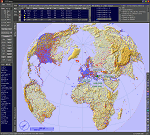
This add-on is an EXE application for Microsoft Flight Simulator and a DLL module for all other simulators. The DLL variant is activated via hotkeys or the simulator menu add-ons or plugins. Window size and layout are configurable for one or more screens. To avoid dazzling, the brightness of the entire application is customizable. Primarily it is a flight management system (FMS) with automatic control from start to landing. This also includes the observance of SID, STAR and Approaches in unmatched quality. The flight plan required for the FMS can be created manually or automatically, interactive changes and additions during the flight are possible. The basis of the flight planner is the 3D world map and the search function for airfields and navigation aids. The FMS by FSTramp relies on the autopilot of the aircraft. In case of incompatibility, the autopilot integrated in FSTramp will be used. This allows FSTramp to control almost all aircraft from airport to airport. The altitude profile of the flight plan, SID, STAR and approach is taken into account. This means that FSTramp extends the often incomplete airport procedures to and from the runway so that they can be flown completely automatically. During the fully automatic flight, the autopilot values ​​for HDG, ALT, VSPEED, SPD and MACH can be manually overridden. This is e.g. useful for being able to react to the instructions of the tower in the final approach without completely stopping the automatic flight. The rotating or north pointing 3D world map with numeric display of the terrain elevation under the mouse arrow is another special feature. It does not need an internet but is synthesized from included height profiles of the globe. The Data of continents, mountains and rivers are included in the setup. Airspaces, Airways, Waypoints and SID, STAR and Approaches are also included in the setup, but can be updated by installing additional AIRAC cycles. Airfields and navigation stations are taken from the simulator. NVIDIA: If the frame rate of the simulator drops sharply about 20 seconds after FSTramp's visibility, the power management of the GPU slows down prematurely. In the NVIDIA Control Panel, change the 'Manage 3D settings - Power management mode' option to 'Adaptive'.
| Filename: | FSTramp_v884_for_MSFS_FSXSE_Prepart3D_XPlane_Win.zip |
| License: | Shareware, time limited |
| Added: | 7th July 2023, 04:35:43 |
| Downloads: | 130 |
| Author: | Helge Schroeder |
| Size: | 358.21 MB |
| Category: Flight Simulator X - Utilities | |
| FlyChrono |
|
Images related to this file:
File Description:
FlyChrono is a time management application for FSX, Prepar3D, and X-Plane. It syncs your simulator time to the real world zulu time.
Once FlyChrono is fully released, you will be able to:
-Sync the real-world zulu time with your simulator
-Manually set the time
-Set an alarm that goes off when you reach a certain distance before an airport or x minutes before your ETA to an airport.
FlyChrono also automatically updates, so there will be no need to re-download anything manually!
PREQUISITES:
If you use FSX/P3D, you will need FSUIPC.
If you use X-Plane, you will need XPUIPC.
TWO PROGRAMS WILL BE INSTALLED:
FlyCentral - This is where all FlyApps (my company's) applications are managed. It is required for FlyChrono's functionality.
FlyChrono - Time management tool for flight simulator.
| Filename: | FlyChrono.zip |
| License: | Freeware, limited distribution |
| Added: | 30th December 2017, 19:18:31 |
| Downloads: | 1,056 |
| Author: | Mark Ng |
| Size: | 291.67 KB |
| Category: Flight Simulator X - Utilities | |
| FS2004/FSX/Prepar3D Flight Analyzer/Logbook Utility V6.14 |
|
File Description:
FS2004/FSX/Prepar3D Flight Analyzer/Logbook Utility V6.14 Flight Data Recorder - Logbook. Now a few bugs are fixed. Very easy to use, just make a flight plan in the simulator or in this utility. What this program does: quickly change the settings of P3D/FSX/Fs2004, such as time, date, fuel, weight, traffic etc.; start a failure sytem, such as gear, flaps, engine, etc.; freeze the time, so you can fly in a for everlasting sunset; runway detecting system to see wich runways are in use; flight analyzing/data recording from departure to parking at the gate; When flight analysis is finished you can print a report, the report is automaticly saved as pdf File. By Evander Tholen.
| Filename: | FS2004FSXPrepar3D_Flight_AnalyzerLogbook_Utility_V.zip |
| License: | Shareware, limited functionality |
| Added: | 21st January 2020, 17:43:48 |
| Downloads: | 193 |
| Author: | Evander Tholen |
| Size: | 3.43 MB |
| Category: Flight Simulator 98 - Aircraft | |
| TransLink Virtual Airlines DeHavilland Dash 8-102 |
|
File Description:
TransLink Regional Airlines (A company of TransLink Virtual Enterprises) Bombardier DeHavilland Dash 8-102 for Flight Simulator 98. All of these aircraft are designed for use by the pilots of TransLink Virtual Airlines and are completely FS2002 compatible. NOTE: Some aircraft may require new panels inorder to work properly.
http://members.shaw.ca/translink/index2.htm
| Filename: | TransLink_Virtual_Airlines_DeHavilland_Dash_8102.zip |
| License: | Freeware |
| Added: | 11th September 2002, 19:54:15 |
| Downloads: | 152 |
| Author: | Stuart Blackbourn |
| Size: | 858.14 KB |
| Category: Flight Simulator 98 - Aircraft | |
| TransLink Virtual Airlines DeHavilland Dash 8-Q400 |
|
File Description:
TransLink Regional Airlines (A company of TransLink Virtual Enterprises) Bombardier DeHavilland Dash 8-Q400 for Flight Simulator 98. All of these aircraft are designed for use by the pilots of TransLink Virtual Airlines and are completely FS2002 compatible. NOTE: Some aircraft may require new panels inorder to work properly.
http://members.shaw.ca/translink/index2.htm
| Filename: | TransLink_Virtual_Airlines_DeHavilland_Dash_8Q400.zip |
| License: | Freeware |
| Added: | 11th September 2002, 19:55:06 |
| Downloads: | 166 |
| Author: | Stuart Blackbourn |
| Size: | 1005.76 KB |


© 2001-2026 AVSIM Online
All Rights Reserved
Privacy Policy |