
Where Flight Simulation Enthusiasts Gather from Around the World!
AVSIM Library - Search Results

| Category: Flight Simulator 2004 - Flight Plans | |
| OB-96 Fort Worth Texas |

|
Images related to this file:
File Description:
FS2004 Flight Plan for OB-96 Fort Worth Texas IFR high speed low altitude military training route. This is the fifteenth in a series of FS2004 flight plans I have uploaded. This route goes through mostly flat and rolling terrain in Texas, Oklahoma and Louisiana. This route has two different sets of targets. These are great routes for B-52, F-111, B-1B, B-2 A6, A4, Vulcan and any fighter or bomber enthusiasts. Of course you can fly the route with any aircraft of your choice. Included in this package is a gauge by Karol Chlebowski for TFR flying at very low altitude. This gauge will greatly enhance your ability to fly these challenging routes and is a great companion of the flight plans. Another option to download Version 2.0 of my FS2004 mini panel which has all this functionality and more.
| Filename: | OB96_Fort_Worth_Texas.zip |
| License: | Freeware |
| Added: | 27th July 2011, 23:11:17 |
| Downloads: | 94 |
| Author: | Bill McClellan |
| Size: | 466.75 KB |
| Category: Microsoft Flight Simulator (2020) - Utilities | |
| FSTramp v8.84 for MSFS, FSX(-SE), Prepart3D, X-Plane (Win) |
|
Images related to this file:
File Description:

This add-on is an EXE application for Microsoft Flight Simulator and a DLL module for all other simulators. The DLL variant is activated via hotkeys or the simulator menu add-ons or plugins. Window size and layout are configurable for one or more screens. To avoid dazzling, the brightness of the entire application is customizable. Primarily it is a flight management system (FMS) with automatic control from start to landing. This also includes the observance of SID, STAR and Approaches in unmatched quality. The flight plan required for the FMS can be created manually or automatically, interactive changes and additions during the flight are possible. The basis of the flight planner is the 3D world map and the search function for airfields and navigation aids. The FMS by FSTramp relies on the autopilot of the aircraft. In case of incompatibility, the autopilot integrated in FSTramp will be used. This allows FSTramp to control almost all aircraft from airport to airport. The altitude profile of the flight plan, SID, STAR and approach is taken into account. This means that FSTramp extends the often incomplete airport procedures to and from the runway so that they can be flown completely automatically. During the fully automatic flight, the autopilot values ​​for HDG, ALT, VSPEED, SPD and MACH can be manually overridden. This is e.g. useful for being able to react to the instructions of the tower in the final approach without completely stopping the automatic flight. The rotating or north pointing 3D world map with numeric display of the terrain elevation under the mouse arrow is another special feature. It does not need an internet but is synthesized from included height profiles of the globe. The Data of continents, mountains and rivers are included in the setup. Airspaces, Airways, Waypoints and SID, STAR and Approaches are also included in the setup, but can be updated by installing additional AIRAC cycles. Airfields and navigation stations are taken from the simulator. NVIDIA: If the frame rate of the simulator drops sharply about 20 seconds after FSTramp's visibility, the power management of the GPU slows down prematurely. In the NVIDIA Control Panel, change the 'Manage 3D settings - Power management mode' option to 'Adaptive'.
| Filename: | FSTramp_v884_for_MSFS_FSXSE_Prepart3D_XPlane_Win.zip |
| License: | Shareware, time limited |
| Added: | 7th July 2023, 04:35:12 |
| Downloads: | 111 |
| Author: | Helge Schroeder |
| Size: | 358.21 MB |
| Category: Prepar3D V5 - Utilities | |
| FSTramp v8.84 for Prepart3D 2-6, MSFS, FSX(-SE), X-Plane (Win) |
|
Images related to this file:
File Description:
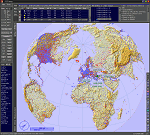
This add-on is an EXE application for Microsoft Flight Simulator and a DLL module for all other simulators. The DLL variant is activated via hotkeys or the simulator menu add-ons or plugins. Window size and layout are configurable for one or more screens. To avoid dazzling, the brightness of the entire application is customizable. Primarily it is a flight management system (FMS) with automatic control from start to landing. This also includes the observance of SID, STAR and Approaches in unmatched quality. The flight plan required for the FMS can be created manually or automatically, interactive changes and additions during the flight are possible. The basis of the flight planner is the 3D world map and the search function for airfields and navigation aids. The FMS by FSTramp relies on the autopilot of the aircraft. In case of incompatibility, the autopilot integrated in FSTramp will be used. This allows FSTramp to control almost all aircraft from airport to airport. The altitude profile of the flight plan, SID, STAR and approach is taken into account. This means that FSTramp extends the often incomplete airport procedures to and from the runway so that they can be flown completely automatically. During the fully automatic flight, the autopilot values ​​for HDG, ALT, VSPEED, SPD and MACH can be manually overridden. This is e.g. useful for being able to react to the instructions of the tower in the final approach without completely stopping the automatic flight. The rotating or north pointing 3D world map with numeric display of the terrain elevation under the mouse arrow is another special feature. It does not need an internet but is synthesized from included height profiles of the globe. The Data of continents, mountains and rivers are included in the setup. Airspaces, Airways, Waypoints and SID, STAR and Approaches are also included in the setup, but can be updated by installing additional AIRAC cycles. Airfields and navigation stations are taken from the simulator. NVIDIA: If the frame rate of the simulator drops sharply about 20 seconds after FSTramp's visibility, the power management of the GPU slows down prematurely. In the NVIDIA Control Panel, change the 'Manage 3D settings - Power management mode' option to 'Adaptive'.
| Filename: | FSTramp_v884_for_Prepart3D_26_MSFS_FSXSE_XPlane_Wi.zip |
| License: | Shareware, time limited |
| Added: | 7th July 2023, 04:35:26 |
| Downloads: | 43 |
| Author: | Helge Schroeder |
| Size: | 358.21 MB |
| Category: Flight Simulator X - Utilities | |
| FSTramp v8.84 for MSFS, FSX(-SE), Prepart3D, X-Plane (Win) |
|
Images related to this file:
File Description:
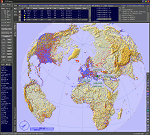
This add-on is an EXE application for Microsoft Flight Simulator and a DLL module for all other simulators. The DLL variant is activated via hotkeys or the simulator menu add-ons or plugins. Window size and layout are configurable for one or more screens. To avoid dazzling, the brightness of the entire application is customizable. Primarily it is a flight management system (FMS) with automatic control from start to landing. This also includes the observance of SID, STAR and Approaches in unmatched quality. The flight plan required for the FMS can be created manually or automatically, interactive changes and additions during the flight are possible. The basis of the flight planner is the 3D world map and the search function for airfields and navigation aids. The FMS by FSTramp relies on the autopilot of the aircraft. In case of incompatibility, the autopilot integrated in FSTramp will be used. This allows FSTramp to control almost all aircraft from airport to airport. The altitude profile of the flight plan, SID, STAR and approach is taken into account. This means that FSTramp extends the often incomplete airport procedures to and from the runway so that they can be flown completely automatically. During the fully automatic flight, the autopilot values ​​for HDG, ALT, VSPEED, SPD and MACH can be manually overridden. This is e.g. useful for being able to react to the instructions of the tower in the final approach without completely stopping the automatic flight. The rotating or north pointing 3D world map with numeric display of the terrain elevation under the mouse arrow is another special feature. It does not need an internet but is synthesized from included height profiles of the globe. The Data of continents, mountains and rivers are included in the setup. Airspaces, Airways, Waypoints and SID, STAR and Approaches are also included in the setup, but can be updated by installing additional AIRAC cycles. Airfields and navigation stations are taken from the simulator. NVIDIA: If the frame rate of the simulator drops sharply about 20 seconds after FSTramp's visibility, the power management of the GPU slows down prematurely. In the NVIDIA Control Panel, change the 'Manage 3D settings - Power management mode' option to 'Adaptive'.
| Filename: | FSTramp_v884_for_MSFS_FSXSE_Prepart3D_XPlane_Win.zip |
| License: | Shareware, time limited |
| Added: | 7th July 2023, 04:35:43 |
| Downloads: | 130 |
| Author: | Helge Schroeder |
| Size: | 358.21 MB |
| Category: Flight Simulator 2004 - AFCAD Files | |
| Abu Dhabi Intl Airport |
|
Images related to this file:
File Description:

Abu Dahbi International Airport (OMAA). Designed on future Master plan for default FS9.
Includes simple detailed main terminal, new midfield terminal + concourse, new midfield cargo ramp, and new eastern cargo ramp and new VIP parking's, new Runway 13L/31R with ILS, over 200 Parking spots.
| Filename: | Abu_Dhabi_Intl_Airport.zip |
| License: | Freeware |
| Added: | 19th July 2012, 20:05:31 |
| Downloads: | 887 |
| Author: | Hendrik Klon, Endeavour AI |
| Size: | 1.61 MB |
| Category: Flight Simulator 2004 - Miscellaneous Files | |
| POP "Plans-on-Paper" Nr. 3 |
|
File Description:
Plans on paper is for the real "pure" navigating pilot, no addons, no moving maps and no gps ofcourse ;-)
The file contains one single Excell file with an IFR navigation/log form and one or more maps.
Just print the plan and map(s), complete it with the "actual" wheather and aircraft details and off you go.
You need Excell or another application that read Excell files to be able to read the file and it does some automatic calculation.
This plan can be used with the SCEvolution scene "A trip to Flesland" (28th october 2008)
More information and the SCEVolution installer can be found here on AVSIM too.
| Filename: | POP_PlansonPaper_Nr_3.zip |
| License: | Freeware |
| Added: | 30th October 2008, 14:24:03 |
| Downloads: | 321 |
| Author: | Arjen de Vries |
| Size: | 246.42 KB |
| Category: Flight Simulator X - Miscellaneous Files | |
| POP "Plans-on-Paper" Nr. 3 |
|
File Description:
Plans on paper is for the real "pure" navigating pilot, no addons, no moving maps and no gps ofcourse ;-)
The file contains one single Excell file with an IFR navigation/log form and one or more maps.
Just print the plan and map(s), complete it with the "actual" wheather and aircraft details and off you go.
You need Excell or another application that read Excell files to be able to read the file and it does some automatic calculation.
This plan can be used with the SCEvolution scene "A trip to Flesland" (28th october 2008)
More information and the SCEVolution installer can be found here on AVSIM too.
| Filename: | POP_PlansonPaper_Nr_3.zip |
| License: | Freeware |
| Added: | 30th October 2008, 14:24:27 |
| Downloads: | 377 |
| Author: | Arjen de Vries |
| Size: | 246.42 KB |
| Category: Flight Simulator X - Gauges | |
| Integrated Standby Flight Display V2 for Saitek Pro Flight Inst Panel |
|
Images related to this file:
File Description:
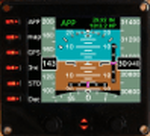
This is a second version of the ISFD for FIP. It was resized to let the left side empty to allow some text through the SaiFlightSimX.xml file to identify the buttons.
The gauge provides indicated air speed, altitude, heading, aircraft attitude and QNH. When in range of an ILS the ILS bars appear. When the autopilot mode approach is selected the text APP in green colour appears.
| Filename: | Integrated_Standby_Flight_Display_V2_for_Saitek_Pr.zip |
| License: | Freeware |
| Added: | 4th July 2013, 06:59:07 |
| Downloads: | 380 |
| Author: | Philippe Verhaege |
| Size: | 243.17 KB |
| Category: Flight Simulator X - Flight Plans | |
| Year End´s Flight ( a WW2 Flight Adventure in New Zealand) |
|
File Description:
New Zealand entered the Second World War by declaring war on Nazi Germany at 9.30 pm 3 September 1939.
It is December 29th and your DC-3, C-46 squadron 599 has been alerted to pick up special mountain experts
personnel throught the country. Your DC-3 must start at Mount Cook and fly the "Mountain" Route to places like
the famous seminary of The Holy Grail, where Father Ephrom is waiting. (Plan your approach here and land almost at
stall speed!!!!). The men and women you will pick up are expert climbers needed to advise Allied commanders in the field.
----Not a flight for beginners!!!!!-----, make sure the specially turbo charged DC-3 or C-46 is in top shape.
All the mountain fields you will be landing are very tricky so make sure some strong stuff is in the thermos bottle!!!!!
(like fortified Quanine Water!!!!)
---------Weather?...Approaching Storms!!!!!
| Filename: | Year_Ends_Flight__a_WW2_Flight_Adventure_in_New_Ze.zip |
| License: | Freeware, limited distribution |
| Added: | 28th December 2007, 23:13:36 |
| Downloads: | 704 |
| Author: | Gera Godoy C |
| Size: | 387.63 KB |
| Category: Flight Simulator 2004 - Aircraft Repaints, Textures and Modifications | |
| Royal Dutch Air Force F-84 Thunderstreak |
|
Images related to this file:
File Description:
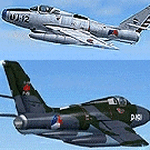
Re-upload - This package contains the excellent F-84F Thunderstreak of Kazunori Ito in 2 color schemes, representing the Royal Dutch Air Force in the fifties and sixties.
To make it interesting from an AI point of view there are 4 different registrations in both texture versions included, so 8 in total. 4 all aluminum versions (pre 1959) and 4 camouflaged versions (post 1959) will fly an interesting flight plan with round flights and touch & go's between Volkel, Gilze-Rijen, Eindhoven and Twente. They can be used in the NL2000 scenery as well as the default scenery.
| Filename: | Royal_Dutch_Air_Force_F84_Thunderstreak.zip |
| License: | Freeware |
| Added: | 31st May 2010, 09:29:27 |
| Downloads: | 908 |
| Author: | Jaap de Baare / Harry Biard |
| Size: | 4.26 MB |


© 2001-2026 AVSIM Online
All Rights Reserved
Privacy Policy |