
Where Flight Simulation Enthusiasts Gather from Around the World!
AVSIM Library - Search Results

| Category: Flight Simulator X - Scenery | |
| Central Massachusetts Airports |

|
Images related to this file:
File Description:
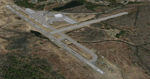
This package contains 25 airports in central Massachusetts. These airports are intended to be used with FSX and the free addon - TileProxy. TileProxy provides real-time photorealistic satellite imagery in place of the stock auto generated FSX scenery or any other scenery package.
The package includes sixteen (16) stock FSX airports which have been modified (re-located runways, buildings, taxiways, etc.) to more accurately re-position them with the real-world scenery. In addition, there are two (2) unlisted airports which are not available in FSX. These airports are existing real private airports. There are also seven (7) "abandoned" airports included (i.e. airports that no longer exist). These airports were active in the 1920s-1970s.
| Filename: | Central_Massachusetts_Airports.zip |
| License: | Freeware |
| Added: | 2nd July 2013, 06:01:25 |
| Downloads: | 426 |
| Author: | John Greenwood |
| Size: | 5.15 MB |
| Category: Flight Simulator X - Gauges | |
| PFD for Flight Instrument Panel |
|
Images related to this file:
File Description:
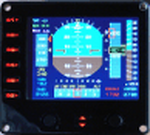
For Saitek Pro Flight Instrument Panel.
This Primary Flight Display (PFD) Glass type gauge provides following utilities:
1. Artificial horizon with sliding bug (yellow).
2. Moving tapes for: Air speed, Altitude, Heading.
3. Detail window for altitude.
4. Needle for vertical speed.
5. Glide slope and Localizer bars, they appear when in range of ILS only.
6. Digital values for: Total Air Temperature (TAT), QNH, Mach number, VOR 1 selected course, VOR 1 bearing, DME 1 range, Radio height altitude up to 2000 feet, above a bar go through the window, vertical speed, a minus sign appears when vertical speed is negative.
7. Autopilot bugs for: Selected altitude, Selected speed, Selected heading. Rmk: Bugs appear only when autopilot ALT, SPD or HDG functions are selected.
8. Display Autopilot functions with Text acronysm in yellow: AP, Autopilot Master On, THR, auto throttle mode engaged, SPD, air speed mode selected, HDG, heading mode selected, NAV, navigation mode selected (VOR 1), APR, approach mode selected, BC, back course mode selected.
9. Knobs functions: Right, allows to change QNH value. Left, allows to move VOR 1 course.
| Filename: | PFD_for_Flight_Instrument_Panel.zip |
| License: | Freeware |
| Added: | 23rd May 2011, 22:37:18 |
| Downloads: | 1,096 |
| Author: | Philippe Verhaege |
| Size: | 249.48 KB |
| Category: Flight Simulator X - Aircraft Repaints, Textures and Modifications | |
| Upgrade pack - Airbus A318 FD Special Version from V2 to V3 (update pack only) |
|
Images related to this file:
File Description:

This Pack is only to update my aircraft "Airbus A318 FD Special Version V2" (pa318fd_v2_299527.zip) with a new ehanced panel that I have created with the Airbus A321.
This new panel version (v3.05) provides many new features to the version V2 of the aircraft: New fuel system management gauge like the real Airbus, full manual engines startup procedure, with all new BLEED circuit (with new Bleed page on ECAM with animations), all fuel valves, pumps, crossfeed work. All bleed valves work. Engines failure procedure management, ehanded Navigation display with TCAS on ARC or NAV mode, gps Approach procedure sheme on the navigation display, corrected electrical circuit, and many other features (too long to describe here).
There is a user manual in English and in French. Very important to read it (for the manual engines startup procedure). You must have the orignal aircraft installed on your computer (Aribus A318 FD Special version V2) because this pack is only an update. Please, read the pdf installation file (English and French version) for full information on installing this update.
| Filename: | Upgrade_pack__Airbus_A318_FD_Special_Version_from_V2_to_V3_update_pack_only.zip |
| License: | Freeware, limited distribution |
| Added: | 17th June 2012, 13:21:38 |
| Downloads: | 2,931 |
| Author: | Francois Dore |
| Size: | 19.29 MB |
| Category: Flight Simulator 2004 - Gauges | |
| FS2004 Simulated Aircraft Bubble Sextant |
|
File Description:
As travel by air developed and matured, navigation over long distances also developed and improved. In the early days, however, air navigation essentially used ship navigation techniques adapted for aircraft. Without "landmarks", the navigators used Ded Reckoning (DR) and the stars. Celestial or Astronomical Navigation provides a means of obtaining Lines of Position (LOPs) from the stars. Crossing LOPs will fix a position. It requires a chart, and a planned course on that chart, with waypoints specified by Latitude and Longitude, an assumed time of arrival at each waypoint, and stars (including the Sun, Moon, or planets) in view. In the 1940s, extensive tables of star positions were made available to air navigators to be used with sextants to obtain these LOPs. In the tables, all times involved are GMT. This data is available from the Internet in "ready to use" form. This gauge simulates the sextant, and the process by which one obtains a LOP, or crossing LOPs to obtain a position, or fix. Can be used with any FS2004 aircraft. Includes comprehensive browser-based manual and references.
| Filename: | FS2004_Simulated_Aircraft_Bubble_Sextant.zip |
| License: | Freeware |
| Added: | 6th December 2004, 19:21:14 |
| Downloads: | 4,977 |
| Author: | Dave Bitzer, Mark Beaumont |
| Size: | 989.73 KB |
| Category: Flight Simulator 2004 - Miscellaneous Files | |
| FS2004 Mobile Control Tower |
|
File Description:
Control the incoming and outgoing traffic on your RADAR screen (MARCIANO’s great Radar gauge) or with the excellent Ground and Traffic Radar included in the FSUIPC addon as AI planes fly around you.Rotating engine rotates the tower for a cockpit full 360ª View on 5 different levels or with the virtual view. Completely re-designing of the Main panel for a more professional look and new 7 panels for other views. Now listed as Mobile Tower in the FS2004 planes list with 1 to 5 levels variation. The tower moves easily and rapidly from one level to another without FS2004 reloading scenery textures while Traffic AI remains active. Revolutionary rotating and positioning engines by Rob Barendregt ! Precise and exact "GoodYear Blimp" view ideal for AFCAD designer. Serves also as mirador or observatiopn tower anywhere. This is a complete new Control tower and does not need the 2002 version which was downlaoded more than 11.500 times.
This sucessfull accesory is intended to be the most complete and useful FREEWARE Control Tower available at the moment for FS2004.Full Web support. by Ronald R. Cachemaille
| Filename: | FS2004_Mobile_Control_Tower.zip |
| License: | Freeware |
| Added: | 11th July 2004, 02:33:25 |
| Downloads: | 16,951 |
| Author: | Ronald R. Cachemaille |
| Size: | 12.03 MB |
| Category: Flight Simulator 2004 - Utilities | |
| Traffic View Board Version 2.1 |
|
File Description:
Traffic View Board is a new AI view gauge file that will give you an overview of the AI traffic without the need of external programs. This package works like a regular user aircraft and must be installed in the FS "Aircraft" folder. Instead of a regular aircraft model, this model is invisible, and the regular panel is replaced with a traffic board (similar to those found at any airport). When powered on you may choose between "Arrival", "Departure", "In flight" and "On ground". Each flight in the traffic board list represents an AI aircraft in FS2004. By clicking on a flight form the list, that particular aircraft is selected. When activating the "Follow aircraft" button the user aircraft are mapped to the AI aircraft position. This little trick allows you to spot that AI aircraft from any view in FS2004. FS2004 is still "looking" towards the user aircraft, but as the user aircraft are mapped to the AI aircraft FS2004 is "looking" towards the AI aircraft as well.
| Filename: | Traffic_View_Board_Version_21.zip |
| License: | Freeware |
| Added: | 29th October 2004, 22:38:48 |
| Downloads: | 54,526 |
| Author: | Arnt Helge Haland |
| Size: | 479.8 KB |
| Category: Flight Simulator X - Aircraft Repaints, Textures and Modifications | |
| Myanmar Airways International Airbus A321 |
|
File Description:
Repaint for default FSX Airbus_A321 in Myanmar Airways International Colours. MAI is the international airline of Burma.
| Filename: | Myanmar_Airways_International_Airbus_A321.zip |
| License: | Freeware |
| Added: | 19th November 2006, 21:32:22 |
| Downloads: | 1,370 |
| Author: | HOUSE-RP, Robby Pauletto |
| Size: | 3.32 MB |
| Category: Flight Simulator X - Aircraft Repaints, Textures and Modifications | |
| Alpha Blue Cargo Boeing 737-300 |
|
File Description:
Replacement CFG's for Alpha Blue Cargo's Boeing 737-300. This aircraft works with FSX with these Files.
| Filename: | Alpha_Blue_Cargo_Boeing_737300.zip |
| License: | Freeware |
| Added: | 12th January 2007, 00:57:03 |
| Downloads: | 334 |
| Author: | Alpha Blue | Robbie Nelson | Tom Hughes |
| Size: | 527.45 KB |
| Category: Flight Simulator X - Scenery | |
| Mt Taranaki, NZ photoreal |
|
File Description:
30 x 40 kms of photoreal scenery at 2.5m/pixel for FSX. Mt Taranaki/Egmont, New Zealand.
| Filename: | Mt_Taranaki_NZ_photoreal.zip |
| License: | Freeware, limited distribution |
| Added: | 25th February 2007, 11:53:49 |
| Downloads: | 5,908 |
| Author: | Robin Corn |
| Size: | 28.24 MB |
| Category: Flight Simulator X - Aircraft Repaints, Textures and Modifications | |
| Take To The Skies Embraer 190 Paintkit |
|
File Description:
Embraer 190/E190/EMB190/ERJ190
Paintkit for the Take to The Skies add-on for FSX & 2004
| Filename: | Take_To_The_Skies_Embraer_190_Paintkit.zip |
| License: | Freeware |
| Added: | 1st April 2007, 10:40:52 |
| Downloads: | 427 |
| Author: | Scott Pairman |
| Size: | 828.69 KB |


© 2001-2026 AVSIM Online
All Rights Reserved
Privacy Policy |