
Where Flight Simulation Enthusiasts Gather from Around the World!
AVSIM Library - Search Results

| Category: Flight Simulator X - Miscellaneous Files | |
| FSX A321 Workaround for Shockwave 3d – Redux lights |

|
File Description:
FSX A321 landing or taxi lights only in shockwave Redux.
Workaround for Shockwave 3d – Redux lights in the default A320. (an easter egg!)
When you install the Shockwave 3d lights (both the plain version and the Redux version) you will end up with a plane that can not land with it’s lights on without having it’s gear down.
Luckily, there is a taxi light switch on the overhead panel that works.
Therefore by removing the “lights out when gear up command” by the shockwave gauge, lights won’t go out when gear is up any more.
Now you’ll have to switch the gear lights (not the landing lights!) off by clicking the taxi lights switch on the overhead, and the taxi (gear) lights actually go out, while the landing lights stay on (and vice versa, and you also can have both on or off at the same time)
| Filename: | FSX_A321_Workaround_for_Shockwave_3d__Redux_lights.zip |
| License: | Freeware |
| Added: | 23rd March 2008, 00:32:29 |
| Downloads: | 1,164 |
| Author: | Joost Visser |
| Size: | 911.71 KB |
| Category: Flight Simulator X - Original Aircraft | |
| LATAM Airbus A350-900 V5 / Lights |
|
Images related to this file:
File Description:

FSX LATAM Airbus A350-900 V5 / Lights. This version 5 / Lights, features more improved and detailed aircraft model, ( image comparison between v5 and v4 inside ), also modifications have been done on both, taxi lights and wing lights.
Taxi lights will add new night lighting on main landing gears and wheels and add bleu LED ground lighting effect for each gears.
Landing light will add logo lights on winglets, ( more info regarding proper functioning of the night effects in the Read Me FSX ).
Version 5 / Lights, included CamSim's own static displays and Animated Ground Servicing (AGS).
Model design and paint by Camil Valiquette.
| Filename: | LATAM_Airbus_A350900_V5__Lights.zip |
| License: | Freeware |
| Added: | 22nd October 2016, 01:25:02 |
| Downloads: | 359 |
| Author: | Camil Valiquette |
| Size: | 5.42 MB |
| Category: Prepar3D V1-4 - Scenery | |
| Dynamic Lights for NSTU Pago Pago |
|
File Description:
Dynamic Lights for Pago Pago Airport. Has been designed to work with NSTU ORBX scenery, however may work with other versions too. You need SODE and P3Dv4.5 + Hotfix 2. You can choose yellow and orange variations by just using SODE menu. No need to close the simulator. If you have comments or need help, just dropp me an email to: [email protected]
| Filename: | Dynamic_Lights_for_NSTU_Pago_Pago.zip |
| License: | Freeware, limited distribution |
| Added: | 27th March 2020, 03:18:37 |
| Downloads: | 142 |
| Author: | Walter Almaraz |
| Size: | 277.34 KB |
| Category: Flight Simulator 2004 - Original Aircraft | |
| LATAM Airbus A350-900 V5 / Lights |
|
Images related to this file:
File Description:
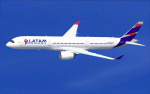
FS2004 LATAM Airbus A350-900 V5 / Lights. This version 5 / Lights, features more improved and detailed aircraft model, ( image comparison between v5 and v4 inside ), also modifications have been done on both, taxi lights and wing lights.
Taxi lights will add new night lighting on main landing gears and wheels and add bleu LED ground lighting effect for each gears.
Landing light will add logo lights on winglets, ( more info regarding proper functioning of the night effects in the Read Me FS2004 ).
Version 5 / Lights, included CamSim's own static displays and Animated Ground Servicing (AGS).
Model design and paint by Camil Valiquette.
| Filename: | LATAM_Airbus_A350900_V5__Lights.zip |
| License: | Freeware |
| Added: | 22nd October 2016, 01:24:51 |
| Downloads: | 238 |
| Author: | Camil Valiquette |
| Size: | 4.79 MB |
| Category: Flight Simulator 2004 - Scenery Design | |
| Lights SS v2 FS9 Scenery Objects |
|
File Description:
IMPORTANT! CHANGES FROM VERSION 1: Version 1 of Lights SS was created using a modified landing lights texture (spotlight.bmp) and multiple light sources in each light "bulb". Unfortunately, this method had a serious effect on frame rates, especially on older systems like mine. With this version I have gone back to using the default landing lights texture and reduced the number of light sources to one per "bulb". The result is lights that are less bright than in version 1, and also have a different shape on the ground. If you have already installed Lights SS version 1, VERSION 2 WILL REPLACE ANY VERSION 1 LIGHTS YOU HAVE ALREADY PLACED IN YOUR SCENERY!! I strongly recommend that you back up your existing version 1 files before installing version 2. Then if you decide you don't like version 2, you can go back to version 1.
| Filename: | Lights_SS_v2_FS9_Scenery_Objects.zip |
| License: | Freeware |
| Added: | 23rd January 2008, 00:35:47 |
| Downloads: | 7,341 |
| Author: | Sidney Schwartz |
| Size: | 433.13 KB |
| Category: Flight Simulator 2004 - Scenery Design | |
| Lights SS V2+ scenery object library |
|
Images related to this file:
File Description:
This is a collection of lighting objects for FS9. It includes ramp lights, street lights, and smaller lights for mounting on the outsides of buildings. Version 2+ adds specific compatibility with RWY12, ADE9X, and Sbuilder 2.05. If you have already installed the previous version of this library and are NOT using one of these programs to place scenery objects, you do not need to download and install V2+. V2+ also includes the updated textures from SS_Textures_update_3.zip. Installing V2+ version should not affect any scenery made using objects from V2.
| Filename: | Lights_SS_V2_scenery_object_library.zip |
| License: | Freeware |
| Added: | 29th December 2009, 01:21:12 |
| Downloads: | 7,082 |
| Author: | Sidney Schwartz |
| Size: | 602.8 KB |
| Category: Flight Simulator 2004 - Scenery | |
| Maceio Photoreal |
|
Images related to this file:
File Description:
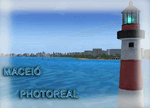
Maceio / Alagoas, Brazil photoreal. Includes night textures, 3D generic objects and autogen. This scenery no need updates, re-upload after AVSIM hack attack.
| Filename: | Maceio_Photoreal.zip |
| License: | Freeware |
| Added: | 5th January 2011, 14:59:21 |
| Downloads: | 1,135 |
| Author: | Rodrigo Eduardo |
| Size: | 31.32 MB |
| Category: Flight Simulator 2004 - AI Aircraft | |
| Airbus A330-300 Factory Primer |
|
File Description:
Three generic Airbus factory primer repaints for the FSPainter A330-300, one for each engine type. Textures only, FSP base model availible separately.
| Filename: | Airbus_A330300_Factory_Primer.zip |
| License: | Freeware, limited distribution |
| Added: | 18th July 2007, 19:12:23 |
| Downloads: | 718 |
| Author: | Daniel Fall |
| Size: | 769.62 KB |
| Category: Flight Simulator 2004 - AI Aircraft | |
| Airbus A330-200 Factory Primer |
|
File Description:
Three generic Airbus factory primer repaints for the FSPainter A330-200, one for each engine type. Textures only, FSP base model availible separately.
| Filename: | Airbus_A330200_Factory_Primer.zip |
| License: | Freeware, limited distribution |
| Added: | 18th July 2007, 19:08:58 |
| Downloads: | 742 |
| Author: | Daniel Fall |
| Size: | 1.06 MB |
| Category: Flight Simulator 2002 - Panels | |
| Generic Panel For 2-4 Engine Heavy Jets |
|
File Description:
Version 5.0 of this fully functional panel.
Based on default FS2002 Boeing 777 panel, and
additional gauges from others; like FMC's,
brake/gear sounds, seatbelts/no-smoking signs,
CDplayer, taxispeed control, and many more.
Optimised for readability, with the panel
using less than half the screen height. So
excellent outside view in Cockpit Mode, while
panel is enabled. Since this panel includes
gauges for both 2- and 4 engine aircraft, it
can be used for any heavy jet.
Includes extensive documentation for installation
and how-to operate the added gauges.
NOTE: since it is generic, it has NO Virtual
Cockpit.
| Filename: | Generic_Panel_For_24_Engine_Heavy_Jets.zip |
| License: | Freeware, limited distribution |
| Added: | 11th September 2002, 00:19:27 |
| Downloads: | 1,452 |
| Author: | Rob Barendregt |
| Size: | 6.64 MB |


© 2001-2026 AVSIM Online
All Rights Reserved
Privacy Policy |