
Where Flight Simulation Enthusiasts Gather from Around the World!
AVSIM Library - Search Results

| Category: Flight Simulator 2002 - Panels | |
| America West B737-300 Panel Merge |

|
File Description:
B737-300 Project Freeware model in America West colors prepared for use with Dreamfleet panel with F/O Vspeeds callouts and real wing passenger views. Watch the flaps extend/retract, ailerons move and spoilers extend/retract! You need Dreamfleet's Greatest Airliners B737-400 installed on your system!
| Filename: | America_West__B737300_Panel_Merge.zip |
| License: | Freeware |
| Added: | 21st December 2002, 16:11:25 |
| Downloads: | 1,532 |
| Author: | Patrizio Fangio |
| Size: | 3.93 MB |
| Category: Prepar3D V5 - AI Aircraft | |
| P3DV4-5 FSPXAI A321-200neo Viva Aerobus fleet |
|
Images related to this file:
File Description:
Textures only for FSPXAI payware A32X neo. Fantastic models and paint kit with PBR textures by Mitsushi Yukata. Three variations for 3 planes as they don't have the same sharklets paints. Paint by Joel Branchu for real traffic with the registration for each variation. Feb 2021
| Filename: | P3DV45_FSPXAI_A321200neo_Viva_Aerobus_fleet.zip |
| License: | Freeware |
| Added: | 6th February 2021, 18:53:11 |
| Downloads: | 108 |
| Author: | Joel Branchu |
| Size: | 36.42 MB |
| Category: Flight Simulator X - Utilities | |
| FS2004/FSX Flight Analyzer Utility V2.04 |
|
Images related to this file:
File Description:
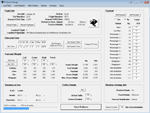
NOW ALSO WORKING WITH FS2004
What this program do:
- quickly change the settings of FSX/Fs2004, such as time, date, fuel, weight, traffic etc.
- start a failure sytem, such as gear, flaps, engine, etc.
- freeze the time, so you can fly in a for everlasting sunset.
- runway detecting system to see wich runways are in use.
- a flight analysis system, this is automaticly started when you start FsQC.
- When flight analysis is finished you can print a report, the report is automaticly saved as pdf File.
- flight analysis is finished when you parked your aicraft with the parking brakes set for more then 5 seconds.
- graphical landingchart.
- load a existing flight or flightplan.
- quickly look to your CFG (settings) files (only FSX) and change them even before the flight simulator is running.
- After a flight is finished FsQC saves your flight automaticly as 'FsQC last Flight', so you can continue the next day or hour.
- for properly working, flight analysis require a fsx/fs2004 flightplan.
Flight analysis:
Flight analysis start recording at the moment when you begin taxiing.
It gives you huge information such as:
- takeoff- and landing-weight
- takeoff roll in m. or ft.
- separate fuel consumption in taxi, climb, cruise and descent.
- maximum banking in flight
- which speed you using the flaps and gear
- when autopilot on or off
- vertical speed on touchdown
- reverser set after landing
- wich speed you cancel reverser
- bouncing at landing
- graphical landingchart.
- and lots of more
You can better look the example of the pdf document located in the 'Flight Reports' folder.
Failures:
In the settings menu you can select the kind of failures you want to occur and when they must occur.
At this moment 10 failures are possible:
-altitude
-attitude
-heading
-airspeed
-vertical speed
-pitot
-fuelleak
-flaps
-engine
-gear
Recommended:
For more easy use, run this program on a second monitor or much better on a second computer(laptop) where FSUIPC-client is running in the same network where FSX/FS2000 is running and FSUIPC WideFs is registered.
See also the pdf Manual.
Also look at www.FsQC.eu for more information.
If you have a problem look first on www.fsqc.eu/faq.html
If you have questions please contact [email protected]
| Filename: | FS2004FSX_Flight_Analyzer_Utility_V204.zip |
| License: | Check within download |
| Added: | 5th March 2018, 22:40:20 |
| Downloads: | 332 |
| Author: | Evander Tholen |
| Size: | 2.45 MB |
| Category: Flight Simulator X - Aircraft Repaints, Textures and Modifications | |
| Cessna C152II PH-JVB |
|
Images related to this file:
File Description:
Depicted is PH-JVB flown by Stella Aviation based at Teuge ( EHTE ) in the Netherlands .
This repaint can be used in FS 9 and FS X . A thumbnail of PH-JVB is included .
| Filename: | Cessna_C152II_PHJVB.zip |
| License: | Freeware |
| Added: | 15th November 2009, 18:48:17 |
| Downloads: | 175 |
| Author: | John Glanville / Carenado |
| Size: | 4.35 MB |
| Category: Flight Simulator X - Aircraft Repaints, Textures and Modifications | |
| Cessna C172II N G-BNKE |
|
Images related to this file:
File Description:
Depicted is G-BNKE privately owned , paint scheme still in use .
Repaint is for Carenado's C172 N .
This repaint can be used in FS 9 and FS X . Full instructions to install included .
| Filename: | Cessna_C172II_N_GBNKE.zip |
| License: | Freeware |
| Added: | 17th November 2009, 11:28:31 |
| Downloads: | 295 |
| Author: | John Glanville / Carenado |
| Size: | 2.88 MB |
| Category: Flight Simulator 2004 - Aircraft Repaints, Textures and Modifications | |
| Indiana ANG |
|
File Description:
Five repaints of Hrvoje Kovacevic's F-16 AI aircraft in the colours of the Indiana ANG. 113th FS - Terre Haute IAP (3), 163rd FS - Fort Wayne IAP (2). Textures only original aircraft required.
| Filename: | Indiana_ANG.zip |
| License: | Freeware, limited distribution |
| Added: | 27th February 2005, 15:53:02 |
| Downloads: | 237 |
| Author: | Graham King |
| Size: | 237.97 KB |
| Category: Flight Simulator 2004 - Aircraft Repaints, Textures and Modifications | |
| Ohio ANG F-16 |
|
File Description:
Four repaints of Hrvoje Kovacevic's F-16 AI aircraft in the colours of the Ohio ANG. 112th FS - Toledo Express AP (2), 162nd FS - Springfield / Beckley MAP (2). Textures only original aircraft required.
| Filename: | Ohio_ANG_F16.zip |
| License: | Freeware, limited distribution |
| Added: | 27th February 2005, 15:57:47 |
| Downloads: | 264 |
| Author: | Graham King |
| Size: | 192.39 KB |
| Category: Flight Simulator X - Aircraft Repaints, Textures and Modifications | |
| Cessna C172R Skyhawk (C-GBAF) |
|
Images related to this file:
File Description:
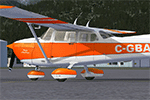
This is a repaint for the superb A2A Simulations Cessna 172R. This repaint is real yet semi-fictional; the real aircraft this paint is based on is a 172K, s/n: 17257297, manufactured in 1969. The real aircraft makes it's home at CYKM Kincardine Municipal Airport in Ontario.
| Filename: | Cessna_C172R_Skyhawk_CGBAF.zip |
| License: | Freeware, limited distribution |
| Added: | 24th September 2013, 14:20:04 |
| Downloads: | 538 |
| Author: | Jim Stewart |
| Size: | 11.08 MB |
| Category: Flight Simulator 2004 - Miscellaneous Files | |
| Air Ambulance Aviator for B200 |
|
File Description:
This is a spreadsheet that models a fictitious air ambulance company based in the North East of the USA. You are a Junior Captain who has started working for an air ambulance company called MedEvac Services. With a home base at Albany, NY, this company operates a single B200 to some 64 destination airfields in the North East of the USA. The company uses just one captain (you) and several co-pilots. All pilots earn salaries based on an hourly rate but only you get an additional profits-related bonus.
The spreadsheet will randomly create a variety of assignments at different times of day, with two- or three-leg operations involving patient transfers and organ transplant transits plus a host of operational and financial challenges thrown in. Your aim is to fulfil your assignments and fly your aircraft as well as possible in order to earn money and gain points. As your points increase, so will your rank, hourly rate and bonus percentage. Either you can see how quickly you can attain the most senior rank or see how much money you can earn in a set period of time. The challenge is up to you!
| Filename: | Air_Ambulance_Aviator_for_B200.zip |
| License: | Freeware |
| Added: | 16th January 2007, 17:17:28 |
| Downloads: | 413 |
| Author: | Owen Hanmer |
| Size: | 83.62 KB |
| Category: Civil Flight Simulators - Looking Glass Flight Unlimited 3 | |
| Visual GTL Editor |
|
Images related to this file:
File Description:
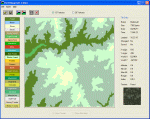
This is a standalone program that allows you to change the terrain textures of outer terrain megatiles by applying altitude based rule changes. This means that the Editor allows you to do what FU3 does through the RULES.TXT file but in visual form and on a per tile basis. The Editor converts and displays l0xxxx.gtl files and their corresponding l5xxxx.geo elevation files to 512x512 bitmaps. It also displays useful information when moving the mouse across the main display, i.e. Min Alt, Max Alt, Alt Range, Alt Index, Texture and so on. The Index value is an altitude range corresponding to the 64 colours used to create the elevation bitmap and is useful when specifying Min Alt and Max Alt values for rule changes. You can apply up to 8 rule changes at a time (just repeat until you get the desired results), either to the entire tile or to a subsection defined as X and Y co-ordinates. The Editor displays X-origin and Y-origin values within the tile as an aid to this. You can use this with the default 13 textures or with my extended 26 textures.
| Filename: | Visual_GTL_Editor.zip |
| License: | Freeware |
| Added: | 29th June 2011, 21:14:30 |
| Downloads: | 76 |
| Author: | Jonathan Stonehouse |
| Size: | 2.76 MB |


© 2001-2026 AVSIM Online
All Rights Reserved
Privacy Policy |