
Where Flight Simulation Enthusiasts Gather from Around the World!
AVSIM Library - Search Results

| Category: Flight Simulator 2004 - Original Aircraft | |
| Air Nostrum (Iberia Regional) Bombardier CRJ900 v3 |

|
Images related to this file:
File Description:
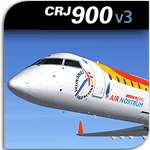
The Project Open Sky team now presents our long awaited version 3 of our CRJ-900, in Air Nostrum (Iberia regional) colours [EC-JYA]. This release also includes the 2008 sticker "Comunidad Sede de la 32a America's Cup". This model is a continuation of our previous CRJ700 project.
Built mainly for FS2004 (not fully tested in FSX, see our support forums at http://www.projectopensky.com), the CRJ900 model features highly detailed and accurate exterior model, dynamic wing flex with XML coding, wing views, fully animated control surfaces, fully independent XML landing gear suspension, trim animation, highly realistic Opening Passenger Door L1 (integrated Airstair door) and opening forward and aft baggage holds (opened by the included POSKY Utility Panel), rolling wheels and extremely detailed animated landing gears with photorealistic textures, XML coded nose gear steering with steering lock at high rolling speed, animated thrust reversers, modeled built-in Lektro Pushback Tug (controlled by POSKY Utility Panel) and highly-detailed and accurate, 32bit day and night textures and realistic lighting effects. Aircraft painted by Project Opensky member Dickson Chan.
| Filename: | Air_Nostrum_Iberia_Regional_Bombardier_CRJ900_v3.zip |
| License: | Freeware, limited distribution |
| Added: | 15th May 2010, 23:22:07 |
| Downloads: | 5,816 |
| Author: | Project Opensky |
| Size: | 19.06 MB |
| Category: Flight Simulator X - Scenery | |
| FSX-LPMA-Funchal-Madeira |
|
File Description:
FSX-LPMA-Funchal-Madeira
well it starts as always, i can't find any usable freeware airport in this case for
the LPMA Madeira Funchal so I'll build it myself again...............well what can i
say here it is after a lot of work as real as possible with a lot of details with the
Default scenery built ..........So fly to Madeira with an Airbus A321 or a Boeing
737, of course There youchange to a heli or a smaller plane and see each other on
the premises at......
Installation:copy the folder LPMA-Madeira Scenery into the addon folder of the
FSX, start the FSX go to settings, scenery library , add area, press ok , after that
you can already start............
Extras:
to be able to see people I deliver the file 3DPeoble_Lib with you can also put it in
the Copy the addon folder and activate it in FSX as described during installation
and you'll see you people..............
the same applies to extra vehicles and extra buildings with the supplied files
ObjLib-Large-Car-Parking-FSX and you'll see more vehicles...........
Airport_Restaurants_ss_fsx.BGL + RCS_Cobus3000.BGL
! You don't need these extras if you already have them!
Extra bonus:
especially for the LPMA-Madeira, I'm adding the Airport AI Enhancer program so
that you can create your own AI traffic.........
more about it on my Youtube channel
https://www.youtube.com/channel/UC7vHXQMa3hhU2iGtODXlkHw/videos
Support:
Questions and help on my Youtube channel or by email to [email protected]
now have fun in Madeira Funschal
Jamaika
| Filename: | FSXLPMAFunchalMadeira.zip |
| License: | Freeware |
| Added: | 18th September 2022, 21:19:38 |
| Downloads: | 1,840 |
| Author: | Ewald Wagner |
| Size: | 71.29 MB |
| Category: Flight Simulator X - Scenery | |
| Middle East Carrier Operations (MECOPS) |
|
Images related to this file:
File Description: This scenery has been developed for FSX Flight Simulator SP1 or SP2. It

has also been tested with Microsoft Acceleration , but compatibility is not
guaranteed by the author.
The scenery includes: Two carrier groups CVN68 and CVN69, ( carrier models from
Javier Fernandez ), two AI KC-135 tanker aircraft, AI F-18A aircraft approaching
the carrier, Navy destroyer and a Navy Cruiser as escort ships for the carrier,
a number of oil platforms and the ARS4 radar gauge which displays air targets
and boat targets.
The ARS4 radar gauge provides also a auto landing function for the carrier and a
auto tracking function for aircraft in order to support a A2A re-fueling. The
scenery package includes as well the program Arrcab, developed by Richard Hogan,
and the RCBCO gauge developed by Rob Barendregt. Arrcab or RCBCO are required to
support a catapult start from a carrier and the cable arrestor function for a
carrier landing.
This is not a load and fly package. Please take your time to read the included
documentation for the ARS4 gauge and the MECOPS scenery carefully. Do not skip
chapters because you may think, they are not important for you.
Do not start the installation of the scenery before you have finished the
reading of the documents.
For copyrights and credits please look at the documentation for this scenery.
| Filename: | Middle_East_Carrier_Operations_MECOPS.zip |
| License: | Freeware, limited distribution |
| Added: | 4th March 2013, 18:03:32 |
| Downloads: | 1,892 |
| Author: | Dietmar Loleit |
| Size: | 62.04 MB |
| Category: Flight Simulator 2004 - Aircraft Repaints, Textures and Modifications | |
| Embraer EMB-120 Brasilia Private/Business Version |
|
File Description:
Flyable...
A repaint of a great flight model, the AI-AARDVARK EMB-120 as a private or
Businessaircraft. There are an increasing number of these around... thisis just one
idea for a color scheme for one. I have not included a registration number.. that is
left up to you as to what number (based on where it is you want to fly it) and where
you want to place it.
Also.. in the complete model you will find a panel file ... the only item in that
file is a rear view in case you are like me and like panels that offer cockpit views..
I use a slightly modified panel that comes with the Project Fokker F100/70 series.
This rear view is of an executive interior, sadly I could not find an exact one for
the 120, however after comparing many interior shots, I have really found little
difference between the interiors of the EMB120 and the ERJ135...although I am sure
there are, at least visually they seem close. Close enough that I included a rear
view of an exec 135 i case you choose to "Gussy up" a 120 panel with a luxury
interior shot. To me, at least... the interior dimensions are close enough for
government work... hope you enjoy. ANy questions or comments.. please, would love to
hear from you as I am still new at this and am using only the standard Microsoft
paint program that comes with Windows... have never mastered the paint pro
programs... no matter how hard I tried.
| Filename: | Embraer_EMB120_Brasilia__PrivateBusiness_Version.zip |
| License: | Freeware |
| Added: | 29th December 2004, 18:54:13 |
| Downloads: | 982 |
| Author: | AI-AARDVARK, Dale Caruso |
| Size: | 2.6 MB |
| Category: Flight Simulator X - Scenery | |
| LFMQ - Le Castellet |
|
File Description:
Welcome to Le Castellet Airfield -
This airfield is situated few Nm east of Marseille Provence - LFML, in the south of France. On the 1,000 hectares of plateau he acquired between Marseille and Toulon, Paul Ricard, forever motivated by innovation and development, constructed in 1962 the largest
private airfield in the Provence-Alpes-Côte d’Azur region.
The landing strip at Le Castellet covered a distance of 1,000 metres and allowed for VFR (Visual Flight Rules) operation. Situated on a plateau at the time free of all economic development, it was above all a private airfield. In 1970, the construction
of the Paul Ricard Circuit nearby created an economic dynamic for the first time on Le Castellet plateau. In 1972, Paul Ricard invested in improvements to the runway, lengthening it from 1,000 to 1,750 metres, thus rendering it capable of
receiving business and private airplanes of up to 38 tonnes.
Over twenty years, Le Castellet Airport saw intense periods of activity due to business and private aviation, notably with the arrival of the first F1 French Grand Prix on the Paul Ricard Circuit in 1971, and more recently, with the creation of the Entreprise Zone at Signes, situated only a few kilometres from the airfield. Stop by for an amazing visit at the medieval village as well, situatued on top of a hill.
Nevertheless, from 1972 to 1999, no investment was made at the airfield. In May 1999, the company Excelis S.A. purchased the site (airfield and circuit) and refurbished and modernised the installations.
A truly amazing place to fly to - I have enhanced the entire apron as it is today, all marking correctly set, acces to runway and the Heli area for the "Eggbeater" fan :)
includes the hangar, building and other things around. Hope you'll enjoy your stay at "Le castellet"!
| Filename: | LFMQ__Le_Castellet.zip |
| License: | Freeware |
| Added: | 24th April 2009, 16:28:59 |
| Downloads: | 2,350 |
| Author: | Daniel Louvet |
| Size: | 986.65 KB |
| Category: Flight Simulator X - Scenery | |
| FSX-LIEO-Olbia-Sardinien |
|
File Description:
Now, after a long construction period and many hours of free time,
the new FSX airport LIEO-Olbia-Sardinia is finally finished, of
course as always with lots of details and a few extras.........
So off we go, off to Sardinia to the Costa Smeralda, preferably
with an A 321 or a Boeing 737, where you switch to a helicopter or
a smaller aircraft and explore the landscape in detail, including
the port, which has a heli pad for them VIP guests or you can take
a fire-fighting plane and help put out the fire. Of course, in the
direction of the hot air balloons, please first fill up with water
in the sea.............
Installation:
Unpack the zip folder: then copy the FSX-LIEO-Olbia folder into
the FSX addon folder, start the FSX, go to settings, scenery
library, add area, press OK, then you can start.
Extras:
! If you already have one of these files activated in your scenery
library, you do not need to install it again.
For all extras, the respective file must be copied individually
into the Addon Scenery folder and activated individually in FSX as
described during installation.
File: 3DPeople_Lib............ (to see people)
File: ObjLib-Large-Car-Parking-FSX.............(parking spaces and
vehicles)
File: PKP...........(to see trains and wagons)
File: Cobus.........(to see buses)
File: FSX_LTS......(lights and light poles)
File: EZ object Library.......(! Most important file for numerous
accessories + buildings)
! Note whoever installed the old EZ Object Library from me before
October 25th, 2023 should install this new one here and delete the
old one in FSX because I have completely revised it!
Candy:
As a treat, I'll give you the Canadair CL215 firefighting plane
that is stationed in Olbia 1x as AI traffic + 1x for flying
yourself..............
You can find more information on my YouTube channel
https://www.youtube.com/channel/UC7vHXQMa3hhU2iGtODXlkHw/videos
| Filename: | FSXLIEOOlbiaSardinien.zip |
| License: | Freeware |
| Added: | 29th October 2023, 12:01:15 |
| Downloads: | 590 |
| Author: | Ewald Wagner alias Jamaika |
| Size: | 251 MB |
| Category: Prepar3D V1-4 - Aircraft Repaints, Textures and Modifications | |
| Asiana Airlines 1998 AI Package |
|
File Description:
Asiana and Korean Air had full control of the Korean domestic market in 1998 as South Korea's only 2 scheduled airlines, making them appear at the vast majority of Korean airports. 737-500s were exiting the fleet, with only 3 remaining, and the first A321 had just come online. International routes were flown by 747-400 Combis or 767-300s, with several "tag on" routes onward from Seoul. Asiana served many commercial airports in Japan with 737-400s at the time, and is an important part of the Japanese traffic as well. The carrier had 2 737-500s and it's first A321 painted in a special "Experimental Color Scheme"(EC), and this is represented in the flightplans. One 737-500 also remained in a slightly different older livery dubbed as the "1994" colors, while the rest of the fleet had been modified to the "1998" colors. As a BONUS, ranmori has painted the 747-400, 747-400M and 737-400 in the 1994 livery for use with those flightplans, though there is no use for them in these 1998 plans. Repaints included for the FAIB 737-400, 737-500, 767-300, 747-400, and A321. All repaints were done by the very talented Ranmori Scythe, flightplans done by the not-so-talented Chasen Richardson. Part of the 1998 Flight Simulator Project. Follow us on Facebook at facebook.com/flightsim98 and on instagram as @bayviationsim. For more Retro AI, check out the forums at: http://retroai.proboards.com/
| Filename: | Asiana_Airlines_1998_AI_Package.zip |
| License: | Freeware, limited distribution |
| Added: | 21st November 2019, 19:17:55 |
| Downloads: | 232 |
| Author: | Ranmori Scythe, Chasen Richardson/Bayviation |
| Size: | 27.13 MB |
| Category: Flight Simulator 2004 - Sounds | |
| DC-4 / C-54 / Carvair sound.cfg |
|
File Description:
In my search for sounds that would be (nearly) matching the real sounds of the Douglas C-54/DC-4 and the Aviation Traders ATL.98 Carvair (vehicle ferry conversion of the C-54 and DC-4), I struck on the DC-3 Sound Pack compiled
by Des Braban several years ago. Although intended as a DC-3 sound set, it doesn't quite sound like the Pratt & Whitney Twin Wasp C-series (aka R-1830) engines which powered the majority of the DC-3/C-47/C-53 aircraft. Instead it sounds much more like the Pratt & Whitney Twin Wasp D-series (aka R-2000) engines which powered the C-54/DC-4 and, later on, the Pan American converted Hi-Per DC-3, the EC-47Q, the DHC-4 Caribou and ATL.98 Carvair. In order to make the sound set appropriate for the four engined C-54/DC-4/Carvair, I slightly altered the sound.cfg by just doubling the number of engines and copying some existing lines. Nothing else has been changed. All the wav files remained unaltered and no wav files have been added. The result, however, is a full sound which is very close to that of the real C-54/DC-4/Carvair. In order to get the proper sound, you will require Des Braban's DC-3 Sound Package (dc3sndpk.zip). Original sound.cfg by Des Braban; revised for Douglas DC-4/C-54 and Aviation Traders ATL.98 Carvair by Maarten Brouwer.
| Filename: | DC4__C54__Carvair_soundcfg.zip |
| License: | Freeware, limited distribution |
| Added: | 27th May 2008, 17:20:20 |
| Downloads: | 1,739 |
| Author: | Maarten Brouwer |
| Size: | 1.66 MB |
| Category: Prepar3D V1-4 - Utilities | |
| Flightplan Visualizer 1.17 |
|
Images related to this file:
File Description:
Flightplan Visualizer (FV) version 1.17.0. Copyright 2018-2020 by Pelle F. S. Liljendal ([email protected]), all rights reserved.
FV comes with 783 pre-imported Commercial AI flightplans (+380 BizJet flightplans are available as a separate download). However you are able to import additional (AI) flightplans yourself. Once imported these (AI) flightplans can be visualized on a map-view, and the user will be able to search accross all these. Hence you can use the program as inspiration as to which routes to fly. E.g. you can search across all imported flightplans to find all flights in an A321 flying into/out from LDDU, or simply to look for all flights in a Boeing 747-8F.
Simply run the included installer to install the software. The program will be installed into "C:\Program Files (x86)\Flightplan Visualizer" and all datafiles will be installed into: "C:\Users\[UserName]\AppData\Roaming\FlightplanVisualizer". The program comes with a full manual explaining everything, and a 3 page quick manual to get you started. The first 3 times you run the program the quick manual will automatically open. The forum is hosted here: https://forum.aerosoft.com/index.php?/forum/919-flightplan-visualizer/
Version 1.17 Contains the following changes:
- A big Thank You to Alex for the donation, it is appreciated ... You are actually the first one to donate, but then again I never expected to get rich writing this software :-)
- Both version 1.16 and 1.17 are mandatory, so if updating from a previous version you MUST install/run both versions as outlined on the forum. Running version 1.17 will forcefully update all flightplans to the latest file-version, as version 1.18 will remove some of the backward comparability.
- Added support for importing flightplans from the new .aigfp file-format used by Alpha India Group. Export of flightplans (in aifp-format) is disabled for flightplans originally imported from .aigfp files, because the repaint-info is not imported from these.
- Beside the supplied aircraft-types contained in the ("factory") aircraft-database, users can now add their own user-aircraft, both in form of owned (flyable) 3rd party aircraft and aircraft-types (used in flightplans, or as basis for owned aircraft).
- Added support for Helicopters (simply created the "aircraft" with the engine-type set to "Heli"). They will be listed/treated as an "aircraft" with a specific engine-type (and in stead of a "wingspan" they have a "rotor diameter").
- Many reports have been added to list "suitable" substitute aircraft based on match-score (a value between 0 and 100, where 100 is a perfect match). Likewise reports have been added to visualize repaints that you have, and those you might be "missing" for a particular aircraft/airline.
- In form leg-info you can now "tag" a leg by pressing the new "Tag" button. Doing so will add the leg to the new "Tagged legs" menu-item found in the "Misc" menu. This menu can contain the last 10 tagged legs (flights). Selecting any of these 10 menu-items will open the leg-info form and show the details of the tagged leg.
- The AIG flightplan download-form will now only pre-select flightplans with a new season or a new revision, as you have to pay attention to flightplans with status "Not installed" since the reason these are not installed can be due to airlines being defunct or have changed their names.
- The AIG flightplan download-form now have 2 numbers above the list-view. The first tells the number of flightplans being listed for the selected season, and the 2nd number in parentheses tells the number of checked flightplans. So choosing a season, you can simply look at the number in the parentheses to see the count of new seasons/revisions to install (without the need to scroll throgh the list).
- The "Defunct list" (list of all defunct airlines, as marked by AIG) that can both be displayed in the "AIG flightplan downloader" and the "Enable / disable flightplans" forms, is now both sorted by Name (first) and by ICAO (last), making it more easy to look for a particular airline.
- The Leg-info and Edit flightplan -forms now both list the (flightplan) sub-folder name and the name of the original imported filename (in case you need to see the version/revision number that AIG append to this filename).
- The same sub-foldername and original imported flightplan filename are also added in the top when generating a leg-info report.
- If the departure/destination airports have gates marked as favorites, or gates with comments, therse are added to the leg-info report. E.g. "Gate G47 (36.0): B744F, no-jetway", where "36.0" is the radius of the gate (in meters), and "B744F, no-jetway" is the comment.
- Many "behind the scene" changes were made to the Leg-info report, and more data have been added (e.g. carrier/operator-callsign, time-zone/offset, airport-size, rank and traffic-density).
- Added a button to the Leg-info form to show list of possible substitute aircraft, sorted by scored (based on how well these match the parameters of the original aircraft).
- Internally the program stores- and perform all weight-calculations in lbs, however in settings you can now choose if weights should be shown in lbs or kg.
- Using EOW- or MTOW- filter sub-type in the aircraft filter the specified weight will now be according to the chosen weight-unit specified in the settings form (in previous version it was fixed to be lbs).
- Obtaining METAR/TAF messages from the internet takes a few fractions of a second, hence the "Show as Report" button on the Leg info form, now contains an asterisk until the METAR/TAF messages have been obtained, as these would otherwise appear as "not obtained" in the generated report. So if you need these messages in the report, you should wait pressing the "Show as Report" button, until the asterisk is removed.
- The form for creating user-airlines now contains a "Lookup" button that lets you search for airlines, so you can check if an airline already exists before creating it as a user airline.
- Airlines without official iCAO/IATA-codes are sometime created with an artificial ICAO code of "---". Airlines with this ICAO-codes are no longer listed as alternatives.
- Reordered the two "fields" in the "Min. Rank" and "Min. Traffic-density" combo-boxes, to make it more easy reading- and picking- the correct.
- Improved scanning of readme-files during import (more files are excluded such as "Repaints.txt").
- Changed the default size of the about-form, to make it more easy to being reading the history-text without having to first resize the form.
- All forms in FV have been made with a HD resolution (1920x1080) in mind. Some users are running at this resolution, but have chosen to scale the font-size to 125%. If doing so, some forms were not fully visible. Hence there is now a new setting item called "Reduced desktop". If defaults to be disabled, however once enabled some forms will be reduced in their size (e.g. the flightplan-, airline and aircraft- list-views in the Leg Search form will be more narrow, allowing the form to be fully visible).
- The country sub-filter no longer supports wildcards (nor partial codes), but now it accepts both 2 and 3 letter (ISO) country-codes. The filter-text will be colored red, if an invalid country-code is entered.
- The result-viewer now have a "Save as" button that allows you to save its content. Also an "Enable edit" check-box have been added, which puts the text-box into edit-mode, so you can change its conent (e.g. before copying to clipboard, or saving to disk).
- Right-clicking the main-map there is now a menu-item to show country, time-zone/offset (as a hint) at the GPS-position of the mouse-cursor. These information are downloaded from the web, hence there will be a small delay.
- Added more logging, to better identify which actions might have led to the program displaying an error-message. Also tweaked the log-format a bit to make it more readable.
- Updated all external libraries to the latest versions.
- Added release dates for each version in this version-history text.
- Fixed: If marking gates as favorites or adding comments to gates these data were not saved unless other user-data were added to the airport (e.g. marking the airport as favorite, setting rank/traffic-density, manually specifying size, taxi-in/out times, entering comments or hint-text for the airport).
- Fixed: If changing the ICAO-code of a user-airline, the alternative-list was not updated until next time the form was opened. The form also got a minor optimization in the process. When editing an user-airline you can now press enter in stead of clicking the "Save" button (as long as the Comments field does not have focus).
- Fixed: In a few cases the week-number was not calculated correctly for multi-week flightplans.
- Fixed: In some cases the week-day was still shown as a "name" (2 letters), even if the user had selected to display these as numbers in settings.
- Fixed: Aircraft/Airline search forms would not perform initial search when opening the form, if the search-text was blank. You had to enter a letter, and delete it again, before the search was performed.
- Fixed: Aircraft search form did not use natural-sort when sorting by name (e.g. "CRJ1000" was listed before "CRJ200").
- Fixed: Setting core-affinity to a non-zero mask, and change it back to zero, it would not return to its initial state (e.g. all cores selected) until the program was re-started.
- Data: Updated a few airports with missing country-code and/or missing time-zone.
- Data: A few new aircraft were added and some aircraft were split in dedicate pax/freight-versions.
- Data: A few helicopters have been added.
- Data: Aircraft-data updated as there were still a couple of freighters with non-zero passenger-count. Also the weight constraints were updated for A LOT of aircraft.
- Data: Cumulative aircraft-types (such as "[32S] Airbus A318/A319/A320/A321") are now removed in many views, unless the type is in use by at least one active flightplan.
- Flightplans: Compared the list of flightplans bundled with FV to the list of flightplans available in AIG AIM. This meant a few flightplans were marked as defunct (and removed from the installer) and a few missing were added (primarily from 2017).
- Flightplans: The first Summer 2020 flightplans have been added (FedEx and UPS).
- Flightplans: All new/updated flightplans have been added to the installer, and all obsolete have been removed. A total of 783 active flightplans are bundled with the installer.
Pelle
| Filename: | Flightplan_Visualizer_117.zip |
| License: | Freeware, limited distribution |
| Added: | 8th August 2020, 17:44:15 |
| Downloads: | 415 |
| Author: | Pelle Liljendal |
| Size: | 29.48 MB |


© 2001-2026 AVSIM Online
All Rights Reserved
Privacy Policy |