
Where Flight Simulation Enthusiasts Gather from Around the World!
AVSIM Library - Search Results

| Category: Flight Simulator 2004 - Scenery | |
| Lanseria International Airport (FALA), Johannesburg, South Africa |

|
Images related to this file:
File Description:
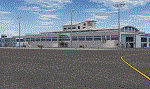
Lanseria international airport is Johannesburg's second international airport and mostly cater to private jets, low cost airlines and many private general aviation and flightschool aircraft. It is a privately owned airport and can accomodate aircraft up to the size of a Boeing 757-300. This airport has seen John Travolta use it with his Boeing 707, the Hilton family with a private Boeing 757 and even the USAF have landed their C-17 Globemasters at the airport when Air Force one came here in the past with the latter landing at AFB Waterkloof.
This package started out as a conversion of the wonderfull FSX scenery of the airport by Lee Hall and converted with permission from the original author. It quickly expanded however to a project that now additionally includes photoreal ground textures that changes with seasons, many added fences and gates around the airport, inclusion of the shaded parking areas with parked cars, static airplanes (RWY12 and EZ scenery libraries needed to see this) as well as numerous objects around the airport and apron made by myself in Gmax to give the airport some FS9 life.
Also included is the wonderfull "apron light splashes" by Hans Günther Schnell who kindly gave me permission to use it for the night times.
I have also included a local mesh for the area for users of FSGlobal 2010 to eliminate the extreme elevation anomoly around the airport.
| Filename: | Lanseria_International_Airport_FALA_Johannesburg_S.zip |
| License: | Freeware, limited distribution |
| Added: | 11th August 2023, 16:03:37 |
| Downloads: | 282 |
| Author: | Kobus van Wyk, Lee Hall |
| Size: | 37.64 MB |
| Category: Flight Simulator X - Scenery | |
| North Central Ecuador v3, including SEQM (SEQU) and SEIB |
|
Images related to this file:
File Description:
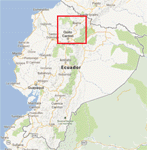
FSX/P3D Version 3 of this scenery is a completely new build of SEQM from the ground up. The entire complex is rendered using FSX objects along with the new highway that connects to the highway infrastructure with AI road traffic. The airport is now at a mean altitude that better blends with the newly included NASA SRTM GL1 30m mesh for the region. The tower is at the correct altitude. Buildings use more accurate footprints, new models, floating jetways, and updated landclass, and work seamlessly with the roads added by FTX Global/Vector. Lakes are corrected within roughly 100 square miles. Although the Ibarra/Atahualpa (SEIB) airport no longer exists, there is an option to add it back. Startup files are included to fly from the lakes and the Ibarra/Atahualpa (SEIB) airport. As a “bonusâ€, SEQU was restored in this version, because much of the footprint of the airport still remains as part of its conversion to a park. As such, a custom and fully functional SEQU is included for users who would like to revisit the old airport. AI Traffic can be restored at SEQU by simply using the "Reversed SEQU-SEQM AI Traffic" option. Scenery was created using Airport Design Editor X v1.76.6715, SBuilderX 3.13, and the FSX Object Placement Tool. Scenery objects were added and modified from stock FSX scenery to resemble as closely as possible the actual airport. Bill Leaming's Ramp Lights for P3D/FSX illuminate the aprons.
| Filename: | North_Central_Ecuador_v3_including_SEQM_SEQU_and_S.zip |
| License: | Freeware |
| Added: | 22nd March 2020, 22:13:37 |
| Downloads: | 4,117 |
| Author: | Carlyle Sharpe |
| Size: | 29.44 MB |
| Category: Flight Simulator X - AFCAD Files | |
| Salem Airfield Airport (NJ74), NJ |
|
File Description:
Located 01 miles E of Salem, New Jersey on 14 acres of land, Salem Airfield is a private turf strip 2200' in length. The hard surface runway has been removed so have your mesh settings as high as possible to get the most out of landing/taking off on actual terrain. The surrounding area has been highly detailed with as much forestation as possible included to block out the horizon as much as possible considering the many open spaces surrounding the airport. Tie downs are located next to the middle of the runway, look for the marker cones or start in any RAMP_GA_SMALL parking locations. A hangar is available as well, and attendant is on call on NAV2 to open the door. You can start inside the hangar in the DOCK_GA parking spot or outside the hangar in the RAMP_GA parking spot. All parking is for aircraft with wingspans no greater than 40 feet. There is no fuel available. The field is lit for night use, but the windsock is not so check your weather before flying in!
Scenery constructed with use of satellite images/streetview/aerial photos - the author has not been there in person.
This scenery is meant to be used in conjunction with MegaScenery Earth New Jersey/Delaware 004. It is not required, but apron use is minimized to allow satellite scenery to show through as much as possible, and objects are placed based on the MSE textures - lack of it may make scenery look out of place.
| Filename: | Salem_Airfield_Airport_NJ74_NJ.zip |
| License: | Freeware |
| Added: | 10th August 2011, 02:05:51 |
| Downloads: | 176 |
| Author: | Drew Sikora |
| Size: | 910.96 KB |
| Category: Flight Simulator X - AFCAD Files | |
| Mount Pleasant Landing Strip Airport (67NJ), NJ |
|
File Description:
Located 01 miles S of Hainesburg, New Jersey on 192 acres of land, Mount Pleasant Landing Strip Airport is a private turf field. The strip itself is 2100 feet in length over fairly level ground. There is no hard-surfaced grass runway in place, so setting your mesh to the highest resolution is recommended as you will be landing on bare terrain. Next to Runway 06 is a path through the trees you can taxi along to get to a hangar - although it is not available for transient aircraft and is closed. Collision with the trees along the path near the hangar and the static aircraft parked near it is disabled to make it easier to move through this relatively tight area. Immediately beyond the hangar is a clearing with ample room to turn around to taxi back out. You can also start parked in front of the hangar. The windsock is located a few feet west of the hangar and is not lit. The runway also has no edge lighting so daytime VFR operations only are recommended for this airfield.
Scenery constructed with use of satellite images/streetview/aerial photos - the author has not been there in person.
This scenery is meant to be used in conjunction with MegaScenery Earth New York 007. It is not required, but apron use is minimized to allow satellite scenery to show through as much as possible, and objects are placed based on the MSE textures - lack of it may make scenery look out of place.
| Filename: | Mount_Pleasant_Landing_Strip_Airport_67NJ_NJ.zip |
| License: | Freeware |
| Added: | 7th February 2011, 23:49:26 |
| Downloads: | 198 |
| Author: | Drew Sikora |
| Size: | 468.64 KB |
| Category: Flight Simulator 2004 - Scenery | |
| OSM World: South America |
|
Images related to this file:
File Description:
OSM World is a community project! If you wish to help, check the documentation and contact the author!
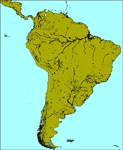
Welcome to OSM Wold: South America! This is a vector data scenery package covering the South American area. Coastlines, Rivers, lakes, roads, railways, and power lines with detail never before seen! All in an autogen-compatible density! You can see roundabouts, train terminals, harbor areas in a resolution of a point every 10 meters. At this same resolution a vectorial city class places residential (in small and big building variations, depending on surface area) and industrial areas exactly where they are supposed to be. This gives the city areas a resolution far superior to the capacity of FS-2004 default landclass bitmaps, limited to approximately 1 Km x 1 Km squares. OSM World: South America will even give you small roads leading to small towns (even a few houses across)! From big highway intersections, including ramps, to the tiniest rural pathways covering the entire South american area! Wherever in South America you fly, there is something to see!
You can enjoy this scenery near coastlines too! harbor areas and extremely detailed coastal topology (try the southern Chile). This scenery makes sure that the ocean is always flat, you can forget about the climbing water often found around photo-sceneries! This scenery is best paired with a good set of terrain meshes (like the freeware global SRTM mesh by Stephen Rothlisberger , available here: http://simviation.com/1/fs2004terrainmesh).
| Filename: | OSM_World_South_America.zip |
| License: | Freeware |
| Added: | 5th August 2015, 02:31:08 |
| Downloads: | 3,105 |
| Author: | Mario Noriega, Luis Miguel Hernandez |
| Size: | 64.37 MB |
| Category: Flight Simulator X - Scenery | |
| Honduras Islands v3 |
|
Images related to this file:
File Description:
Version 3 includes all previous patches and updates. This version also restructures the file system to be fully compatible with the ORBX "FTX Global openLC North America" product as well as adding functionality for default FSX users. Additionally, water class scenery is updated to appear more realistic, MHRO is updated to reflect the newly expanded apron, and SRTMGL1 (30m) mesh is included. All landclass polygons and coastlines were meticulously hand-drawn directly from satellite imagery to provide the most detailed and accurate scenery available for this region.
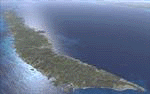
This project rebuilds the islands of Roatán, Barbareta, Guanaja, and Utila, and adds Cayos Cochinos and the numerous cays associated with the "Islas de la Bahia" (Islands of the Bay). Roatán (MHRO), Guanaja (GJAJ/MHNJ) and Puerto Lempira (MHPL) are completely overhauled and positioning is corrected. New and fully functioning AI airports are added for Utila (MHUT), Fort Cay (MHFC) and Cochino Pequeño (MHCP) of the Cayos Cochinos chain, and La Ceiba (MHLC) is modified to accommodate more AI traffic. Accurate coastlines, lakes, road and river data, as well as corrected landclass are provided based on the latest available satellite imagery. GA flight plans are provided to add or enhance service to the smaller islands. Updates were created or rebuilt in a manner which carefully aligned airport data with current satellite imagery, when available. Scenery was created using Airport Design Editor X v1.70.6042, SBuilderX 3.13, and the FSX Object Placement Tool. Scenery objects were added and modified from stock FSX scenery to resemble as closely as possible the actual airports.
| Filename: | Honduras_Islands_v3.zip |
| License: | Freeware |
| Added: | 23rd December 2016, 08:17:26 |
| Downloads: | 1,613 |
| Author: | Carlyle Sharpe |
| Size: | 17.35 MB |
| Category: Flight Simulator X - AFCAD Files | |
| Dave's Aerodrome Airport (7NJ9), NJ |
|
File Description:
Located 01 miles SW of Cedarville, New Jersey on 43 acres of land, Dave's Aerodrome Airport is a private turf field 2000' with a 600' displaced threshold on Runway 12. Each runway has a clear 20:1 approach slope, but in the case of Runway 12 be sure to aim for a landing past the hangar! There are power lines running along the road at the runway threshold that are not just there for decoration - come in too low and FSX will register a crash. In real life they have red balls on them - unfortunately I have no way of adding those in the sim at this time. So be on the lookout while on approach. Also take note that it is a right pattern for Runway 12 and a left pattern for Runway 30. The windsock is located next to the hangar and is not lit. There are no lights at this airport so daytime VFR operations only are suggested. No services are offered for transient aircraft. There is no hard-surfaced runway, you will be landing on bare terrain so set your mesh complexity slider as high as it will go for the best effect.
Scenery constructed with use of satellite images/streetview/aerial photos - the author has not been there in person.
This scenery is meant to be used in conjunction with MegaScenery Earth New Jersey/Delaware 005. It is not required, but apron use is minimized to allow satellite scenery to show through as much as possible, and objects are placed based on the MSE textures - lack of it may make scenery look out of place.
| Filename: | Daves_Aerodrome_Airport_7NJ9_NJ.zip |
| License: | Freeware |
| Added: | 16th February 2011, 15:36:42 |
| Downloads: | 211 |
| Author: | Drew Sikora |
| Size: | 1.02 MB |
| Category: Orbiter - Miscellaneous Files | |
| Complete Apollo 16 pack for Nassp v3.0 |
|
File Description:
This is a COMBINED Descartes Landing site and Descartes Enhancement Pack for the new NASSP (v3.0) and the new ORBITER (021202). It also includes Vinka's updated (for 021202) Generic Spacecraft DLL Module so that the "independent" Lunar EVA implementation would work. It also includes YesRushGen's Apollo 16 scenarios which depict the Apollo 16 mission in various stages during the mission.
Everything found in Descartes Landing Site and DEP add-ons are included, along with a new Lunar Rover that has both the CMDR and LMP on board when pressing "V" after the NASSP EVA key is pressed. However, due to an inexplicable bug, I decided not to include the detailed SIMBAY EVA astronaut mesh, because Orbiter kept on crashing whenever I perform EVA on BOTH the LM and the CSM.
Furthermore, although the LM now sports the bronze-like coloring of the J-Mission Advanced LMs (from inside the SIVB booster until separation of ascent stage), I had to remove the enhancements like the hanging MESA and the LRV from the Descent Stage because it caused inexplicable Orbiter crashes too. But I hope you like the new LM color which is now consistent during the course of the entire mission (in the DEP add-on, it was still aluminum/grey when docked to the CSM and only turned bronze when undocked).
Finally, I added a NAV/ADF beacon to the landing site, so that if you press SHIFT-C and tune to 109.10, then press SHIFT-L, your landing display will show your position with respect to the landing site, provided you are within 500 kilometers.
| Filename: | Complete_Apollo_16_pack_for_Nassp__v30.zip |
| License: | Freeware |
| Added: | 17th December 2002, 13:26:13 |
| Downloads: | 5,645 |
| Author: | Rodion M. Herrera |
| Size: | 7 MB |
| Category: Orbiter - Miscellaneous Files | |
| Edwards AFB Upgrade 1.1 |
|
File Description:
This upgrade replaces Edwards Air Force Base upgrade 1.0. This is an upgrade to, and requires, Slat's Edwards AFB add-on.
Included in this release:
• Five new high-definition surface tiles (for a total of eleven!), covering the area around Rogers Dry Lake, the main base and the north and south bases, including the town of Boron, CA.
• Edwards AFB ILS and VOR frequencies
• Several main flightline hangars
• Edwards tower camera view
• Mesh resolution increased 800%!
• Scenarios to fly several previously-released X-planes at Edwards AFB
• Support for X-33 VentureStar; placement of the VentureStar base in the correct place, just north of Haystack Butte.
Scenarios are included for the following aircraft, all tested/flown at the real Edwards AFB:
• X-15 rocketplane and B-52 dropship
• SR-71 "Blackbird"
• SR-71 with drone
• X-34 lifting body and Lockheed L-1011 Stargazer dropship
• X-36 thrust vector prototype
• X-38 Crew Recovery Vehicle
• X-33 VentureStar
• Shuttle Training Aircraft
(STA control surfaces patch)
• Space Shuttle Enterprise
| Filename: | Edwards_AFB_Upgrade_11.zip |
| License: | Freeware |
| Added: | 18th November 2003, 16:32:31 |
| Downloads: | 4,492 |
| Author: | John Wilson |
| Size: | 2.81 MB |
| Category: Flight Simulator 2004 - Scenery | |
| Airstrips of Scandinavia and the Baltic States |
|
Images related to this file:
File Description:
Effectively an extension of my "Airstrips of Western Europe" project for FS2004, around 140 sceneries of small airfields in Scandinavia and the Baltic states, each enhanced with buildings, taxiways, parking spaces and aprons as appropriate, to further facilitate the generation of lightweight AI traffic in the area, without overloading the more major airfields.
Given the available comprehensive coverage of both Norway and Finland by other authors, and much of Denmark by myself in my earlier "Airstrips of North-West Europe" upload, this selection comprises mostly small Swedish and Baltic State airfields.
Unfortunately, due to the very nature of much of the area, some of these airstrips are just that, a grass/dirt runway on a flattened/mown area in the landscape with just an associated building or two. Nevertheless, they do perform the required function of providing sources for AI traffic. The very existence of those airstrips not included in FS2004 is referred to in various on-line databases.
Again, there's no photo-realism here, just a selection of basic 'generic' buildings, more or less accurately sized and placed to reflect the airfield layout as seen on on-line satellite imagery and aerial photography. These buildings have minimal effect on frame-rates, so are ideal for this kind of job. The airfields are aligned as well as possible with the roads etc. in UT Europe (where applicable) and the Genesis Europe mesh, but should mostly be fine in a default installation or other configuration.
Please read the rest of this "blurb" in the included text file. There may be some details of note or interest.
| Filename: | Airstrips_of_Scandinavia_and_the_Baltic_States.zip |
| License: | Freeware |
| Added: | 11th November 2024, 17:25:16 |
| Downloads: | 112 |
| Author: | Chris Eve |
| Size: | 2.52 MB |


© 2001-2026 AVSIM Online
All Rights Reserved
Privacy Policy |