
Where Flight Simulation Enthusiasts Gather from Around the World!
AVSIM Library - Search Results

| Category: Flight Simulator X - Aircraft Repaints, Textures and Modifications | |
| Supermarine Spitfire Mk.IX EN186 Bluebird |

|
Images related to this file:
File Description:
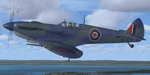
Spitfire IXc EN186 was the personal aircraft of S/L L.C. Wade, an American flying with the RAF. Wade was born in the small farming community of Broaddus, Texas in 1915. He was the second son of Bill and Susan Wade, who named him L.C. (only after the RAF demanded a forename did he call himself Lance Cleo Wade). After the family moved to a farm near Reklaw, Texas in 1922 he worked on the family farm and attended the local school. He was unable to join the US Army Aviation Cadet Program due to a lack of a college education. He began flying at age 17, at Tucson, Arizona. In 1934 at age 19, Wade joined the Civilian Conservation Corps (CCC) in Arizona. He joined the RAF in Canada in December 1940 and trained with No. 52 Operational Training Unit (OTU). Wade was then sent to the British aircraft carrier Ark Royal and flew off her deck in Hawker Hurricane to reinforce the depleted ranks of aircraft on the island of Malta. He was then sent to Egypt as a Hawker Hurricane Mk I pilot in September 1941, and was posted to 33 Squadron. The squadron's mission was to provide close air support for Operation Crusader, the British assault launched on November 18, 1941, against the German Afrika Korps. His first kills were two Fiat CR.42s on 18 November. He attained the rank of "ace" on 24 November 1941. He began flying Hurricane Mk IIs in April 1942, and was awarded the Distinguished Flying Cross (DFC). He had 13 victories as of September 1942. He spent the next several months back in the US on various RAF projects including evaluating some American fighters at Wright Field. He returned to combat as a Flight Commander in 145 Squadron with a Bar to his DFC, flying Supermarine Spitfire Mk Vs. Promoted to squadron leader, he had a busy 60 days, as by the end of April his score was 21, by then flying Spitfire Mk IXs. His squadron moved to Italy, and as a Spitfire VIII pilot he claimed two Focke-Wulf Fw 190s of Schlachtgeschwader 4 on 2 October 1943. His last claims were three FW 190s (again of SG 4) damaged on 3 November. Wade became a wing commander and joined the staff of the Desert Air Force but was there only briefly, as he was killed in a flying accident on 12 January 1944 at Foggia, Italy. In 30 fights for which he made claims he was credited with 23 victories including two shared), one probable, and 13 damaged. He is also credited with one destroyed and five damaged on the ground.
Wing Commander Wade is usually listed with 25 victories but official RAF records show that he had 22 solo victories and half each of two more for a total of 23, not counting one probable. Regardless of whether his score is 25, or 23 victories, he is still the leading American fighter ace to serve exclusively in any foreign air force.
Since he never transferred to the USAAF, or any other American Air service, Wade never got the publicity that other American aces received and thus is more obscure than his peers.
The aircraft depicted in this repaint, EN186, started its active career with 249 sqn on Malta, who used it for high flying reconaissance, and who were responsible for replacing the dark green with Mediterranean Blue. The aircraft was then transferred to Tunisia, where it was the personal aircraft of W/C Gleed of the 244 wing. After his death, it went to L.C. Wade, who scored 5 victories with it in april 1943. He did not apply any codes to it, and referred to it in his logbook as BB, for Blue Bird. He flew it till august 1943, when he changed to flying Spitfire MK VIII JF472
Repaint by Jan Kees Blom, based on the paintkit by RealAir.
| Filename: | Supermarine_Spitfire_MkIX_EN186_Bluebird.zip |
| License: | Freeware |
| Added: | 11th July 2018, 16:54:01 |
| Downloads: | 103 |
| Author: | Jan Kees Blom |
| Size: | 3.59 MB |
| Category: X-Plane - Original Aircraft | |
| Spruce Goose for X-Plane 6.4/6.51 (hk-1/H-4 Hercules) |
|
File Description:
Spruce Goose v1.0 for X-Plane copyright (c) by Robert App, January 2003. History of the "Goose" - Officially designated the HK-1 (this project started out as a join venture between Hughes Aircraft and Kaiser) and later designated the H-4 Hercules after Kaiser was unable to work with Howard. It was and still remains the largest (physical dimensions wingspan and length) aircraft ever built, with the largest radial engines ever built by the West (28 cylinder, 3000 HP). The plane had to be constructed mainly of wood due to the shortage of strategic metals caused by WWII. The plane became known as the "Spruce Goose" or "Flying Lumberyard" despite the fact that the wood frame and skin were constructed mainly of laminated poplar; it also involved "sandwich" construction. The plane was flown briefly on a trial taxiing run but Hughes never allowed the plane to be flown again. Speculation has always been rampant that the design was flawed and the plane could not have met the original specification requirements. The X-Plane model is as accurate as is possible with limited plans available to me. The main wing is an X-Plane standard symmetrical high lift airfoil as opposed to the high lift asymmetrical foil section used in the actual plane. The main wing angle of attack has been adjusted to emulate the asymmetrical foil as closely as possible.
Flight Testing the Goose - I have spent many hours testing the plane on X-Plane which with few exceptions provides a very accurate flight model. The published landing speed (79 mph) pretty well verifies the takeoff speed of 52 to 55 knots (k/hr x 1.15 (approx.) = mph). In straight flight the plane is difficult to stall since the nose quickly drops and increases speed if a stall develops with a significant loss of altitude. The plane has a range on 14000 gallons of fuel and takeoff weight of 350,000 Lbs of well over 3000 nautical miles. San Diego to Wake Island via Midway Attol is a piece of cake with lots of fuel to spare at 350,000 lb GW. The plane is flyable at a GW of over 410,000 lb but climb rate is very sluggish (max 400-600 fpm) and loss of speed due to excessive side slip can cause a fatal stall, in straight flight the plane is difficult to stall. So far my conclusion is that with todays materials and jet engines (which may be a future project) this aircraft could probably be competitive in performance with todays planes. With aluminum alloys that were available during its construction its performance would probably have exceeded the initial requirements.
| Filename: | Spruce_Goose_for_XPlane_64651_hk1H4_Hercules.zip |
| License: | Freeware, limited distribution |
| Added: | 31st January 2003, 05:19:19 |
| Downloads: | 1,739 |
| Author: | Robert App |
| Size: | 1.69 MB |
| Category: Prepar3D V1-4 - Utilities | |
| Flightplan Visualizer 1.17 |
|
Images related to this file:
File Description:
Flightplan Visualizer (FV) version 1.17.0. Copyright 2018-2020 by Pelle F. S. Liljendal ([email protected]), all rights reserved.
FV comes with 783 pre-imported Commercial AI flightplans (+380 BizJet flightplans are available as a separate download). However you are able to import additional (AI) flightplans yourself. Once imported these (AI) flightplans can be visualized on a map-view, and the user will be able to search accross all these. Hence you can use the program as inspiration as to which routes to fly. E.g. you can search across all imported flightplans to find all flights in an A321 flying into/out from LDDU, or simply to look for all flights in a Boeing 747-8F.
Simply run the included installer to install the software. The program will be installed into "C:\Program Files (x86)\Flightplan Visualizer" and all datafiles will be installed into: "C:\Users\[UserName]\AppData\Roaming\FlightplanVisualizer". The program comes with a full manual explaining everything, and a 3 page quick manual to get you started. The first 3 times you run the program the quick manual will automatically open. The forum is hosted here: https://forum.aerosoft.com/index.php?/forum/919-flightplan-visualizer/
Version 1.17 Contains the following changes:
- A big Thank You to Alex for the donation, it is appreciated ... You are actually the first one to donate, but then again I never expected to get rich writing this software :-)
- Both version 1.16 and 1.17 are mandatory, so if updating from a previous version you MUST install/run both versions as outlined on the forum. Running version 1.17 will forcefully update all flightplans to the latest file-version, as version 1.18 will remove some of the backward comparability.
- Added support for importing flightplans from the new .aigfp file-format used by Alpha India Group. Export of flightplans (in aifp-format) is disabled for flightplans originally imported from .aigfp files, because the repaint-info is not imported from these.
- Beside the supplied aircraft-types contained in the ("factory") aircraft-database, users can now add their own user-aircraft, both in form of owned (flyable) 3rd party aircraft and aircraft-types (used in flightplans, or as basis for owned aircraft).
- Added support for Helicopters (simply created the "aircraft" with the engine-type set to "Heli"). They will be listed/treated as an "aircraft" with a specific engine-type (and in stead of a "wingspan" they have a "rotor diameter").
- Many reports have been added to list "suitable" substitute aircraft based on match-score (a value between 0 and 100, where 100 is a perfect match). Likewise reports have been added to visualize repaints that you have, and those you might be "missing" for a particular aircraft/airline.
- In form leg-info you can now "tag" a leg by pressing the new "Tag" button. Doing so will add the leg to the new "Tagged legs" menu-item found in the "Misc" menu. This menu can contain the last 10 tagged legs (flights). Selecting any of these 10 menu-items will open the leg-info form and show the details of the tagged leg.
- The AIG flightplan download-form will now only pre-select flightplans with a new season or a new revision, as you have to pay attention to flightplans with status "Not installed" since the reason these are not installed can be due to airlines being defunct or have changed their names.
- The AIG flightplan download-form now have 2 numbers above the list-view. The first tells the number of flightplans being listed for the selected season, and the 2nd number in parentheses tells the number of checked flightplans. So choosing a season, you can simply look at the number in the parentheses to see the count of new seasons/revisions to install (without the need to scroll throgh the list).
- The "Defunct list" (list of all defunct airlines, as marked by AIG) that can both be displayed in the "AIG flightplan downloader" and the "Enable / disable flightplans" forms, is now both sorted by Name (first) and by ICAO (last), making it more easy to look for a particular airline.
- The Leg-info and Edit flightplan -forms now both list the (flightplan) sub-folder name and the name of the original imported filename (in case you need to see the version/revision number that AIG append to this filename).
- The same sub-foldername and original imported flightplan filename are also added in the top when generating a leg-info report.
- If the departure/destination airports have gates marked as favorites, or gates with comments, therse are added to the leg-info report. E.g. "Gate G47 (36.0): B744F, no-jetway", where "36.0" is the radius of the gate (in meters), and "B744F, no-jetway" is the comment.
- Many "behind the scene" changes were made to the Leg-info report, and more data have been added (e.g. carrier/operator-callsign, time-zone/offset, airport-size, rank and traffic-density).
- Added a button to the Leg-info form to show list of possible substitute aircraft, sorted by scored (based on how well these match the parameters of the original aircraft).
- Internally the program stores- and perform all weight-calculations in lbs, however in settings you can now choose if weights should be shown in lbs or kg.
- Using EOW- or MTOW- filter sub-type in the aircraft filter the specified weight will now be according to the chosen weight-unit specified in the settings form (in previous version it was fixed to be lbs).
- Obtaining METAR/TAF messages from the internet takes a few fractions of a second, hence the "Show as Report" button on the Leg info form, now contains an asterisk until the METAR/TAF messages have been obtained, as these would otherwise appear as "not obtained" in the generated report. So if you need these messages in the report, you should wait pressing the "Show as Report" button, until the asterisk is removed.
- The form for creating user-airlines now contains a "Lookup" button that lets you search for airlines, so you can check if an airline already exists before creating it as a user airline.
- Airlines without official iCAO/IATA-codes are sometime created with an artificial ICAO code of "---". Airlines with this ICAO-codes are no longer listed as alternatives.
- Reordered the two "fields" in the "Min. Rank" and "Min. Traffic-density" combo-boxes, to make it more easy reading- and picking- the correct.
- Improved scanning of readme-files during import (more files are excluded such as "Repaints.txt").
- Changed the default size of the about-form, to make it more easy to being reading the history-text without having to first resize the form.
- All forms in FV have been made with a HD resolution (1920x1080) in mind. Some users are running at this resolution, but have chosen to scale the font-size to 125%. If doing so, some forms were not fully visible. Hence there is now a new setting item called "Reduced desktop". If defaults to be disabled, however once enabled some forms will be reduced in their size (e.g. the flightplan-, airline and aircraft- list-views in the Leg Search form will be more narrow, allowing the form to be fully visible).
- The country sub-filter no longer supports wildcards (nor partial codes), but now it accepts both 2 and 3 letter (ISO) country-codes. The filter-text will be colored red, if an invalid country-code is entered.
- The result-viewer now have a "Save as" button that allows you to save its content. Also an "Enable edit" check-box have been added, which puts the text-box into edit-mode, so you can change its conent (e.g. before copying to clipboard, or saving to disk).
- Right-clicking the main-map there is now a menu-item to show country, time-zone/offset (as a hint) at the GPS-position of the mouse-cursor. These information are downloaded from the web, hence there will be a small delay.
- Added more logging, to better identify which actions might have led to the program displaying an error-message. Also tweaked the log-format a bit to make it more readable.
- Updated all external libraries to the latest versions.
- Added release dates for each version in this version-history text.
- Fixed: If marking gates as favorites or adding comments to gates these data were not saved unless other user-data were added to the airport (e.g. marking the airport as favorite, setting rank/traffic-density, manually specifying size, taxi-in/out times, entering comments or hint-text for the airport).
- Fixed: If changing the ICAO-code of a user-airline, the alternative-list was not updated until next time the form was opened. The form also got a minor optimization in the process. When editing an user-airline you can now press enter in stead of clicking the "Save" button (as long as the Comments field does not have focus).
- Fixed: In a few cases the week-number was not calculated correctly for multi-week flightplans.
- Fixed: In some cases the week-day was still shown as a "name" (2 letters), even if the user had selected to display these as numbers in settings.
- Fixed: Aircraft/Airline search forms would not perform initial search when opening the form, if the search-text was blank. You had to enter a letter, and delete it again, before the search was performed.
- Fixed: Aircraft search form did not use natural-sort when sorting by name (e.g. "CRJ1000" was listed before "CRJ200").
- Fixed: Setting core-affinity to a non-zero mask, and change it back to zero, it would not return to its initial state (e.g. all cores selected) until the program was re-started.
- Data: Updated a few airports with missing country-code and/or missing time-zone.
- Data: A few new aircraft were added and some aircraft were split in dedicate pax/freight-versions.
- Data: A few helicopters have been added.
- Data: Aircraft-data updated as there were still a couple of freighters with non-zero passenger-count. Also the weight constraints were updated for A LOT of aircraft.
- Data: Cumulative aircraft-types (such as "[32S] Airbus A318/A319/A320/A321") are now removed in many views, unless the type is in use by at least one active flightplan.
- Flightplans: Compared the list of flightplans bundled with FV to the list of flightplans available in AIG AIM. This meant a few flightplans were marked as defunct (and removed from the installer) and a few missing were added (primarily from 2017).
- Flightplans: The first Summer 2020 flightplans have been added (FedEx and UPS).
- Flightplans: All new/updated flightplans have been added to the installer, and all obsolete have been removed. A total of 783 active flightplans are bundled with the installer.
Pelle
| Filename: | Flightplan_Visualizer_117.zip |
| License: | Freeware, limited distribution |
| Added: | 8th August 2020, 17:44:15 |
| Downloads: | 415 |
| Author: | Pelle Liljendal |
| Size: | 29.48 MB |


© 2001-2026 AVSIM Online
All Rights Reserved
Privacy Policy |