
Where Flight Simulation Enthusiasts Gather from Around the World!
AVSIM Library - Search Results

| Category: Flight Simulator X - Scenery | |
| FSX_MeSA_H04 |

|
File Description:
FSX Mesh South America Project:
This terrain mesh file is a part of a whole project covering all the Continent
of South America and some islands, divided in tiles identified in a map by its
column (letters) and rows (numbers).
Those files were multi-LOD compiled from 90m SRTM2 source data, reprocessed
with 3DEM to remove voids and spikes, providing a 76.4m (LOD9) horizontal
resolution topography intended for use only in FSX updated with SP1.
Although not well documented, to improve performance, the updated FSX loads DEM
files in threads and only the closer terrain (about 5-10 NM from the point of view)
is rendered in high detail, while at far distances FSX shows up its default low
resolution mesh, when there is not a third part terrain mesh compiled in all
others intermediate level of details (multi-LOD).
THIS FILE:
FSX_MeSA_H04 (Column H x Row 04)
covers the area inside the boundaries:
N = 0º 0' S; S = 5º 37.5' S;
W = 37º 30' W; E = 30º 0' W;
AUTHORS:
Hely Heck Junior - Magrao ( [email protected] )
and Jose Lobo ( [email protected] )
| Filename: | FSX_MeSA_H04.zip |
| License: | Freeware |
| Added: | 15th June 2007, 15:07:51 |
| Downloads: | 946 |
| Author: | Hely Heck Jr. and José Lôbo |
| Size: | 3.56 MB |
| Category: Flight Simulator X - Scenery | |
| FSX_MeSA_G08 |
|
File Description:
FSX Mesh South America Project:
This terrain mesh file is a part of a whole project covering all the Continent
of South America and some islands, divided in tiles identified in a map by its
column (letters) and rows (numbers).
Those files were multi-LOD compiled from 90m SRTM2 source data, reprocessed
with 3DEM to remove voids and spikes, providing a 76.4m (LOD9) horizontal
resolution topography intended for use only in FSX updated with SP1.
Although not well documented, to improve performance, the updated FSX loads DEM
files in threads and only the closer terrain (about 5-10 NM from the point of view)
is rendered in high detail, while at far distances FSX shows up its default low
resolution mesh, when there is not a third part terrain mesh compiled in all
others intermediate level of details (multi-LOD).
THIS FILE:
FSX_MeSA_G08 (Column G x Row 08)
covers the area inside the boundaries:
N = 22º 30' S; S = 28º 7.5' S;
W = 45º 0' W; E = 37º 30' W;
AUTHORS:
Hely Heck Junior - Magrao ( [email protected] )
and Jose Lobo ( [email protected] )
| Filename: | FSX_MeSA_G08.zip |
| License: | Freeware |
| Added: | 15th June 2007, 15:04:47 |
| Downloads: | 1,138 |
| Author: | Hely Heck Jr. and José Lôbo |
| Size: | 12 MB |
| Category: Flight Simulator 2004 - Aircraft Repaints, Textures and Modifications | |
| Airborne Express Boeing 767-281 SF Fleet |
|
Images related to this file:
File Description:
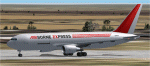
This started out a simple project, and has ended up in fleet production. Thanks go out to Allen at AIG for the tail numbers.
Thanks to Stuart for pointing out the typo in the flight sim entry file. This typo pertained to the yellow rudder Airborne paint, so for new guys, use it.
This pack contains the red and gray tail Airborne Express SF version with large side cargo door.
I do not know if all these have been converted, and I am not going looking to find out. Allen at AIG thinks they have, so, those guys would know.
I have included a new voice mod so the entry will read ABEX.
And that is all it will say.
One semi custom light map for all paints, borrowed from Boris.
Not really, it was made by me.
I hope someone would throw out some flight plans.
Please look at the readmes, just brief over them, please.
Questions and comments are welcome.
Thanks Allen for all the information provided.
| Filename: | Airborne_Express_Boeing_767281_SF_Fleet.zip |
| License: | Freeware |
| Added: | 3rd March 2010, 15:07:49 |
| Downloads: | 284 |
| Author: | Roger Martin |
| Size: | 977.93 KB |
| Category: Flight Simulator 2004 - AI Aircraft | |
| Caribbean Airlines Boeing 737-800 9Y-MBJ and 9Y-TJR |
|
Images related to this file:
File Description:

Caribbean Airlines Limited operating as Caribbean Airlines is the national airline of Trinidad and Tobago. Caribbean Airlines Limited operates both Caribbean Airlines and Air Jamaica brands and as such is also the flag carrier to Jamaica through its brand, Air Jamaica. Source Wiki.
Flightplans may be available on AVSIM/Flightsim.com.
This works for both FS9 and FSX. Tested in FSX. FS9 model used.
For FSX users make sure you have UNCHECKED "Aircraft casts shadows on the ground" under the Aircraft - Exterior Settings in FSX to make any FS9-based model visible during the day!
Texture quality; FSX Native: DDS DXT5 with alpha. FS9 Native: BMP DXT3 with alpha.
FSX Light Fix included in the DDS night texture.
Custom Light Map. Custom Shadows, Highs, Weathering as usual...
Included repaint is for the following model; AIA_737_800_winglet from AI Aardvark. Non-Reflective, Winglet SD Model.
Model is available on AVSIM and FlightSim.com or on the author/developers site.
You need the basekit for this to work!!
Do make sure you copy the texture folder(s) in the respective folder.
| Filename: | Caribbean_Airlines_Boeing_737800_9YMBJ_and_9YTJR.zip |
| License: | Freeware, limited distribution |
| Added: | 22nd July 2012, 15:11:58 |
| Downloads: | 752 |
| Author: | Stephan Faessler / ImpulseAI |
| Size: | 2.88 MB |
| Category: Prepar3D V1-4 - Scenery | |
| LGLR military base (P3D4) |
|
File Description:
Hi there !!
My name is Dimitri.
This is my FIRST EVER creation for flight simulation. And i like to share it with you all.
It's my hometown airport LGLR military base, Larissa city, here in central Greece.
When microsoft released FSX, i noticed that THIS airport was COMPLETLY ruined, empty .. and completly
misplaced at the wrong place on the map !! I tried for years, to find a good add-on but ....
nothing good so far ... Then lockheed martin toke over the code from microsoft and created P3D.
But still, this airport remained as it was before, nothing changed... I was SO mad, that i thought
I should do something about it my self.. so, here we are, i fixed it.
This airport was created with "Airport design editor version.177" and SbuilderX v.315
I was using ORBX base pack, with ORBX Europe LC and ORBX vector during the creation.
Keep in mind that i am using some small ORBX library objects like, grass, bushes and so on...
If you don't have ORBX installed, i don't know if this is gonna work.
| Filename: | LGLR_military_base_P3D4.zip |
| License: | Freeware |
| Added: | 4th August 2019, 17:25:21 |
| Downloads: | 703 |
| Author: | Dimitris P. Mylonas |
| Size: | 12.24 MB |
| Category: Prepar3D V1-4 - Utilities | |
| Flightplan Visualizer 1.10 |
|
Images related to this file:
File Description:
Flightplan Visualizer (FV) version 1.10.0. Copyright 2018-2019 by Pelle F. S. Liljendal ([email protected]), all rights reserved.
FV comes with 300 Commercial-, and +380 BizJet AI pre-imported flightplans which the creators of those flightplans have gracefully allowed me to include with the installer, however you are able to import additional (AI) flightplans if you want to. Once imported these (AI) flightplans can be visualized on a map-view, and the user will be able to search accross all these. Hence you can use the program as inspiration as to which routes to fly. E.g. you can search across all imported flightplans to find all flights in an A321 flying into/out from LDDU, or simply to look for all flights in a Boeing 747-8F.
Simply run the included installer to install the software. The program will be installed into "C:\Program Files (x86)\Flightplan Visualizer" and all datafiles will be installed into: "C:\Users\[UserName]\AppData\Roaming\FlightplanVisualizer". The program comes with a full manual explaining everything, and a 3 page quick manual to get you started. The first 3 times you run the program the quick manual will automatically open. The forum is hosted here: https://forum.aerosoft.com/index.php?/forum/919-flightplan-visualizer/
Version 1.10 Contains the following changes: In the flightplan combo-box at the bottom of the main-form, "Active Search" have been renamed into "Last Search". Picking "Last Search" from the flightplan combo-box, will re-execute the last performed search, and populate the map accordingly. A new entry called "None", have been added flightplan combo-box (at the top of the list). Chosing this item will "deselect" the otherwise current search or selected flightplan, and clear the map of routes. A form have been added to assist enabling/disabling flightplans. Gate-letters/numbers are now by default written using a (5x7) Matrix-"font". If you want to revert to the segment-"font", used in previous versions, simply set the value of the "UseMatrixGateChars" tag in the settings-file to false. changed how the Gate-letters/numbers are written in the round gate-markers on the map. Previously all "chars" had the same width. Now the width is dependant on which sub-elements are in use by each "char" (e.g. a "1" is not as wide as an "8"), as a result the gate letter/number are more easy to read. Zulu- and local-time added to the "Selected airport" group-box in the upper/right corner of the main form. If no airport is selected, or no time-zone is registred for the selected airport, only zulu-time will be displayed. Selections of favorite aircraft can now be saved and loaded.⦠This selection of aircraft can be loaded as a selection of aircraft in the "Search leg" form. Video tutorials can now be accessed from the "Help" menu. These are simply "links" to the actual videos on YouTube, hence will launch the default browser. If you hold SHIFT the url will in stead be copied to the clipboard (e.g. in case you want to upen the link in another browser). In the same manner the "Help" menu now contains a link to the forum. The form with decoded METAR/TAF-messages now shows: name, city, and country/state for the selected station in the caption. This text will also be embedded when copying the content to the clipboard. Likewise UTC/Local-time is also embedded when copying the content to the clipboard as it can be used to show the "age" of the report and convert between UTC and Local -times (based on the difference of UTC- and local-time). The info presented when pressing the "Show Scenery Gates" button on the Airport Info form, can now be copied to the clipboard. Various minor "behind the scenes" changes and optimizations. Added support for additional aircraft: Airbus A220-100 (CS100), Airbus A220-300 (CS300), Boeing 777-8 and Boeing 777-9. Listviews containing both (aircraft) IATA and ICAO-codes now all list them in the following order: IATA, ICAO (both individual sortable). Hovering the mouse over gate-markers the hint window will no show the radius both in meters and feet. Editing gate-info you will now see more info for the gate being edited: Type, Size (meters and feet) and if applicable: airlines. Fixed: Minor bug in relation to how the airport size was calculated. Fixed: IATA/ICAO columns were swapped when choosing Favorite Aircraft. Fixed: Typo on the METAR/TAF-decoder form.
| Filename: | Flightplan_Visualizer_110.zip |
| License: | Freeware, limited distribution |
| Added: | 5th June 2019, 21:20:51 |
| Downloads: | 320 |
| Author: | Pelle Liljendal |
| Size: | 24.81 MB |
| Category: Flight Simulator X - Miscellaneous Files | |
| 737NG Normal Procedures |
|
Images related to this file:
File Description:
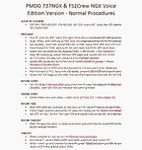
Sorry folks but yet another update since I found some additional small issues I wanted to correct. I hope with this version I caught them all so this will be the FINAL version...at least for today ;-) If you have problem fitting the list on 2 A4 pages when printing it from WordPad make sure you have unchecked the option in WordPad to print page numbers.
A flow/checklist for flying PMDG's 737NGX with FS2Crew Voice Edition. Did this mainly for my own use meaning the flow/checklist is adjusted for how I do my flying and with the addons I use like Aerosoft AES for example. Please also be aware this is not the kind of flow/checklist that includes all things you need to perform during a normal flight but instead you are expected to already have a general knowledge of both the NGX and FS2Crew. However I thought others might be helped by this too both newbies to get you going with the "flow" using FS2Crew but also for the more experienced users as a simple to print out and use memory note. It's also easy for you to change whatever you like to suit your own needs better since I created it in common rtf format using the standard Wordpad Windows application. I deliberately made it as compressed as possible leaving out stuff like all the answers to the checklists etc so it would fit on a single A4 sheet being easy to print and maybe also laminate if you like. Hope you'll enjoy it!
| Filename: | 737NG_Normal_Procedures.zip |
| License: | Freeware |
| Added: | 18th June 2012, 19:58:29 |
| Downloads: | 4,154 |
| Author: | Richard Asberg |
| Size: | 6.17 KB |
| Category: Microsoft Flight Simulator (2020) - Utilities | |
| WorkingTitleCJ4_LINDA_Module_ByJujunet_v0.2 |
|
File Description:
This module allows to use hidden controls of the default MSFS CJ4, using FSUIPC and LINDA software. Require : FSUIPC ver 7 full licence, Microsoft Flight Simulator and LINDA software. Installation : Uncompress archive in any place. Move CJ4.hvar on \Community\fsuipc-lvar-module\modules On LINDA software : Click on "Maintenance", on top, select "--aircrafts--". Click on "Select Source Folder", below "Import Aircraft Module", browse to the folder CJ4, click on "Import", or "Overwrite" if updating. This module for Linda freeware allows to bind : - Menu choice, menu inc/dec and puch : bind a key to browse to all screen menus, and scroll with an encoder to move up and down inside the menus. Push a key to validate. - Map zoom in/out - Terrain/WX - PFD functions (FRMT/TFC/NAV) - Seatbelt light - Safety light - Baro inc/dec - Baro std - AP modes : FLC, HDG, ALT, VS, APPR and Toga button. To create your own module, or customize this one, go to my Youtube Tutorial : My channel : https://www.youtube.com/channel/UCVgdlnaAk2Q4EOSCICW_0iA Changelog : Version 0.2 : Correction to working with the default CJ4 since AAU1 update, the Working title mod no longer exist.
| Filename: | WorkingTitleCJ4_LINDA_Module_ByJujunet_v02.zip |
| License: | Freeware |
| Added: | 16th January 2024, 14:29:33 |
| Downloads: | 37 |
| Author: | Julien GICQUIAUD |
| Size: | 6.35 KB |
| Category: Flight Simulator 2002 - Utilities | |
| FlightSim Manager v1.0.4 |
|
File Description:
FlightSim Manager 1.0.4
FlightSim Manager is a great tool for managing addons to Microsoft Flight Simulator 2002. You may easily import your existing Aircraft, Panels, Sounds and Scenery. FlightSim Manager can also to install new aircraft and scenery directly from distribution ZIP files you may have downloaded using an Easy to use Wizard. While installing new aircraft/scenery FlightSim Manager will automatically copy the required files and repair it if necessary. You may even add or remove aircraft variants as you wish. The comprehensive Hangar management allows you to manage and configure your addons off your live FS2002 installation. You can mass add scenery, clean gauges and a fly from anywhere in the world using an map view. Create Texture Sets and install with ease. Automatically Save Screenshots from FS. Launch FlighSimulator in High Priority mode with Random Splash screen and more.
FSM can also diagnose Flight Simulator scenery, aircrafts, gauges, effects, alias used and such - with a repository with easy restore feature.
Please search on my name to make sure you are downloading the latest version of this program.
| Filename: | FlightSim_Manager_v104.zip |
| License: | Freeware |
| Added: | 27th June 2004, 21:57:04 |
| Downloads: | 2,167 |
| Author: | Rana Hossain |
| Size: | 3.3 MB |
| Category: Flight Simulator X - Scenery | |
| Mesh South America / MeSA B13 |
|
File Description:
FSX Mesh South America Project:
This terrain mesh file is a part of a whole project covering all the Continent
of South America and some islands, divided in tiles identified in a map by its
column (letters) and rows (numbers).
Those files were multi-LOD compiled from 90m SRTM2 source data, reprocessed
with 3DEM to remove voids and spikes, providing a 76.4m (LOD9) horizontal
resolution topography intended for use only in FSX updated with SP1.
Although not well documented, to improve performance, the updated FSX loads DEM
files in threads and only the closer terrain (about 5-10 NM from the point of view)
is rendered in high detail, while at far distances FSX shows up its default low
resolution mesh, when there is not a third part terrain mesh compiled in all
others intermediate level of details (multi-LOD).
THIS FILE:
FSX_MeSA_B13 (Column B x Row 13)
covers the area inside the boundaries:
N = 50º 37,5' S; S = 56º 15' S;
W = 82º 30' W; E = 75º 0' W;
AUTHORS:
Hely Heck Junior - Magrao ( [email protected] )
and Jose Lobo ( [email protected] )
TerraBrasilis: www.terra-brasilis.org
| Filename: | Mesh_South_America__MeSA_B13.zip |
| License: | Freeware |
| Added: | 11th June 2007, 22:12:07 |
| Downloads: | 1,160 |
| Author: | Hely Heck Jr. and José Lôbo |
| Size: | 1.82 MB |


© 2001-2026 AVSIM Online
All Rights Reserved
Privacy Policy |