
Where Flight Simulation Enthusiasts Gather from Around the World!
AVSIM Library - Search Results

| Category: Flight Simulator 2004 - AI Flight Plans | |
| Gulfstream International flightplans August 2008 |

|
File Description:
Gulfstream International flightplans correct from their timetable on their website for 13 August 2008
| Filename: | Gulfstream_International_flightplans_August_2008.zip |
| License: | Freeware |
| Added: | 9th August 2008, 22:28:26 |
| Downloads: | 635 |
| Author: | Graeme Manning |
| Size: | 330.33 KB |
| Category: Flight Simulator X - Aircraft Repaints, Textures and Modifications | |
| Iberia Boeing 737-700 ngx |
|
Images related to this file:
File Description:

PMDG 737-700NGx fictional Iberia livery, based on EC-EHX.
Requires payware PMDG NGX
| Filename: | Iberia__Boeing_737700_ngx.zip |
| License: | Freeware |
| Added: | 22nd November 2011, 08:26:14 |
| Downloads: | 1,723 |
| Author: | Marijn van den Berg |
| Size: | 7.86 MB |
| Category: Flight Simulator X - Scenery | |
| CYQM Greater Moncton Romeo Leblanc Int. Airport, New Brunswick |
|
Images related to this file:
File Description:
Completely redone with custom buildings based on photos. Runway 6/24 extended to 10,000'.
| Filename: | CYQM_Greater_Moncton_Romeo_Leblanc_Int_Airport_New.zip |
| License: | Freeware |
| Added: | 18th February 2018, 04:11:48 |
| Downloads: | 840 |
| Author: | Sidney Schwartz |
| Size: | 6.98 MB |
| Category: Microsoft Flight Simulator (2020) - Utilities | |
| Flightplan Visualizer 1.18 |
|
Images related to this file:
File Description:
Flightplan Visualizer (FV) version 1.18.0. Copyright 2018-2020 by Pelle F. S. Liljendal ([email protected]), all rights reserved.
FV comes with 787 pre-imported Commercial AI flightplans (+380 BizJet flightplans are available as a separate download). However you are able to import additional (AI) flightplans yourself. Once imported these (AI) flightplans can be visualized on a map-view, and the user will be able to search accross all these. Hence you can use the program as inspiration as to which routes to fly. E.g. you can search across all imported flightplans to find all flights in an A321 flying into/out from LDDU, or simply to look for all flights in a Boeing 747-8F.
Simply run the included installer to install the software. The program will be installed into "C:\Program Files (x86)\Flightplan Visualizer" and all datafiles will be installed into: "C:\Users\[UserName]\AppData\Roaming\FlightplanVisualizer". The program comes with a full manual explaining everything, and a 3 page quick manual to get you started. The first 3 times you run the program the quick manual will automatically open. The forum is hosted here: https://forum.aerosoft.com/index.php?/forum/919-flightplan-visualizer/
Version 1.18 Contains the following changes:
- GREATLY improved the search-legs feature (by a factor of +50).
- In the past the application was forced to 32 bit. This is no longer the case, hence if needed its able to allocate more memory than before. I have never heard of anyone getting an "out of memory" exception, buy anyway.
- In the settings form, the field for entering the path to where to look for the Make Runways -files, have been replaced with a (MRU) combo-box, remembering the last 5 paths entered. So now you don't need to remember these paths each time you want to change it (e.g. if you switch between a set of files generated for P3D and another generated for MSFS). Remark that when this path is changed, FV will automatically restart when saving the settings, as the MkRwy-data are only loaded at startup.
- Added new command-line argument /MkRwy="G:\FS\MakeRunways". If this argument is set, FV will try to locate the files generated by Pete Dowson's MakeRunway in the specified folder, no matter the value of the MkRwy-path set in the settings-form.
- Added new command-line argument /FilePrefix=XXX. If this prefix is set (in the short-cut starting FV) it will look for files in the UserData-folder using this prefix and an underscore (e.g. open "XXX_UserAirportInfo.xml" in stead of "UserAirportInfo.xml"). If FV is started with this argument it will be displayed in the caption of the main-form to notify the user "which prefix is in use".
- Added new command-line argument /ForceReprocessFlightplans which forces all flightplans to be reprocessed on startup (e.g. process all airport redirections according to loaded redirection file).
- Added new command-line argument /? or /help. Using either of these, or having specified a wrong command-line argument will show a small example of the correct way to use these arguments.
- Added a new "Auto-activation prefixes" entry field to the "Edit owned aircraft" form where you can now enter a comma separated list of prefixes for which each aircraft should set to active. If entered, the aircraft will automatically be set active when FV have been started with the /FilePrefix argument set to the entered value (e.g. P3D). If one or more prefixes have been entered into this field, and FV have been started with another prefix, those aircraft will be set to not-active.
- Added new setting to reprocess all loaded flightplans on startup if FV was started with another /FilePrefix argument than used the previous time FV was started (e.g. if you switch between two different simulators).
- Improved how pseudo-airports tries to look-up airport data from the bundled airport-database. So there is now a higher chance that: name, country/state, and time-zone will be populated with useful data for the pseudo airports.
- In previous versions when opening the airport-info form, the checkbox "Exclude small/grass/dirt" (runways) was always checked, meaning you had to uncheck this checkbox before being able to see any runway-information for small airports. In this version a new setting have been added where you can chose if this checkbox should default to being: Checked, Unchecked or (default) Automatic. if choosing "Automatic", this checkbox will default to un-checked for airports only having few/small runways.
- Redesigned the settings-form so things are less "cluttered", and it will be more easy for me to add additional items in the future.
- The Search Airport form now contains fields that lets you specify min/max criteria for rwy-length and airport elevation, and min/max distance to a specified airport (e.g. find all airports within 20-50 Nm of XXXX). Also you can specify required rwy-type (e.g. "All Hard", "Have Soft" ...).
- Added an "Edit" menu-item to the context menu in the Search Airport form, which opens the Airport Info form, and returns back to the Search Airport form (e.g. see details for a few found airports before chooing one of them).
- If Transition Altitude (TA) is not known for a particular airport, the program will now try to estimate TA based on nearby airports in the same country, where those nearby are weighted more than those further away (its not perfect, but "better" than 0). An estimated TA will be postfixed by a asterisk to mark that it is estimated.
- Minor (internal) changes to the automatic version-check.
- Fixed: Issue importing some AigFP flightplans where airports were being redirected (e.g. "AIG_AviaTrafficCompany_Winter_2019-2020v2").
- Fixed: Using the context menu in the list-view showing all owned aircraft, the changes were sometimes not saved.
- Fixed: In the conversion-form when converting weight/volume into US-Gal, the calcuation was wrong (converting from US-Gal was not an issue).
- Fixed: In the leg-info report the value of Transition Altitude was in some cases used in stead of the length of the longest runway.
- Fixed: Leg-info report only contained taxi-out time for all airports. Now it only contains the taxi-out time for the departure airport, but both departure- and destination airports contains a taxi-in time.
- Fixed: In some cases an airport that was currently being edited, could be edited in another window at the same time (opening multiple Airport Info forms).
- Data: The bundled airport-database had a MAJOR face-lift. Various data were corrected, and it have more than doubled in number of airports/helipads contained within the database.
- Data: Improved detection of aircraft-type "IAI 1126 Galaxy" (as "Gulfstream G200"). Thanks to Bruce Nicholson for notifying me of the issue when importing a particular AIG flight-plan.
- Flightplans: All new/updated flightplans have been added to the installer, and all obsolete/defunct have been marked/removed. A total of 787 active flightplans are bundled with the installer.
Pelle
| Filename: | Flightplan_Visualizer_118.zip |
| License: | Freeware, limited distribution |
| Added: | 9th November 2020, 20:09:24 |
| Downloads: | 479 |
| Author: | Pelle Liljendal |
| Size: | 34.48 MB |
| Category: Flight Simulator 2004 - Scenery | |
| Fort St James CYJM in British Columbia Canada |
|
Images related to this file:
File Description:
Fort St James is a small town of around 1,600 folks at the southeastern end of Stuart Lake, at the head of the Stuart River, and around 360 miles north of Vancouver and 220 miles inland from the coast. It was a long-established trading post for furs, with a permanent presence there from 1806 onwards. The airfield is 3 miles south of the town and is called "Fort St James (Perison)" in the Nav Canada listings. I presume that this is part of their trend towards calling airfields by their location rather than by their name. Makes sense as it is difficult to find information by searching for an airfield that is listed under a name you don't know. The field has an asphalt runway of 4,000 feet aligned 10-28 and at 2,364 feet ASL. There is no lighting. The main user of the airfield is Interior Helicopters Ltd. who are based there as operators, and at Williams Lake as helicopter dealers. For the AI helicopters, there is a screenshot (01) of the AS350 helicopter installation folder when it has been transformed into an AI helicopter. The process is to download and install the Ecuriel AS 350, along with the additional textures, as normal; this is straightforward. Then you download the software shown in screenshot 02 and add it as instructed and as shown in 01 so that the helicopter now operates as AI, with a different air file and a modified config file. I should have included this with the Pemberton post. I have posted this as Fort St James CYJM, but I suggest that you just add it to your previously created "BC airfields" and avoid the inevitable doubling up of common textures etc. Up to you. If you find a defect, email me.
| Filename: | Fort_St_James_CYJM_in_British_Columbia_Canada.zip |
| License: | Freeware, limited distribution |
| Added: | 23rd November 2020, 20:14:04 |
| Downloads: | 151 |
| Author: | Roger Wensley |
| Size: | 2.62 MB |
| Category: Flight Simulator 2004 - Scenery | |
| Scenery Objects - Rwy 12 scenery Level 2 |
|
File Description:
[File re-uploaded at request of AVSIM] This pack contains the standard scenery objects for the Rwy12 scenery generation program by Israel Roth and Seev Kahn and is specifically issued for the benefit of the end users of my add-on scenery series, although there is no reason why it will not work equally well with any other sceneries designed using this software. Most other designers have stated that the end user MUST download the massive 45 MB full program but this is not only pointless and unnecessary, it is not in accordance with the recommendations of Israel and Seev. Furthermore, the obligatory automatic installation programme is flawed and only works correctly if you have Flight Simulator 2004 installed to the default directory.
This pack of scenery objects addresses all of these issues, and all of my scenery sets will work with or without it - with three possible levels of scenery detail:
Level 1 - the airport scenery will only use Microsoft's default scenery objects (no extras require to be installed).
Level 2 - the airport scenery will additionally display all standard Rwy 12 scenery objects (Fedex vehicles, static GA aircraft, people and trees.
Level 3 - the airport scenery will additionally display third-party Rwy 12 objects.
The latter will require separate download and installation will be detailed in my scenery sets.
| Filename: | Scenery_Objects__Rwy_12_scenery_Level_2.zip |
| License: | Freeware |
| Added: | 20th June 2010, 10:35:15 |
| Downloads: | 12,943 |
| Author: | Israel Roth, Seev Kahn; compiled by John Hinson |
| Size: | 2.83 MB |
| Category: Flight Simulator 2004 - Scenery | |
| Kindley Field Bermuda 1955-1962 |
|
File Description:
Kindley Field, on the British Overseas Territory of Bermuda, was built as a joint RAF/USAAF facility during the Second World War. Subsequently the RAF area became the civilian terminal while Kindley Air Force Base was operated by the USAF between 1948 and 1970. It was primarily a staging post between the US and Western Europe for land-based planes unable to cross the Atlantic non-stop, very like Ernest Harmon in Newfoundland and the civilian Gander, and like Harmon it closed when the jet age made such bases redundant. Prior to that it hosted no combat units, but the 59th and then 53rd Weather Reconnaissance Squadrons, the 'Hurricane Hunters', were based there, and also from 1 February 1956 to 15 June 1963 the 303rd ARS Stratotankers were present to support Strategic Air Command and other refueling requirements. After 1970 it became a US Navy facility primarily concerned with tracking Soviet submarines, and was closed at the end of the Cold War. This scenery represents Kindley between 1955 and 1962 and has custom made scenery by Dan French and ai military traffic by Al Von Pingel to add to the downloadable California Classic civilian and MATS traffic available at Tom Gibson's site. Like Harmon and Gander, it was one of the most important airfields of its time.
| Filename: | Kindley_Field_Bermuda_19551962.zip |
| License: | Freeware |
| Added: | 3rd December 2022, 13:10:38 |
| Downloads: | 147 |
| Author: | Ken Lawson, Al Von Pingel, Dan French |
| Size: | 30.31 MB |
| Category: Flight Simulator 2004 - Original Aircraft | |
| TAA Trans Australian Airline Airbus A300-B4-200 |
|
File Description:
Trans Australian Airlines or Nationally known as TAA, was established in 1946 by the Commonwealth Government, which called the airline Australian National Airlines Commission which operated as TAA. Qantas assigned TAA to perfome its domestic routes in Australia as at that stage Qantas was flying Internation sectors. Taa began with Convair Cv-240 and then ended with the Airbus a300 which was purchaced in the Mid 1970's. TAA ceased opperations in 1989. Then Australian Airlines was born. This aircraft works for both fs2002/fs2004. Features ( in depth ): Fully animated control surfaces Fully independent suspension Dynamic flexing wings Animated tilting bogies Rolling main wheels Animated thrust reversers Fully reflective textures ( each part has different degree of reflection based on material ) Flaperons Detailed textures Interchanging 2D and 3D engine fans Full night lighting Visible landing lights from the cockpit Reflective cockpit windows Crash affects Transparent Nav light lenses Dynamic Shine Opening Passenger and Cargo Doors ( fully independent ) Shift+E = left door Shift+T = right door, Shift+E+2 = Cargo doors Park Mode ( Shift+F, Ailerons and elevators droop to simulate airplane in parked position ) More detail to landing gear and flaps More textures to add realism ( landing gear, leading edge flaps , fan blades ) Improved nose shape and belly Animated vent scoops under belly ( Shift+W) New lighting and condensation effects. Enjoy Flying.
| Filename: | TAA_Trans_Australian_Airline_Airbus_A300B4200.zip |
| License: | Freeware |
| Added: | 2nd April 2004, 15:38:22 |
| Downloads: | 10,128 |
| Author: | Jacob Kubique/ SGA |
| Size: | 1.7 MB |
| Category: Flight Simulator X - Original Aircraft | |
| Lockheed C-5M Super Galaxy |
|
Images related to this file:
File Description:
C-5M SUPER-GALAXY:
The US Air Force has initiated a comprehensive upgrade program to ensure the capability of the C-5 fleet to at least 2040. The first phase of the upgrade is the avionics modernization program (AMP). The second phase, the C-5 reliability enhancement and re-engineering program (RERP) is to upgrade the aircraft's engines, pylons and improve reliability. The C-5s that complete these upgrades are designated C-5M Super Galaxy.
This aircraft has been rebuilt using real world aero/engine dynamics which are all public access related, and some based on real world aerodynamic formulas. The aircraft in this version includes all correct aerodynamic characteristics, correct engine dynamics, correct weight/balance, correct payload management, correct wheel details, and correct Moments of Inertia. As far as I know, nothing is incorrect, and any real world C-5M pilot will likely agree. This all required over 5 years of study and test flights in my free time. It is now at a point where I cannot find anything new to correct. This version also includes AFCAD files to help the user simulate realistic flights to/from normal C-5M bases.
Installation details in the Readme.txt file
Credits:
Model by Kazunori Ito
Panel by Philippe Wallert
Sound by Emil Serafino
Realistic modifications by Douglas E. Trapp
AFCAD Scenery Add-ons by:
Chris Peschke
Allen Laughmiller
Jim Cook
Unidentified (AR51)
| Filename: | Lockheed_C5M_Super_Galaxy.zip |
| License: | Freeware |
| Added: | 1st July 2017, 18:24:37 |
| Downloads: | 1,328 |
| Author: | Douglas E. Trapp |
| Size: | 119.39 MB |
| Category: Flight Simulator X - Aircraft Repaints, Textures and Modifications | |
| Boeing B-17G 91st BG (LG-N) "Boston Bombshell" |
|
Images related to this file:
File Description:
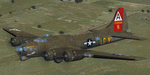
This folder contains a repaint for the A2A WoP2 B-17G in the colors of B-17G-10-VE #42-39996 which arrived at Bassingbourn to join the 91st BG on 14 january 1944. She was assigned to the 332nd BS and after completing a few flights, she received the name 'Boston Bombshell' after the original aircraft carrying that name was brought down near Munster. Tony Stracer painted the nose art, based on Esquire's August centrefold by Varga. On 16 August 1944, on its 47th mission, "Boston Bombshell" was attacked by a group of 25 fighters before reaching the target, Halle. All four engines caught fire and she went down in a blazing inferno. Only two crew members survived, pilot Lt. John Dunlap, and navigator Lt Hubert Carpenter.
Repaint by Jan Kees Blom, based on the paintkit by A2A.
| Filename: | Boeing_B17G_91st_BG_LGN_Boston_Bombshell.zip |
| License: | Freeware |
| Added: | 7th October 2019, 18:19:48 |
| Downloads: | 91 |
| Author: | Jan Kees Blom |
| Size: | 16.34 MB |


© 2001-2026 AVSIM Online
All Rights Reserved
Privacy Policy |