
Where Flight Simulation Enthusiasts Gather from Around the World!
AVSIM Library - Search Results

| Category: Microsoft Flight Simulator (2020) - Utilities | |
| FBWA320_LINDA_Module_ByJujunet_v0.3 |

|
File Description:
This module allow to control hidden controls of the FBW A320, using LINDA software and FSUIPC. Require : FSUIPC ver 7 full licence, Microsoft Flight Simulator and LINDA software. Installation : Uncompress archive in any place. Move A32nx.evt file to your FSUIPC root folder. Move A320.hvar on \Community\fsuipc-lvar-module\modules. On LINDA software : Click on "Maintenance", on top, select "--aircrafts--". Click on "Select Source Folder", below "Import Aircraft Module", browse to the folder FBWA320, click on "Import", or "Overwrite" if updating. This module for Linda freeware allows to bind : -Landing and Nose light independently -Seat-belt -No Smoking -Mode and zoom on ND -Display function ARPT, VOR, WPT, NDB... on ND -Terrain on ND -Eicam pages, with an encoder -ILS -Barometer increment and decrement with automatic detection of position (HPA or inHg) -Toggle between HPA and inHg -Toggle between QNH setting and STD -Autobrake Cycle -Reverse ON/OFF -Full compatibility for Managed/Selected on SPD, HDG, ALT and Selected mode on VS. To create your own module, or customize this one, go to my Youtube Tutorial : My channel : https://www.youtube.com/channel/UCVgdlnaAk2Q4EOSCICW_0iA Changelog : Version 0.1 : Initial Release Version 0.2 : Update to work with FBWA320 v0.8.0, Version 0.3 : Update to work with FBWA320 v0.11.0
| Filename: | FBWA320_LINDA_Module_ByJujunet_v03.zip |
| License: | Freeware |
| Added: | 16th January 2024, 14:31:38 |
| Downloads: | 33 |
| Author: | Julien GICQUIAUD |
| Size: | 14.32 KB |
| Category: Flight Simulator X - Flight Plans | |
| SIDSTAR for KJFK John F Kennedy Intl, New York |
|
File Description:
SIDSTAR Procedure File for KJFK for Cycle 1204/1205 (05APR12-31MAY12) based on FAA National Data from National Flight Data Center, issued every 56d (Two Navigraph Cycles). These procedures include the following enhancements: All procedures are included as-published by the FAA and they are expanded to replace VECTORS with realistic route segments for use in a non-ATC environment (ie not using VATSIM or other service). All STARs include routing from the arrival to the final approach fix of the approach and all SIDs are expanded to include routing from the runway to the departure gate, except where noted in the file header. Each procedure file includes a text header that provides information on all the procedures for that location.
The KJFK procedure file includes all published SIDs plus routes to often filed departure gates such as BAYYS, BERGH, COATE, CUTOX DIXIE GAYEL LINND NEION and RBV. All published STARs are included and routes are provided to all ILS as well as GPS13L and Visual 22L. All published approaches are provided including two Charted Visual Approaches BELMONT VIS22L and PARKWAY VIS13L/R.
For PMDG 737NG/737NGX/747-400/747-400X/MD-11FS9/MD-11FSX/BAeJS41
| Filename: | SIDSTAR_for_KJFK_John_F_Kennedy_Intl_New_York.zip |
| License: | Freeware |
| Added: | 21st April 2012, 22:21:49 |
| Downloads: | 351 |
| Author: | Dan Downs |
| Size: | 14.09 KB |
| Category: Flight Simulator 2004 - Miscellaneous Files | |
| Nick's Prop Dust with Control Gauges |
|
File Description:
Prop aircraft users are in for a real treat. This gauge/effects package automatically senses the terrain the aircraft is in contact with or flying over and changes the dust and water effects for the aircrafts prop/rotor wash based on dirt, dry mud or clay, snow, rain, water, ice, sand, gravel and short grass. In addition the real time surface conditions are also sensed. In example, a dry asphalt or concrete runway will produce no dust, however, the same runway with snow conditions present will automatically produce a throttle controlled snow blowing effect. The 25 included effects files and 5 gauges have been tuned to reflect a realistic representation of the dust/mist produced by different types of aircraft taking off or touching down on different terrains and surface conditions. The effects are properly influenced by cross wind conditions and reverse pitch is also supported. Effects files and gauges are included for large and small, single engine, multi-engine, amphibians, helicopters and massive scale military and commercial transports. It requires editing/adding lines in the aircraft.cfg and panel.cfg files. The README files include very complete and comprehensive instructions including a quick and easy copy/paste file for all the Microsoft prop aircraft and tutorial on making custom gauges from the ones provided.
By Nick Needham
| Filename: | Nicks_Prop_Dust_with_Control_Gauges.zip |
| License: | Freeware |
| Added: | 8th December 2003, 17:07:07 |
| Downloads: | 7,298 |
| Author: | Nick Needham |
| Size: | 1.22 MB |
| Category: Flight Simulator X - AFCAD Files | |
| ZSGS - Zhuhai Janwan Airport - Zhuhai, China |
|
File Description:
The Zhuhai Sanzao airport (ZGSD/ZUH, China), close to Macao, was built on request of someone who found it included in the FMC of PMDGs 737NGX, but missed in FSX. I used ADE and the Google based old version 2 of Plan-G (thanks to both authors) and some charts being available in the internet. However, it is equipped with standard buildings which are roughly adapted to the real dimensions well. Lighting, windsocks, taxisigns and moving jetways. Of course I added both ILS as well. There is a big exhibition apron on the airport which is modeled but blocked for AI traffic. You will see the lines of the taxiways nevertheless. The latest temporary chart (Nov 2012) shows a third apron which is not realised and I'm not planning to do so (obviously the whole site is still under construction).
As being built on a FSX island (which is now a peninsula) and default coast lines not fitting to the real position of the airport (Rwy05 was hanging in the water) I decided to compromise in a way that I corrected the area in the vicinity of the airport but respected the remaining part as it was in the default scenery. The attached pictures should give an impression even if I'm not using the pure default scenery. Therefore this little patch should be compatible to advanced mesh sceneries.
| Filename: | ZSGS___Zhuhai_Janwan_Airport__Zhuhai_China.zip |
| License: | Freeware |
| Added: | 2nd May 2013, 07:56:18 |
| Downloads: | 684 |
| Author: | Axel Birsul |
| Size: | 614.11 KB |
| Category: Flight Simulator X - Flight Plans | |
| SIDSTAR Procedure File for KATL |
|
File Description:
PMDG SIDSTARS Cycle 1113-1201 (15DEC11-09FEB12) based on FAA National Data from National Flight Data Center, issued every 56d (Two Navigraph Cycles). These procedures include the following enhancements: All procedures are included as-published by the FAA and they are expanded to replace ATC-vectors with realistic route segments for use in a non-ATC environment (ie not using VATSIM or other service). All STARs include routing from the arrival to the final approach fix of the approach and all SIDs are expanded to include routing from the runway to the departure gate. RNP approaches that have arc-segments are accurately modelled. Procedure turns are included for all approaches where published.
At Atlanta in particular, the unpublished departures alluded to in the ATL5 SID (EAONE EATWO etc) are included for use with turboprop aircraft (the jets use the RNAV departures), and the non-RNAV STARs provide route segments to the arrival approaches with realistic constraints for turboprops.
The SIDSTAR text file includes a detailed header listing all procedures and notes to help get the best use of the procedures. For the interested, I included an example of how to create an arc where the radius and arc center are unknown based on using a geographical tool such as COMPSYS (available free from the FAA).
For PMDG 737NG/737NGX/747-400/747-400X/MD-11FS9/MD-11FSX/BAeJS41
| Filename: | SIDSTAR_Procedure_File_for_KATL.zip |
| License: | Freeware, limited distribution |
| Added: | 11th January 2012, 22:01:45 |
| Downloads: | 269 |
| Author: | Dan Downs |
| Size: | 17.02 KB |
| Category: Flight Simulator 2004 - AFCAD Files | |
| La Guardia |
|
File Description:
A high quality AFCAD2 file the New York La Guardia (KLGA) scenery by Shehryar Ansari. This file features assigned gates for all airlines that currently serve LGA. In order to ensure only 'mainline' aircraft use the jetbridges, a new 'Express' apron for Dash 8 and RJ size aircraft is provided near the Central Terminal and also adjacent to the US Air and Delta Terminals. An extensive GA parking area has also been added to the west side of the airport and includes 4 Helipads. A tower view is provided for the airport and both runways are also in use to maximize traffic flow. The Marine Terminal (Delta Shuttle) and US Airways (Shuttle) areas now have seperate parking codes. The txt for these codes is included in this zip, to add to your 'ParkingSpecs' document. Every available space at this airport has been used to provide a total of 140 parking positions, comprising 42 gates for regional jets, 59 gates for mainline aircraft, 4 Cargo Ramps and 35 GA ramps. A very easy to use tutorial explaining how to make AI Delta Shuttle aircraft use only the Marine Terminal and US Air Shuttle aircraft only use the US Shuttle Terminal is included. This package also includes screenshots showing the effects that this file has on your AI traffic. Requires the excellent scenery addon LGA2004.zip by Shehryar Ansari. This file is not recommended to be used with the default FS airport.
| Filename: | La_Guardia.zip |
| License: | Freeware |
| Added: | 1st February 2005, 04:51:36 |
| Downloads: | 8,783 |
| Author: | Lee Brompton |
| Size: | 4.2 MB |
| Category: Flight Simulator 2004 - Miscellaneous Files | |
| Nick's AI Jet Exhaust With Control Gauge |
|
File Description:
Hanging around the airport watching the A-I traffic and chasing A-I jet aircraft just got a little more interesting. Enjoy watching your entire A-I jet fleet as they display engine heat shimmer effects -after- push-back from the terminal and during taxi to the active runway. All the A-I traffic take off displaying a lite, expanding, frame-rate friendly and nicely scaled high throttle heat/exhaust trail FX which remain with the A-I aircraft during its entire flight. To top off the show, the A-I aircraft that are throttled down and landing display no exhaust from the engines! This package also comes with a gauge that allows pilot throttle control of the taxi heat shimmer/full-throttle exhaust FX for the jet aircraft being flown in the sim by the user. This package does NOT interfere with the logo, taxi or wing lights of any aircraft and comes with 5 all new exhaust effects files which can be applied to just about any size private, commercial or military jet. It requires editing/adding lines in the aircraft.cfg and panel.cfg files. The README files include very complete and comprehensive instructions including a quick and easy copy/paste file for all the Microsoft jet aircraft and tutorial on making custom gauges from the one provided. This package completely replaces my original *Nick's Jet Smoke* package and any/all updates for it.
By Nick Needham
| Filename: | Nicks_AI_Jet_Exhaust_With_Control_Gauge.zip |
| License: | Freeware, limited distribution |
| Added: | 22nd December 2003, 21:16:01 |
| Downloads: | 29,957 |
| Author: | Nick Needham |
| Size: | 894.61 KB |
| Category: Flight Simulator X - Miscellaneous Files | |
| 737NG Normal Procedures |
|
Images related to this file:
File Description:
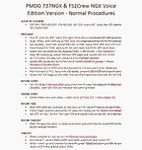
Sorry folks but yet another update since I found some additional small issues I wanted to correct. I hope with this version I caught them all so this will be the FINAL version...at least for today ;-) If you have problem fitting the list on 2 A4 pages when printing it from WordPad make sure you have unchecked the option in WordPad to print page numbers.
A flow/checklist for flying PMDG's 737NGX with FS2Crew Voice Edition. Did this mainly for my own use meaning the flow/checklist is adjusted for how I do my flying and with the addons I use like Aerosoft AES for example. Please also be aware this is not the kind of flow/checklist that includes all things you need to perform during a normal flight but instead you are expected to already have a general knowledge of both the NGX and FS2Crew. However I thought others might be helped by this too both newbies to get you going with the "flow" using FS2Crew but also for the more experienced users as a simple to print out and use memory note. It's also easy for you to change whatever you like to suit your own needs better since I created it in common rtf format using the standard Wordpad Windows application. I deliberately made it as compressed as possible leaving out stuff like all the answers to the checklists etc so it would fit on a single A4 sheet being easy to print and maybe also laminate if you like. Hope you'll enjoy it!
| Filename: | 737NG_Normal_Procedures.zip |
| License: | Freeware |
| Added: | 18th June 2012, 19:58:29 |
| Downloads: | 4,154 |
| Author: | Richard Asberg |
| Size: | 6.17 KB |
| Category: Flight Simulator X - Original Aircraft | |
| American Airlines Boeing 787-900 |
|
Images related to this file:
File Description:
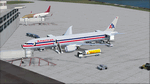
The Boeing 787 is one of the most sophisticated aircraft ever designed, and I have worked on several FS models from even before the real aircraft was ever built. I have accumulated so much data relating to this plane that I can now incorporate real world dynamics for it based on extremely realistic information. The aircraft offered here has been modified to offer all of that realism. In the real world, the 787 is flown primarily with autopilot controls, and this model is no different. It doesn't take a lot to fly this plane, and if I were to be offered the challenge I think I'd be up and flying within a few minutes, in a real 787. Because of this, I offer no advise other than normal flight rules.
If you are new to FSX, please learn through the on-board tutorials. I am not a tutor. I do not have anything to do with cosmetics. I do not design panels. All I do is help educate you about the realism of aircraft design. You can look at the aircraft.cfg and the .air file (Airfile Editor Required) to see what I've done in comparison to the original model, but I will not really help you with tutorial related issues. If you find something you think is wrong, let me know. Otherwise, enjoy this model and fly her like the real thing.
Everything I've done here is for educational purposes without any expectation of any monetary gain, and offered publicly for free. What I offer here is protected by the Fair Use Doctrine of International Copyright Law, and you are free to study this as follows:
https://www.law.cornell.edu/uscode/text/17/107
All persons involved with this and the original design are credited, unless they are unknown and have offered no credit details.
Model Designer: Camil Valiquette
Sound: Emil Serafino
Panel: Marco Spada
Real World Dynamics, Effects and Data: Douglas E. Trapp, [email protected]
July 2017
| Filename: | American_Airlines_Boeing_787900.zip |
| License: | Freeware |
| Added: | 15th July 2017, 16:46:49 |
| Downloads: | 861 |
| Author: | Douglas E. Trapp |
| Size: | 41.65 MB |
| Category: Flight Simulator X - Scenery | |
| Freeware Project Kobe X (RJBE) Japan |
|
Images related to this file:
File Description:
Freeware project KOBE X (RJBE) Japan. Contains fully detailed airport with custom ground polygons. Accurate 3d model and texture of all the building of the airport including the terminal, control tower, hangars, bridge and many more. Please note that this project was my initial experience in many fields of scenery design so take it as it is and enjoy flying in Japan. The design is never done but I think it was ready to be released. Still have some work to do with the animated jetways and night lighting for my next "payware" project (KSAN, San Diego Intl). It's going to be far better than this freeware.
You can download the world of ai installer and install the All Nippon Airways package and maybe the JAL too. The jetways are not animated but you can park a 747 in gate 1, a 767 in gate 5 and a 737 in gate 6 and be perfectly aligned with the jetway door.
Also I've not try this scenery in a less powerful computer than mine. I run a Windows 7, I7-950 @ 3.8 GHz and a GTX 570. So don't get mad if you're having bad performances :). With all sliders in the "display settings" set to max I've around 20 fps in the virtual cockpit of the level-d 767. You'll get a nicer airport with also the global texture resolution set to max, water effects set to High 2.x and traffic to ultra-high. Do not turn on Ground scenery shadows as it will make a shadow for the entire airport (ground poly).
I've some tutorial on my YouTube channel (n170toga) on how to make fsx sceneries if you are interested. Don't forget to subscribe there and have updates for the upcoming scenery. Please review this airport if you like as I will learn a lot for my next
project and it's only going to be better.
This scenery is a freeware and should be considered as a freeware. Arigato, Sagga Toure (Devinci), Devinci Design and Development (3De)
| Filename: | Freeware_Project_Kobe_X_RJBE_Japan.zip |
| License: | Freeware |
| Added: | 12th June 2011, 08:28:51 |
| Downloads: | 6,648 |
| Author: | Sagga Toure |
| Size: | 66.48 MB |


© 2001-2026 AVSIM Online
All Rights Reserved
Privacy Policy |