
Where Flight Simulation Enthusiasts Gather from Around the World!
AVSIM Library - Search Results

| Category: Flight Simulator 2004 - Original Aircraft | |
| Avions Mudry CAP20L |

|
File Description:
The CAP 20L is a single-seat descendant of the two seat Mudry CAP10, the CAP20L is itself derived from the single seat Mudry CAP20, featuring shortened and modified fuselage and shortened wings. First flown on January 15th 1976. The CAP20L is also an often modeled Radio Controlled model aircraft & is where this author got inspired to make this FS9 model.
The model features full animation, including variable pitch propeller blades, reflective textures and as accurate as I can get, flight dynamics fully tuned & optimised for FS2004/FS9. The model also features a dynamic Virtual cockpit and customised 3d panel, there is no 2d panel with this release.
| Filename: | Avions_Mudry_CAP20L.zip |
| License: | Check within download |
| Added: | 11th February 2005, 23:31:32 |
| Downloads: | 4,786 |
| Author: | David Friswell |
| Size: | 1.75 MB |
| Category: Flight Simulator 2004 - Original Aircraft | |
| House Colours Canadair Regional Jet 900 (Project OpenSky) |
|
File Description:
Presenting the Project Opensky CRJ-900 series featuring a GMAX model, detailed textures and other standard FS2004 features
- Dynamic shine
- Wingview and Virtual Cockpit
- Opening Door
- 3d Flight Attendants in the cabin
- All normal animations
CRJ-900 Official House Colours repaint with phorealistic 32bit textures, different levels of reflection are used to enhance the look.
CRJ-900 Official House Colours (C-FRJX)
http://www.airliners.net/open.file/177713/L/
Visit Project OpenSky today http://projectopensky.com/
| Filename: | House_Colours_Canadair_Regional_Jet_900_Project_Op.zip |
| License: | Check within download |
| Added: | 11th August 2004, 19:51:01 |
| Downloads: | 46,189 |
| Author: | Project OpenSky |
| Size: | 6.84 MB |
| Category: Flight Simulator 2004 - Original Aircraft | |
| Waco Classic Biplane |
|
File Description:
Former payware package uploaded with permission of original authors. Built by the Waco Classic Aircraft Corporation this new/old biplane combines the beautiful and classic lines of the 1930s Waco and the new world of modern avonics. Of all the antique and/or classic biplanes of the pre-war era, the Waco is certainly the most beautiful of them all and Bill Lyons has packaged several repaints of the wheeled version and 2 repaints of a float version in this single download. Having an excellent dynamic 3D virtual cockpit (as all of Bill's aircraft have had since the days of FS98) and excellent sounds, this is truly an FS classic! Bear!
| Filename: | Waco_Classic_Biplane.zip |
| License: | Freeware, limited distribution |
| Added: | 19th August 2003, 01:53:11 |
| Downloads: | 30,126 |
| Author: | Lynn & Bill Lyons |
| Size: | 3.13 MB |
| Category: Flight Simulator X - Scenery | |
| ValparaÃso Provincia, Litoral 2016. Chile. For FSX |
|
Images related to this file:
File Description:
Scenery of ValparaÃso Province from North (Quintero) to South (Laguna Verde valley). About 2.000 km2 intervention that brings up to fsx the current urban density, neighborhoods, forests and the most important iconic 3d objects you can recognize from a real VFR flight. This project uses FTX Vector as it main complement (only for the shapes of the coast). Also uses satellite background DAY/NIGHT, SPRING/ FALL / WINTER Photoscenery for Ritoque, Aconcagua, Concon, Embalse Los Aromos, Salinas, Borde Costero de Viña del Mar, Tranque La Luz, Peñuelas. Recomended to use (as an option) with my airport projects. SCVM, SCER, SCRD, SCSN, SCCV, SCIR, SCEL.
| Filename: | Valparaso_Provincia_Litoral_2016_Chile_For_FSX.zip |
| License: | Freeware |
| Added: | 4th November 2016, 04:59:42 |
| Downloads: | 1,097 |
| Author: | Orlando Veas |
| Size: | 180.36 MB |
| Category: Flight Simulator 2004 - Aircraft Repaints, Textures and Modifications | |
| Iran Air Airbus 300B4-200 |
|
File Description:
SGA's superb A300B4-200 in Iran Air colours, EP-IBT. This aircraft is mainly used on Iran Airs vast domestic services, usually flying to cities such as Ahwaz in Irans Khuzestan province. Features include high quality 32-bit textures, detailed and accurate model recreating the A300B4 in all its prestige with dynamic shine, full compliment of animations including accurately deploying spoilers, accurate flap animations that model their real counterparts faithfully, full and accurate lighting, 3D engine fans, detailed landing gear with accurate retraction sequence, opening cargo and passenger doors, tilting trucks on the landing gear that remain level with the ground during rotation and much more!
| Filename: | Iran_Air_Airbus_300B4200.zip |
| License: | Freeware, limited distribution |
| Added: | 20th February 2004, 00:43:21 |
| Downloads: | 2,804 |
| Author: | Amir Alemohammed |
| Size: | 3.87 MB |
| Category: Flight Simulator 2004 - Panels | |
| Boeing 737 v1.4 2d |
|
File Description:
This 1.4 version has new updates such as GPS and digital fuel meter in the 3d Virtual cockpit! Also fixed the missing NAV2 radio. This is a fully functional panel for your favorite Boeing Airliner that has built in GPS, Radio and Throttle into the 2d panel too. Very easy to install. NOTES: V1.4 has everything V1.0, 1.1, 1.2 and 1.3 have, but added the above mentioned updates. I have had lots of great feedback and welcome ideas/suggested mods. Credit also goes to Alex Stankevitch for his 1.3 update/mods. Feel free to email a suggestion/idea if you want. Please read the readme and most all....Happy flying!
| Filename: | Boeing_737_v14_2d.zip |
| License: | Freeware |
| Added: | 13th October 2004, 04:27:28 |
| Downloads: | 5,761 |
| Author: | Randy Oldfield |
| Size: | 4.44 MB |
| Category: Flight Simulator X - Original Aircraft | |
| Grumman F-14D Tomcat v2.20 |
|
File Description:
The Grumman F-14D Tomcat is a supersonic, twin-engine, two-seat, variable-sweep wing fighter aircraft employed by U.S.Navy from 1991 to 2006. This package contains an entirely new visual model,with self shadowing,bump mapping and hi-res textures, working virtual cockpit for pilot and RIO, 3D gauges,reasonably accurate flight model and support for VRS Tacpack working weapon systems. Includes custom HUD by Jivko "Neutrino" Rusev and Scott Printz, sound package by Serge "fsxnavypilot" Lsa, and repaints by Jiri Soukup and Groom Lake Simulations. Designed by Dino Cattaneo. Requires FSX:Acceleration or Gold versions or Prepar3d V1.X or V2.X (fully compatible).
| Filename: | Grumman_F14D_Tomcat_v220.zip |
| License: | Freeware |
| Added: | 6th January 2014, 13:58:53 |
| Downloads: | 8,733 |
| Author: | Dino Cattaneo |
| Size: | 187.61 MB |
| Category: Microsoft Flight Simulator (2020) - Utilities | |
| FSTramp v8.84 for MSFS, FSX(-SE), Prepart3D, X-Plane (Win) |
|
Images related to this file:
File Description:

This add-on is an EXE application for Microsoft Flight Simulator and a DLL module for all other simulators. The DLL variant is activated via hotkeys or the simulator menu add-ons or plugins. Window size and layout are configurable for one or more screens. To avoid dazzling, the brightness of the entire application is customizable. Primarily it is a flight management system (FMS) with automatic control from start to landing. This also includes the observance of SID, STAR and Approaches in unmatched quality. The flight plan required for the FMS can be created manually or automatically, interactive changes and additions during the flight are possible. The basis of the flight planner is the 3D world map and the search function for airfields and navigation aids. The FMS by FSTramp relies on the autopilot of the aircraft. In case of incompatibility, the autopilot integrated in FSTramp will be used. This allows FSTramp to control almost all aircraft from airport to airport. The altitude profile of the flight plan, SID, STAR and approach is taken into account. This means that FSTramp extends the often incomplete airport procedures to and from the runway so that they can be flown completely automatically. During the fully automatic flight, the autopilot values ​​for HDG, ALT, VSPEED, SPD and MACH can be manually overridden. This is e.g. useful for being able to react to the instructions of the tower in the final approach without completely stopping the automatic flight. The rotating or north pointing 3D world map with numeric display of the terrain elevation under the mouse arrow is another special feature. It does not need an internet but is synthesized from included height profiles of the globe. The Data of continents, mountains and rivers are included in the setup. Airspaces, Airways, Waypoints and SID, STAR and Approaches are also included in the setup, but can be updated by installing additional AIRAC cycles. Airfields and navigation stations are taken from the simulator. NVIDIA: If the frame rate of the simulator drops sharply about 20 seconds after FSTramp's visibility, the power management of the GPU slows down prematurely. In the NVIDIA Control Panel, change the 'Manage 3D settings - Power management mode' option to 'Adaptive'.
| Filename: | FSTramp_v884_for_MSFS_FSXSE_Prepart3D_XPlane_Win.zip |
| License: | Shareware, time limited |
| Added: | 7th July 2023, 04:35:12 |
| Downloads: | 110 |
| Author: | Helge Schroeder |
| Size: | 358.21 MB |
| Category: Flight Simulator X - Utilities | |
| FSTramp v8.84 for MSFS, FSX(-SE), Prepart3D, X-Plane (Win) |
|
Images related to this file:
File Description:
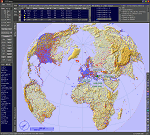
This add-on is an EXE application for Microsoft Flight Simulator and a DLL module for all other simulators. The DLL variant is activated via hotkeys or the simulator menu add-ons or plugins. Window size and layout are configurable for one or more screens. To avoid dazzling, the brightness of the entire application is customizable. Primarily it is a flight management system (FMS) with automatic control from start to landing. This also includes the observance of SID, STAR and Approaches in unmatched quality. The flight plan required for the FMS can be created manually or automatically, interactive changes and additions during the flight are possible. The basis of the flight planner is the 3D world map and the search function for airfields and navigation aids. The FMS by FSTramp relies on the autopilot of the aircraft. In case of incompatibility, the autopilot integrated in FSTramp will be used. This allows FSTramp to control almost all aircraft from airport to airport. The altitude profile of the flight plan, SID, STAR and approach is taken into account. This means that FSTramp extends the often incomplete airport procedures to and from the runway so that they can be flown completely automatically. During the fully automatic flight, the autopilot values ​​for HDG, ALT, VSPEED, SPD and MACH can be manually overridden. This is e.g. useful for being able to react to the instructions of the tower in the final approach without completely stopping the automatic flight. The rotating or north pointing 3D world map with numeric display of the terrain elevation under the mouse arrow is another special feature. It does not need an internet but is synthesized from included height profiles of the globe. The Data of continents, mountains and rivers are included in the setup. Airspaces, Airways, Waypoints and SID, STAR and Approaches are also included in the setup, but can be updated by installing additional AIRAC cycles. Airfields and navigation stations are taken from the simulator. NVIDIA: If the frame rate of the simulator drops sharply about 20 seconds after FSTramp's visibility, the power management of the GPU slows down prematurely. In the NVIDIA Control Panel, change the 'Manage 3D settings - Power management mode' option to 'Adaptive'.
| Filename: | FSTramp_v884_for_MSFS_FSXSE_Prepart3D_XPlane_Win.zip |
| License: | Shareware, time limited |
| Added: | 7th July 2023, 04:35:43 |
| Downloads: | 130 |
| Author: | Helge Schroeder |
| Size: | 358.21 MB |
| Category: Prepar3D V5 - Utilities | |
| FSTramp v8.84 for Prepart3D 2-6, MSFS, FSX(-SE), X-Plane (Win) |
|
Images related to this file:
File Description:
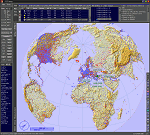
This add-on is an EXE application for Microsoft Flight Simulator and a DLL module for all other simulators. The DLL variant is activated via hotkeys or the simulator menu add-ons or plugins. Window size and layout are configurable for one or more screens. To avoid dazzling, the brightness of the entire application is customizable. Primarily it is a flight management system (FMS) with automatic control from start to landing. This also includes the observance of SID, STAR and Approaches in unmatched quality. The flight plan required for the FMS can be created manually or automatically, interactive changes and additions during the flight are possible. The basis of the flight planner is the 3D world map and the search function for airfields and navigation aids. The FMS by FSTramp relies on the autopilot of the aircraft. In case of incompatibility, the autopilot integrated in FSTramp will be used. This allows FSTramp to control almost all aircraft from airport to airport. The altitude profile of the flight plan, SID, STAR and approach is taken into account. This means that FSTramp extends the often incomplete airport procedures to and from the runway so that they can be flown completely automatically. During the fully automatic flight, the autopilot values ​​for HDG, ALT, VSPEED, SPD and MACH can be manually overridden. This is e.g. useful for being able to react to the instructions of the tower in the final approach without completely stopping the automatic flight. The rotating or north pointing 3D world map with numeric display of the terrain elevation under the mouse arrow is another special feature. It does not need an internet but is synthesized from included height profiles of the globe. The Data of continents, mountains and rivers are included in the setup. Airspaces, Airways, Waypoints and SID, STAR and Approaches are also included in the setup, but can be updated by installing additional AIRAC cycles. Airfields and navigation stations are taken from the simulator. NVIDIA: If the frame rate of the simulator drops sharply about 20 seconds after FSTramp's visibility, the power management of the GPU slows down prematurely. In the NVIDIA Control Panel, change the 'Manage 3D settings - Power management mode' option to 'Adaptive'.
| Filename: | FSTramp_v884_for_Prepart3D_26_MSFS_FSXSE_XPlane_Wi.zip |
| License: | Shareware, time limited |
| Added: | 7th July 2023, 04:35:26 |
| Downloads: | 42 |
| Author: | Helge Schroeder |
| Size: | 358.21 MB |


© 2001-2026 AVSIM Online
All Rights Reserved
Privacy Policy |