
Where Flight Simulation Enthusiasts Gather from Around the World!
AVSIM Library - Search Results

| Category: Prepar3D V1-4 - Utilities | |
| Boeing 777-300ER Weight & Balance Sheet |

|
Images related to this file:
File Description:
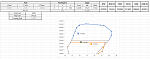
This is an excel sheet for calculating weight and balance for the PMDG Boeing 777-300ER. The values calculated should correspond with FMC-reported values. All weights in kg only for now.
| Filename: | Boeing_777300ER_Weight__Balance_Sheet.zip |
| License: | Freeware |
| Added: | 8th February 2019, 17:34:23 |
| Downloads: | 294 |
| Author: | Frank Grivel |
| Size: | 58.77 KB |
| Category: Prepar3D V1-4 - Utilities | |
| Flightplan Visualizer 1.8 |
|
Images related to this file:
File Description:
Flightplan Visualizer (FV) version 1.8.0. Copyright 2018 by Pelle F. S. Liljendal ([email protected]), all rights reserved.
FV comes with 300 Commercial-, and +380 BizJet AI pre-imported flightplans which the creators of those flightplans have gracefully allowed me to include with the installer, however you are able to import additional (AI) flightplans if you want to. Once imported these (AI) flightplans can be visualized on a map-view, and the user will be able to search accross all these. Hence you can use the program as inspiration as to which routes to fly. E.g. you can search across all imported flightplans to find all flights in an A321 flying into/out from LDDU, or simply to look for all flights in a Boeing 747-8F.
Simply run the included installer to install the software. The program will be installed into "C:\Program Files (x86)\Flightplan Visualizer" and all datafiles will be installed into: "C:\Users\[UserName]\AppData\Roaming\FlightplanVisualizer". The program comes with a full manual explaining everything, and a 2 page quick manual to get you started. The first 3 times you run the program the quick manual will automatically open. Lacking a “proper forum†I have - for now - setup a Facebook group for support. This group is called “Flightplan Visualizerâ€, and you can seek membership via this link: https://www.facebook.com/groups/FlightplanVisualizer/
If you are installing this version on top of a version prior to 1.7 the program will start slower than ususal and display a lot of warnings. This is because it fileformat of the pre-imported flightplans was changed between version 1.6 and 1.7, so starting version 1.8 it will update all flightplans (and in the progress it will display all those warnings). The next time you start FV you will no longer see this warnings as all flightplans will have become updated.
Pelle
| Filename: | Flightplan_Visualizer_18.zip |
| License: | Freeware, limited distribution |
| Added: | 16th December 2018, 01:30:27 |
| Downloads: | 330 |
| Author: | Pelle Liljendal |
| Size: | 24.48 MB |
| Category: Prepar3D V1-4 - Utilities | |
| GSX 2 OJAI |
|
File Description:
GSX Level 2 Sode Files For OJAI Freewere vatsim jordan scenery releasd! Make sure to follow the Readme File
if you see somthing you think i can do Better or evan a Bug Write it down here and i promise update will be up here In less than a day
thank you Dor.
email: [email protected]
| Filename: | GSX_2_OJAI.zip |
| License: | Freeware |
| Added: | 25th December 2018, 21:08:01 |
| Downloads: | 134 |
| Author: | Dor Bashan |
| Size: | 31.97 KB |
| Category: Prepar3D V1-4 - Utilities | |
| Flightplan Visualizer 1.6 |
|
Images related to this file:
File Description:
Flightplan Visualizer (FV) version 1.06. Copyright 2018 by Pelle F. S. Liljendal ([email protected]), all rights reserved.
FV comes with 300 pre-imported AI flightplans which the creators of those flightplans have gracefully allowed me to include with the installer, however you are able to import additional (AI) flightplans if you want to. Once imported these (AI) flightplans can be visualized on a map-view, and the user will be able to search accross all these. Hence you can use the program as inspiration as to which routes to fly. E.g. you can search across all imported flightplans to find all flights in an A321 flying into/out from LDDU, or simply to look for all flights in a Boeing 747-8F.
| Filename: | Flightplan_Visualizer_16.zip |
| License: | Freeware, limited distribution |
| Added: | 1st November 2018, 17:07:59 |
| Downloads: | 155 |
| Author: | Pelle Liljendal |
| Size: | 22.22 MB |
| Category: Prepar3D V1-4 - Utilities | |
| Addit! Pro Add-on Manager V8.6.5 |
|
Images related to this file:
File Description:
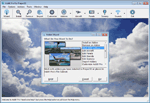
Addit! Pro is a comprehensive addon manager for Lockheed Martin's Prepar3D. Easily install, manage and remove aircraft, adventures, flights, flight plans, gauges, missions, panels, AI airport and facilities data, scenery, sounds, textures, videos, weather and more! Simple wizard-based interface makes installing and removing addons a breeze. Comprehensive addon management allows you to archive, rebuild and remove addons. Addit! Pro is fast and easy--no unzipping or file copying is necessary. Modify all aircraft, panels, sounds and scenery. Let Addit! Pro tackle the tough chores and spend your time flying. Shareware, please register to install an unlimited number of add-ons. See Register.htm. Supports Prepar3D v4, v3, v2, and v1. By Joseph Stearns.
| Filename: | Addit_Pro_Addon_Manager_V865.zip |
| License: | Shareware, limited functionality |
| Added: | 4th April 2019, 23:30:07 |
| Downloads: | 538 |
| Author: | Joseph Stearns |
| Size: | 36.91 MB |
| Category: Prepar3D V1-4 - Utilities | |
| PMDG 737 -800WL New lighting Mod |
|
File Description:
A new light mod for PMDG 737-800WL. Transforms the Dawn/Dust night lighting into as close to photo real I could make. Enjoy!
| Filename: | PMDG_737_800WL_New_lighting_Mod.zip |
| License: | Freeware |
| Added: | 14th November 2018, 15:20:43 |
| Downloads: | 638 |
| Author: | David Murden |
| Size: | 2.38 KB |
| Category: Prepar3D V1-4 - Utilities | |
| Flightplan Visualizer 1.7 |
|
File Description:
Flightplan Visualizer (FV) version 1.7.1. Copyright 2018 by Pelle F. S. Liljendal ([email protected]), all rights reserved.
FV comes with 300 Commercial-, and +380 BizJet AI pre-imported flightplans which the creators of those flightplans have gracefully allowed me to include with the installer, however you are able to import additional (AI) flightplans if you want to. Once imported these (AI) flightplans can be visualized on a map-view, and the user will be able to search accross all these. Hence you can use the program as inspiration as to which routes to fly. E.g. you can search across all imported flightplans to find all flights in an A321 flying into/out from LDDU, or simply to look for all flights in a Boeing 747-8F.
Simply run the included installer to install the software. The program will be installed into "C:\Program Files (x86)\Flightplan Visualizer" and all datafiles will be installed into: "C:\Users\[UserName]\AppData\Roaming\FlightplanVisualizer". The program comes with a full manual explaining everything, and a 2 page quick manual to get you started. The first 3 times you run the program the quick manual will automatically open. Lacking a “proper forum†I have - for now - setup a Facebook group for support. This group is called “Flightplan Visualizerâ€, and you can seek membership via this link: https://www.facebook.com/groups/FlightplanVisualizer/
If you are installing this version on top of a version prior to 1.7 the program will start slower than ususal and display a lot of warnings. This is because it fileformat of the pre-imported flightplans was changed between version 1.6 and 1.7, so starting version 1.7 it will update all flightplans (and in the progress it will display all those warnings). The next time you start FV you will no longer see this warnings as all flightplans will have become updated.
Pelle
| Filename: | Flightplan_Visualizer_17.zip |
| License: | Freeware, limited distribution |
| Added: | 27th November 2018, 17:23:12 |
| Downloads: | 463 |
| Author: | Pelle Liljendal |
| Size: | 23.28 MB |
| Category: Prepar3D V1-4 - Utilities | |
| Flightplan Visualizer 1.14 |
|
Images related to this file:
File Description:
Flightplan Visualizer (FV) version 1.14.0. Copyright 2018-2019 by Pelle F. S. Liljendal ([email protected]), all rights reserved.
FV comes with 629 pre-imported Commercial AI flightplans (+380 BizJet flightplans are available as a separate download). However you are able to import additional (AI) flightplans yourself. Once imported these (AI) flightplans can be visualized on a map-view, and the user will be able to search accross all these. Hence you can use the program as inspiration as to which routes to fly. E.g. you can search across all imported flightplans to find all flights in an A321 flying into/out from LDDU, or simply to look for all flights in a Boeing 747-8F.
Simply run the included installer to install the software. The program will be installed into "C:\Program Files (x86)\Flightplan Visualizer" and all datafiles will be installed into: "C:\Users\[UserName]\AppData\Roaming\FlightplanVisualizer". The program comes with a full manual explaining everything, and a 3 page quick manual to get you started. The first 3 times you run the program the quick manual will automatically open. The forum is hosted here: https://forum.aerosoft.com/index.php?/forum/919-flightplan-visualizer/
Version 1.14 Contains the following changes:
- Flightplan file-format was changed, to accommodate changes to the airline-data. In previous versions the airline ICAO-code had to be unique, hence not allowing old defunct airlines still remaining in the data-file when a new airline would be issued the same ICAO-code (now they can both exists, and many of the defunct have been marked as defunct).
- On start-up old flightplans in enabled folders will automatically be updated to the new format. If you have sub-folders containing additional flightplans, you should make sure these are enabled, in order to have these updated as well. Once they have been updated you can go ahead and disable these sub-folders again as you please.
- Its now possible to add user defined airlines, in case you want to add you own fictitious airlines (e.g. VA's) or you want to add airlines missing in the official data-files that I supply with the program (if this is the case, please notify me, so I can add these in the next release of the program).
- "Favorite aircraft" have been renamed into "Favorite aircraft-types", as it is the "types" of aircraft you mark. You don't mark a particular aircraft/cofiguration (like the PMDG B737-800 NGXu) as your favorite, but rather the "type" (B737-800). The file containing the (active) favorite aircraft-type selection was renamed as well (you don't have to do anything, the file is automatically renamed on start-up).
- Added a new Unit-Conversion form, letting the user convert units of: Speed, Lenght/Distance, Weight/Volume, Pressure and Temperature. The Weight/Volumne conversions is a bit special as it lets the user convert between weight (kg/lbs) and volume (liter/gal), thanks to a Fuel Density that defaults to 0.785, but can be changed by the user.
- All search-forms (seaching for airport, aircraft and airline) was changed to ignore whitespeaces (e.g. "airBaltic" vs. "air Baltic"), and ignore diacritics (e.g. "AerolÃnea" vs. "Aerolinea"), making it more easy to find what you are searching for in one go.
- The airline search-form will by default exclude airlines that have been marked as defunct. However a new "Include defunct" check-box have been added to the form, allowing you to include these (who am I to say you can not still use "Air Berlin", "Monarch" or "Thomas Cook" flightplans if you want to).
- Added 3 new columns to the airline search form showing commence/cease-date, and wheter or not the airline is "in use" (as carrier/operator by any of the active fligthplans).
- State is now by default excluded when using the airport search form, which make it a lot more convenient to find airports in the city of "New York". State can still be included in the search by choosing a different search-type using the combo-box in the upper/right corner.
- When Flightplan Visualizer needs for perform potentially lengthy operations it will spread the workload over the available cores of the CPU. However if you want to limit which cores it uses you can now set the affinity-mask in the settings form.
- The splash-screen shown when the program starts, and when reloading active flightplans was prevoiusly always shown on top (top-most), but if you find this anoying it can now be disabled in settings.
- Fixed: Warnings/errors regarding loading flightplans were only displayed at start-up. Now they are shown whenever all active flightplans are loaded (e.g. after having enabled a sub-folder).
- Data: The airline-data got a major update, and a bunch of new airlines were added, and the data for MANY others were updated. It is a manual process to update these, almost as funny to do as to watch paint dry ;-)
- Data: A few countries had a wrong- or no sub-region code, so these were fixed/updated. As usual, if any of you spot any erros, or missing data, please use the forum to notify me.
- Data: Additional info added to the aircraft-data (in preparation for some future plans).
- Flightplans: All flightplans bundled with the installer have been updated to the new file-format.
- Flightplans: Thanks to Ryan Carson (RCAI) for allowing me to bundle the installer with a few of his flightplans, so the installer comes with the very first winter 2019-2020 flightplan.
- Flightplans: The good people over at AIG (Alpha India Group) have been VERY busy since the last release, hence the installer comes with +130 new pre-imported flightplans, bringing the total to 629. This update concludes Summer 2019, and AIG already have the first Winter 2019/2020 flight-plans in beta-test.
Pelle
| Filename: | Flightplan_Visualizer_114.zip |
| License: | Freeware, limited distribution |
| Added: | 10th December 2019, 06:59:46 |
| Downloads: | 370 |
| Author: | Pelle Liljendal |
| Size: | 31.01 MB |
| Category: Prepar3D V1-4 - Utilities | |
| Affinity Shortcut Creator |
|
File Description:
This tool allows you to start any program with a specifec affinity code
The affinity code tells the computer which CPU cores to use to run a program.
The tool will create a shortcut to start the program with the set affinity
The shortcut must be run as administrator !
Due to windows restrictions, it will not work for apps installed in \programs files and \program files(x86)
| Filename: | Affinity_Shortcut_Creator.zip |
| License: | Freeware |
| Added: | 10th December 2019, 17:59:01 |
| Downloads: | 147 |
| Author: | Willy Vercruyssen |
| Size: | 130.64 KB |
| Category: Prepar3D V1-4 - Utilities | |
| Linda for A330 Aerosoft Pro |
|
File Description:
A working version of LINDA for FSX/PREPAR3D must be installed on the computer.
Unzip the downloaded zip file to the module folder in prepar3D.
If you already have a configuration of other aircrafts choose not to overwrite.
Only with the Aerosoft A330 do you allow this but since this is not yet present you have no problems either.
Contact can be done at the following Mail address [email protected]
| Filename: | Linda_for_A330_Aerosoft_Pro.zip |
| License: | Freeware |
| Added: | 14th December 2019, 20:48:11 |
| Downloads: | 108 |
| Author: | Frank Bogaerts |
| Size: | 13.77 MB |


© 2001-2026 AVSIM Online
All Rights Reserved
Privacy Policy |