
Where Flight Simulation Enthusiasts Gather from Around the World!
AVSIM Library - Search Results

| Category: Prepar3D V1-4 - Utilities | |
| business and scheduled template for Random Flight Database |

|
File Description:
Template for add business airlines and scheduled airlines in RANDOM FLIGHT DATABASE
Installation :
Unzip and Import files XLSX in user database.
To use these files choose user database or Default database + user database
Contact :
[email protected]
| Filename: | business_and_scheduled_template_for_Random_Flight_.zip |
| License: | Freeware |
| Added: | 4th September 2019, 19:11:39 |
| Downloads: | 54 |
| Author: | mikoulprostgrandprix |
| Size: | 51.27 KB |
| Category: Prepar3D V1-4 - Utilities | |
| Airport list conversion utility for FSMOVMAP2 |
|
Images related to this file:
File Description:
Powershell Script to create an airport list for FSMOVMAP2. Script can be modified for other purposes regarding FSX/P3D airport information. Required input to the script (runways.xml) must be generated by Makerwys.exe (4.873 upwards recommended) of Peter Dowson.
This file contains the following bug corrections:
- 09.08.19: mark unused secondary ILS with "-1" (App suppress them) instead of "-2" (App displays the value "-2")
- 10.09.19: skip ILS with heading but without frequency
| Filename: | Airport_list_conversion_utility_for_FSMOVMAP2.zip |
| License: | Freeware |
| Added: | 11th September 2019, 17:13:07 |
| Downloads: | 50 |
| Author: | Achim Haag |
| Size: | 8.77 KB |
| Category: Prepar3D V1-4 - Utilities | |
| Random Flight Database 2.2.2 |
|
File Description:
Random Flight Database is a simple and easy to use application. It will allow you to randomly choose a flight according to your criteria. A default database is already included, but also the possibility for each user to create his own database. But it's not all, you can also extract the flights of the day for an airport, or extract flights on a full week. Windows Only 2.2.2 : Added Flight Aware extraction last week on 7 days in "Extraction of scheduled flights and random choice in the list" Install : Execute .exe Contact [email protected] https://mikoulprostgrandprix.wixsite.com/randomflightdatabase
Other install : execute the shortcut "Check Update Random Flight Database"
Do not hesitate to send me bugs, or proposals.
Thanks
| Filename: | Random_Flight_Database_222.zip |
| License: | Freeware |
| Added: | 12th September 2019, 16:55:42 |
| Downloads: | 56 |
| Author: | mikoulprostgrandprix |
| Size: | 78.94 MB |
| Category: Prepar3D V1-4 - Utilities | |
| Random Flight Database v2.2.5 |
|
File Description:
Random Flight Database is a simple and easy to use application.
It will allow you to randomly choose a flight according to your criteria.
A default database is already included, but also the possibility for each user to create his own database.
But it's not all, you can also extract the flights of the day for an airport, or extract flights on a full week.
Windows Only
2.2.5 :
Replace winter by summer 2019 :
Cyprus Airways
Flyadeal
Flynas
Frontier Airlines
GetJet Airlines
Saudia Cargo
Saudia
SkyUp Airlines
Uzbekistan Airways Cargo
Uzbekistan Airways
Improved code for extracting data from Flightpedia and FlightAware sites
Added in "Extraction of scheduled flights and random choice in the list" :
- Flight Aware Departure (Longest Extraction, 3 Day Extraction, No Codeshare Extract)
- Flight Aware Departure (Longest Extraction, Last Week's Flight Extraction, No Codeshare Preview)
- Flight Aware Arrival (Longest Extraction, 3 Day Extraction, No Codeshare Extract)
- Flight Aware Arrival (Longest Extraction, Last Week's Flight Extraction, No Codeshare Preview)
Install : Execute .exe
Contact [email protected]
https://mikoulprostgrandprix.wixsite.com/randomflightdatabase
Other install : execute the shortcut "Check Update Random Flight Database"
Do not hesitate to send me bugs, or proposals. Thanks
| Filename: | Random_Flight_Database_v225.zip |
| License: | Freeware |
| Added: | 15th September 2019, 20:52:26 |
| Downloads: | 91 |
| Author: | mikoulprostgrandprix |
| Size: | 79.06 MB |
| Category: Prepar3D V1-4 - Utilities | |
| Random Flight Database 2.2.6 |
|
File Description:
Random Flight Database is a simple and easy to use application.
It will allow you to randomly choose a flight according to your criteria.
A default database is already included, but also the possibility for each user to create his own database.
But it's not all, you can also extract the flights of the day for an airport, or extract flights on a full week.
Windows Only
2.2.6
Replace winter by summer 2019 :
Evelop Airlines
Neos
Orbest
Added Check Update on startup
Install : Execute .exe
Contact [email protected]
https://mikoulprostgrandprix.wixsite.com/randomflightdatabase
Other install : execute the shortcut "Check Update Random Flight Database"
Do not hesitate to send me bugs, or proposals. Thanks
| Filename: | Random_Flight_Database_226.zip |
| License: | Freeware |
| Added: | 16th September 2019, 20:58:34 |
| Downloads: | 54 |
| Author: | mikoulprostgrandprix |
| Size: | 78.87 MB |
| Category: Prepar3D V1-4 - Utilities | |
| Random Flight Database 2.2.7 |
|
File Description:
Random Flight Database is a simple and easy to use application.
It will allow you to randomly choose a flight according to your criteria.
A default database is already included, but also the possibility for each user to create his own database.
But it's not all, you can also extract the flights of the day for an airport, or extract flights on a full week.
Windows Only
2.2.7
Added in "Extraction of scheduled flights and random choice in the list" :
- Flight Aware Live Airline (Longest Extraction, Extraction of flights in progress, No Codeshare Preview)
- Flight Aware Live Aircraft (Longest Extraction, Extraction of flights in progress, No Codeshare Preview)
Install : Execute .exe
Contact [email protected]
https://mikoulprostgrandprix.wixsite.com/randomflightdatabase
Other install : execute the shortcut "Check Update Random Flight Database"
Do not hesitate to send me bugs, or proposals. Thanks
| Filename: | Random_Flight_Database_227.zip |
| License: | Freeware |
| Added: | 18th September 2019, 02:32:16 |
| Downloads: | 61 |
| Author: | mikoulprostgrandprix |
| Size: | 78.93 MB |
| Category: Prepar3D V1-4 - Utilities | |
| Random Flight Database 2.2.8 |
|
File Description:
Random Flight Database is a simple and easy to use application. It will allow you to randomly choose a flight according to your criteria. A default database is already included, but also the possibility for each user to create his own database. But it's not all, you can also extract the flights of the day for an airport, or extract flights on a full week. Windows Only
2.2.8
Added in "Extraction of scheduled flights and random choice in the list" :
- search entry box
Added in "Random Flight Database"
- Search ICAO
Install : Execute .exe
Other install : execute the shortcut "Check Update Random Flight Database"
Contact [email protected]
https://mikoulprostgrandprix.wixsite.com/randomflightdatabase
Do not hesitate to send me bugs, or proposals. Thanks
| Filename: | Random_Flight_Database_228.zip |
| License: | Freeware |
| Added: | 19th September 2019, 17:21:33 |
| Downloads: | 56 |
| Author: | mikoulprostgrandprix |
| Size: | 79.2 MB |
| Category: Prepar3D V1-4 - Utilities | |
| Flightplan Visualizer 1.11 |
|
Images related to this file:
File Description:
Flightplan Visualizer (FV) version 1.11.0. Copyright 2018-2019 by Pelle F. S. Liljendal ([email protected]), all rights reserved.
FV comes with 540 pre-imported Commercial AI flightplans (+380 BizJet flightplans are available as a separate download). However you are able to import additional (AI) flightplans yourself. Once imported these (AI) flightplans can be visualized on a map-view, and the user will be able to search accross all these. Hence you can use the program as inspiration as to which routes to fly. E.g. you can search across all imported flightplans to find all flights in an A321 flying into/out from LDDU, or simply to look for all flights in a Boeing 747-8F.
Simply run the included installer to install the software. The program will be installed into "C:\Program Files (x86)\Flightplan Visualizer" and all datafiles will be installed into: "C:\Users\[UserName]\AppData\Roaming\FlightplanVisualizer". The program comes with a full manual explaining everything, and a 3 page quick manual to get you started. The first 3 times you run the program the quick manual will automatically open. The forum is hosted here: https://forum.aerosoft.com/index.php?/forum/919-flightplan-visualizer/
Version 1.11 Contains the following changes: The file-format of the Flightplan-files was changed to accommodate some planed changes. The program remains backward compatible, so "old" flightplans can still be loaded. I wanted to implement these changes BEFORE I began importing new flightplans, to ensure these new/updated flightplans are all utilizing the new format. On startup the old flightplans will automatically be converted to the new format. The new installer now comes bundled with 540 commercial flightplans (schedules:22291, legs:699158) whereas the old one "only" contained 300 commercial flighplans (schedules:16786, legs:536198). All BizJet flightplans were removed from the installer and are now available as a separate download. A new settings-form have been added to eliminate the need to manually edit the settings-file using a text-editor. A new menu-item have been added which opens an explore window browsing the content of the UserData folder. Individual (disabled) flightplan-files can now be permanently deleted via the "Enable/disable flightplans" form. Flightplan sub-folders (with exception of "Disabled") can now be marked as "enabled" (using a check-box). Meaning that the flightplans in these will be also loaded on startup (along with the files in the root-folder). Using the "Enable/disable flightplans" form you can now both move and copy flightplans (based on the value of the radio-buttons). A creator-field have been added to flightplans, which can be entered when you import/edit a flightplan. The name of the creator is displayed as a tool tip when hoovering the mouse over the combo-box in the bottom of the main-form. When importing new Flightplans the program will try to grab creator and provider from the files bundled with the flightplan. Likewise a button is added to the import-form which list the content of the text-files (e.g. "ReadMe.txt"), in case you need to manually grab the creators name from this file. Both when importing- and editing flightplans a new column have been added to the airport list-view containing comments regarding airports that have been redirected (from one ICAO to another), or airports classified as pseudo-airports (in case the airport does not exists in the flightsim). The elevation-column from previous versions was removed to make more room for the comment-column. Added a new form to edit airport-redirections (redirect from one ICAO to another on import). In the airport-info form you can now switch between showing flights for the selected flightplan/last search and all flights to/from the airport being displayed. Added a new "Nearby Airports" tab-sheet to the Airport-info form, which shows a distance-sorted list of nearby airports. In the previous versions all new aircraft were automatically added to the selection of favorite aircraft. From version 1.11 you must manually choose which are your favorites (upgrading from a previous version, your current selection of favorites will NOT be changed). First letter of decoded-metar is now changed to uppercase, and a checkbox lets you decide if you want to perserve line-breaks in the decoded text copied to the clipboard. Switched position of "Save" and "Cancel" buttons in airport-info form, to match layout of other forms. Like elsewhere in the program, the airport search-browser now lists the icao-codes with an asterisk (*) for each airport that is a pseudo airport. Greatly improved the responsiveness/performance of the browser-forms, when searching for : Airports, Airlines and Aircraft. Managed to shave off a few 10th of a second loading/processing data at startup. Added support for additional Aircraft. Many of the Airports in the supplied data-files were updated likewise some new Airlines were added as well. Made the importer stronger to import flightplans where aircraft names are not in quotes, and multiweek days are written as "1/3" in stead of "10". Fixed: When manually redirecting an airport during import, the flightplan was not visualized corretly until re-loading the flightplan (e.g. restarting the program). Fixed: Closing the Enable/Disable-flightplan using other means than the close-button would not make the program re-load active flightplans afterwards. Fixed: Several of the combo-boxes on the airport-info form allowed text being entered into them. Fixed: Corrected an issue with map-caching.
Pelle
| Filename: | Flightplan_Visualizer_111.zip |
| License: | Freeware, limited distribution |
| Added: | 7th July 2019, 18:15:30 |
| Downloads: | 227 |
| Author: | Pelle Liljendal |
| Size: | 29.95 MB |
| Category: Prepar3D V1-4 - Utilities | |
| FS2Crew Captains Flows for the FSL Airbuses (included all other FS2Crew titles) |
|
Images related to this file:
File Description:
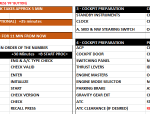
These are the Captains only flows for the FSL Aibuses. Included all flows, checklists and useful notes. These flows make it simple to follow FS2Crew and are designed to be used on a second screen, computer or tablet. File uploaded as Excel with tabs for various FS2Crew Aircraft. Excel Includes the following aircraft: FSL Airbus, MaddogX, PMDG 747,777,737, Majest Q400, Aerosoft Aibus. The spreadsheet has been password protected to prevent accidental overwriting by the user. If you wish to edit and/or print off PDF, etc, please read the README (last tab) for the unlock password!!!
| Filename: | FS2Crew_Captains_Flows_for_the_FSL_Airbuses_includ.zip |
| License: | Freeware |
| Added: | 16th July 2019, 15:30:19 |
| Downloads: | 956 |
| Author: | Mark Wolpert |
| Size: | 428.13 KB |
| Category: Prepar3D V1-4 - Utilities | |
| Random Flight Database 2.4.5 |
|
File Description:
Random Flight Database is a simple and easy to use application. It will allow you to randomly choose a flight according to your criteria. A default database is already included, but also the possibility for each user to create his own database. But it's not all, you can also extract the flights of the day for an airport, or extract flights on a full week. Windows Only
2.4.5
Replace winter by summer 2019 :
Air Cairo
Avanti Air
BA CityFlyer
Bluebird Airways
British Airways
Ellinair
La Compagnie
Sundair
Install : Execute .exe
Contact [email protected]
https://mikoulprostgrandprix.wixsite.com/randomflightdatabase
All my downloads for RFD : https://forums.x-plane.org/index.php?/profile/170054-mikoulprostgrandprix/
Other install : execute the shortcut "Check Update Random Flight Database"
Do not hesitate to send me bugs, or proposals. Thanks
| Filename: | Random_Flight_Database_245.zip |
| License: | Freeware |
| Added: | 7th November 2019, 17:47:13 |
| Downloads: | 69 |
| Author: | mikoulprostgrandprix |
| Size: | 73.41 MB |


© 2001-2026 AVSIM Online
All Rights Reserved
Privacy Policy |