
Where Flight Simulation Enthusiasts Gather from Around the World!
AVSIM Library - Search Results

| Category: Flight Simulator 2004 - AI Aircraft | |
| McDonnell Douglas F-4N Phantom II (Version 2) |

|
Images related to this file:
File Description:

McDonnell Douglas F-4N Phantom II (Version 2). This is one of the most iconic military aircraft of all time, ushering in the modern age of air combat; from Asia to the Middle East; and some of the 5,057 manufactured airframes are still in active use today, after over five decades of excellent service. This revised model set is what I originally envisioned when I undertook the modification of Nick Black's F-4E source files. Numerous changes are listed in the extensive documentation with this file. This file contains early and late F-4N base models, as well as the QF-4N with its NOLO (No Live Operator) drone configuration. The three main aircraft variants include a total of 19 loadout options, and 35 repaints representing these aircraft in service with the US Navy and United States Marine Corps. I have also included a layered Photoshop paint kit for repainters. While I did not paint every squadron from every cruise or time period, I believe there is a nice spread of representation in this package. This project properly updates my comprehensive (AI traffic) history of this aircraft. I did not do this alone by any means, and all contributors that I can think of are listed in the documentation. This is the complete aircraft, with all main FS textures and effects included. Original FSDS source and paint kit by Nick Black; FDE by Mike MacIntyre, all model/paint kit modifications and repaints by Michael Pearson.
| Filename: | McDonnell_Douglas_F4N_Phantom_II_Version_2.zip |
| License: | Freeware |
| Added: | 20th August 2012, 13:08:46 |
| Downloads: | 518 |
| Author: | Michael Pearson |
| Size: | 24.22 MB |
| Category: Flight Simulator X - Aircraft Repaints, Textures and Modifications | |
| DanTrix Airlines Boeing 737-900WL |
|
Images related to this file:
File Description:

In order to use this repaint, you must have the PMDG 737 NGX installed. The NGX is a payware aircraft. This file includes the 900 "Non-Winglet" instructions also as an added bonus.
This paint is the paint that my new Video Paint Tutorials focus on, and is the actual paint I show you how to create yourself. Since you might want to paint something different than what I chose to paint, I want you to at least have this paint as reference. It is a highly modeled paint, meaning I did every single rivet and line completely from scratch. This is also something you will learn in the tutorial, but also the files themselves can be studied on your own. I like to try things that no one else has tried, and do them differently for painters to use as blueprints of their own work. We can all learn a lot from one another and I hope what I have here can benefit a painter and give you lots of enjoyment flying. If you're not interested in being a painter, that's fine as well. I think you'll enjoy this paint very much, and if not, please email me your thoughts (email address is in the readme.txt). The tutorial link is in the readme.txt also. To see a video of this paint covering every rivet,
Click here!
| Filename: | DanTrix_Airlines_Boeing_737900WL.zip |
| License: | Freeware |
| Added: | 17th January 2012, 17:39:33 |
| Downloads: | 332 |
| Author: | Dan Prunier, PMDG |
| Size: | 27.99 MB |
| Category: Flight Simulator 2004 - Helicopters | |
| Bell 429 Base Pack |
|
Images related to this file:
File Description:
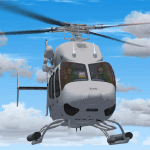
A large number of different models based on the real rotorcraft and with at least one different livery per model (32 in total) / A great variety of animations: All doors (including the clamshell in the rear of the ship). Main rotor, which is fully articulated. Show/hide flight controls feature by a single mouse click. Show/hide passengers feature by a single mouse click. Show/hide pilots feature. Depending if the helicopter is on the ground, with both engines off and the battery switch off, some other objects will show or hide. And much more, find it out yourself! / Clickable Virtual Cockpit; the most important switches and knobs do its job! Engine starter, fuel valves, etc., you name it! / Integration between 2d panel gauges and virtual cockpit gauges, switches and clickspots. Caution and warning messages, depending on helicopter’s conditions and limits. / Instrument backlighting effects at sunset, night and dawn! / Your flight experience will be enhanced by a sophisticated sound system which resembles the Pratt&Whiney PW207D1 Turboshaft Engines. You will be able to enjoy the start up and shuting down sequences for both engines from interior and exterior perspectives; audible transitions between idling, on ground at 100% rpm and also in flight conditions. I have included -as a bonus- a set of two audio files meant to be used beside the BladeSlapSND (Helicopter Blade Slap Sound Gauge) by Stephan Siebertz. / Author: Sergio Kauffman.
| Filename: | Bell_429_Base_Pack.zip |
| License: | Freeware, limited distribution |
| Added: | 15th September 2016, 12:34:23 |
| Downloads: | 2,020 |
| Author: | Sergio Kauffman |
| Size: | 150.11 MB |
| Category: Flight Simulator X - Scenery | |
| Marchwood Sea Mounting Centre & Power Station |
|
File Description:
Marchwood Sea Mounting Centre & Power Station Scenery.
Had a few hours over the Christmas period to have a go at FSX secenery design. Know it's not perfect but using a few free programs, knocked up a Marchwood scene to try and improve the look of VFR Photographic Scenery in the area.
The programs I used as follows:-
Google Earth Pro (to take overhead screen shots of area)
ModelconverterX (to import Sketchup .skp file and convert to BGL
Sketchup Make (to model buildings and export .skp to .dae files)
Microsoft Paint (save copy of screen shot)
GIMP2 (to enhance image & cut / blend image to import to Sketchup)
My thanks to the people who provide these tools especially Arno and the people behind MCX.
The ships I converted from ones provided on the free Sketchup 3D Warehouse, my thanks to them.
Install: Copy the Final Marchwood & MW Power Station Folders to your FSX Addon scenery folder.
Do that for the HMS Trio & Husband Shore Folders also if you think it may improve the scenery. It did using my set up.
Make sure you have the fx_SmokeStack2.fx effect in your Effects folder. If not copy the file into the folder.
Install all as normal using the FSX Add Scenery facility.
Provided as freeware. Not to be distributed by anyone for gain.
Hope you like the scenery and hope it dosent affect frame rates too much.
ijm1959... ([email protected])
| Filename: | Marchwood_Sea_Mounting_Centre__Power_Station.zip |
| License: | Freeware |
| Added: | 7th January 2018, 16:59:11 |
| Downloads: | 166 |
| Author: | Ian McAdam |
| Size: | 9.9 MB |
| Category: Flight Simulator 2004 - Scenery | |
| Anaktuvuk PAKP Runway and Taxiway Lighting in Alaska |
|
Images related to this file:
File Description:
Anaktuvuk is in Alaska, and this posting adds proper runway and taxiway lighting to the scenery, as shown in the screenshots. There will be runway and taxiway lights visible during the day and at night there will be lit lights that properly illuminate the runway for landing, and at a lower level of brightness the taxiways. Put the bgl's into the existing scenery folder of your previous Anaktuvuk PAKP installation and say yes to replace the existing bgl's that have the same names. Instal the Library objects once and for all by placing the CONTENTS of the Lighting Library scenery folder in your static objects scenery folder and the CONTENTS of the texture folder in the static objects texture folder (which is how I install scenery objects libraries). Alternatively, put them in the scenery and texture folders of your Add on scenery folder, or even in the main scenery and texture folders. They just have to be in related scenery and texture folders that are always active when FS9 is running. If you do all this and there are no textures to the lights then put the library textures into the Anaktuvuk texture folder too; FS9 has done some strange things while I was making scenery so I would never rule out a possibility.
There will be further retro upgrades to other recent scenery that was posted with temporary lighting. Say thank you to Greg Putz for making the lighting.
| Filename: | Anaktuvuk_PAKP_Runway_and_Taxiway_Lighting_in_Alas.zip |
| License: | Freeware, limited distribution |
| Added: | 25th November 2019, 17:52:18 |
| Downloads: | 136 |
| Author: | Roger Wensley |
| Size: | 699.17 KB |
| Category: Flight Simulator X - Scenery | |
| VTSM - Koh Samui |
|
File Description:
Today, after almost half a year of construction, I am presenting my new airport to
youVTSM- Samui Airport in front of .......
since I was already there myself and again no decent freeware scenerywas to be
found for the FSX,
so building it yourself was once again the trend
I tested the airport on another computer - everything works fine
Traffic works, Ai traffic as well as road traffic and ILS approach works. So
have fun in Koh Samui at the airport and the surrounding area .......
The best way to go on a voyage of discovery is with a small plane or helicopter so
that you can do the same
see many details .........
lands at the airport VTSM with an A319 or a Boing 737 larger planes are not there
then allowed to take a helicopter or a small plane and fly over the island
explores the many details ...............
Installation:
Put the folder VTSM - Samui in the folder FSX Addon Scenery and activate
Him......... !
The steps listed below only if you don't have these add-ons yet! !
to be able to see people unzip the supplied folder 3dpeoble_Lib and put
the unzipped folder in your FSX Addon Scenery and activate it
Support:
If you have any problems or questions, please send an email to
[email protected]
now have fun and good luck on your flight LG Jamaica
Demo video at https://youtu.be/dcIkSi03sfg?t=7
| Filename: | VTSM__Koh_Samui.zip |
| License: | Freeware |
| Added: | 5th February 2021, 19:28:51 |
| Downloads: | 780 |
| Author: | Ewald Wagner |
| Size: | 52.16 MB |
| Category: Flight Simulator 2004 - Scenery | |
| CYFD Brantford Municipal Airport, Ontario, Canada Version 1.0 |
|
File Description:
I decided to make Brantford a little more like the real thing. I also changed the landclass in the area to make it more realistic as this is where I live. Here are the changes I have made.
--
Modified the airport in AFCAD2 to have the aircraft park on either side of the large apron as they do in real life
, Corrected the runway lengths and added the connector between the runway ends at the north side of the airport
, Added AI Flightplans (see details below)
, Added a landclass update so that the area appears as it does in real life. There are now more farms around the airport as well as in the Burford area. The towns of Burford (my hometown) and Scotland are added, the Long Point Conservation Authority Forest is added to the west of Burford, and the Burford Golf Links appear beside the 403 (divided highway) to the north west of town.
--AI Flightplans
I tried to make the AI traffic as realistic as possible. I have training aircraft doing touch and goes 7 days a week. A few DC-3's have been restored at the airport so I have a DC-3 that flies for testflights on Monday, Wednesday, and Friday from 7am to 12:30pm. A learjet flies to Chicago on business days. It departs at 8am and arrives at 1:59pm. Also, a 182 flies up to Timmins on the weekends. It departs on Saturday at 9am and arrives home on Sunday at 11:36am.
| Filename: | CYFD_Brantford_Municipal_Airport_Ontario_Canada_Ve.zip |
| License: | Freeware, limited distribution |
| Added: | 9th November 2003, 02:46:05 |
| Downloads: | 2,572 |
| Author: | David Voogd |
| Size: | 425.3 KB |
| Category: Flight Simulator 2004 - Scenery | |
| Butuan Bancasi Airport, Butuan, Philippines |
|
File Description:
This is a totally new Butuan Scenery Addon for Flight Simulator 2004. This features Multi-Level of Detail (MLOD) which makes a scenery framerate-friendly. At a distance, the objects are on its LOW POLYGON STATE. And while you get closer and closer, the objects become more and more complex, making you landing sequence unaffected by heavy framerate hit due to the High number of Polygons of the Library Objects.
Butuan Bancasi Airport Scenery (RPME) features photorealistic textures. This includes the Main Terminal Building, the Philippine Airlines Cargo warehouse, the Old Butuan Airport Cargo Warehouse, the Air Transportation Office Building, the Old Private Hangar, and the Control Tower. This scenery has full night lighting textures and has night lighting beams that illuminate the ramp from the main terminal building. Other library objects included are: Cebu Pacific baggage carts, Cebu Pacific and Philippine Airlines stairs, Airport and Ramp personnel, cars, trucks, buses, jeeps, cows and horses. But these objects do not interfere with the framerate so much because this is defined in the MLOD feature.This scenery has not been tested with FS2002 but is more likely to work without problem in that version.
Currently, Philippine Airlines serves this destination daily from Manila arriving at 12:15 p.m. and departing for Manila at 01:15 p.m. Cebu Pacific also serves this destination daily from Manila arriving at 10:25 a.m. and departing for Manila at 11:15 a.m. and thrice weekly (Mon-Wed-Sat) from Mactan, Cebu arriving at 11:50 a.m. and departing for Mactan at 12:30 p.m.
| Filename: | Butuan_Bancasi_Airport_Butuan_Philippines.zip |
| License: | Freeware |
| Added: | 24th June 2004, 05:40:52 |
| Downloads: | 6,873 |
| Author: | Ver Walter Gulfan, Philippine Flightsimmers Group |
| Size: | 8.85 MB |
| Category: Flight Simulator 2004 - Scenery | |
| Masbate Airport, Masbate, Philippines |
|
File Description:
This is a totally new Masbate Scenery Addon for Flight Simulator 2004. This features Multi-Level of Detail (MLOD) which makes a scenery framerate-friendly. At a distance, the objects are on its LOW POLYGON STATE. And while you get closer and closer, the objects become more and more complex, making you landing sequence unaffected by heavy framerate hit due to the High number of Polygons of the Library Objects.
In this scenery, you will see a total transformation from the default Masbate City area in FS2004 to a new realistic and alive Masbate City as seen in the included screenshots.
Masbate Airport Scenery (RPVJ) features photorealistic textures. This includes the Main Terminal Building, the Rancho Cuervo Verde Hangar, the Masbate Airport cargo warehouse, the Administration Building, the Crash and Fire Rescue Station, and the Control Tower. This scenery has full night lighting textures and has night lighting beams that illuminate the ramp from the firestation building. Other library objects included are: Animated Baggage Carts, Airport and Ramp personnel, ferry boats, ships, yachts, sailboats, cargo vessels, lighthouse, jeeps, cows and horses. But these objects do not interfere with the framerate so much because this is defined in the MLOD feature.This scenery has not been tested with FS2002 but is more likely to work without problem in that version except that AFCAD for FS2002 should be separately designed.
Currently, Asian Spirit serves this destination daily from Manila arriving at 7:15 a.m. and departing for Manila at 7:35 a.m.
| Filename: | Masbate_Airport_Masbate_Philippines.zip |
| License: | Freeware |
| Added: | 29th June 2004, 02:55:36 |
| Downloads: | 4,247 |
| Author: | Ver Walter Gulfan, Philippine Flightsimmers Group |
| Size: | 4.09 MB |
| Category: Flight Simulator 2004 - Utilities | |
| FlightSim Manager 2.4.0 |
|
File Description:
FlightSim Manager 2.4.0
Compatible with both FS2002 and FS2004
FlightSim Manager is a great tool for managing add-ons to Microsoft Flight Simulator. Using easy to Wizard - FSM can install aircraft, panels, textures and scenery directly from distribution ZIP files you may have downloaded, with proper uninstallation of add-ons. From an easy to use Aircraft editor to add or remove aircraft variants, to an comprehensive Hangar management allows you to manage and configure your add-ons off your live FS installation.
Using FSM, you can create Texture Sets - i.e.. different Tree Sets, and you can install the texture with a single click, capture screenshots from Flight Simulator, and launch it with random Splash Screens, and fly from anywhere in the world using an map view.
You can also control Flight Simulator with speech commands using FSM. Other features include Benchmark Flight Simulator, Repository support and set of diagnostics tools.
Version 2.4 also enhaces the Pilot-mode, with auto-saving flight, warning sytem, and voice recognition.
Installation -
Please use the setup.exe file. If you wish to uninstall the software, you can do so from Control Panel - Uninstall software.
You can find the latest version from -
http://www.ranainside.com/
To request any new feature, or to submit bugs, please visit our forum at
http://softwares.ranainside.com/
Programmer
Rana Hossain
[email protected]
| Filename: | FlightSim_Manager_240.zip |
| License: | Freeware |
| Added: | 4th August 2004, 20:49:50 |
| Downloads: | 11,171 |
| Author: | Rana Hossain |
| Size: | 3.77 MB |


© 2001-2026 AVSIM Online
All Rights Reserved
Privacy Policy |