
Where Flight Simulation Enthusiasts Gather from Around the World!
AVSIM Library - Search Results

| Category: Flight Simulator 2004 - Scenery | |
| LFJA Chaumont_Semoutiers AB |

|
Images related to this file:
File Description:
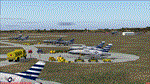
From 1950 to 1967 the USAF set up and maintained bases in France, with the agreement of the French government, as part of its commitment to the North Atlantic Treaty Organisation. Chaumont AB was one of the ten main air bases which supported both attack and air defence capabilities. Many people do not appreciate the sheer extent of the USAF bases in France at this time and the reasons leading to the USAF departure in 1967. There is a link to a fine article on all this included.
This scenery and traffic represent Chaoumont Air Base during the years 1955 to 1962. Custom Tower and Hangars by Dan French along with a large number of custom paints by DeltataDart for the many types of aircraft represented over this period. Traffic files and the aircraft and paints needed are provided for 1955 (including the Skyblazer Demonstration Team), 1957, 1959 and 1962.
| Filename: | LFJA_Chaumont_Semoutiers_AB.zip |
| License: | Freeware |
| Added: | 22nd November 2023, 16:08:16 |
| Downloads: | 109 |
| Author: | Al von Pingel, Ken Lawson, Dan French, DeltaDart |
| Size: | 38.9 MB |
| Category: Flight Simulator 2004 - Miscellaneous Files | |
| Shoot 1.6.3' Voice Contro File |
|
File Description:
"Shoot 1.6.3" voice control file for use with FS2004. You will need to download the main "freeware" program from http://clans.gameclubcentral.com/shoot/downloads.php which will allow you to make use of this control file for FS2004. The program is brilliant and allows you to control FS2004 by voice and it's totally free! All I have done is made a config file that works very well with FS2004.
It will allow you to; speak to ATC and instead of fighting with the keyboard or yoke/stick so you can fly more like a real pilot and keep your hands on the yoke more of the time. For example a commercial jet pilot calls out to the co-pilot to get the gear up and simply says "gear up". That's just what you will have to do, just like the real thing; the gear will go up when you make the call. When FS2004 ATC controller tells you to reply you can just say "roger" or "hello" or "ATC" or "air traffic" etc, etc, and the ATC window will pop up. Then all you have to do is call out the command instead of pushing buttons that real pilots don't use. Does a real pilot push a button to look out of the window or use a "mouse" to engage the autopilot?
Similarly you can call out "autopilot engage" or "autopilot master" or "autopilot disengage" and that's just what happens; the autopilot comes on/off. The best part though is when you try looking around the cockpit. If you want to move your head up you just say "move up" and presto you are higher up in your seat. You can move to the left or
Right, back or forward. You can say "zoom in" and that's what happens. You can say "reset zoom" and so on. You can say "next view" and then the view may be outside or another panel. Alternatively, you can say "panel 2" and the radio panel will come up in the 737 so you can tune the radios. If you have FS navigator installed all you have to
do is say "navigator" and the map comes up, and then say navigator again and off it goes. Just for once it is easy and possible to make full use of FS2004. Using this program has afforded me the opportunity of making better use of the views available, (and I have CH products yoke so if was never hard) but now it's even easier.
All the panels can be activated in this way, and control of the autopilot and control of FS2004. It's probably the best kept secret. I've made a file so we can all share in this freebie of a program. I've included a readme and instructions of how to make the best use of the program.
Config file for FS2004 only is provided.
| Filename: | Shoot_163_Voice_Contro_File.zip |
| License: | Freeware |
| Added: | 7th January 2004, 19:52:26 |
| Downloads: | 8,795 |
| Author: | Peter Wilding |
| Size: | 21.83 KB |
| Category: Flight Simulator 2004 - Miscellaneous Files | |
| Active Approach - PHNL (Honolulu Intl Honolulu, Hawaii) |
|
File Description:
As most know the Approach and Final (VMC) for AI Traffic in FS9 is a straight in type landing and does not always consider high terrain at airports. This is do to the way that the coding is written in FS9 and it puts limits on IFR arriving aircraft. If you open runways at certain airports the AI Traffic will fly directly through a mountain once it is established on Final for a runway. What you will see with my file is a different type approach used for the way I control AI Traffic in FS9. No longer do the AI Planes use a straight in approach when landing to the west at PHNL. My new AI Aircraft Approach coding for FS9 now uses a base leg approach so AI Traffic does not fly through the mountains. The Honolulu Control Tower will clear all AI Traffic (IFR FP) landing either on 26L and 26R as a straight in landing even though the offset to final is 30 degrees from the runway center line. The Control Tower will instruct the AI Planes landing on either 22L or 22R to fly a left base leg which is greater then a 45 degree offset and then the AI Planes will turn on a short 1.5 mile final. The left base approach to 22L and 22R runways is a 65 degree offset from the runway center line. My testing shows excellent behavior of the FS9 default models, PAI models and the Aardvark planes of all sizes to execute this new type of visual approach that I am now writting code for which supersedes the FS9 default straight in ATC hard code approach. Read the text file for all the default scenery enhancements (plus Jetways) added to PHNL along with a full understanding of how the new Approaches work *** 3rd Party Scenery Designers Special APProach bgl and a FS2004 Default Scenery AFCAD included ***
| Filename: | Active_Approach__PHNL_Honolulu_Intl__Honolulu_Hawa.zip |
| License: | Freeware, limited distribution |
| Added: | 16th March 2005, 04:10:43 |
| Downloads: | 5,604 |
| Author: | Jim Vile |
| Size: | 134.3 KB |
| Category: Flight Simulator 2004 - Aircraft Repaints, Textures and Modifications | |
| W91 Smith Mountain Lake Airport in Virginia |
|
File Description:
W91 Smith Mountain Lake Airport near Lynchburg, Virginia (MY soon to be NEW HOME)
This project is nearly ALL RWY12 ... I did use the Lago Scenery enhancer for the
trees.. so if you have LAgo.. the .SE2 is included, but you really don't need it.
But you will need RWY12 with all the latest additions... all freeware and all
available here at avsim.
Instructions... best to unzip to a temp directory... then do the following..
if you use Lago's Scenery Enhancer... place the .SE2 file in (Your flightsim main
folder)\LAGO\FSE\Data. Unziping will create a folder titled "Smith Mountain Lake" .. in that folder is one titled "scenery" Simply place Smith Mountain Lake in (your flightsim main folder)\Addon scenery\ folder then start the simulator.. go to settings, the library.. and - well most all know the drill .... add the folder Spring Mountain Lake then exit.. and restart.. and blamo... it is there... (Hopefully- LOL) ALSO in the scenery folder are two exclude .bgl.. this got rid of the default buildings and an AFCAD .bgl... this modified the airport properity a bit.. just leave all the .bgls where they are in the scenery folder.. all should work well.
oh.. for those who use RWY12 for scenery making... I have included the .XML file.. so you are welcome to add..subtract or change anything you find at Smith Mountain Lake.
if you have any questions or comments.. PLEASE do drop me a line.
Oh.. since I have your attention... a question for YOU... whether you download this
scenery or not.... How in the world does one get rid of that idiot "Flying Tips"
translucant window that appears.. telling you among other things .. your engines are not started... hit control E ... you ever notice how it ONLY appears when you have set up a screen shot and are ready to shoot?????? Write me and PLEASE tell me how to get rid of it.. I remember reading how somewhere, but for the life of me ..can't remember where.
| Filename: | W91_Smith_Mountain_Lake_Airport_in_Virginia.zip |
| License: | Freeware |
| Added: | 18th March 2005, 22:37:05 |
| Downloads: | 330 |
| Author: | Dale Caruso |
| Size: | 563.31 KB |
| Category: Flight Simulator 2004 - Scenery | |
| Seward PAWD in Alaska V2 plus 6AK5 |
|
Images related to this file:
File Description:
This is V2, the combined original and also V1. If you have already installed V1 then you do not need this. The town of Seward (population around 2,700) is on the east coast of the Kenai Peninsula, 70 miles east of Kenai town and also 70 miles southeast of Anchorage, amid mountains and glaciers at the northern end of the 20 mile long and fjord-like Resurrection Bay. It is also at the southern end of both the Alaska Railway and the Seward Highway, and has a sheltered dock for freight and also for cruise liners. Passengers from the liners can enjoy local attractions (dog sledging on a glacier?) and also easily continue further north by bus or train to Anchorage or to other tourist attractions such as Denali. The airport is next to the port and the town, with two runways aligned (in FS9, not taking account of the recently wandering magnetic north) 15-33 and 12-30, both asphalt and 2,100 and 4,200 feet long respectively. Only 12-30 (and its taxiways) is lit, with VASI on 30. There are no regularly scheduled flights to Seward; with buses and trains running direct from Anchorage there is no money to be made. There are some charter flights coordinated with cruise liners, and some freight flights, the very occasional visit by the Coastguard, but most flights are GA, air taxi,or short scenery-viewing trips for summer tourists. In a mountainous area the only sure thing about the behaviour of AI aircraft is that it is unpredictable but often involves a mountain; nothing to be done about it. At Seward there is also marine AI from and to the port, in the shape of a cruise liner and an Alaskan ferry, but the latter only if you have Holger Sandmann's Alaska scenery installed. Also included with this is a correction for Fire Island 6AK5, near Anchorage, that takes the airfield out of the water; this is something I have meant to do for the last 5 years.
| Filename: | Seward_PAWD_in_Alaska_V2_plus_6AK5.zip |
| License: | Freeware, limited distribution |
| Added: | 19th January 2016, 18:27:26 |
| Downloads: | 591 |
| Author: | Roger Wensley |
| Size: | 12.47 MB |
| Category: Flight Simulator 2004 - Scenery | |
| Monument Valley UT25 and Oljato 05UT in Utah USA |
|
Images related to this file:
File Description:
Monument Valley is an impressive sight in south Utah but not, unfortunately, in FS9. Unless you invest in a detailed terrain mesh there are no stacks of rocks reaching for the sky and the lasting overall impression is just of a desert. But I had already downloaded the land textures so I ended up making the Monument Valley UT25 airfield and the nearby Oljato 05UT, which has no buildings of any sort. Maybe I was bored. There is a lodge close to the field with dozens of cabins, but I had insufficient information so this is for the airfield only. The 4,000 feet of new tarmac is aligned 16-34 and is single ended with a large chunk of rock at the southern end; 16 is only used for landing and 34 is only for take off. The runway is not lit. Do not be surprised when you ask to select a runway for take off and FS9 only gives you 16 as a choice, even though you know this is the wrong one. When you accept it FS9 will quickly switch it to 34; apart from a possible sense of humour I have no idea why it does this. Nothing much to say about Oljato. What do you need? You actually don't need Ultimate Terrain as there are other land textures used here, so you will definitely need to have downloaded and installed the land textures "cny_south3west_2010 lr" and "cny_south3west2_2010 lr" by Gottfried Razek, as these land textures showed the runways in the correct positions. Look in the scenery library here or at the other place. A note here about my scenery making. There will not be many more to follow this (unless you count 4 as many) as I am almost at the end of the photos I either took or found for scenery purposes, plus I expect to move on from FS9 at some point during next year.
| Filename: | Monument_Valley_UT25_and_Oljato_05UT_in_Utah_USA.zip |
| License: | Freeware, limited distribution |
| Added: | 22nd January 2020, 20:13:54 |
| Downloads: | 218 |
| Author: | Roger Wensley |
| Size: | 2.91 MB |
| Category: Flight Simulator 2004 - AI Aircraft | |
| English Electric Lightning for AI traffic - The Frightening Part 2 |
|
Images related to this file:
File Description:

English Electric Lightning for AI traffic - The Frightening Part 2. This aircraft is one of the iconic military aircraft of the Cold War era, charged with home defense of
the United Kingdom, as well as duties abroad, throught the 1960s - early 1980s. The Lightning served admirably in that role, was exported to Saudi Arabia and Kuwait; and
also saw limted combat service in the Arabian penninsular region. After thirteen years of painting, and eight years of abortive attempts to discover the true mysteries of
aircraft design, this is my first from-scratch original aircraft to make it to upload. There is a lot of Nick Black influence (and pilot figure) in this model, but the rest
of the physical model is all mine, good or bad. This is an 8-LOD model, with all sorts of eye candy listed in the documentation. The painting comes from an age when gaudy
heraldic liveries were quite acceptable on tactical aircraft, so this is a painter's dream as well. My intent was to make a very comprehensive offering with a lot of
options (and paints), so to that end I am breaking this up into three manageable parts so it won't be a 70MB download. This is part 2, encompassing the F.2A, F.6, T.4, and
T.5 variants; collectively containing 24 model options and 30 paints. Please take some time to read the extensive doucmentation, there are numerous credits and instructions
regarding this model. Base models, paint kits, and release repaints by Michael Pearson, inspiration by Nick Black, flight dynamics by Michael MacIntyre, and relentless
technical expertise from Steve Holland.
| Filename: | English_Electric_Lightning_for_AI_traffic__The_Fri.zip |
| License: | Freeware |
| Added: | 30th March 2012, 00:26:07 |
| Downloads: | 1,348 |
| Author: | Michael Pearson |
| Size: | 16.43 MB |
| Category: Flight Simulator X - Utilities | |
| Flight Simulator First Officer V2 |
|
Images related to this file:
File Description:
Flight Simulator First Officer is a generic virtual copilot that can be used with any aircraft. The primary
function of FSFO is to assist the Pilot In Command (PIC) to fly the aircraft safely while adhering to
Standard Operating Procedures (SOPs). This is accomplished via virtual checklist and sharing of cockpit
duties/responsibilities. Specifically, the First Officer reads the following configurable checklist:
- Pre-Flight
- Before Start
- After Start
- Before Takeoff
- In-Range
- After Landing
- Shutdown
After reading the checklist item, the Copilot will wait to ensure you (i.e. the pilot) have configured the
aircraft correctly before proceeding to the next item. Also, the Virtual copilot is capable of performing
the following actions:
1. Call Vspeeds based on your input
2. Raise/Lower the Landing Gear on Takeoff/Landing
3. Retract the Flaps
4. Extend the Flaps
5. Manage the taxi/landing/strobe lights
6. Tune the ILS frequencies
7. Call Climb Power based on your input
8. Reset Vertical Speed when the Aircraft is within 1000 ft of the programmed altitude
9. IAS warning (e.g. Aircraft is above 250 IAS while below 10000 ft)
10. GS Warnings (e.g. Aircraft is above 25 knots while taxing)
11. Resets the altimeter to standards when passing TA
12. Engage Heading Hold on Takeoff
13. Engage Altitude Hold on Takeoff
14. Reset Speed on Takeoff
15. Engage Speed Hold on Takeoff
16. Engages Rev Thrust on Landing
17. Ground Proximity Warning System (GPWS)
18. Over Speed Warning
19. Stall Warning
20. Bank Angle Warning
21. Vref monitoring
22. Set AutoBrakes
23. Loads Fuel/Payload
24. Random Payload/Pax generator
25. Plus much more!
Share checklist and report bugs here: http://flightsimaddons.proboards.com/index.cgi#general
| Filename: | Flight_Simulator_First_Officer_V2.zip |
| License: | Freeware, limited distribution |
| Added: | 21st December 2013, 21:58:46 |
| Downloads: | 3,238 |
| Author: | Matthew King |
| Size: | 60.63 MB |
| Category: Flight Simulator 2004 - Scenery | |
| Alaska South Slope 10; Port Clarence KPC |
|
Images related to this file:
File Description:
There are four main northwestern Alaska towns which are serviced by Alaska Airlines, and from which local flights spread out. The northernmost is Barrow. Southwest of Barrow is Kotzebue, then Nome, and the furthest south is Bethel (not yet made). This is the third in a series for local flights from Nome, and it is on the coast around 40 miles east of Wales, and 65 miles northwest of Nome. There are two other airfields around a large lagoon that is almost totally enclosed from the sea, and Port Clarence is on the end of the enclosing spit. Port Clarence was, until the LORAN navigation system went out of use, a Coastguard Station that had a LORAN transmitter, with an impressive mast that was 1,350 feet tall. It "was" as the mast was demolished in 2010, after the LORAN systems had been closed down in stages (LORAN-A in 1980 in the US, LORAN-C in 2010). In the meantime the runway had been lengthened to around 8,500 feet, and continued to be used by the Coastguard. Port Clarence has a population of 24, in theory, though presumably the census information refers to Coastguard personnel in the buildings of the LORAN station. The date for this scenery is anytime you like so long as it is before 2010 as the mast is still there. The AI includes Coastguard C-130 Hercules and helicopter flights, plus a weekly fuel delivery by Everts Air Fuel in a fancy colour scheme (Wednesday) and a daily visit by Bering so Coast Guards can go to civilisation in Nome.
| Filename: | Alaska_South_Slope_10_Port_Clarence_KPC.zip |
| License: | Freeware, limited distribution |
| Added: | 23rd October 2016, 18:53:14 |
| Downloads: | 232 |
| Author: | Roger Wensley |
| Size: | 3.05 MB |
| Category: Flight Simulator 2004 - Miscellaneous Files | |
| The World Tour |
|
Images related to this file:
File Description:
01) https://youtu.be/36ZpHnGq7a4
02) https://youtu.be/vFImsajMgLc
03) https://youtu.be/X_FfupH_-MU
04) https://youtu.be/oU6ypwHF6ik
05) https://youtu.be/qz_-HPTv2oo
06) https://youtu.be/Qnbnwi_UAwk
07) https://youtu.be/qeS94k8_hkE
08) https://youtu.be/Rz93YNRQbvw
09) https://youtu.be/BlisZXwgG3Q
10) https://youtu.be/jwor56LaRb4
11) https://youtu.be/IkbSk6z2bfw
12) https://youtu.be/2u8jqtNQxyM
13) https://youtu.be/8qx8R_zCfQ0
14) https://youtu.be/j5kiDHzTBH8
15) https://youtu.be/6z1mLJ-Ne6M
16) https://youtu.be/6sypz9ljSXQ
17) https://youtu.be/_rw5LwjfsmQ
18) https://youtu.be/cp0kDNPjxLc
19) https://youtu.be/eMB7uzHBgeE
20) https://youtu.be/0ohUqRADcjU
21) https://youtu.be/y2PNB0w9SEE
22) https://youtu.be/YHqzjlB8xoo
23) https://youtu.be/bMpS536hPDc
24) https://youtu.be/edd7OmU1674
25) https://youtu.be/vsnCD_dUbEk
26) https://youtu.be/iGR9LkmZ6iI
27) https://youtu.be/G4MeInVKUII
28) https://youtu.be/5RtNJ5N2OuE
29) https://youtu.be/3Ob42QNz6uk
30) https://youtu.be/bdmgdFnADVQ
31) https://youtu.be/uRxygmvyRS8
32) https://youtu.be/mSH-Hh2ShIw
33) https://youtu.be/1HjKTsvub2Y
34) https://youtu.be/An-MndXznow
35) https://youtu.be/aT-Y69R9XeI
36) https://youtu.be/kXwDY1AiIKM
37) https://youtu.be/7VwxMboQCAI
38) https://youtu.be/yFfNxZdcQ6w
39) https://youtu.be/KyRHD9WWpb4
40) https://youtu.be/0zbj7IsSva8
41) https://youtu.be/Z81ixHuSUJE
42) https://youtu.be/rxS0BsyVy8Q
43) https://youtu.be/-9AeEfNRG9c
44) https://youtu.be/hAq9jOC6wFM
45) https://youtu.be/-HuzxYh2cao
46) https://youtu.be/eCngRAujuB4
47) https://youtu.be/_DL0rOV6li0
48) https://youtu.be/DgM4e_bS0uY
49) https://youtu.be/MD0K_VAGtWA
50) https://youtu.be/x6-rHHgb5As

This is only an Utility, to fly a tour of the world in 50 steps. It was Built for FS9, it has not been tested for other simulators (FSX, etc). For presentation, suggestions and other see enclosed file The World Tour.pdf. Contents: 50 flight plans, with FLT, WX and PLN files for each plan and Krakatoa scenery with a fictional scenery of Krakatoa volcano. Enjoy your flights
| Filename: | The_World_Tour.zip |
| License: | Freeware |
| Added: | 29th November 2016, 15:07:29 |
| Downloads: | 232 |
| Author: | Aldo Della Vedova |
| Size: | 35.66 MB |


© 2001-2026 AVSIM Online
All Rights Reserved
Privacy Policy |