
Where Flight Simulation Enthusiasts Gather from Around the World!
AVSIM Library - Search Results

| Category: Flight Simulator 2002 - Gauges | |
| Air Traffic Detector by Reality XP |

|
File Description:
Dear flight simulation enthusiast, we are pleased to offer a new freeware gauge:
The Reality XP ATD. This is the perfect companion of the Geofa’s B33.
We have designed this gauge based on the Monroy ATD 200 (http://www.monroyaero.com).
As you might have been aware off, we are currently designing the overall systems and avionics of the upcoming Flight1’s Piper Meridian. This extraordinary aircraft features an advanced cockpit panel, with Glass Cockpit Meggitt Avionics EADI, EHSI and EDU, coupled with a state of the art S-TEC Autopilot System and a full featured Garmin Radio Stack and Navigation System. Rest assured that our rendition of the Meridian avionics is up to the level of the Flight Line Avionics depth and accuracy, and even more!
This gauge is copyright © 2002 by Reality XP
| Filename: | Air_Traffic_Detector_by_Reality_XP.zip |
| License: | Freeware, limited distribution |
| Added: | 17th November 2002, 01:54:49 |
| Downloads: | 4,077 |
| Author: | Reality XP |
| Size: | 177.46 KB |
| Category: Flight Simulator 2004 - Aircraft Repaints, Textures and Modifications | |
| Dark Angels X31 |
|
File Description:
An American Experimental Thrust Vectoring Jet
Find more at www.darkangels252.webs.com
| Filename: | Dark_Angels_X31.zip |
| License: | Freeware, limited distribution |
| Added: | 28th April 2009, 19:45:18 |
| Downloads: | 237 |
| Author: | Sam Stocks Repaint, orignal model by I. D'Attomo & G. Quai |
| Size: | 61.43 MB |
| Category: Flight Simulator 2004 - Miscellaneous Files | |
| Carenado Piper Cherokee 180F checklist |
|
File Description:
This is a modified real-world kneeboard checklist for the FS2004 Carenado Piper Cherokee 180F (payware). It is in large font, clear and concise. Includes startup from cold & dark to shutdown, as well as a handy 'reference speed' section in a clear, easy to read table format. Installation is simple and the original Carenado checklist is included in the download. It is not intended for printing, but rather for the FS2004 kneeboard.
| Filename: | Carenado_Piper_Cherokee_180F_checklist.zip |
| License: | Freeware |
| Added: | 22nd July 2005, 22:09:25 |
| Downloads: | 743 |
| Author: | Al McCann |
| Size: | 37.29 KB |
| Category: Flight Simulator 2004 - Gauges | |
| Boeing 777 Exits Gauge |
|
File Description:
This file adds a small 'doors gauge' to the cockpit of the PSS Boeing 777. Clicking on 'PAX' will open the passenger doors, 'Cargo', the cargo doors. In this aircraft all the passenger doors open on both sides of the fuselage by default - that 'feature' is part of the aircraft model and unfortunately cannot be changed. Payware PSS B777 needed for use of this gauge.
| Filename: | Boeing_777_Exits_Gauge.zip |
| License: | Freeware |
| Added: | 30th November 2011, 16:14:29 |
| Downloads: | 1,099 |
| Author: | Martin Stebbing |
| Size: | 6.3 KB |
| Category: Flight Simulator X - Gauges | |
| TextInfo Gauge 3.0 and XML Tutorial |
|
Images related to this file:
File Description:
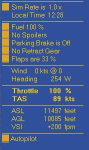
Display flight data as screen text. Use mouse clicks to toggle equipment and change settings within the text gauge. Single, small XML file with no framerate impact. Has manual with more than 30 pages of info about text gauges, XML examples, tips, and how to make text gauges clickable. Has full details about the FSX Shift-Z feature, including changing Shift-Z colors.
| Filename: | TextInfo_Gauge_30_and_XML_Tutorial.zip |
| License: | Freeware |
| Added: | 30th March 2014, 14:38:57 |
| Downloads: | 589 |
| Author: | Rick Federmann |
| Size: | 730.81 KB |
| Category: Flight Simulator X - Gauges | |
| FSX A321 and B738 Gauge Corrections |
|
File Description:
This package corrects several gauge issues with the FSX default Airbus A321 and Boeing 737-800. "TAS" in the B738 now indicates TAS instead of IAS. Wind arrow in the A321 points in the correct direction instead of 180° off. Further adjustments are outlined in the included documentation.
| Filename: | FSX_A321_and_B738_Gauge_Corrections.zip |
| License: | Freeware, limited distribution |
| Added: | 27th November 2006, 11:18:19 |
| Downloads: | 8,342 |
| Author: | Gene Zimmer |
| Size: | 4.53 MB |
| Category: Flight Simulator X - Panels | |
| TextInfo Gauge 4.0 and XML Tutorial |
|
Images related to this file:
File Description:
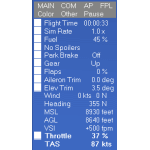
On-screen text display of flight data that operates equipment and dials settings. Includes a 70-page manual loaded with info about text gauges and panels, XML examples, and tips, plus detailed info about the FSX Shift-Z feature. Ver 4.0 is a complete re-write with too many adds and fixes to list here. Now has size settings that are transferable from aircraft to aircraft. Switch between two color schemes with a single click.
| Filename: | TextInfo_Gauge_40_and_XML_Tutorial.zip |
| License: | Freeware |
| Added: | 9th May 2014, 13:02:21 |
| Downloads: | 614 |
| Author: | Rick Federmann |
| Size: | 1.14 MB |
| Category: Flight Simulator X - Gauges | |
| TCAS and Traffic Display Gauge V2.0 |
|
Images related to this file:
File Description:
This TCAS and Traffic Display Gauge Version 2.0 includes significant improvements from V1.0. It has been developed for the FSX Flight Simulator SP1/2 also. It should also work with Acceleration.The functionality for the TCAS part is based on general specs for commercial aircrafts. It does not provide in detail the function for a specific aircraft model. It is a generic gauge, and can be simple added to any aircraft as a standalone popup window.
In addition the gauge provides a AI traffic display in the ranges of 10,20, and 40 miles.Within this display mode, no TCAS rules are valid, which means all AI aircraft are displayed independent of any altitude or distance.
Improvements in V2.0 are: 1: Full TCAS and traffic display capability is provided even though your aircraft is on the ground. Only the trigger of the alarm/warn sound and the blinking lamp display willbe blocked. 2: An AI HDG pointer will be displayed. It shows in which direction the AI is moving. 3: A bearing pointer has been introduced. It allows the pilot to point to a specific AI.4: The AI additional text info display follows the structure of an ATC text.5:The AI additional text can be selected individually per AI with a mouse click.
6: Each AI display contains a ID index number (0 � 20).7: The design of the TCAS and Traffic Display Box has been updated.8: Increased the number of AIs displayed on the screen in display mode.
For installation and functional description look at the doc inside the ZIp.
CREDIT goes to :
Stefan Schneider for his support on special XML issues and TCAS functionality.
Bob Familton for his review of the documentation and testing for SP1 FSX.
Doug Dawson for his dsd-XML-sound interface in order to generate the sounds.
| Filename: | TCAS_and_Traffic_Display_Gauge_V20.zip |
| License: | Freeware |
| Added: | 25th October 2010, 13:37:36 |
| Downloads: | 3,759 |
| Author: | Dietmar Loleit |
| Size: | 981.32 KB |
| Category: Flight Simulator X - Gauges | |
| TCAS and Traffic Display Gauge V1.0 |
|
Images related to this file:
File Description:
This TCAS and Traffic Display Gauge Version 1.0 has been developed for the FSX Flight Simulator SP1/2. It should also work with Acceleration. The functionality for the TCAS part is based on general specs for commercial aircrafts. It does not provide in detail the function for a specific aircraft model. It is a generic gauge, and can be simply added to any aircraft as a standalone pop-up window.
In addition the gauge provides a AI traffic display in the ranges of 10,20, and 40 miles.
Within this display mode, no TCAS rules are valid, which means all AI aircraft are displayed independent of any altitude or distance.
For installation and functional description look at the doc inside the Zip.
CREDIT goes to:
Stefan Schneider for his support on special XML issues and TCAS functionality.
Bob Familton for his review of the documentation and testing for SP1 FSX.
Doug Dawson for his dsd-XML-sound interface in order to generate the sounds.
| Filename: | TCAS_and_Traffic_Display_Gauge_V10.zip |
| License: | Freeware |
| Added: | 13th September 2010, 12:58:33 |
| Downloads: | 1,731 |
| Author: | Dietmar Loleit |
| Size: | 979.49 KB |
| Category: Flight Simulator 2004 - Gauges | |
| DC-3 Single IFR Panel Comms Pack Update 2.3 |
|
File Description:
This package may appeal to those who fly the DC-3 or other aircraft in multiplayer using Mark "Dark Moment" Beaumont's IFR panel. The modification was initially designed for the very active virtual airline 'DC-3 Airways' (www.dc3airways.com). It updates this panel to be able to change either preset 'Teamspeak' or 'Roger Wilco' frequencies from within the cockpit with no task switch, depending on which Comms software is in use at the time. That said, the new 'Roger Wilco' switch gauge included can be added to any panel, allowing switching of preconfigured 'Roger Wilco' frequencies with no requirement for additional software other than 'Roger Wilco' itself. Offered with choice of white or orange Bendix-style readout. To use the 'Teamspeak' gauge, which appears as a light on the COM2 panel and can be switched using dialed frequencies, 'Teamspeak' Client and 'FSTSTuner' software are required. Full details are in the README.
| Filename: | DC3_Single_IFR_Panel_Comms_Pack_Update_23.zip |
| License: | Freeware |
| Added: | 2nd April 2004, 00:03:26 |
| Downloads: | 801 |
| Author: | Mark Beaumont, Matt Kaprocki |
| Size: | 143.64 KB |


© 2001-2026 AVSIM Online
All Rights Reserved
Privacy Policy |