
Where Flight Simulation Enthusiasts Gather from Around the World!
AVSIM Library - Search Results

| Category: Flight Simulator X - Gauges | |
| GPS |

|
File Description:
A GPS gauge for casual fliers. Provides a good deal of information while utilizing a minimum of screen real estate. Not designed to replicate any real instrument. Should work in FS9, although not heavily tested in that sim. Freeware.
| Filename: | GPS.zip |
| License: | Freeware |
| Added: | 7th March 2012, 18:41:48 |
| Downloads: | 818 |
| Author: | Doug Dawson |
| Size: | 175.64 KB |
| Category: Flight Simulator X - Gauges | |
| Vspeed-callout gauge (with aural callouts) |
|
Images related to this file:
File Description:

This gauge is a virtual co-pilot calling out Vspeeds during take-off. It should work with most standard commercial jetliners. The auto-calculated Vspeeds depend on the aircraft's air-file, but are not really aircraft-specific as such. The Vspeed-values are average approximations for sim-use only, and are not necessarily true to the various individual real-life aircraft-specifications. The gauge is not for GA-aircraft, military or special-operation's aircraft. Only commercial jetliners (you are free to try it on any aircraft ofcourse, but don't expect it to work properly on others than those mentioned above, although it may.) Enjoy!
| Filename: | Vspeedcallout_gauge_with_aural_callouts.zip |
| License: | Freeware |
| Added: | 29th September 2013, 18:31:53 |
| Downloads: | 1,741 |
| Author: | Jacob Larsen |
| Size: | 143.44 KB |
| Category: Flight Simulator X - Gauges | |
| Head Up Display (HUD) |
|
Images related to this file:
File Description:
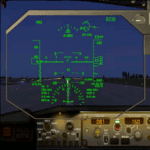
This gauge has been developed for FSX Flight Simulator SP1 or SP2. It
has also been tested with Microsoft Acceleration but compatibility is not guaranteed by the
author. The functionality of this gauge is based on the Rockwell Collins HGS which is
designed for the Bombardier CRJ 700. However, this gauge is not following the Rockwell
Collins design completely. It is created to be used as a generic HUD for all commercial
aircraft. It can be programmed to work on any FSX aircraft as a stand alone pop up
window. The gauge is available in the frame color of gray and beige.
For installation and configuration look at the documentation inside the zip file.
Credit goes out to: Kaj O. Hallstrom for his outstanding support on
documentation, pre beta and beta testing and improvement recommendations
for the gauge and control panel.
Credit also goes to Doug Dawson for his config.gau generating dsd-XML
interface.
| Filename: | Head_Up_Display_HUD.zip |
| License: | Freeware |
| Added: | 14th October 2011, 16:57:19 |
| Downloads: | 5,223 |
| Author: | Dietmar Loleit |
| Size: | 2.68 MB |
| Category: Flight Simulator X - Gauges | |
| Generic Stand-Alone HUD |
|
Images related to this file:
File Description:
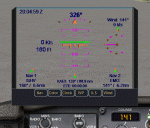
A generic stand-alone HUD, which can be used for any aircraft. Some of the displays can be toggled on or off, as desired, by clicking on the buttons at the base of the HUD. The Color button provides a choice of three colors to suit various terrain or weather backgrounds, and for night flight. Written in the old FS 9 xml. Not tested on FS 9, but should work.
| Filename: | Generic_StandAlone_HUD.zip |
| License: | Freeware |
| Added: | 20th August 2011, 19:58:43 |
| Downloads: | 1,226 |
| Author: | Robert Picht |
| Size: | 213.69 KB |
| Category: Flight Simulator X - Gauges | |
| Simple HUD |
|
File Description:
Simple HUD for use in GA aircaft. Displays aircraft's altitude, attitude, airspeed, vertical speed, heading, turn rate, tc ball and engine torque. Best used if you want critical info right before your eyes (for example, during low and slow flights in a helicopter), or panel instruments are small and/or hard to read.
| Filename: | Simple_HUD.zip |
| License: | Freeware |
| Added: | 1st March 2008, 18:34:29 |
| Downloads: | 1,244 |
| Author: | Yan Evstigneev |
| Size: | 103.72 KB |
| Category: Flight Simulator X - Gauges | |
| Boeing 787 HUD On/Off Toggle * Update * |
|
File Description:
Updated install.txt
Panel mod to toggle the HUD on or off. Includes custom 2-D panel icon. Useful for visual approaches.
| Filename: | Boeing_787_HUD_OnOff_Toggle__Update_.zip |
| License: | Freeware |
| Added: | 4th November 2010, 18:19:25 |
| Downloads: | 531 |
| Author: | Dave Opper |
| Size: | 2.54 KB |
| Category: Flight Simulator X - Gauges | |
| Beechcraft Baron 58 FULL Engine Gauges for Saitek FIP's |
|
Images related to this file:
File Description:
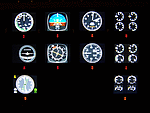
10 Left/Right analog Engine Gauges plus Fuel Level for the Beechcraft Baron 58 across 3 Saitek FIP's. I recommend these if you have 9 or more Saitek FIP's. However you can always scroll through the 3 gauges if you have less.
These compliment Philippe Verhaege's fantastic Beechcraft Baron 58 main gauges "essential_gauges.zip" nicely.
I grouped the Left/Right Manifold Pressure and RPM onto the first Saitek FIP. The Fuel Flow and Cylinder Head/Exhaust Gas Temperature onto the second. The Oil Temp/Pressure onto the third. Since there was room and they are directly below the engine gauges, I also incorporated the Fuel Level gauges.
The beautiful Freeware gauge artwork is by Laurent Ferrari (FlyFrog) of the www.thegaugesfactory.org (Website now dead). They even have the "Beechcraft" logo. Laurent's gauges were originally designed for high end custom cockpit gauges that I resized and configured to fit the Saitek FIP's. I customized XML's to position and calibrate to Flight Simulator X.
Thanks to Horacio for providing the original artwork via a zip file.
Installation requires simple copy and paste. These were only tested on a Windows 7 computer with a X99 i7-5960X processor. You may have to adjust the needle reaction speeds for your machine.
| Filename: | Beechcraft_Baron_58_FULL_Engine_Gauges_for_Saitek_.zip |
| License: | Freeware |
| Added: | 19th March 2015, 09:44:28 |
| Downloads: | 325 |
| Author: | Jack Pickett, Laurent Ferrari |
| Size: | 677.35 KB |
| Category: Flight Simulator X - Gauges | |
| Essential gauges - Speed gauges for Saitek Pro Flight Instrument Panel *Update* |
|
Images related to this file:
File Description:
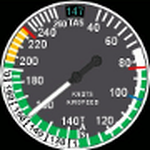
Following a remark from a Canadian simer that the speed gauges didn't provide the right True Air Speed (TAS) during cold weather conditions at very low altitude because the conditions make the True Air Speed (TAS) below the Indicated Air Speed I did change some values to get the correct TAS whatever are the weather conditions.
| Filename: | Essential_gauges__Speed_gauges_for_Saitek_Pro_Flig.zip |
| License: | Freeware |
| Added: | 2nd July 2013, 15:43:42 |
| Downloads: | 316 |
| Author: | Philippe Verhaege |
| Size: | 3.87 KB |
| Category: Flight Simulator X - Gauges | |
| Essential gauges for FIP |
|
Images related to this file:
File Description:
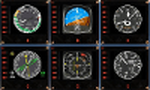
For Saitek Pro Flight Instrument Panel. This is folder contains 8 essential gauges, 7 for the Beech Baron and 1 for the Mooney Bravo.
Beach Baron: Airspeed with TAT, Alternative Airspeed with the True air speed, Vertical Situation Indicator (VSI), Altimeter, Radio Magnetic Indicator (RMI), Horizontal Situation Indicator (HIS) and Vertical speed.
Mooney Bravo: Airspeed with TAT.
| Filename: | Essential_gauges_for_FIP.zip |
| License: | Freeware |
| Added: | 1st March 2013, 16:49:39 |
| Downloads: | 761 |
| Author: | Philippe Verhaege |
| Size: | 1.72 MB |
| Category: Flight Simulator X - Gauges | |
| Cessna 172 - analogical engine panel for FIP |
|
Images related to this file:
File Description:

For Saitek Pro Flight Instrument Panel. This is folder contains 2 analogical engine panels for Cessna 172. The two panels are identical except for the upper middle gauge, left side is EGT for Cessna_172_engine_1.xml file and it is manifold pressure instead for Cessna_172_engine_2.xml file. The package includes a serie of colored needles that can be change easily, just replace the default needles by the one of your choice. Default needles are yellow and provide more visibility in small gauges.
The panel provides Fuel quantity for left and right tanks, Exhaust Gas Temperature or Manifold pressure, Fuel flow, Suction, Alternator charge, Rotation Per Minutes, Oil temperature and pressure, Flaps handle and bug, trim bug and numbers for pitch, rudder and aileron.
| Filename: | Cessna_172__analogical_engine_panel_for_FIP.zip |
| License: | Freeware |
| Added: | 28th February 2012, 18:29:10 |
| Downloads: | 498 |
| Author: | Philippe Verhaege |
| Size: | 228.12 KB |


© 2001-2026 AVSIM Online
All Rights Reserved
Privacy Policy |