
Where Flight Simulation Enthusiasts Gather from Around the World!
AVSIM Library - Search Results

| Category: Flight Simulator X - Gauges | |
| Flypad Gauge V2.0 |

|
Images related to this file:
File Description:
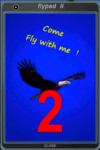
FSX, Flypad Gauge Version 2.0
This gauge has been developed on Win7 for FSX Flight Simulator SP2 or SP1.It should also work with Acceleration, but this is not guaranteed by the author. The gauge is a little extra addon based on the design of a smart phone and provides 9 different displays which are different from all of the standard gauge displays on a regular aircraft panel. It is mainly helpful for the user flying small propeller aircraft, and old timer aircraft.
However, the displays are as well attractive for sim pilots flying modern jet aircraft. Use it as if you just grabbed to your smart phone during a flight and check on the status of your aircraft, or how the terrain awareness situation looks like, how the AI traffic on the radar is, while you proceed with your flight plan. Enjoy the new design of a simple aircraft attitude display during an ILS approach. A new screen for LAT/LON coordination control and distance/bearing calculation has been added to this version in addition with a number of improvements.For credits look at the pdf documentation inside the zip file. By Dietmar Loleit
| Filename: | Flypad_Gauge_V20.zip |
| License: | Freeware |
| Added: | 2nd August 2014, 17:50:45 |
| Downloads: | 779 |
| Author: | Dietmar Loleit |
| Size: | 4 MB |
| Category: Flight Simulator X - Gauges | |
| Air to Air Refueling Gauge - Receiver Side Version 1.1 |
|
File Description:
This gauge will help you to simulate a realistic air to air refueling transfer by adding fuel gradually to your tanks based on the type of transfer that you choose. Fuel will be added at fixed rate each seconds and the weight of your airplane increased accordingly. Enjoy the feeling of your plane being heavier. Air to Air refueling gauge - Receiver Side version 1.1
| Filename: | Air_to_Air_Refueling_Gauge__Receiver_Side_Version_11.zip |
| License: | Freeware |
| Added: | 28th September 2010, 03:22:54 |
| Downloads: | 784 |
| Author: | Chris DUB |
| Size: | 24.68 KB |
| Category: Flight Simulator X - Gauges | |
| 4 Engine Turboprop Throttle quadrant gauge for FS9 and FSX |
|
File Description:
Throttle quadrant gauge for 4 engine turboprop aircraft. For FS9 and FSX.
Panel installation instructions included.
| Filename: | 4_Engine_Turboprop_Throttle_quadrant_gauge_for_FS9.zip |
| License: | Freeware, limited distribution |
| Added: | 16th December 2006, 10:58:19 |
| Downloads: | 2,347 |
| Author: | Rick Milne |
| Size: | 184.03 KB |
| Category: Flight Simulator X - Gauges | |
| BeThere! |
|
File Description:
This package contains the BeThere! gauge. It lets you pause the flight simulator once the aircraft reaches a certain position.
This is useful for long range flights where the pilot wants to leave the flight sim unattended. The procedure is to either load an FS flightplan, switch the navigation mode of the autopilot to GPS and engage the autopilot. Or - with advanced aircraft add-ons - a flightplan is loaded into the FMC and the LNAV mode is set to let the aircraft automatically follow the track. Anyway, the problem is, that the pilot doesn't want to miss the top of descent. So the pilot has to check the computer regularily in order to be there when it becomes interesting again. Or, and that's the idea of this package, the flight sim is automatically paused at a safe position/distance.
Read more about this gauge, how to install and use it, in the readme.txt file included in the package.
| Filename: | BeThere.zip |
| License: | Freeware |
| Added: | 8th February 2007, 15:40:29 |
| Downloads: | 3,406 |
| Author: | Thilo Arndt |
| Size: | 44.46 KB |
| Category: Flight Simulator X - Gauges | |
| FSX A321 fly-by-wire landing fix |
|
File Description:
This simple gauge fixes the 'drop' of the default A321 when one passes below 100 feet. Use only when fly-by-wire is enabled on the A321
| Filename: | FSX_A321_flybywire_landing_fix.zip |
| License: | Freeware |
| Added: | 5th May 2010, 21:45:57 |
| Downloads: | 1,296 |
| Author: | Gary Galea |
| Size: | 1.67 KB |
| Category: Flight Simulator X - Gauges | |
| FSX A321 and B738 Gauge Corrections |
|
File Description:
This package corrects several gauge issues with the FSX default Airbus A321 and Boeing 737-800. "TAS" in the B738 now indicates TAS instead of IAS. Wind arrow in the A321 points in the correct direction instead of 180° off. Further adjustments are outlined in the included documentation.
| Filename: | FSX_A321_and_B738_Gauge_Corrections.zip |
| License: | Freeware, limited distribution |
| Added: | 27th November 2006, 11:18:19 |
| Downloads: | 8,342 |
| Author: | Gene Zimmer |
| Size: | 4.53 MB |
| Category: Flight Simulator X - Gauges | |
| "FeelThere Map" Eurowings |
|
Images related to this file:
File Description:

This is an Eurowings/Lufthansa Group bitmap replacing File for "FeelThere Map!". You MUST own FeelThere's Map in order to use it!
| Filename: | FeelThere_Map_Eurowings.zip |
| License: | Freeware |
| Added: | 4th August 2017, 13:05:52 |
| Downloads: | 238 |
| Author: | Ian Brolute |
| Size: | 113.36 KB |
| Category: Flight Simulator X - Gauges | |
| V-One Gauge for B707-300 with Call-Outs |
|
Images related to this file:
File Description:
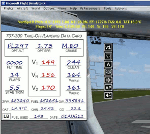
This gauge is written specifically for Captain Sim's B707-300 aircraft (http://www.captainsim.com/products/x707/). It will inform you of appropriate take-off speeds (V-speeds), take-off trim units, Vref landing speeds, elapsed flight time, fuel used, optimum cruise altitude and optimum EPR setting. It will also indicate when the aircraft's max gross weight and TOW has been exceeded by displaying in red text. Take-off speeds are adjusted for altitude and temperature values. Flight time and fuel used can be reset at any time by clicking on their respective displays. Pounds (LB), Kilograms (KG), Celsius (C) and Fahrenheit (F) are toggled by a mouse click. Provisions have been made to allow user adjustments to Optimum Altitude, Optimum EPR and Center of Gravity values. Seven F/O take-off call-outs are included: 80 knots, V1, VR, V2, Gear-up, Flaps-up and Slats Retract.
| Filename: | VOne_Gauge_for_B707300_with_CallOuts.zip |
| License: | Freeware, limited distribution |
| Added: | 3rd August 2012, 18:17:03 |
| Downloads: | 1,234 |
| Author: | Paul Tally |
| Size: | 1.04 MB |
| Category: Flight Simulator X - Gauges | |
| V-One Gauge for B727-100/F 727-200/F with Call-Outs |
|
Images related to this file:
File Description:
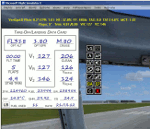
This gauge is written specifically for Captain Sim's B727-100/F and B727-200/F aircraft (http://www.captainsim.com/products/x727/). It will inform you of appropriate take-off speeds (V-speeds), take-off trim units, Vref landing speeds, elapsed flight time, fuel used, optimum cruise altitude, optimum ERP setting and Maximum Climb Thrust (MCT). It will also indicate when the aircraft's gross weight has been exceeded by displaying in red text. Take-off speeds are adjusted for altitude and temperature values. Flight time and fuel used can be reset at any time by clicking on their respective displays. Pounds (LB), Kilograms (KG), Celsius (C) and Fahrenheit (F) are toggled by a click on their displays. Provisions have been made to allow user adjustments to Optimum Altitude, Optimum EPR and Center of Gravity values. Seven F/O take-off call-outs are included: 80 knots, V1, VR, V2, Gear-up, Flaps-up and Slats Retract. A trim wheel sound is also included.
| Filename: | VOne_Gauge_for_B727100F_727200F_with_CallOuts.zip |
| License: | Freeware, limited distribution |
| Added: | 22nd July 2012, 08:07:50 |
| Downloads: | 2,606 |
| Author: | Paul Tally |
| Size: | 1.1 MB |
| Category: Flight Simulator X - Gauges | |
| C-130 T.I.T. Gauge |
|
Images related to this file:
File Description:
This is an XML gauge that simulates the Turbine Inlet Temperature (T.I.T.) for Captain Sim's C-130 X-perience version 1.3 for FSX.
Note: All gauge click functions are accessed from the 2D gauge only.
Features included in this gauge:
- Simulated Turbine Inlet Temperature (T.I.T.)
- Virtual Cockpit installation
- Access to 2D panel via VC click-spot (Radio Stack)
- T.I.T. follow for Take-off, climb and cruise
- Display toggle (top): T.I.T., Cruise Ceiling and Current Elevator Trim
- Display toggle (bottom): Engine Torque, Engine Fuel Flow and True Airspeed (knots)
- T.I.T. follow will disconnect when altitude hold is selected and climb temperature is above 900°C
- Pre-defined selectable temperatures for T.I.T. follow: user selectable, 970°, 1010° and 1049°
- T.I.T. display will indicate T.I.T. follow is within ±2°C control during climb
- GTC sound fix for start-up, run and shut-down of Gas Turbine Compressor
| Filename: | C130_TIT_Gauge.zip |
| License: | Freeware, limited distribution |
| Added: | 21st August 2016, 20:28:29 |
| Downloads: | 443 |
| Author: | Paul Tally |
| Size: | 3.94 MB |


© 2001-2026 AVSIM Online
All Rights Reserved
Privacy Policy |