
Where Flight Simulation Enthusiasts Gather from Around the World!
AVSIM Library - Search Results

| Category: Flight Simulator X - Aircraft Repaints, Textures and Modifications | |
| P-47D 334th FS "Miss Plainfield" |

|
File Description:
This folder contains a repaint for the A2A Wings of Power III P-47D Thunderbolt, representing P-47C 42-7945 flown by Lieutenant Spiros 'the Greek' Pisanos of the 334th FS, 4th FG, Finschhafen, New Guinea, 1944. Born in Athens, Greece, in the suburb of Kolonos, on 10 November 1919, Spiros Nicholas "Steve" Pisanos, the son of a subway motorman, came to America in April 1938, as a crew member on a Greek Merchant ship. Arriving in Baltimore, Maryland and unable to speak English, Steve found his way to New York City, where he worked in bakeries and restaurants. As he earned money he started flying lessons at Floyd Bennett Field. In August 1940, he setled i Plainfield, New Jersey, his adopted home town, and continued flying lessons at Westfield Airport. He earned a private pilot's license and, although still a Greek national, in October 1941 he joined the British Royal Air Force sponsored by the Clayton Knight Committee in New York City.
Steve began his military flight training at Polaris Flight Academy in Glendale, California. Upon graduation, Pilot Officer Pisanos was transferred to England where he completed RAF Officers Training School at Cosford, England and OTU (Operational Training Unit) at Old Sarum Aerodrome in Salisbury. Pilot Officer Pisanos was posted to the 268 Fighter Squadron at Snailwell Aerodrome in Newmarket flying P-51A's. He later transferred to the 71 Eagle Squadron, one of the three Eagle squadrons in the RAF, comprised of American volunteers flyin Spitfires at Debden RAF Aerodrome.
When the USAAF 4th Fighter Group absorbed the American members of the Eagle Squadrons in September and October 1942, Pilot Officer Pisanos was commissioned a lieutenant in the U.S. Army Air Forces. On 3 May 1943, Lt. Pisanos was naturalized as an American citizen in London, England, becoming the first individual in American history to be naturalized outside the Continental United States.
Flying his first mission in his P-47 "Miss Plainfield" out of Debden Aerodrome with the 334th Fighter Squadron, 4th Fighter Group, Lt. Pisanos, "The Flying Greek," scored his first victory on 21 May 1943, when he downed a German FW-190 over Ghent, Belgium. by 1 January 1944 he had become an ace with five confirmed victories. On 5 March 1944, he obtained his 10th victory and while returning from that B-17 escort mission to Limoges and Bordeaux, France, Steve experienced engine failure in his P-51B and crash-landed south of Le Havre. For six months he evaded the Germans and worked with the French Resistance and the American OSS sabotaging the German war machine in occupied France. Lt. Pisanos returned to England on 2 September 1944, following the liberation of Paris.
Upon returning to the United States, Captain Pisanos was assigned to the Flight Test Division at Wright Field, Ohio. He attended the USAF Test Pilot School and subsequently served as a test pilot at Wright Field and Muroc Lake, California, testing the YP-80 jet aircraft. During his career in the USAF, Steve graduated from the University of Maryland, attended the Air Command and Staff College and the Air War College. In December 1973, after a distinguished thirty years of service in the United States Air Force, he retired with the rank of Colonel. Repaint by Jan Kees Blom, based on the paintkit by Martin Catney
| Filename: | P47D_334th_FS_Miss_Plainfield.zip |
| License: | Freeware |
| Added: | 14th March 2009, 10:55:44 |
| Downloads: | 730 |
| Author: | Jan Kees Blom |
| Size: | 7.17 MB |
| Category: Flight Simulator X - Aircraft Repaints, Textures and Modifications | |
| Delta Airlines Boeing 757-200 (N672DL) |
|
Images related to this file:
File Description:
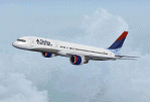
TDS (Tenkuu Developers Studio) Boeing 757-200 PW 2040 model, in the Delta Wavy Gravy livery, registration N672DL. Includes custom Cabin and Ground Support Equipment and personnel textures and both winglet textures for those that want to use winglets. Lots of mild weathering and other new details including photo real refuel station under right wing as well as the refueling access panel and new wing textures. New photoreal Landing and taxi light lenses on the nose gear and wings. A special thanks to Luis Castro for the winglet night lighting and the photoreal wing tops and flaps and Nick Chinn for the refueling station photos from a real Delta 757 that helped me enhance these textures even more....
Model developed by Tenkuu Developers Studio, features high resolution textures, dynamic flexing wings, nose gear steering, rudder lock, ground spoilers, low speed aileron locks at high speed, fully animated control surfaces, fully independent suspension, trim animation, opening passenger doors, rolling wheels, animated thrust reverse with reverser block doors, detailed textures, full night lighting, ground service vehicles and more. Model design by Hiroshi Igami. Flight dynamics design by Nate Rosenstrauch and Joe DeGregorio. Paint kit and master textures by Carlos Eduardo Salas. TDS members: Hiroshi Igami,Nick Wilkinson,Carlos Eduardo Salas,Yosuke Ube,Stian Svensen,David Biggar, Luiz Antonio Perina,Nate Rosenstrauch, Joe DeGregorio. By Joe DeGregorio. Enjoy!!
| Filename: | Delta_Airlines_Boeing_757200_N672DL.zip |
| License: | Freeware |
| Added: | 16th October 2018, 16:26:56 |
| Downloads: | 497 |
| Author: | Joe DeGregorio - TDS |
| Size: | 12.79 MB |
| Category: Flight Simulator X - AFCAD Files | |
| Peaslees Airstrip Airport (NJ25), New Jersey |
|
File Description:
Located 01 miles SW of Clarksboro, New Jersey on 8 acres of land, Peaslees Airstrip is a private turf field 2207' in length. The hard surface runway has been removed to allow for landings on terrain, so have your terrain mesh set as high as possible. The surrounding area of rural farmland and houses has been filled in to provide an encompassing ground environment with as few breaks to the horizon as possible. There are no services at this airport - if you arrive there is room past the hangar to park and tie down although no tie downs are available in real life, thus you can only start from this airport on the runway. The windsock is located approximately midfield of the runway, as in real life. A second hangar has been constructed nearby the current one, but MSE textures do not reflect this and it was not included. This airport is not lit and daytime VFR operations only are recommended.
Scenery constructed with use of satellite images/streetview/aerial photos - the author has not been there in person.
This scenery is meant to be used in conjunction with MegaScenery Earth New Jersey/Delaware 004. It is not required, but apron use is minimized to allow satellite scenery to show through as much as possible, and objects are placed based on the MSE textures - lack of it may make scenery look out of place.
| Filename: | Peaslees_Airstrip_Airport_NJ25_New_Jersey.zip |
| License: | Freeware |
| Added: | 20th August 2011, 19:56:22 |
| Downloads: | 160 |
| Author: | Drew Sikora |
| Size: | 1 MB |
| Category: Flight Simulator X - Original Aircraft | |
| Airbus A359ULR |
|
Images related to this file:
File Description:
Sinapore Airlines is the launch customer for the A359ULR. The aircraft is configured in a two-class layout, with 67 Business Class seats and 94 Premium Economy Class seats. She is designed for long range flights of over 9,700 nm. Fuel has been increased at the expense of souls on board. The primary use will initially be for routes between WSSS and KJFK (or KLGA), but many others of similar distance can be added later. The flight number on this aircraft reflects the first flight from KJFK-WSSS which is only 8,275 nm (Contrary to media reports of over 9,000 nm) and about 17.5 hours duration (see You Tube video on this flight). The aircraft follows normal flight rules with a higher flight level and longer range. Almost everything is computer controlled and monitored throughout the flight, from take-off to landing. Two of Four pilots monitor the flight at all times, and shift changes occur on a schedule that allows appropriate rest for the crew. The passengers enjoy accommodations unlike provided in any other aircraft or flight, with plenty of meal servings and entertainment options. To see the seating chart, enter the Airbus A359ULR Singapore Airlines folder and click the icon named “SeatGuru Seat Map Singapore Airlines Airbus A350-900 ULR.html†and the seating map will appear. The model here has ground servicing animation. Please review the ReadMe_FSX.txt document for further info on this. Read A359ULR details.txt for aircraft details. Model Design and Panel by: Camil Valiquette; Sounds: Unknown Author and modified by Douglas E. Trapp; Auto Smoke Effects by Richard Wisman, modified by Douglas E. Trapp; Real World Aero/Engine Dynamics and Modifications by: Douglas E. Trapp, Irving, Texas, [email protected], December 2018. The use of this model, and the configuration of such, is designed for free educational purposes, and protected by the Free Use Act: (https://www.law.cornell.edu/uscode/text/17/107). This model and/or aspects of such cannot be used for monetary purposes!
| Filename: | Airbus_A359ULR.zip |
| License: | Freeware |
| Added: | 2nd December 2018, 00:56:21 |
| Downloads: | 1,010 |
| Author: | Douglas E Trapp |
| Size: | 31.63 MB |
| Category: Flight Simulator X - Scenery | |
| OPNH - Nawabshah Airport - Nawabshah, Sindh, Pakistan |
|
Images related to this file:
File Description:
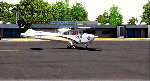
First ever freeware Scenery of PSDG/MSK OPNH Nawabshah Airport FsX/P3D. Our projects will range from major to regional airports and we will strive to add realism and detail to flight locations spanning the entire country. With each new project we will aim to enhance the flight simulation experience by providing familiar terrain in the Pakistani air space for both training as well as recreation purposes. We have embarked upon our first project OPNH airport in Nawabshah, which is currently completed and have included screenshots in the pack Scenery Developed by Sarmad Khan (MSK) & Raihan Shahzad along with supported by Ali Kazimi, Irfan Khan, Omais Khan, Ahmed Arif & Mr. Shahid Iqbal. PSDG (Pakistan Scenery Development Group) was established by Pakistan vACC, a VATSIM division in West Asia region.
| Filename: | OPNH__Nawabshah_Airport__Nawabshah_Sindh_Pakistan.zip |
| License: | Freeware |
| Added: | 1st March 2015, 15:41:50 |
| Downloads: | 811 |
| Author: | M Sarmad Khan |
| Size: | 65.88 MB |
| Category: Flight Simulator X - Aircraft Repaints, Textures and Modifications | |
| Default Bell 206 "Old Glory" |
|
Images related to this file:
File Description:

This paint is "yet another" one based on "Old Glory". I know I'm British... but the American flag is really one of the most impressive ones to use as a paint theme on aircraft. The British "Union Flag" (as it is properly called) simply doesn't "wave" as nicely on my paints yet - I need more practice.
This paint also uses those fantastic high resolution bumpmaps created by the OZx Redux painter team - thanks guys!
Readme is enclosed in the zipfile
| Filename: | Default_Bell_206_Old_Glory.zip |
| License: | Freeware |
| Added: | 27th March 2011, 18:26:40 |
| Downloads: | 253 |
| Author: | Chris Brisland and the OZx Redux Team |
| Size: | 12.09 MB |
| Category: Flight Simulator X - Miscellaneous Files | |
| Lockheed L-049A Constellation SP2/Acceleration v3.02 Patch |
|
File Description:
Thanks to the generous feedback I have received regarding this model, the v3.02 patch corrects the following: Mis assignment of some of the liveries. Aircraft registrations & ATC designations. Radio size made larger for better visibility. Requires file name: l049a_v30.zip.
| Filename: | Lockheed_L049A_Constellation_SP2Acceleration_v302_.zip |
| License: | Freeware |
| Added: | 26th January 2008, 03:59:04 |
| Downloads: | 2,722 |
| Author: | David (The Fid) Fidler & High Flight Simulations |
| Size: | 403.95 KB |
| Category: Flight Simulator X - Gauges | |
| V-One Gauge for Captain Sim L-1011/F V1.3 |
|
File Description:
This is an updated V-One gauge for Captain Sim CS L1011 v1.3
The following changes are in this version release:
1. V-One code optimized to FSX xml.
2. Sounds are played using Captain Sim's sound module.
3. All voice recordings have been re-recorded.
4. Maneuvering speed display corrected to match L-1011 alpha control for flaps-up.
5. Sounds for call-outs call be toggled on-off.
6. Current trim displays Captain Sim's trim value (trim value does not match visual trim wheel).
7. Decision Height Set Knob (Captain's side) controls 'Minimums' call-out.
List of features: Approximately 40 sounds integrated into gauge. Take-off V-Speeds calculated for Flaps 10, 18 or 22. Take-off command speed automatically set for V2 + 15. Maneuvering speed displayed for flap selected. Optimum altitude and optimum EPR (EPR calc for M.84) continually calculated. Take-off trim calculated for current gross weight. Current Altitude, EPR, Speed (knts), Flaps and Trim displays via toggle. Display units can be toggled between LB and KG (default LB). Re-settable flight timer. Re-settable fuel use. Selectable Vref landing configurations, Vref33 (default) or Vref42. ZFW, Fuel, CG, Gross Weight and Barometric Pressure MSL (QNH) displayed.
| Filename: | VOne_Gauge_for_Captain_Sim_L1011F_V13.zip |
| License: | Freeware, limited distribution |
| Added: | 25th October 2015, 11:00:24 |
| Downloads: | 2,042 |
| Author: | Paul Tally, Stefan Liebe, Jimmy Foong |
| Size: | 3.93 MB |
| Category: Flight Simulator X - AFCAD Files | |
| PAKT - Ketchikan airport - Ketchikan, Alaska - USA |
|
Images related to this file:
File Description:
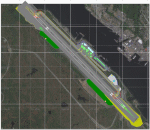
This AFCAD requires payware "Ultimate Terrain Alaska X"!! It will not work without it as it is built on the underlying terrain features and the included file "PAKT_AP.BGL" which has to be renamed or moved to a folder outside the FSX terrain environment. The original file included some errors which I tried to correct. This patch is published with permission.
Changes: The apron layout is corrected including now taxiway "C" leading to GA parking. The pavement has been changed to asphalt as it appears to be when taking aerial pictures as template. The runway got the proper overruns at both sides and the position of the ILS glideslope and localizer has been corrected as well as the DME. The layout of the airport building arrangement including the tower should be now closer to the real world and I added a working jetway. However, I used FSX default objects. As I was dependent on quite rare layout information I just tried to adjust the taxi paths and parking spots probably closer to the reality than before but I did not put any effort to name the parking spots like in real life nor did I take care for taxi signs (only the runway entries got such).
| Filename: | PAKT__Ketchikan_airport__Ketchikan_Alaska__USA.zip |
| License: | Check within download |
| Added: | 25th May 2013, 19:40:38 |
| Downloads: | 442 |
| Author: | Axel Birsul |
| Size: | 1.28 MB |
| Category: Flight Simulator X - Aircraft Repaints, Textures and Modifications | |
| USAAF PT-17 Stearman (N38940) |
|
Images related to this file:
File Description:
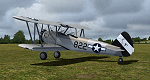
This is a repaint only, for the payware Vertigo Studios Stearman Vol.1 set. This repaint depicts the restored Stearman PT-17 N38940, owned/operated by Paul Bennett, based at Priory Farm, Norfolk, England. The aircraft was manufactured as USAAF 41-8263, and from 1941 until February 1944 the aircraft was used continually, despite being involved in 4 separate training accidents, with a 5th accident taking it out of service althogether. The remains of the aircraft were restored, with the aircraft first flying again in 1977, and later, sold to Paul Bennett in 1992, the aircraft was restored again, to factory-original award-winning condition and finished in the same all-silver color scheme it would have had in 1944. The contrast between the metal and fabric surfaces on this aircraft is period-authentic, as although the fabric surfaces were coated in silver dope, the metal panels were anodized and left bare. Two versions of the repaint are included, with one featuring the temporary 445th Bomb Group tail markings the aircraft sported in 2006.
| Filename: | USAAF_PT17_Stearman_N38940.zip |
| License: | Freeware |
| Added: | 22nd January 2017, 04:05:20 |
| Downloads: | 160 |
| Author: | John Terrell |
| Size: | 46.2 MB |


© 2001-2026 AVSIM Online
All Rights Reserved
Privacy Policy |