
Where Flight Simulation Enthusiasts Gather from Around the World!
AVSIM Library - Search Results

| Category: Flight Simulator X - Gauges | |
| V-One Gauge for Milviz Boeing 737-200 v2.0 |

|
File Description:
The following changes are in this version release:
1) All pilot/co-pilot call-outs replaced
2) V-One XML code and sound file logic updated
3) Altitude Call-Out XML code re-written & optimized
4) Corrected setting of Airspeed Cursor when SP177 is in use during approach phase
5) Added Call-out sound toggle for: 'All', 'Altitude' or 'Off' (box in upper right of Data Card)
6) Added 'Current %N1' display to Data Card
List of features: Approximately 40 sounds integrated into gauge. Take-off V-Speeds calculated for Flaps 1, 2, 5, 10, 15 or 25 including temperature and altitude correction. Take-off speed bugs and command speed bug automatically set for: V1, Vr, V2, V2 + 15 and flaps-up maneuvering speed (clean speed). Optimum altitude and optimum EPR (EPR calc for M.74) continually calculated. Flap mis-configuration is displayed in text. Tooltip indicates overweight value (LB/KG). Take-off trim calculated for current gross weight. Current Altitude, EPR, Speed (knts), Flaps and Trim displays via toggle. Display units can be toggled between LB and KG (default LB). Re-settable flight timer. Re-settable fuel use. Selectable Vref landing configurations, Vref15, Vref30 (default) or Vref40. Approach / landing speed bugs and Command speed bug automatically set for: Vref, Vref + 5, Vref + 15 and flaps-up maneuvering speed (clean speed). ZFW, Fuel, CG, Gross Weight and Barometric Pressure MSL (QNH) displayed.
| Filename: | VOne_Gauge_for_Milviz_Boeing_737200_v20.zip |
| License: | Freeware, limited distribution |
| Added: | 1st November 2015, 18:35:29 |
| Downloads: | 2,440 |
| Author: | Paul Tally |
| Size: | 4.11 MB |
| Category: Flight Simulator X - Scenery | |
| ZGGG Guangzhou Baiyun Int'l Airport 2017 |
|
File Description:
Guangzhou Baiyun International Airport (ZGGG) is the major airport of Guangzhou, China. Located in Guangzhou's Baiyun District, it opened on August 5, 2004, but has gone through major changes since FSX was created. The default version only has one terminal and two runways and is slightly out of place from the actual location. I placed the airport in its real location based upon the charted latitude and longitude of the airport reference point. Guangzhou Baiyun Int'l Airport now has three runways. The third runway opened in February 2015. The centerpiece is the new Terminal 2, faithfully rendered here as much as possible. The terminal footprint and gates are accurate. The 3D terminal itself is a simple Sketchup project with generic textures (including night textures). The scenery converted and placed using MCX's amazing Convert and Place Wizard. I added the FBO ramp and the FEDEX Cargo Ramp Aprons and added some hangars to both locations, all default FSX buildings, so no additional library downloads are required. The new runway (now called 02R/20L) was added with Airport Design Editor. The old runway 02R/20L was renamed to the current runway 02L/20R and the old runway 02L/20R was renamed to the current runway 01/19. All taxiways are accurately drawn and designated with taxisigns using the latest AIRAC 1712 Jeppesen chart for ZGGG. All six ILS approaches are rendered as well as ADE would let me.
| Filename: | ZGGG_Guangzhou_Baiyun_Intl_Airport_2017.zip |
| License: | Freeware |
| Added: | 26th November 2017, 22:43:37 |
| Downloads: | 1,083 |
| Author: | Randy Tyndall |
| Size: | 490.4 KB |
| Category: Flight Simulator X - Panels | |
| Project Black Panels v6.3 |
|
Images related to this file:
File Description:

Looking for a functional all-in-one panel? This package might be worth a look then. With a consistent layout for all instrumentation except aircraft type specific gauges (like engine displays and controls), this package offers panels for nearly all possible aircraft types. These IFR compatible 2D panels use the proper autopilot system for the aircraft type and have all the bells and whistles in easy reach; including an upgraded PFD, backup gauges, full IFR gauges (including ADF), fuel request, jetway toggle, engine startup and shutdown ability, a speed reduction system with auto spoilers, auto reverse thrust and auto taxi after landing, automatic gear, a true auto-smoke gauge that works with any aircraft having an engine smoke system, ground handling and popups like a custom exits control gauge, flight information computer and a TCAS radar plus much more. No attempt was made to replicate an actual aircraft panel, these were designed to allow flight of any aircraft in any location or situation without having to figure out how to use a different panel for each plane, and to assure all the necessary controls are present.
v6.3 is a Major Upgrade with a cleaner, more uniform look and tons of updated graphics, along with a load of new and improved features, including a functional TOGA system and, for piston engine aircraft, an Auto-Takeoff system. Complete package, no previous version required.
Support & Updates for this package can be found here:
http://www.thecurrentpage.com/?page_id=2686
| Filename: | Project_Black_Panels_v63.zip |
| License: | Freeware, limited distribution |
| Added: | 18th June 2010, 01:50:04 |
| Downloads: | 1,855 |
| Author: | Don Janusz |
| Size: | 28.84 MB |
| Category: Flight Simulator X - Gauges | |
| V-One Gauge for Boeing 727-100/200/F (Complete) |
|
Images related to this file:
File Description:
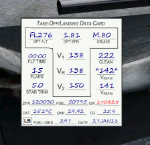
New features in this version are in indicated in '[ ]'.
Twenty call-outs sounds integrated into gauge [13 new call-outs].
Take-off V-Speeds calculated for Flaps 5, 15, or 25 with temperature and altitude adjustments.
[Take-off speed bugs and Command speed bug automatically set for: V1/Vr, V2, V2 + 15].
[Flaps-up maneuvering speed (clean speed) bug set after flaps-up].
Optimum altitude and optimum EPR (EPR calc for M.80) are continually calculated.
Gross Weight overage will display in 'red' text. Tooltip indicates overweight value (LB/KG).
Take-off trim calculated for current gross weight.
Maximum Climb Thrust (MCT) calculated based on current TAT temperature.
[Current EPR displayed adjacent to MCT for ease of use during climb phase].
Display units can be toggled between LB and KG (default LB).
Outside air Temperature can be toggle between Fahrenheit and Celsius.
Resettable fuel use.
Resettable flight timer.
[Selectable Vref landing configurations, Vref30 (default) or Vref40].
[Approach / landing speed bugs and Command speed bug automatically set for: Vref, Vref + 5, Vref + 15].
ZFW, Fuel, CG, Gross Weight and Barometric Pressure MSL (QNH) displayed.
['Barometer Set' call-out occurs when pressing keyboard letter 'B' (V-One gauge must be open)].
[Airspeed gauge enhanced: CMD speed bug colorized orange and notch added for visibly of tick marks below].
[Decision Height adjustment now on Data Card in hidden click-spot located on upper right corner].
[Now installation to a single location will work for all variants].
| Filename: | VOne_Gauge_for_Boeing_727100200F_Complete.zip |
| License: | Freeware, limited distribution |
| Added: | 28th January 2013, 11:30:53 |
| Downloads: | 1,512 |
| Author: | Paul Tally |
| Size: | 3.55 MB |
| Category: Flight Simulator X - Original Aircraft | |
| Piaggio P-180 v2.0 |
|
File Description:
www.mariopilot.6x.to
What's new in version 2.0:
1) gMAX re-formatted model: FS-X compatibility, and new animations.
2) Completely new Avionics 100% XML formatted
3) new ultra-fine tuned flight dynamics
4) Hi-res virtual cockpit with 3-D throttles and 3-D virtual cabin.
5) Lots more...
Thanks to Andrew Spring of www.p166.com!! The Piaggio P-180 Avanti is a Luxury Jetprop. Its design is the result of a "thinking outside the box" project philosophy. It means that building techniques are standard while aerodynamics are unique for it's kind. It features a three lifting surface design, laminar flow wing and twin pusher turboprop configuration. Passenger comfort features the possiiblity of standing in feet inside the plane, low noise due to pusher propellers and "Pininfarina" designed arrangement. Performances are unique too, cruising at 395 KTAS (260 KIAS) at 28000 ft, a jet-like speed, being the P-180 a twin turboprop. The result is a 40% reduced operational cost respect to a jet of similar size, and 30% less respect to a similar size turboprop, all at same price of a small Jet. This model is 804 Kbs with c.a. 19000 polygons in c.a.170 assemblies. Features Clickable Dynamic Photortreal VC with Night Lighting, night lighted internals, Photoreal 2D Cockpit, Engine start Effect, advanced FDE, Customizable Payloads. **READ NOTES BEFORE FLYING**(README.TXT, P180_REF.HTM AND P180_CHECK.HTM, also available as reference and checklist in FS kneeboard...) WORKS IN FS9
| Filename: | Piaggio_P180_v20.zip |
| License: | Freeware |
| Added: | 21st February 2007, 15:27:11 |
| Downloads: | 31,068 |
| Author: | Mario Noriega |
| Size: | 21.43 MB |
| Category: Flight Simulator X - AFCAD Files | |
| Newark Liberty International Airport (EWR), NJ (Beta) |
|
File Description:
Located 03 miles S of Newark, New Jersey on 2027 acres of land, Newark Liberty International Airport is a major regional hub. Currently, this airport is fully modeled to match MegaScenery Earth ground textures. It is functional to the point where I feel comfortable releasing it, however it is a far cry from "complete". As a primarily General Aviation pilot, I do not have much use for this airport, however I do fly over it from time to time and prefer to see it blend in with MSE textures properly. If you are a frequent user of KEWR and its facilities, please consult the Known Issues section of the ReadMe to decide whether you wish to install this version. It might be worth adding it as a layer you can turn on when you're not using the airport but will be flying in the area and want it to blend in properly. I do plan to further develop this airport if I end up using it more often in the future.
Scenery constructed with use of satellite images/streetview and personal reference.
This scenery is meant to be used in conjunction with MegaScenery Earth New York 005. It is not required, but apron use is minimized to allow satellite scenery to show through as much as possible, and objects are placed based on the MSE textures - lack of it may make scenery look out of place.
| Filename: | Newark_Liberty_International_Airport_EWR_NJ_Beta.zip |
| License: | Freeware |
| Added: | 28th November 2010, 02:05:25 |
| Downloads: | 2,957 |
| Author: | Drew Sikora |
| Size: | 3.34 MB |
| Category: Flight Simulator X - Utilities | |
| PJEZFSX |
|
File Description:
PETER JAMES' EZCAM .CAM FILES AS OF 3-25-10. I have made some great cams to share based on the new
Flight1 EZDOK software. Installation is a snap. Just copy these into your EZDOK root directory and you're
ready to go! As a real commercial pilot with over 7500 hours flying time, I can assure you these cams
give you the most realistic virtual cockpit views possible. I base this on proper seat position, as
well as a zoom level I have been fiddling with since the beginning of FSX.
I have here cams for the A319 by Project Airbus, the Default A321, default Beaver, the 739 by Ariane, the LDS 767-300ER,
and the great free biplane (Tigermoth) by ORBIX ...Whether you own the two payware products or not
does not matter. These cams will work well on any similar aircraft. Just use the EZDOK interface to import these cams,
and then you can edit them for any plane you want. The real thing I did was take the default cams that came with EZDOK and dampen
out the touchdown head wobble...but that's about it. I am still learning all the tweaks available
with vibrational effects, but have gotten good at setting up 9 viewpoints for each virtual cockpit
included... when you run the EZDOK interface you'll see the titles and number key for each position.
Enjoy!
Peter James / [email protected]
| Filename: | PJEZFSX.zip |
| License: | Freeware |
| Added: | 25th March 2010, 06:23:33 |
| Downloads: | 2,533 |
| Author: | Peter James |
| Size: | 16.85 KB |
| Category: Flight Simulator X - AI Aircraft | |
| AI Mexicana Link AI Malcontent Bombardier CRJ-200 Fleet Pack |
|
Images related to this file:
File Description:
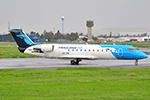
This is the Third Oldest Airline in the world, the Second Oldest Airline in Latin America, and the First Oldest Airline in Mexico, Mexicana Airlines (Mexicana de Aviacion), this is the Airbus A318-111 for now the pack have the Last New Livery (2010) and the Old Livery (2005), more later will upload the Older Liveries, the Old Livery but with the Thin Logo and No Wingtips Logos, and the mos popular and old Mexicana´s livery, (1997-2005). For the 100th Anniversary I´ll upload all the fleet, since 1940´s with the DC-2 to the last fleet that had when it flies, the Mark and Airline still exists, BUT It doesn´t fly since 2011. In this case this is the MexicanaLink, a subsidiary of Mexicana based in Guadalajara International Airport, was the feeder airline for Mexicana and MexicanaClick, operating in markets that did not justify the use of larger aircraft, as they were considered thin routes. This airline was the regional operator, while MexicanaClick was the domestic low-price airline that competed with Interjet, Volaris and Viva Aerobus.
The airline's presentation to the media was made on March 10, 2009.The fleet consisted in 2010 in Bombardier Canadair Regional Jet CRJ-200. I´ll upload very soon the other Model Raven FS Labs (RFSL/RAI) Bombardier CRJ-200, with the same fleet pack than this model.
The model is AI Malcontent (AIM) Bombardier CRJ-200 Basepack. I hope enjoy it!.
| Filename: | AI_Mexicana_Link_AI_Malcontent_Bombardier_CRJ200_F.zip |
| License: | Freeware |
| Added: | 18th November 2021, 22:25:41 |
| Downloads: | 86 |
| Author: | Jesús Gibran Soriano Solleiro |
| Size: | 166.47 MB |
| Category: Flight Simulator X - AI Aircraft | |
| AI Mexicana Link Raven FS Labs Bombardier CRJ-200 Fleet Pack |
|
Images related to this file:
File Description:
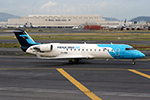
This is the Third Oldest Airline in the world, the Second Oldest Airline in Latin America, and the First Oldest Airline in Mexico, Mexicana Airlines (Mexicana de Aviacion), this is the Airbus A318-111 for now the pack have the Last New Livery (2010) and the Old Livery (2005), more later will upload the Older Liveries, the Old Livery but with the Thin Logo and No Wingtips Logos, and the mos popular and old Mexicana´s livery, (1997-2005). For the 100th Anniversary I´ll upload all the fleet, since 1940´s with the DC-2 to the last fleet that had when it flies, the Mark and Airline still exists, BUT It doesn´t fly since 2011. In this case this is the MexicanaLink, a subsidiary of Mexicana based in Guadalajara International Airport, was the feeder airline for Mexicana and MexicanaClick, operating in markets that did not justify the use of larger aircraft, as they were considered thin routes. This airline was the regional operator, while MexicanaClick was the domestic low-price airline that competed with Interjet, Volaris and Viva Aerobus. The airline's presentation to the media was made on March 10, 2009.The fleet consisted in 2010 in Bombardier Canadair Regional Jet CRJ-200. I´ll upload very soon the other Model AI Malcontent (AIM) Bombardier CRJ-200, with the same fleet pack than this model. The model is Raven FS Labs (RFSL/RAI) Bombardier CRJ-200 Basepack. I hope enjoy it!.
| Filename: | AI_Mexicana_Link_Raven_FS_Labs_Bombardier_CRJ200_F.zip |
| License: | Freeware |
| Added: | 2nd December 2021, 02:11:40 |
| Downloads: | 69 |
| Author: | Jesús Gibran Soriano Solleiro |
| Size: | 97.19 MB |
| Category: Flight Simulator X - AFCAD Files | |
| MRLB - Daniel Oduber Quiros International Airport / Liberia, Guanacaste, Costa Rica |
|
Images related to this file:
File Description:
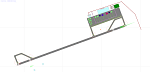
MRLB - Daniel Oduber Quiros International Airport / Liberia, Guanacaste, Costa Rica.
This airport update was made with the latest version of ADE (Airport Design Editor) and made for FSX as a replacement for the stock (default) airport. I found that most stock airports in FSX lack a decent amount of character and realism and I've tried to fix that a little bit. The stock airport file for the Liberia airport was sub par to say the least. There were absolutely no parking spots for commercial aircraft and no terminal buildings.
I've done major reworking to this airport and added the brand new terminal, which opened several months ago, I hope you enjoy. Below is a list of changes/additions. All these enhancements are as close to the real airport as I can get with stock library objects. I've used satellite images, terminal photos and maps throughout the whole process so building locations are as accurate as possible. Happy landings in Costa Rica!
Features:
*Greatly expanded parking apron
*Old terminal building added with GA parking area
*Brand new terminal building added with its 4 jetways and 3 additional ramp parking spots
*Parking lots with static vehicles
*Small current construction area
*Road that connects the airport to the main highway w/ static vehicles
*Hilton Garden Inn hotel south of runway 25
*Static vehicles and GA aircraft on the ramp
*Fire station
*Birds in the vicinity of the airport
| Filename: | MRLB__Daniel_Oduber_Quiros_International_Airport__.zip |
| License: | Freeware |
| Added: | 12th July 2012, 16:35:27 |
| Downloads: | 879 |
| Author: | Jaison Diaz |
| Size: | 7.63 KB |


© 2001-2026 AVSIM Online
All Rights Reserved
Privacy Policy |