
Where Flight Simulation Enthusiasts Gather from Around the World!
AVSIM Library - Search Results

| Category: Flight Simulator X - Aircraft Repaints, Textures and Modifications | |
| F/A-18 Combat Version |

|
Images related to this file:
File Description:
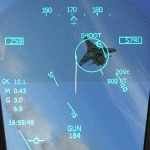
FSX F/A-18 Combat Version. This is the Acceleration F/A-18 Hornet equipped with 20mm M61 cannon and a fully functional air-to-air gun mode found in the real F/A-18. With the two radar modes, the two gun sights and the flying tracers, the virtual dogfight will be very similar to a real one. You will not be able to shoot down other aircraft, but you will receive an immediate indication on your HUD if a bullet hit the bandit. The flight model is unchanged from the Acceleration F/A-18 except for allowing manually controlled flaps and reducing the arresting wire tension for smoother carrier landings. The HUD is an upgrade of the Realistic F/A-18 HUD by Jivko Rusev and Scott Printz, which allows ILS and TACAN navigation for aircraft carriers. You will also get a couple of additional gauges - an In-Flight Refueling Gauge, PLAT Camera and a Carrier Landing Gauge. By Jivko Rusev.
| Filename: | FA18_Combat_Version.zip |
| License: | Freeware, limited distribution |
| Added: | 30th October 2010, 08:42:20 |
| Downloads: | 1,594 |
| Author: | Jivko Rusev |
| Size: | 13.09 MB |
| Category: Flight Simulator X - Miscellaneous Files | |
| Majestic Dash-8 Q400 Easy Flying Guide ** UPDATED ** |
|
Images related to this file:
File Description:
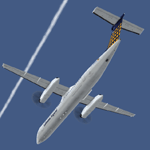
The Dash-8 Q400 by Majestic Software for FSX is a very complex model, and therefore continuous practice is normally needed to remain current on this aircraft. This EASY FLYING GUIDE is made for those who want to fly this wonderful model only occasionally, without studying the manuals before each flight. The EASY FLYING GUIDE leads you through your flight with the Majestic Software Dash-8 Q400, from the preparation of the FSX until engine shutdown at the parking position of the destination airport. It is a kind of checklist, amended by additional information (e.g. where the switches for each step are located in the cockpit and how to operate the essential FMS functions). Besides a PDF, there is also a DOC file which allows you to modify the guide for your own needs (but not for further distribution/publishing!). Updated version with slightly modified flow and extended description of FMS and engine functions, based on Pilot Edition V1.012
| Filename: | Majestic_Dash8_Q400_Easy_Flying_Guide__UPDATED_.zip |
| License: | Freeware |
| Added: | 8th July 2015, 13:34:43 |
| Downloads: | 2,749 |
| Author: | Rainer Pecksen |
| Size: | 209.36 KB |
| Category: Flight Simulator X - Aircraft Repaints, Textures and Modifications | |
| "Blue / White" Aero Commander Shrike (N5784R) |
|
Images related to this file:
File Description:
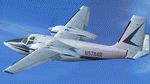
This is a new repaint for an old freeware Aero Commander Shrike - the work of the Milton Shupe Commander Team. I think Paul Sounders is listed as the developer, but several team members contributed lots and lots of hours. This was a native FS2004 model that someone ported over to FSX. The interior evidently did not get the same attention that the flight model and panel received. I asked Tom Tiedman, a fellow flight simmer, to update the interior for my personal taste and he did a great job in a matter of a few hours. You will notice the improvements when compared to the other texture files. You will need the FSX version of the Aero Commander Shrike that is not that easy to find but keep searching. The file I downloaded is ac500sv.zip (freeware). This is nothing fancy at all, just another repaint but a greatly improved interior. Thanks to TomT and I hope you enjoy the repaint.
| Filename: | Blue__White_Aero_Commander_Shrike_N5784R.zip |
| License: | Freeware |
| Added: | 11th November 2015, 19:24:09 |
| Downloads: | 519 |
| Author: | Ray Marshall |
| Size: | 11.53 MB |
| Category: Flight Simulator X - Utilities | |
| Boeing 737 Dispatch sheet v 4.9.5 |
|
Images related to this file:
File Description:
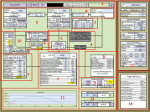
The 737 Dispatch sheet is a comprehensive dispatcher, fuel planner and performance calculator in Excel 2007 and above. It is designed to be used with the PMDG NGX and its ranges of engine and weight variants and other options such as Short Field Package and winglets. Calculations are based on many available optional user inputs such as selected Cost Index, weather information, altitudes en route, altitude steps, passenger load, luggage, and many other factors that impacts fuel usage and aircraft performance. The calculations include takeoff and landing weights as well as estimated flight time, cruise speeds and more. The build in airport and runway database helps you find all the information you would need to plan your flight including takeoff performance settings, engine derates, assumed temperatures, landing configuration, landing and takeoff speeds, and more. This updated version includes a unit change feature for baro settings similar to the distance and weight unit selectors as well as a few other corrections and additions.
| Filename: | Boeing_737_Dispatch_sheet_v_495.zip |
| License: | Freeware |
| Added: | 28th October 2013, 16:32:56 |
| Downloads: | 9,153 |
| Author: | Lasse Kronborg |
| Size: | 8.63 MB |
| Category: Flight Simulator X - Gauges | |
| V-One Gauge for B727-100/F 727-200/F with Call-Outs |
|
Images related to this file:
File Description:
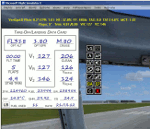
This gauge is written specifically for Captain Sim's B727-100/F and B727-200/F aircraft (http://www.captainsim.com/products/x727/). It will inform you of appropriate take-off speeds (V-speeds), take-off trim units, Vref landing speeds, elapsed flight time, fuel used, optimum cruise altitude, optimum ERP setting and Maximum Climb Thrust (MCT). It will also indicate when the aircraft's gross weight has been exceeded by displaying in red text. Take-off speeds are adjusted for altitude and temperature values. Flight time and fuel used can be reset at any time by clicking on their respective displays. Pounds (LB), Kilograms (KG), Celsius (C) and Fahrenheit (F) are toggled by a click on their displays. Provisions have been made to allow user adjustments to Optimum Altitude, Optimum EPR and Center of Gravity values. Seven F/O take-off call-outs are included: 80 knots, V1, VR, V2, Gear-up, Flaps-up and Slats Retract. A trim wheel sound is also included.
| Filename: | VOne_Gauge_for_B727100F_727200F_with_CallOuts.zip |
| License: | Freeware, limited distribution |
| Added: | 22nd July 2012, 08:07:50 |
| Downloads: | 2,605 |
| Author: | Paul Tally |
| Size: | 1.1 MB |
| Category: Flight Simulator X - Scenery | |
| Los Roques Archipelago and Airports |
|
Images related to this file:
File Description:
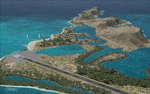
This project rebuilds Venezuela's Los Roques archipelago, adds the Gran Roque (SVRS) and Dos Mosquises (SVDM) airports, and includes AI flight plans, boat traffic, and a custom terrain mesh for Gran Roque. Accurate coastlines and lakes, as well as corrected landclass and waterclass are provided based on the latest available satellite imagery. Although current satellite imagery for this region only exists in relatively low resolution, an abundance of aerial photography was used to add custom features to Gran Roque and Dos Mosquises. Updates were created or rebuilt in a manner which carefully aligned airport data with current satellite imagery, when available. Scenery was created using Airport Design Editor X v1.50.4402, SBuilderX 3.13, and the FSX Object Placement Tool. Scenery objects were added and modified from stock FSX scenery to resemble as closely as possible the actual airports. Thank you to John Hinson and Tiago Besciak for granting permission to adapt their AI flight plans to realistically populate (SVRS) Gran Roque.
| Filename: | Los_Roques_Archipelago_and_Airports.zip |
| License: | Freeware |
| Added: | 27th July 2013, 02:34:10 |
| Downloads: | 1,398 |
| Author: | Carlyle Sharpe |
| Size: | 7.66 MB |
| Category: Flight Simulator X - Scenery | |
| "The fortress between the clouds" of Mount Chaberton coordinates N 44.57.52 E 6.45.05 |
|
File Description:
"The fortress between the clouds" of Mount Chaberton coordinates N 44.57.52 E 6.45.05. I wanted to realize this scenery in honor of the fallen of the 34th Artiglieri i Group and of the Italian Frontier who lost their lives during the 2nd World War. Within the package you will find a readme file where you explain how to install the scenery. The scenario is also compatible with P3d. Good flight.
| Filename: | The_fortress_between_the_clouds_of_Mount_Chaberton.zip |
| License: | Freeware |
| Added: | 10th September 2017, 19:32:35 |
| Downloads: | 250 |
| Author: | Pasquale Marrulli |
| Size: | 1.31 KB |
| Category: Flight Simulator X - Scenery | |
| Monte Chaberton coordinates N 44.57.52 E 6.45.05 "The fortress between the clouds" |
|
File Description:
"The fortress between the clouds" of Mount Chaberton coordinates N 44.57.52 E 6.45.05. I wanted to realize this scenery in honor of the fallen of the 34th Artiglieri i Group and of the Italian Frontier who lost their lives during the 1nd World War. Within the package you will find a readme file where you explain how to install the scenery. The scenario is also compatible with P3d. Good flight.
| Filename: | Monte_Chaberton_coordinates_N_445752_E_64505_The_f.zip |
| License: | Freeware |
| Added: | 11th September 2017, 06:37:17 |
| Downloads: | 128 |
| Author: | Pasquale Marrulli |
| Size: | 1.31 KB |
| Category: Flight Simulator X - Aircraft Repaints, Textures and Modifications | |
| TAM Linhas Aéreas "Rio" Logojet 2011 Airbus A320 PT-MZN |
|
File Description:
Repaint for the payware Flight Sim Labs/FSLabs A320-X IAE variant. PT-MZN was TAM's special livery in promoting the movie Rio in 2011. Aircraft depicted was painted on its early April 2011 colors, just after the movie came out on cinemas. A320-231 MSN 440, originally delivered for South African Airlines as ZS-SHG. Scrapped in 2012. Should be compatible with both FSX and Prepar3D versions.
| Filename: | TAM_Linhas_Areas_Rio_Logojet_2011_Airbus_A320_PTMZ.zip |
| License: | Freeware |
| Added: | 21st July 2019, 21:30:48 |
| Downloads: | 324 |
| Author: | Asher Pramono |
| Size: | 11.01 MB |
| Category: Flight Simulator X - Gauges | |
| Generic Stand-Alone HUD |
|
Images related to this file:
File Description:
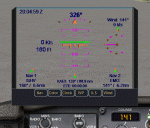
A generic stand-alone HUD, which can be used for any aircraft. Some of the displays can be toggled on or off, as desired, by clicking on the buttons at the base of the HUD. The Color button provides a choice of three colors to suit various terrain or weather backgrounds, and for night flight. Written in the old FS 9 xml. Not tested on FS 9, but should work.
| Filename: | Generic_StandAlone_HUD.zip |
| License: | Freeware |
| Added: | 20th August 2011, 19:58:43 |
| Downloads: | 1,224 |
| Author: | Robert Picht |
| Size: | 213.69 KB |


© 2001-2026 AVSIM Online
All Rights Reserved
Privacy Policy |