
Where Flight Simulation Enthusiasts Gather from Around the World!
AVSIM Library - Search Results

| Category: Flight Simulator 2004 - Panels | |
| Improved Default DC-3 Radio Panel |

|
File Description:
This is the default DC-3 radio panel with a couple of improvements. First I changed the ADF radios so that the frequency band between 420 and 490 is available, since there are NDB's in FS that are inside this band.
Second, I added fast tune hotspots for each radio. These spots are to the left and right of the tuning crank, in the position where the handle is when the crank is horizontal. Just wave the mouse around and you will find the spots. The fast tune hotspots change the frequency by tens. You can then fine tune in the usual way.
| Filename: | Improved_Default_DC3_Radio_Panel.zip |
| License: | Freeware, limited distribution |
| Added: | 3rd November 2006, 04:15:34 |
| Downloads: | 615 |
| Author: | Daniel Collins |
| Size: | 270.33 KB |
| Category: Flight Simulator 2004 - Panels | |
| FS Announcement Panel v2.2 |
|
Images related to this file:
File Description:
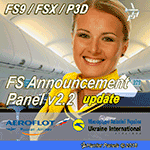
The program will update the FS Announcement Panel to version v2.2 with buttons by Robert L. Clark. The 'Push On' button is now without green illuminating like in version v2.0 yet no more problems with the button animation at night when panel lights are on in some addon aircraft. The update will only affect version v2.0 so version v2.1 Ñan still be used if you installed it previously. The panel will serve as a virtual cabin crew for your aircraft. IMPORTANT: FS Announcement Panel v2.0 is required and should be installed prior to installing the update
| Filename: | FS_Announcement_Panel_v22.zip |
| License: | Freeware, limited distribution |
| Added: | 29th October 2018, 21:22:19 |
| Downloads: | 137 |
| Author: | Gene Churumov |
| Size: | 551.27 KB |
| Category: Flight Simulator 2004 - Panels | |
| Citation X |
|
File Description:
All new panel for FS2004, new custom gauges and semi photo real panel make for great flying. The new gauges include the complete glare panel, radio controls on lower left side of panel, digital engine gauges EICAS display and complete pedestal panel. The panel I started last june at my parents house, and finally got to a point recently I was happy with it. There are some area's I want to work on, but this will do for now. I have tested the panel with bill alderson citation x using my flight model, and the citation x from chuck dome.
| Filename: | Citation_X.zip |
| License: | Freeware, limited distribution |
| Added: | 25th February 2004, 22:46:50 |
| Downloads: | 4,475 |
| Author: | David Durst |
| Size: | 2.45 MB |
| Category: Flight Simulator 2004 - Panels | |
| DC-3 Single IFR Panel Update |
|
File Description:
Official update of Mark Beaumont's single IFR panel only for the DC-3. Requires previous installation of DC3_PAN.ZIP and DC3_PAN2.ZIP but makes no changes to any of the twin panels. As additional pop-ups, adds an improved Electrical Panel with essential gauges, Bill Morad's ATC Control Panel, R.L. Clark's Radio CD player and Robert K. Guy's Airspeed/Groundspeed readout as part of the digital overlay. All simicons are now on a pop-up panel also, leaving the basic panel clear and uncluttered for flying. Optional PANEL.CFG files included for those who have previously installed Beaumont and Bitzer's three and four tank modifications.
| Filename: | DC3_Single_IFR_Panel_Update.zip |
| License: | Freeware |
| Added: | 29th January 2004, 15:59:59 |
| Downloads: | 4,750 |
| Author: | Mark Beaumont |
| Size: | 1.43 MB |
| Category: Flight Simulator 2004 - Panels | |
| Updated Aerostar 'Spirit of Kai Tak' |
|
File Description:
I have been asked to also upload the custom cockpit panel which I have designed (thanks to Harald Scheidl for the Yoke gauge, which
I have modified for the Aerostar Yoke). I designed the panel using
CFG Edit and there are some problems with it (mainly the selection of
altitudes and direction when using the autopilot), which is why I have
reverted to a standard Beech Baron setup for the FS2004 version of the
aircraft. If anyone can suggest fixes to me for these problems, I would
love to hear from them. In the meantime, you can use the panel as is.
| Filename: | Updated_Aerostar_Spirit_of_Kai_Tak.zip |
| License: | Freeware |
| Added: | 2nd January 2004, 02:23:06 |
| Downloads: | 1,018 |
| Author: | Mark Dickinson |
| Size: | 3.35 MB |
| Category: Flight Simulator 2004 - Panels | |
| Panel Merge for the 737 Experience Version 2.03 |
|
File Description:
This is the updated, full version 2.03 of my merge of Andy Karlstetter's 737NG panel and Moach's "737 Experience", which is also compatible to the 737s from Project Opensky.
Features include a full 2D panel with overhead and pedestal panels and an integrated TCAS and pushback panel.
The main aim of this panel 'though, is enhancing the virtual cockpit of POSKY's and Moach's 737 models with new gauges and functionalities, like pop-ups for the LCDs.
Also included are checklists and "virtual cockpit only" configuration files.
For more information, consult the Readme.
This panel is not compatible to FSX!
| Filename: | Panel_Merge_for_the_737_Experience_Version_203.zip |
| License: | Freeware |
| Added: | 25th February 2007, 01:08:07 |
| Downloads: | 6,100 |
| Author: | Andy Karlstetter, Björn Kesten |
| Size: | 5.65 MB |
| Category: Flight Simulator 2004 - Panels | |
| 2D photo-realistic panel for Robin HR200 / Alpha 2160 |
|
File Description:
Photo-realistic 2D panel for the French designed Robin HR200. This particular panel is based on a real world Alpha-2160 (ZK-WKF) built in Hamilton New Zealand for the Waikato Aero Club. You can find the aircraft model at avsim (filename: shr200.zip) and also my repaint of ZK-WKF (filename: zk-wkf.zip). I have tried to keep the panel as close as possible to the configuration of the original panel in the aircraft. I have also only used standard MSFS gauges plus the hr200.cab gauge which you should have installed already in your main FS /gauges/ folder when you added Mike Stone's Robin HR200 aircraft to your sim.
| Filename: | 2D_photorealistic_panel_for_Robin_HR200__Alpha_216.zip |
| License: | Freeware |
| Added: | 2nd January 2009, 11:22:42 |
| Downloads: | 656 |
| Author: | Dean Stringer |
| Size: | 635.66 KB |
| Category: Flight Simulator 2004 - Panels | |
| New Vickers VC10 panel, Part 3 "Overnight Maintenance" |
|
File Description:
Before you download this update make sure you have installed "new_vc10_panel_part_1.zip" and "new_vc10_panel_part_2.zip" first.
This update concentrates mostly on two areas. The Engine Fire System and cabin temperature. The Engine Fire System has been extensively modified and is fully operational. It is as realistic as possible allowing you to do both practice fire drills and "real" fire drills. If you encounter a multiple engine fire it will require consumate piloting skill, even on the VC10!! To help you I have redone the speed reference placard.
In the previous release the cabin temperature control was not functioning correctly. Now it is.
| Filename: | New_Vickers_VC10_panel_Part_3_Overnight_Maintenanc.zip |
| License: | Freeware |
| Added: | 27th September 2011, 17:18:01 |
| Downloads: | 1,665 |
| Author: | Nicholas Weber |
| Size: | 2.67 MB |
| Category: Flight Simulator 2004 - Panels | |
| Version 3.0 Mini Panels |
|
Images related to this file:
File Description:
FS2004 Version 3.0 Mini Panel system has been updated with new primary flight gauges and additional pop-up windows that provide optimal data presentation and versatility plus add to the functional capability. Also the primary flight instruments have been placed on the panel to provide maximum visibility. This version includes panels for Glass Cockpit, Analog, and a Combo option based on aircraft type. The three types are Glass Panel, Analog Panel, and Combo Panel. The Combo panel includes both Analog and Glass panels depending on the type of aircraft type (e.g. Jet, Turboprop, Prop, Helicopter) you select to fly. You do not need any earlier version.
| Filename: | Version_30_Mini_Panels.zip |
| License: | Freeware |
| Added: | 22nd October 2011, 06:05:52 |
| Downloads: | 298 |
| Author: | Bill McClellan |
| Size: | 7.91 MB |
| Category: Flight Simulator 2004 - Panels | |
| Airbus A320 Detailed Overhead Panel |
|
Images related to this file:
File Description:
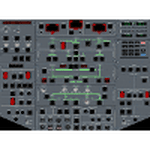
This is a set of gauges for twin-enigne jets, especially Airbus, containing:
- overhead panel with realistic procedures and almost all switches working
- lower EICAS with 10 working screens (F/CTL, FUEL, HYD, DOOR, APU, BLEED, COND, ELEC, WHEEL, EN-GINE, STATUS)
- EICAS switch
- Multiradio gauge (all radio functions in one place)
- optional Multiswitch gauge (flaps, spoilers, gear, autobrake indicators and switches)
It should work with any free or default twin-engine jet aircraft, however it was tested with Airbus models from iFDG and Project OpenSky. It should work on FS2004 and FSX.
Requirements: VasFMC 2.09 or newer in GAUGE version - it provides PFD, ND, upper EICAS, FMC, MCDU.
| Filename: | Airbus_A320_Detailed_Overhead_Panel.zip |
| License: | Freeware |
| Added: | 26th July 2013, 07:13:30 |
| Downloads: | 3,162 |
| Author: | Slawomir Wawak |
| Size: | 12.3 MB |


© 2001-2026 AVSIM Online
All Rights Reserved
Privacy Policy |