
Where Flight Simulation Enthusiasts Gather from Around the World!
AVSIM Library - Search Results

| Category: Flight Simulator 2004 - Gauges | |
| Light Aircraft Autopilot |

|
File Description:
This gauge has been designed to fit into those tight spaces and provide basic functions for flying light aircraft. The autopilot can keep the wings level and hold a chosen vertical speed in feet.
I have included an example panel.cfg for Rick Piper's Aeroprakt A-22 Foxbat with the fantastic Apollo SL40 Comm radio, GX50 GPS and SL70 Transponder radio stack gauges by Gerd R. Nehr. The panel.cfg also uses a gauge called 'dsd_view_skip' by Douglas S. Dawson to remove the 2D view. This gauge is not included.
| Filename: | Light_Aircraft_Autopilot.zip |
| License: | Freeware |
| Added: | 9th September 2007, 15:17:41 |
| Downloads: | 1,791 |
| Author: | Matt Hinchliffe |
| Size: | 431.49 KB |
| Category: Flight Simulator 2004 - Gauges | |
| Bendix King KAP-140 Autopilot |
|
File Description:
AlliedSignal Two Axis/Altitude Preselect System for FS2004 and FSX, in replacement of the default autopilot proposed for light aircrafts (Cessna, Baron, ... ) . See Readme.txt for further info.
| Filename: | Bendix_King_KAP140_Autopilot.zip |
| License: | Freeware |
| Added: | 31st October 2008, 18:27:06 |
| Downloads: | 2,047 |
| Author: | Pierre Fasseaux |
| Size: | 205.52 KB |
| Category: Flight Simulator 2004 - Gauges | |
| XML Sound Gauge - v3.7 |
|
File Description:
This represents what should be the last version of dsd_xml_sound for FS9. It includes dynamic volume control and will follow FS's own sound status. It should work in FSX, although some features which FSX does not support will be absent. Please note that this gauge presumes a fair degree of XML programming knowlege. It is not for beginners.
| Filename: | XML_Sound_Gauge__v37.zip |
| License: | Freeware |
| Added: | 26th December 2006, 23:03:20 |
| Downloads: | 4,886 |
| Author: | Doug Dawson |
| Size: | 67.78 KB |
| Category: Flight Simulator 2004 - Gauges | |
| Shadin MiniFlo-L |
|
Images related to this file:
File Description:
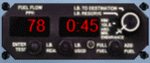
Fuel Flow indicator (PPH or GPH) FSX and FS 2004 stand alone XML gauge for single engine aircraft.
| Filename: | Shadin_MiniFloL.zip |
| License: | Freeware |
| Added: | 7th May 2011, 20:45:21 |
| Downloads: | 321 |
| Author: | Pierre Fasseaux |
| Size: | 232.75 KB |
| Category: Flight Simulator 2004 - Gauges | |
| Autoland gauge v2.1 |
|
File Description:
FS2004 Autoland gauge Version 2.1. Provides full hands-off autoland capability for all airliners. Simple installation. By Martyn Becker, adapted and amended from original XML programming by Nick Pike. File size - 198kB
| Filename: | Autoland_gauge_v21.zip |
| License: | Freeware |
| Added: | 19th April 2008, 13:36:39 |
| Downloads: | 6,654 |
| Author: | Martyn Becker |
| Size: | 197.56 KB |
| Category: Flight Simulator 2004 - Gauges | |
| Bendix King Audio Selectors |
|
File Description:
For FS2004 and FSX including KMA- 24H, KMA-28 and KA134 models and a KA-40 Marker Beacon Indicator. Just to give the choice for the replacement of similar appliances proposed in several default (Cessna, Baron, ... ) or third party panels - without any useless sophistication.
| Filename: | Bendix_King_Audio_Selectors.zip |
| License: | Freeware |
| Added: | 13th March 2009, 11:58:16 |
| Downloads: | 606 |
| Author: | Pierre Fasseaux |
| Size: | 243.53 KB |
| Category: Flight Simulator 2004 - Gauges | |
| Pushback/Tow/Taxi Gauge Version 1.2 |
|
File Description:
This is version 1.2 of my groundhandling gauge that now supports the ability to tow the aircraft in addition to the pushback and taxi features. This update adds keyboard support for the control of all groundhandling features to support hardware cockpits, and some minor sound and cosmetic changes. Use this version over version 1.1. The hot key popup feature allows this gauge to be used in VC and external views. Enjoy!
| Filename: | PushbackTowTaxi__Gauge_Version_12.zip |
| License: | Freeware, limited distribution |
| Added: | 25th September 2004, 05:54:27 |
| Downloads: | 5,914 |
| Author: | Etienne Martin |
| Size: | 739.15 KB |
| Category: Flight Simulator 2004 - Gauges | |
| PalmAP |
|
File Description:
This autopilot gauge has been designed to pop-up and provide basic functions for flying light or vintage aircraft. The autopilot can keep the wings level and hold a chosen vertical speed in feet. It has been designed to compliment a Palm EFIS or Palm GPS to add electronic goodness to a basic cockpit. Useful also for users with sensitive controls, aircraft with heavy trim controls or toilet breaks. You may not distribute this gauge without my permission in writing.
| Filename: | PalmAP.zip |
| License: | Freeware, limited distribution |
| Added: | 3rd February 2008, 01:52:29 |
| Downloads: | 1,319 |
| Author: | Matt Hinchliffe - fs2004.co.uk |
| Size: | 63.25 KB |
| Category: Flight Simulator 2004 - Gauges | |
| Dash-8-300 DME |
|
File Description:
Note that this add-on only applies for the Phoenix Simulation Software
Dash-8 Q300 panel. For installation and detailed usage read the included
PDF document.
| Filename: | Dash8300_DME.zip |
| License: | Freeware, limited distribution |
| Added: | 21st May 2006, 12:09:03 |
| Downloads: | 724 |
| Author: | Jan Harry Sorensen |
| Size: | 453.22 KB |
| Category: Flight Simulator 2004 - Gauges | |
| Mouse Control Gauge |
|
File Description:
FS 2004 Mouse Control Gauge.
A simpel gauge to enable mouse controlled
movements of the primary control surfaces
(Elevators and Ailerons) in case no
joystick or game controller is connected
to the PC. suitable for all FS9 aircrafts.
Made by Herbert Pralle
| Filename: | Mouse_Control_Gauge.zip |
| License: | Freeware, limited distribution |
| Added: | 14th June 2007, 13:56:16 |
| Downloads: | 880 |
| Author: | Herbert Pralle |
| Size: | 234.1 KB |


© 2001-2026 AVSIM Online
All Rights Reserved
Privacy Policy |