
Where Flight Simulation Enthusiasts Gather from Around the World!
AVSIM Library - Search Results

| Category: Flight Simulator 2004 - Sounds | |
| Radar Contact - Update to Voices 94 with UK Airports |

|
File Description:
These files update the latest set of pilot Luigi Sangiovanni 94 with the additional UK airports and voices found in RC4_UKairports.ZIP and UK_Airports_and_callsigns_2.zip.
| Filename: | Radar_Contact__Update_to_Voices_94_with_UK_Airport.zip |
| License: | Freeware |
| Added: | 19th February 2006, 16:44:42 |
| Downloads: | 874 |
| Author: | Graham K Jackson |
| Size: | 118.46 KB |
| Category: Flight Simulator 2004 - Sounds | |
| Radar Contact - Voices 21, 22 and 62 Update 2 |
|
File Description:
These files have been processed to make them more radio-like and match the original main file sets uploaded by John Dekker to AVSIM. Thanks to Ray Proudfoot for all his work in 'tweaking' all the RC voice sets. Unfortunately the update files included in my earlier file UK_Airports_and_callsigns_2.zip did not contain the radiolike effect - these will now match the tone of the remaining wavs.
| Filename: | Radar_Contact__Voices_21_22_and_62_Update_2.zip |
| License: | Freeware |
| Added: | 18th February 2006, 01:08:50 |
| Downloads: | 965 |
| Author: | Graham K Jackson |
| Size: | 441.99 KB |
| Category: Flight Simulator 2004 - Original Aircraft | |
| Sukhoi Su-11 'Fishpot-C' |
|
File Description:
The Sukhoi Su-11 was a development of the Su-9 'Fishpot-B' having a new engine, radar
(‘Skip Spin’) and a revised missile armament. It differed also by having only two underwing pylons,
an enlarged 'blown' cylindrical nose section, an enlarged radar cone, and radio-transparent panels
in the fuselage sides to accommodate an extended radar search angle.
The Su-11 served in the Moscow PVO district with the 790th IAP (at Khotilovo) and the
191th IAP (at Efremov). In July 1967, 30 Su-11’s of 790th IAP performed a fly-by at the Domodedovo
Airshow, led by IAP commander I.S.Kuzkin.
Upgraded versions of the Su-11 served well into the 1980s with the Soviet AF, when
it was then replaced in the interceptor role by the MiG-23P, the MiG-23ML and the MiG-25PD.
Aircraft model, textures & flight model by Brett Hoskins. Su-27 Panel by Johan Peeters,-Erik "aeyes" & -Mark "Ozzy" Osbourne. Sounds by Aaron R. Swindle
| Filename: | Sukhoi_Su11_FishpotC.zip |
| License: | Freeware |
| Added: | 13th October 2004, 04:36:11 |
| Downloads: | 5,845 |
| Author: | Brett Hoskins |
| Size: | 9.12 MB |
| Category: Flight Simulator 2004 - Scenery Design | |
| Military Harbor Master and Searchlight Towers |
|
File Description:
FS2004/FS2002 API macro--Harbormaster Tower and a Firebase Searchlight Tower for use in
military scenery by scenery designers. The harbormaster tower is as it was at Chu Lai,
Vietnam during the war and has a bridge on the back to connect with a radar tower which
is not included with this API. Most design programs have an operating radar tower that
you may want to use with this tower. Also in this file is a similar tower without the bridge but with a powerful searchlight beam that is visible at night and is about 1.5 miles long.
| Filename: | Military_Harbor_Master_and_Searchlight_Towers.zip |
| License: | Freeware |
| Added: | 21st May 2006, 23:26:51 |
| Downloads: | 443 |
| Author: | Albert E Simms Jr |
| Size: | 173.65 KB |
| Category: Flight Simulator 2004 - Original Aircraft | |
| SAAB 35 Draken 3.0 |
|
Images related to this file:
File Description:
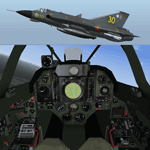
FS2004 Saab 35 Draken 3.0 complete package.
Advanced hydraulic/electrical/navigation/weapons systems simulation, tactical radar, animated drop tanks, drag chute, afterburner, visual fx, authentic sounds and fully functional Virtual Cockpit.
Loadout configuration panel for easy selection of three different Sidewinder models, SAR and IR Falcons, air-air and air-ground rockets.
Includes 80-page illustrated manual and check lists.
J 35J, 35OE and 35FS exterior models are included in this version.
By Thomas Nilsson/Bookmark Digital Graphics.
Config and sound gauges by Doug Dawson, Traffic Radar by Arne Bartels.
| Filename: | SAAB_35_Draken_30.zip |
| License: | Freeware, limited distribution |
| Added: | 26th September 2006, 15:22:07 |
| Downloads: | 8,029 |
| Author: | Thomas Nilsson/Bookmark Digital Graphics |
| Size: | 12.66 MB |
| Category: Flight Simulator 2004 - Miscellaneous Files | |
| EgyptAir Boeing 777 Approach - Heathrow RWY 09L |
|
File Description:
This is a previously released Egypt Air approach, now updated for FS2004. Features real ATC recorded in the cockpit flying into this extremely busy international airport. Expect radar vectors for RWY 09L. ABL Format: FS2004 - A Century of Flight ONLY
| Filename: | EgyptAir_Boeing_777_Approach__Heathrow_RWY_09L.zip |
| License: | Freeware |
| Added: | 15th February 2005, 13:08:18 |
| Downloads: | 1,919 |
| Author: | Fermin Fernandez |
| Size: | 2.67 MB |
| Category: Flight Simulator 2004 - Miscellaneous Files | |
| DHC-2 Beaver Smoke With Control Gauge |
|
File Description:
This xml gauge and effect package automatically controls the light smoke effect in the DHC-2 Beaver by simply accelerating the throttle. The DHC-2 Beaver will automatically emit a very light smoke effect at a Manifold Pressure reading of 32(+) or greater, depicting a hard running engine. Reducing the throttle level for cruising (MP30-32) or less for descents deactivates the smoke effect.
Even though this xml gauge and effect file works perfectly well by itself, when used in conjunction with my dhc2_fx.zip, all the bases are covered. Smoke automatically engages for cold air temps and with this xml gauge, smoke engages as a result of high manifold pressure (eg. when taking off or climbing). The two work together very nicely without any conflict.
Designed for the FS2004 DHC-2 wheeled Beaver by Steven Grant, Fred Choate, and Aaron Swindle. In the AVSIM library-- dhc2_04w.zip --
Also works with the DHC-2 De Havilland Beaver Amphibian v2 that was made for FS2002, but works equally well in FS2004. In the AVSIM library-- dhc2ampv2.zip --
The README file includes complete instructions.
| Filename: | DHC2_Beaver_Smoke_With_Control_Gauge.zip |
| License: | Freeware |
| Added: | 7th October 2003, 16:34:19 |
| Downloads: | 1,767 |
| Author: | Brent Hricziscse |
| Size: | 5.31 KB |
| Category: Flight Simulator 2004 - Panels | |
| Boeing 777 2D/VC Gauge Merge! FIX! |
|
File Description:
This is a fix for the 2D/VC Gauge Merge (2d_and_vc_gauges_merge.zip). FS9 Crashed while loading the aircraft. This fix will show up an oportunity how to fly the Posky 777 with the gauges by Wilco.
| Filename: | Boeing_777_2DVC_Gauge_Merge__FIX.zip |
| License: | Freeware |
| Added: | 1st November 2008, 11:06:16 |
| Downloads: | 4,380 |
| Author: | Ensar Budak/ Posky (Project Opensky)/Wilco |
| Size: | 1.44 MB |
| Category: Flight Simulator 2004 - Miscellaneous Files | |
| Nick's AI Jet Exhaust With Control Gauge |
|
File Description:
Hanging around the airport watching the A-I traffic and chasing A-I jet aircraft just got a little more interesting. Enjoy watching your entire A-I jet fleet as they display engine heat shimmer effects -after- push-back from the terminal and during taxi to the active runway. All the A-I traffic take off displaying a lite, expanding, frame-rate friendly and nicely scaled high throttle heat/exhaust trail FX which remain with the A-I aircraft during its entire flight. To top off the show, the A-I aircraft that are throttled down and landing display no exhaust from the engines! This package also comes with a gauge that allows pilot throttle control of the taxi heat shimmer/full-throttle exhaust FX for the jet aircraft being flown in the sim by the user. This package does NOT interfere with the logo, taxi or wing lights of any aircraft and comes with 5 all new exhaust effects files which can be applied to just about any size private, commercial or military jet. It requires editing/adding lines in the aircraft.cfg and panel.cfg files. The README files include very complete and comprehensive instructions including a quick and easy copy/paste file for all the Microsoft jet aircraft and tutorial on making custom gauges from the one provided. This package completely replaces my original *Nick's Jet Smoke* package and any/all updates for it.
By Nick Needham
| Filename: | Nicks_AI_Jet_Exhaust_With_Control_Gauge.zip |
| License: | Freeware, limited distribution |
| Added: | 22nd December 2003, 21:16:01 |
| Downloads: | 29,958 |
| Author: | Nick Needham |
| Size: | 894.61 KB |
| Category: Flight Simulator 2004 - Utilities | |
| VisualCab |
|
File Description:
VisualCab simply provides a GUI frontend for Microsofts Cabdir utility, it was designed to save XML gauge designers re-typing parameters in the command prompt for every cab file they create.
| Filename: | VisualCab.zip |
| License: | Freeware, limited distribution |
| Added: | 17th April 2004, 07:27:34 |
| Downloads: | 724 |
| Author: | Michael Corcoran |
| Size: | 261 KB |


© 2001-2026 AVSIM Online
All Rights Reserved
Privacy Policy |