
Where Flight Simulation Enthusiasts Gather from Around the World!
AVSIM Library - Search Results

| Category: Flight Simulator 2004 - Scenery | |
| Airstrips of Austria |

|
Images related to this file:
File Description:

Probably the last of my Airstrips of Western Europe project, herewith 30+ sceneries for smaller airfields in Austria, a particularly scenic area of Europe, many of which are not included in FS2004, each enhanced with taxiways, parking spaces, buildings etc. and aprons as appropriate, to further facilitate the generation of lightweight AI traffic in the area, without overloading the more major airfields.
Again, there's no photo-realism here, just a selection of basic 'generic' buildings, more or less accurately sized and placed to reflect the airfield layout as seen on on-line satellite imagery and aerial photography. These buildings have minimal effect on frame-rates, so are ideal for this kind of job. The airfields are aligned as well as possible with the roads etc. in UT Europe and the Genesis Europe mesh, but should mostly be fine in a default installation or other configuration.
As before, the files for each airfield can be easily identified by the ICAO code, even if the airfield names vary slightly, so you can pick and choose and mix and match to suit any sceneries you already have, should you so wish. There is no requirement for any other download. Each airfield will exist as a stand-alone entity should you only want a few of them.
Very few basic library objects are used ... you can add "eye-candy" to suit your own taste should you wish, or just leave them as vague shapes in the scenery that can put a few more small aircraft into the air. As with other airfields in this series, now these are "ai-activated" you might expect to see the occasional little aircraft turn up at some of them if you've got any third-party traffic installed.
| Filename: | Airstrips_of_Austria.zip |
| License: | Freeware |
| Added: | 26th April 2025, 13:59:32 |
| Downloads: | 85 |
| Author: | Chris Eve |
| Size: | 1.04 MB |
| Category: Flight Simulator 2004 - Aircraft Repaints, Textures and Modifications | |
| W91 Smith Mountain Lake Airport in Virginia |
|
File Description:
W91 Smith Mountain Lake Airport near Lynchburg, Virginia (MY soon to be NEW HOME)
This project is nearly ALL RWY12 ... I did use the Lago Scenery enhancer for the
trees.. so if you have LAgo.. the .SE2 is included, but you really don't need it.
But you will need RWY12 with all the latest additions... all freeware and all
available here at avsim.
Instructions... best to unzip to a temp directory... then do the following..
if you use Lago's Scenery Enhancer... place the .SE2 file in (Your flightsim main
folder)\LAGO\FSE\Data. Unziping will create a folder titled "Smith Mountain Lake" .. in that folder is one titled "scenery" Simply place Smith Mountain Lake in (your flightsim main folder)\Addon scenery\ folder then start the simulator.. go to settings, the library.. and - well most all know the drill .... add the folder Spring Mountain Lake then exit.. and restart.. and blamo... it is there... (Hopefully- LOL) ALSO in the scenery folder are two exclude .bgl.. this got rid of the default buildings and an AFCAD .bgl... this modified the airport properity a bit.. just leave all the .bgls where they are in the scenery folder.. all should work well.
oh.. for those who use RWY12 for scenery making... I have included the .XML file.. so you are welcome to add..subtract or change anything you find at Smith Mountain Lake.
if you have any questions or comments.. PLEASE do drop me a line.
Oh.. since I have your attention... a question for YOU... whether you download this
scenery or not.... How in the world does one get rid of that idiot "Flying Tips"
translucant window that appears.. telling you among other things .. your engines are not started... hit control E ... you ever notice how it ONLY appears when you have set up a screen shot and are ready to shoot?????? Write me and PLEASE tell me how to get rid of it.. I remember reading how somewhere, but for the life of me ..can't remember where.
| Filename: | W91_Smith_Mountain_Lake_Airport_in_Virginia.zip |
| License: | Freeware |
| Added: | 18th March 2005, 22:37:05 |
| Downloads: | 330 |
| Author: | Dale Caruso |
| Size: | 563.31 KB |
| Category: Flight Simulator 2004 - Scenery | |
| EPGO Goraszka 2010 - The Airshow Challenge |
|
Images related to this file:
File Description:
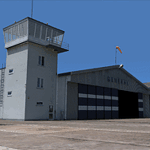
EPGO Goraszka 2010 - The Airshow Challenge is a freeware, extremely detailed scenery of a general aviation airport located 12nm (20km) south-east of Warsaw downtown and Warsaw Frederic Chopin International Airport, Poland. EPGO Goraszka airfield was built in 1994 and currently belongs to a General Aviation company, which offers aero-taxi flights, air transport and special flights (air photo, patrol) and airport services. The airport has a 800m-long runway and a lightened helipad, which can be used by helicopters of up to 5700kg weight. General Aviation's fleet includes Antonov AN-2, PZL-104 Wilga 80, Bell 407 and 427. Since 1996 the International Air Picnic Goraszka is organized every year by the "Polish Eagles" foundation created on initiative of Zbigniew Niemczycki.
The scenery is equipped with an automatic installer. Currently we support a safe, manual way of adding new sceneries to the Scenery Library in Flight Simulator. This is just one thing users need to do for themselves. Detailed instructions will be given during the installation process.
Scenery features:
-Compatible with FS2004 only
-Highest level of accuracy in geographic positioning, modeling and texturing
-Incredibly high quality photoreal textures of all airport buildings. Textures are based on over 300 real world -photographs made for this project.
-Hundreds of 3D objects like tents, exhibitions, airport buildings and surrounding buildings
-Life in the airport: people and cars will enhance your feelings
-AI traffic, animations and effects, designed specifically for FS2004
-Some buildings include interior (control tower)
-High quality aerial photos of the airport surroundings (5 seasons + night) with autogen and water mask
-Ultra high quality aerial photos of the airport (with seasons)
-Plain airport scenery with no airshow objects available too (details in the manual)
-Product includes manual and airport charts in PDF format
EPGO Goraszka 2010 - The Airshow Challenge scenery is compatible with almost every payware add-on, including Ultimate Terrain Eastern Europe and Warsaw Photo Scenery by Simdesign.
Scenery by Drzewiecki Design - www.drzewiecki-design.net
| Filename: | EPGO_Goraszka_2010__The_Airshow_Challenge.zip |
| License: | Freeware |
| Added: | 14th July 2010, 09:49:07 |
| Downloads: | 3,754 |
| Author: | Drzewiecki Design - Stanislaw Drzewiecki, Jakub Paczek |
| Size: | 132.03 MB |
| Category: Flight Simulator 2004 - Scenery | |
| Lake Athabasca Airfields in Alberta & Saskatchewan Canada |
|
Images related to this file:
File Description:
These are four airfields around or near Lake Athabasca, in Alberta and Saskatchewan. Fort Chipewyan CYPY is at the southwestern end of the lake and the direct recipient of pollution that flows north from the Tar Sands to the south. The population of around 850 lives in one of the earliest European settlements in Alberta, founded as a trading post by Peter Pond of the Northwest Company in 1788 and named for the Chipewyan people who lived in the area. The airfield has one runway aligned 03-21 and 5,000 feet of asphalt, with PAPI at both ends. The landclass has been modified along with the grassed area of the airfield to create the village on the lakeshore. There are scheduled flights and GA flights in the AI for all four airfields. Charlot River CJP9 is on the northern shore at the western end of the lake, in Saskatchewan. It serves a nearby hydroelectric project and is used to transport technical staff in and out. There is no terminal building, only waiting pickup trucks and a generator building. There is one lit gravel runway aligned 04-22 and just over 3,200 feet long. Fond-du-Lac CZFD is on the northern shore in Saskatchewan, at the narrower eastern end. The population is around 900 and is a remotely situated "fly-in" village that has existed for over 150 years where "living off the land" is an accepted and normal way of life. The village has been created along with the airfield. The single runway is 3,800 feet of lit gravel aligned 10-28 with PAPI at the western end. Stony Rapids CYSF is east of the end of Lake Athabasca, on the Fond du Lac River. It has a population of around 250 and is only semi-connected to the rest of Canada by a rough gravel road. The runway is over 5,000 feet of gravel, aligned 06-24 with PAPI at both ends. The NorthSKlake is a flatten for an Ultimate Terrain lake that was at an incorrect elevation.
| Filename: | Lake_Athabasca_Airfields_in_Alberta__Saskatchewan_.zip |
| License: | Freeware, limited distribution |
| Added: | 7th August 2018, 12:39:52 |
| Downloads: | 178 |
| Author: | Roger Wensley |
| Size: | 20.36 MB |
| Category: Flight Simulator 2004 - Scenery | |
| Airstrips of North-East Germany |
|
Images related to this file:
File Description:
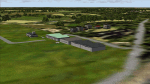
Moving towards completing my Airstrips of Western Europe project, herewith 50+ sceneries for smaller airfields in NE Germany, that I haven't included in my previous uploads, each enhanced with taxiways, parking spaces, buildings etc. and aprons as appropriate, to further facilitate the generation of lightweight AI traffic in the area, without overloading the more major airfields. If you have my "German Airstrips" folder from my previous uploads, these are in addition to that and the folders can be merged. Any apparent duplicates will be (minor) updates and can be over-written.
Again, there's no photo-realism here, just a selection of basic 'generic' buildings, more or less accurately sized and placed to reflect the airfield layout as seen on on-line satellite imagery and aerial photography. These buildings have minimal effect on frame-rates, so are ideal for this kind of job. The airfields are aligned as well as possible with the roads etc. in UT Europe and the Genesis Europe mesh, but should mostly be fine in a default installation or other configuration.
As before, the files for each airfield can be easily identified by the ICAO code, even if the airfield names vary slightly, so you can pick and choose and mix and match to suit any sceneries you already have, should you so wish. There is no requirement for any other download. Each airfield will exist as a stand-alone entity should you only want a few of them.
Very few basic library objects are used ... you can add "eye-candy" to suit your own taste should you wish, or just leave them as vague shapes in the scenery that can put a few more small aircraft into the air. As with other airfields in this series, now these are "ai-activated" you can expect to see the occasional little aircraft turn up at some of them if you've got any third-party traffic installed.
Please read the rest of this "blurb" in the enclosed text file ... there may be some details of interest.
| Filename: | Airstrips_of_NorthEast_Germany.zip |
| License: | Freeware |
| Added: | 14th April 2025, 19:55:20 |
| Downloads: | 79 |
| Author: | Chris Eve |
| Size: | 2.11 MB |
| Category: Flight Simulator 2004 - Original Aircraft | |
| Caproni-Vizzola C-22J Ventura |
|
Images related to this file:
File Description:
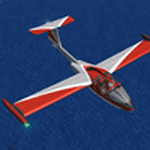
The Machine:
A fully aerobatic, very-light Jet that compares to the Bede BD-5J, but heavier and sporting two instead of one TRS-18 turbojets. Up to Mach 0.47 and 650 NM of range, with a service ceiling of 25000ft. A low stall speed (for a jet) makes the aircraft good for short field operations.
Certified for VFR operations only, yet includes a good avionics suite.
This is a "Classic" aircraft featuring "Steam" gauges and radios. Yet, controls and systems are easy to operate.
The History:
The C-22J is the last aircraft to be adorned with the legendary Caproni name. Originally known as "Caproncino", then marketed as "Ventura". A very-light jet developed in the 1980s as a military trainer, surveillance and reconnaissance aircraft. Powered by two TRS-18 turbojets fed from a dorsal NACA intake, the aircraft reached Mach 0.47 and was fully aerobatic. The airframe shows its origin in a glider design, the Caproni A-21 Calif. After the merger with SIAI Marchetti, the project was cancelled in favor of the SF-260.
The Simulation - 3D Model:
This aircraft ships with a 3-D cockpit, that incorporates realistic night lighting, in the form of a dim dome flood light, backlit gauges and luminous digital displays. The flight crew of 2 is affected by your input in the payloads menu of Flight Simulator, allowing to choose between male, female or empty seats. The Copilot Figure can be hidden with a quick click in the internal 3D view as well.
The Simulation - Realism:
This aircraft has been tuned with the invaluable help of Engineer Carlo Ferrarin, who created the real aircraft. Unique and one-off documentation has been kindly provided, and used extensively, for the creation of this product!
Just like the real aircraft, the systems are simple and of easy operation. Engines can be started with the press of a button. Systems modelling allows the following of real-world checklists as closely as Flight Simulator allows. An in-sim checklist is included, as well as a full flight manual.
The flight model is tuned with advanced aerospace techniques, resulting in a highly realistic aircraft, yet, it is very pleasant to fly, both during aerobatic displays or "A to B" cruising.
Highlights:
- High-Resolution 3D cockpit
- Full Documentation
- Aerobatic
FS-2004 Version comes with limited support and is free due to platform limitations. See Readme. FS-X & P3Dv4 (64-bit) versions are commercial products.
| Filename: | CaproniVizzola_C22J_Ventura.zip |
| License: | Freeware, limited distribution |
| Added: | 7th November 2020, 18:31:45 |
| Downloads: | 677 |
| Author: | Mario Noriega |
| Size: | 157.85 MB |
| Category: Flight Simulator 2004 - Utilities | |
| F1 View Module |
|
File Description:
The F1_View module is a very basic tool that implements mouse-based zooming, panning, and eyepoint adjustments, including the ability to move your eyepoint beyond the limits imposed by Flight Simulator (this feature is good to stroll about virtual cabins of larger aircraft).
This module requires a wheel-mouse (a center wheel that also acts as a center mouse button).
/QUOTE
This application is provided for free by Flight1 and can even be placed on your own website for download providing you follow the guide lines set down in the agreement.
For those who are interested, you can find it HERE http://atr.flight1.net/ , look under:
Quick Links to our ATR Project Areas...
• Accessory Downloads
which can be found about half way down the page you are initially viewing.
and a bit more info from the readme:
Modes of Operation:
Rolling the mouse wheel forward means rolling the wheel away from the user.
Rolling the mouse wheel backward means rolling the wheel towards the user.
Virtual-cockpit:
Wheel forward moves you forward and wheel backward moves you back.
CTRL+forward moves right and CTRL+backward moves left.
SHIFT+forward moves up and SHIFT+backward moves down.
CTRL+SHIFT+forward zooms out and CTRL+SHIFT+backward zooms in.
While in Pan Mode (when mouse wheel is pressed and held down) inside the Virtual Cockpit:
Moving the mouse to the left rotates the view to the left.
Moving the mouse to the right rotates the view to the right.
Moving the mouse forward, away from the user, rotates the view up.
Moving the mouse backward, towards the user, rotates the view down.
Cockpit view:
CTRL+SHIFT+forward zooms the exterior view out and CTRL+SHIFT+backward zooms it in.
Tower view:
CTRL+SHIFT+forward zooms the view out and CTRL+SHIFT+backward zooms it in.
Spot view:
Wheel forward moves the view distance forward, and wheel backward moves the distance back.
CTRL+forward rotates the eyepoint right, and CTRL+backward rotates the eyepoint left.
SHIFT+forward moves the eyepoint down, and SHIFT+backward moves the eyepoint up.
CTRL+SHIFT+forward zooms out and CTRL+SHIFT+backward zooms in.
Note: View distance is different from view zoom.
While in Pan Mode (when mouse wheel is pressed and held down) in spot view:
Mouse left/right rotates the eyepoint right/left.
Mouse up/down moves the eyepoint up/down.
Top-down view:
CTRL+SHIFT+forward moves the view distance out and CTRL+SHIFT+backward moves it in.
Note: In this mode you can move your view all the way to outer space and back in.
| Filename: | F1_View_Module.zip |
| License: | Freeware |
| Added: | 8th May 2005, 04:27:45 |
| Downloads: | 15,464 |
| Author: | Flight1 |
| Size: | 725.3 KB |
| Category: Flight Simulator 2004 - Scenery | |
| Chennai airport for fs9/Fs2004 |
|
File Description:
Hi everyone
This is my first project, and it took 6 months to complete. This is a freeware airport, but I have tried to put in as much detail as I possibly can. I made this airport because FS9 did not have very many good-quality payware or freeware airports, so I decided to make an airport for my home country. Some general info for the airport is below:
Chennai International Airport (MAA), located in Meenambakkam, is the primary airport serving Chennai, Tamil Nadu, and the southern part of India. It has two terminals: Terminal 1 for domestic flights and Terminal 2 for international flights. The airport is known for its modern infrastructure and facilities, including shopping areas, lounges, dining options, and passenger services. It is an important hub for domestic and international travel, especially for travelers heading to South Asia, Southeast Asia, and the Middle East. The airport also has strong connectivity via road and metro.
Features of the scenery:
1)Has the latest terminal and airport layout since I used the latest data
2)added buildings to the surroundings (Custom 3d model made from scratch even the terminals)
3)has partial photoreal scenery(will talk about issues in bugs area)
4)has good jetbridges
5)3d volumetric grass in certain parts(will talk about issues in bugs area)
6)taxiways designed as in real life
7)Includes parked cars, lights, nearby buildings
8)Added lots of ground equipment
9)Trees around the airport
10)airport perimeter walls
11)Used Lh simulations library for some buildings and volumetric grass
Known bugs:
1)photoreal scenery has some issues since I can't get my photoreal scenery maker to work properly
2)Papi lights are kinda bugged
3)3d volumetric grass is limited to some parts due to fps loss
How to install:
1)Download file
2)Extract from rar using WinRaR or other program
3)paste vomm in the addon scenery of your flight sim installation directory and add scenery in settings once you open fs9
4)Includes better default textures for aprons and taxiways (optional!!!!!)
5)enjoy!!
Reminder: This airport does not have custom taxiways or aprons the default textures modified by me are the ones used in the picture. If you decide to replace your default files with mine all your airports globally(default) will have these textures for taxiways and aprons.
Tested to run on low-end devices with minimal lag
will run well on better devices
Hope you enjoy this completely freeware scenery and always read the above instructions to avoid unnecessary scenery limitation discussions.
Thank all you fs9 folks.
Download link: https://sharemods.com/imxa719wg065/Chennai_airport_fs9.rar.html
| Filename: | Chennai_airport_for_fs9Fs2004.zip |
| License: | Freeware |
| Added: | 18th January 2025, 01:22:51 |
| Downloads: | 244 |
| Author: | Jeremy(lol890) |
| Size: | 92.14 MB |


© 2001-2026 AVSIM Online
All Rights Reserved
Privacy Policy |