
Where Flight Simulation Enthusiasts Gather from Around the World!
AVSIM Library - Search Results

| Category: Flight Simulator X - Aircraft Repaints, Textures and Modifications | |
| Grumman Mallard (VH-TGA) |

|
Images related to this file:
File Description:

This folder contains a repaint for the freeware Grumman Mallard by Milton Shupe and LDR development. It shows VH-TGA, which was Mallard c/n J13 as used by Trans Australia Airlines in mid 1963 on the "Coralair Service".
This airframe was constructed in late 1946 and delivered to Canada on 25-01-1947 as CF-FFG. By mid 1951 it was in Indonesia as PK-AKG with an offshoot of Shell Oil. It then moved to the Netherlands New Guinea register as JZ-POB in 1955. It eventually became VH-TGA in 1962 with East Coast Airlines followed by a transfer to Trans Australia Airlines in mid 1963 and used on the "Coralair Service". It was ferried into Auckland on 13-10-1963 and became ZK-CDV on the 15th for Utah-Williamson-Burnett at Invercargill. It still had some hydraulic problems as its nosewheel collapsed on 07-10-1964 at Invercargill. It was purchased in about 1969 by the Department of Internal Affairs and went to NAC in Christchurch for some refurbishment and a paint job before being cancelled on 21-02-1969 and marked up as VQ-FBC. This was for Air Pacific with whom it carried the name "Na Secala". It was withdrawn from use in Fiji on 04-10-1970 and cancelled from their register on 31-03-1971 for transfer to the US as N2442H the following day. It has soldiered on ever since; moving to Canada as C-GRZI for about a year in 1978 before returning to the US again. In June of 1993 it was sold to Steve Hamilton of Reno Nevada, who re-registered it as N2950 in March of 1998. It is still current.
Repaint by Jan Kees Blom, based on the white textures that came with the model
| Filename: | Grumman_Mallard_VHTGA.zip |
| License: | Freeware |
| Added: | 19th July 2018, 13:24:02 |
| Downloads: | 117 |
| Author: | Jan Kees Blom |
| Size: | 11.48 MB |
| Category: Flight Simulator 2004 - Aircraft Repaints, Textures and Modifications | |
| Pacific Western AI Aardvark Boeing 737-200 |
|
File Description:
Pacific Western, repaint for the AI_Aardvark 737-200. By RotorRick Deckard. Freeware, textures only, requires AI_Aardvark 737-200 basepack.
Pacific Western was a Canadian airline based in the western provinces, back when I was growing up, and I saw their planes all the time. They merged into CP Air, which turned into Canadian Airlines when they also took Wardair. And Canadian Airlines exists no longer either, having been absorbed by Air Canada, many of their staff were let go, and less desirable planes sold off to discount airlines.
Pacific Western, in parnership with Boeing, pionered a modification to the 737-200 that enabled it to land on gravel runways! Yes, no joke, with several of the destination runways up near the arctic circle, these runways wouldn't survive the ground temperature changes if they were more common paved or concrete runways. Anyway, I don't know many details, but I do know it involved a large beaver board attached to the rear of the nosegear wheels (which looks very much like that on the Antarctic mission C-130's the US uses to support missions down under), and vortex generators to blow in front of the engines on landing. This is all done to keep the low slung engines from ingesting any FOD. Since that time, such strips are more commonly visited by the Boeing 727, which has it's engines better protected and is generally more suited to such special purposes.
See here for more info:
http://airlines.afriqonline.com/airlines/205.htm
http://www.airtimes.com/cgat/ca/pwa.htm
This airline has operated the 707, Lockheed C-130 Hercules (actually L-100 variant), 767-200 and many other planes, but they were always primarily a 737-200 based airline.
| Filename: | Pacific_Western_AI_Aardvark_Boeing_737200.zip |
| License: | Freeware |
| Added: | 21st May 2005, 00:41:43 |
| Downloads: | 732 |
| Author: | Rick Deckard |
| Size: | 596.88 KB |
| Category: Prepar3D V1-4 - Utilities | |
| Flightplan Visualizer 1.7 |
|
File Description:
Flightplan Visualizer (FV) version 1.7.1. Copyright 2018 by Pelle F. S. Liljendal ([email protected]), all rights reserved.
FV comes with 300 Commercial-, and +380 BizJet AI pre-imported flightplans which the creators of those flightplans have gracefully allowed me to include with the installer, however you are able to import additional (AI) flightplans if you want to. Once imported these (AI) flightplans can be visualized on a map-view, and the user will be able to search accross all these. Hence you can use the program as inspiration as to which routes to fly. E.g. you can search across all imported flightplans to find all flights in an A321 flying into/out from LDDU, or simply to look for all flights in a Boeing 747-8F.
Simply run the included installer to install the software. The program will be installed into "C:\Program Files (x86)\Flightplan Visualizer" and all datafiles will be installed into: "C:\Users\[UserName]\AppData\Roaming\FlightplanVisualizer". The program comes with a full manual explaining everything, and a 2 page quick manual to get you started. The first 3 times you run the program the quick manual will automatically open. Lacking a “proper forum†I have - for now - setup a Facebook group for support. This group is called “Flightplan Visualizerâ€, and you can seek membership via this link: https://www.facebook.com/groups/FlightplanVisualizer/
If you are installing this version on top of a version prior to 1.7 the program will start slower than ususal and display a lot of warnings. This is because it fileformat of the pre-imported flightplans was changed between version 1.6 and 1.7, so starting version 1.7 it will update all flightplans (and in the progress it will display all those warnings). The next time you start FV you will no longer see this warnings as all flightplans will have become updated.
Pelle
| Filename: | Flightplan_Visualizer_17.zip |
| License: | Freeware, limited distribution |
| Added: | 27th November 2018, 17:23:12 |
| Downloads: | 463 |
| Author: | Pelle Liljendal |
| Size: | 23.28 MB |
| Category: Flight Simulator X - Aircraft Repaints, Textures and Modifications | |
| Boeing B-17G 91st BG (LL-B) "General Ike" |
|
Images related to this file:
File Description:
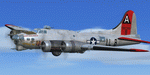
This folder contains a repaint for the A2A WoP2 B-17G in the colors of B-17G 42-97061 LL-B General Ike" of the 401st BS/ 91st BG based in Bassingbourne UK. One of the more well known B-17's of the 91st BG, was originally assigned to the 457th BG, but came to the 91st after only 3 days there, on the 16th March 1944. The aircraft was christened by Genral Eisenhower himself, when he visited the 91st BG on 11 April 1944. The noseart was painted by Cpl. Tony Starcer, with the lettering being done by Cpl. Elvis White. Both artists signed their work, though Cpl White's name later disappeared from the aircraft. Eisenhower liked the painting, but remarked to Cpl Starcer that his eyes were not blue-grey at all. "General Ike" survived the war and returned to Kingman Az, where she was scrapped. On its 65th mission, prop 3 started windmilling and sheared off, hitting the fuselage just below the co-pilots feet, but the only damaged was to the noseart, which was quickly repainted by Cpl Starcer. "General Ike" flew many missions as lead ship, because, as Capt John Davis said after returning from its 21st mission: "She's a mighty sweet plane, not too hot or fast, she moves steadily along. You don't want a fast aircraft for group lead."Ike" gets you over the target and brings you back again", which she did, again and again until the end of the war.
Repaint by Jan Kees Blom, based on the paintkit by A2A.
| Filename: | Boeing_B17G_91st_BG_LLB_General_Ike.zip |
| License: | Freeware |
| Added: | 7th October 2019, 18:19:56 |
| Downloads: | 85 |
| Author: | Jan Kees Blom |
| Size: | 18.8 MB |
| Category: Prepar3D V1-4 - Scenery | |
| KILE, Killeen Texas airport |
|
Images related to this file:
File Description: Instructions: There are 3 folders in this package; effects, scenery and texture.
Create a subfolder under the C:\Program Files (x86)\Lockheed Martin\Prepar3D v3\Scenery folder and call this new folder KILE.
Place the scenery and texture folders (with their associated contents) under this newly created KILE subfolder.
Place only the contents (not the folder) of the effects folder in the P3D effects folder often located at C:\Program Files (x86)\Lockheed Martin\Prepar3D v3\Effects.
Now start up P3D.
On the menu at the top of the P3D screen click on World > Scenery Library > Add Area. This will bring up the Add Scenery Area dialog box. Click the Browse button and browse to find the newly created KILE folder. It should be located at C:\Program Files (x86)\Lockheed Martin\Prepar3D v3\Scenery. Once you select the KILE folder, click the OK button. This will place that folder in the P3D scenery library. You will notice that the library is organized by priority starting at 1. I have my KILE scenery set as #4 priority but I am not sure if it needs to be that high. I did notice during design that sometimes my ground texture at the airport would act strange and I found that by setting KILE to a higher priority, it fixed that. As a last step make sure the checkbox to enable the scenery is checked and click OK.
You should now have the new KILE scenery available to use.
This package covers KILE, Killeen Texas airport. It is a city owned public use airport located 3 miles east of Killeen Texas. It has one runway that is 5,495 x 100 feet.
Almost 100 custom objects are included in this package. They include:
All hangers and buildings on the airport grounds made from on site photos.
Several buildings surrounding the airport grounds.
All taxiway and runway signs.
All taxiway, runway and approach lighting.
ILS antenna, localizer, etc.
Fuel tanks and parking T's.
Night lighting where appropriate.
Currently I am using the default land class instead of photo real because I couldn't find any photo real that suited my needs.
I welcome your feedback good or bad. Currently this airport is only for P3D. I may create an FSX version if I have enough requests. I started learning to make 3d objects and airports last year and I am learning something new every day. I hope you enjoy!
I plan on improving the night lighting for the runway lights, runway end lights, taxiway lights, etc. to make them more visible from a distance at night. I also want to replace the stock P3D vehicles with my own design and a few other things to come in an updated version down the road.
| Filename: | KILE_Killeen_Texas_airport.zip |
| License: | Freeware |
| Added: | 11th May 2017, 19:54:19 |
| Downloads: | 492 |
| Author: | Shannan Landreth |
| Size: | 23.83 MB |
| Category: Flight Simulator X - Aircraft Repaints, Textures and Modifications | |
| Boeing KC-97L Spanish Air Force |
|
Images related to this file:
File Description:
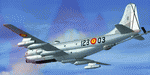
This folder contains a repaint for The Boeing KC-97 by Manfred Janh and team. It shows 123-03, a Boeing KC-97L of No.12 ALA of the Spanish Air Force, which operated three of these aircraft, calling them the TK.1. It was originally 53-0189 with the USAF, entering service with the Spanish Air Force in 1972. You can still see the old US markings in some light, this is not a mistake in this repaint. After an emergency landing in 1986, she was struck of charge. The aircraft is preserved and can be seen at the Museo del Aire Cuatro Vientos in Madrid. The other two Spanish KC-97's are now part of a nightclub near Barcelona. Repaint by Jan Kees Blom for Manfred Jahn's C-97, based on the paintkit by Manfred and team.
| Filename: | Boeing_KC97L_Spanish_Air_Force.zip |
| License: | Freeware |
| Added: | 7th August 2018, 12:53:16 |
| Downloads: | 144 |
| Author: | Jan Kees Blom |
| Size: | 15.63 MB |
| Category: Prepar3D V1-4 - Aircraft Repaints, Textures and Modifications | |
| North American T-6 Texan (ZS-WLP) |
|
Images related to this file:
File Description:
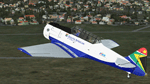
This is an artistic representation of C/N 88-15699, SAAF 7601. The aircraft was built by North American Aviation. Allocated the tail number 41-34067. Diverted from the United States to the RAF with tail number EZ194. Delivered to the SAAF and allocated the tail number 7601. The aircraft was transferred to the Gabon Presidential Guard on the 15th of December 1970 and was identified by the letter 'G'. Returned to the SAAF with its original tail number 7601. The aircraft was rebuilt to airworthy standard and registered ZS-WLP on the 8th of March 1990 and named 'Spook' (Ghost). The aircraft is used for hands on training for a live aircraft and is usually displayed at various air shows and functions. These are textures only and you need a legal copy of the A2A T-6 Texan
| Filename: | North_American_T6_Texan_ZSWLP.zip |
| License: | Freeware |
| Added: | 29th April 2018, 00:24:51 |
| Downloads: | 70 |
| Author: | Eberhard Haberkorn / A2A |
| Size: | 44.91 MB |
| Category: Flight Simulator X - Aircraft Repaints, Textures and Modifications | |
| Boeing KC-97 123-03 Spanish Air Force |
|
Images related to this file:
File Description:
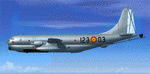
This folder contains a repaint for The Boeing KC-97 by Manfred Janh and team. It shows 123-03, a Boeing KC-97L of No.12 ALA of the Spanish Air Force, which operated three of these aircraft, calling them the TK.1. It was originally 53-0189 with the USAF, entering service with the Spanish Air Force in 1972. You can still see the old US markings in some light, this is not a mistake in this repaint. After an emergency landing in 1986, she was struck of charge. The aircraft is preserved and can be seen at the Museo del Aire Cuatro Vientos in Madrid. The other two Spanish KC-97's are now part of a nightclub near Barcelona. Repaint by Jan Kees Blom for Manfred Jahn's C-97, based on the paintkit by Manfred and team.
| Filename: | Boeing_KC97_12303_Spanish_Air_Force.zip |
| License: | Freeware |
| Added: | 13th July 2018, 19:54:05 |
| Downloads: | 114 |
| Author: | Jan Kees Blom |
| Size: | 12.61 MB |
| Category: Flight Simulator 2004 - Scenery | |
| KCRW - Charleston-Yeager 2014 |
|
Images related to this file:
File Description:
Yeager Airport KCRW in Charleston, West Virginia, is a mid-size airport surrounded by beautiful terrain (see the section on Optional Mesh). The terminal can easily accommodate 737 class airliners as well as commuter turboprops, and there are GA and West Virginia National Guard ramps. This scenery reflects the current single runway configuration, the former second runway having been converted into taxiway C. It is a complete rebuild with all custom buildings and some photo ground textures. I have also redone the instrument approaches to match the current real ones, and they will automatically be listed and displayed on your GPS. Instrument Approach Plates are included.
This work is entirely my own, but I would like to thank Brandon DePalo for his very well done earlier version of KCRW. Without that, I would not have known about this airport.
| Filename: | KCRW__CharlestonYeager_2014.zip |
| License: | Freeware |
| Added: | 26th April 2014, 07:05:30 |
| Downloads: | 646 |
| Author: | Sidney Schwartz |
| Size: | 7.29 MB |
| Category: Flight Simulator 2004 - Scenery | |
| Kenmore Air Harbor Inc. SPB, Kenmore, Washington (S60) |
|
File Description:
Kenmore's home base is at the northern end of Lake Washington, northeast of Seattle. The base has been there since Kenmore was started in 1945. It is squashed up between a marina and a cement plant and if you want to know more about it then read the very entertaining book called "Success On The Step" by C. Martin Faure, with a foreword by Harrison Ford. You may already know that he is one of their more famous clients. This goes with the two scenery files for Lake Union, posted a while ago. For sure you need Ultimate Terrain, as otherwise the lake won't be in the right place. UT for Canada and Alaska may be sufficient, as it stretches south of the border, but I've never tried it without UT for both Canada and the US.
| Filename: | Kenmore_Air_Harbor_Inc_SPB_Kenmore_Washington_S60.zip |
| License: | Freeware |
| Added: | 16th March 2008, 20:16:24 |
| Downloads: | 1,526 |
| Author: | Roger Wensley and Jim Turner |
| Size: | 8.22 MB |


© 2001-2026 AVSIM Online
All Rights Reserved
Privacy Policy |