
Where Flight Simulation Enthusiasts Gather from Around the World!
AVSIM Library - Search Results

| Category: Flight Simulator X - Scenery | |
| "Your Own Sea Port"..Part II of "Your Own" |

|
File Description:
This scenery is Part II of "Your Own" Series. The first one is "Your own AirPort"....
slowly but surely a community is being born!!!!!!...what do you get with YOSP??
--
"YO Airport" has contracted the " Marching Band and Construction Ltd" to construct the " YO-Seaport" near the rich Oil Fields of the coast. MBC Ltd, has thus proceeded full blast on this major important Sea Port which will give traffic to YO Airport and sorroundings.....Now planes will fly on rigid schedules between these two airfields......
later YO-Hill Airfields(Part III) will come along in the mountains in small lakes and Sea Stops...or small seaplane destinations....for more Fun and activities!!!!
What does "Your Own Sea Port" has for you.....?and what can you do there??
1) Two Airfields, one grass for small private planes and one Concrete for Commercial traffic ( new technique so it won´t be "sunk" with whatever mesh you have!!!) ...........+ Floatplane Base!!!
2) Helicopter Pad at the Port Hospital...(lighted)
3) Rescue Sailors at burning ship!!!!---(ship sinking fast!!)...take them to the Port´s Hospital.
4) Check moving traffic with any chopper.( There is a red corvette which must be checked with some women driving too fast!!!)
5) Participate in:
Road Race ( Need a car!!)...Prices galore!!!
Boat Race around Red Bull Pylons (need a Boat!!)...RedBull guys left them here for good!!!
Fly a Race at the same Pylons...(Really Hard!!!!)
6) Fly Tourists to Fishing Lake where Bass Abounds..(Need Floatplane).
8) Fly with your Navy Patrol plane and check on some "Strange Submarine
taking pictures of the port"...if necessary blow it to smitherins!!!!!!!
9) Open a New Airline....YO Air Service Inc...
10) Fly around and take pictures.
11) Take executives to the Oil Facilities in the Interior (EpisodeIII)...
or just fly around with your gal, wife or hummmm, hummmm.............or go fly under its three bridges!!!!!
12) Take passenger from the "Float Plane" Airpark, near the hospital, to lakes and rivers. The Mayor of YOSP will be giving the "city Keys" to all Pilots
who makes four consecutive loops in a helicopter on Sunday at 11:42:45.
| Filename: | Your_Own_Sea_PortPart_II_of_Your_Own.zip |
| License: | Freeware, limited distribution |
| Added: | 28th November 2008, 15:48:14 |
| Downloads: | 1,515 |
| Author: | Gera Godoy Canova |
| Size: | 900.13 KB |
| Category: Flight Simulator X - Scenery | |
| Merrill Field PAMR |
|
Images related to this file:
File Description:
This is a version for FSX of the Merrill Field made by Roger Wensley (me) for FS9, converted by John B Loney jnr. "PAMR read this first" explains this but I have modified John's original procedure, and instead of first installing the Merrill Field original plus two updates I have included here the current FS9 version as installed on my computer. Note that to see the apron lighting working in FS9 it was necessary to have Sidney Schwartz's light library installed, along with his updated textures (to avoid severe blurries caused by a faulty texture). The original installation instructions are included giving file library priorities etc. Just ignore the bits that do not apply, such as installing AI that is not included. I have of course omitted the original AI as this is replaced by John's version. I have no comment to make on installing in FSX as I have not done so, and I have not tested it in FSX. If you have comments or questions I will respond as much as I am able. Merrill Field is in Anchorage Alaska, between Anchorage International to the southwest and and Elmendorf Air Force Base to the north. It caters for general aviation and is the land equivalent of the Lake Hood float plane base, with fuel and numerous maintenance facilities, and several hundred parking spots for small planes. There are three runways, and the longest is 4,000 feet of 100 feet wide asphalt, the second 2,635 feet of asphalt 75 feet wide, and the third 2,000 feet of 60 feet wide gravel. The first two have runway lights. It is a controlled airfield with a relatively new control tower to cater for the numerous flights and to coordinate with Elmensdorf and Anchorage International, the latter also controlling flights from Lake Hood and the adjacent gravel strip Z41. (See my Lake Hood scenery). The gravel runway at Merrill Field is not connected with active taxiways to the rest of the airfield; this avoids you being ordered to land on it when flying a plane too large to do so.
| Filename: | Merrill_Field_PAMR.zip |
| License: | Freeware, limited distribution |
| Added: | 3rd July 2017, 18:00:19 |
| Downloads: | 452 |
| Author: | Roger Wensley and John B loney jnr |
| Size: | 21.73 MB |
| Category: Flight Simulator 2004 - Aircraft Repaints, Textures and Modifications | |
| Louisiana State Police Texture Updates Bell/Textron 430 |
|
File Description:
FS2004 Bell/Textron 430 Helicopter Louisiana State Police Updates
This package contains 2 revised texture sets for: N810SP & N918SP which are based here in Baton Rouge.
These fixes add the gold stripe on the tail and reflect the readjusted bottom
gold cheat stripe and a few more small tweaks that make the textures more accurate.
There is a well known member of the FS Community that is also painting up more LSP Bell430s.I believe that his will feature 430s from LSP Troop I,B and C.
Giving you all more N#'s to fly based on your preference of which Troop you want to fly for.So keep an eye out for more LSP Bell 430s in the near future!!
As always....Enjoy!!
**P.S.***
I am finishing up on a custom scenery to compliment these repaints.
The scenery will feature a large photoreal terrain area of the Independence Park area here in Baton Rouge wich houses on its grounds the following:
Louisiana State Police Headquarters,Louisiana Statepolice Training acadamy,various State Gov't offices such as Dept. of Motor Vehicles,Louisiana State Office of Emergency Managment,State fire Marshals Offices,e.t.c.....
The main Helipad is set up as a runway..rwys 9-27 which feature their own ILS systems with outermarkers,an NDB,Fictioal Airport Designation of 1LSP.Trees,Military Landing Zones,resturants,minmalls,gas stations along the perimeter,the main Fire House/Fire Station for that area.the Main branch of the Public Library and the big school bus transfer area on the west side.Street lights along the roadways,and much more.With minimal impact of FPS.
This will be a great add-on tool for the real LSP and AIr Med pilots who fly into this place everyday.Now you guys/gals can practice approaches in inclement weather conditions without fear of ruining a 5 million dollar chopper,all the while honing your IMC skills.
This scenery will integrate seemlessly with the upcoming release of KBTR v2.
The screenshots in this archive are from KBTRv2 Beta and the 1LSP beta sceneries!!
Keep an eye out at the BSMP forum for updates and preview screenshots... www.bsmp.co.nz
| Filename: | Louisiana_State_Police_Texture_Updates_BellTextron.zip |
| License: | Freeware |
| Added: | 25th May 2008, 19:00:07 |
| Downloads: | 358 |
| Author: | Joe DeGregorio / Alan Devins / Rory Kelly / Keith Devins |
| Size: | 2.96 MB |
| Category: Microsoft Flight Simulator (2020) - Utilities | |
| FSTramp v8.84 for MSFS, FSX(-SE), Prepart3D, X-Plane (Win) |
|
Images related to this file:
File Description:
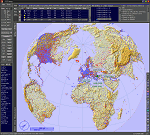
This add-on is an EXE application for Microsoft Flight Simulator and a DLL module for all other simulators. The DLL variant is activated via hotkeys or the simulator menu add-ons or plugins. Window size and layout are configurable for one or more screens. To avoid dazzling, the brightness of the entire application is customizable. Primarily it is a flight management system (FMS) with automatic control from start to landing. This also includes the observance of SID, STAR and Approaches in unmatched quality. The flight plan required for the FMS can be created manually or automatically, interactive changes and additions during the flight are possible. The basis of the flight planner is the 3D world map and the search function for airfields and navigation aids. The FMS by FSTramp relies on the autopilot of the aircraft. In case of incompatibility, the autopilot integrated in FSTramp will be used. This allows FSTramp to control almost all aircraft from airport to airport. The altitude profile of the flight plan, SID, STAR and approach is taken into account. This means that FSTramp extends the often incomplete airport procedures to and from the runway so that they can be flown completely automatically. During the fully automatic flight, the autopilot values ​​for HDG, ALT, VSPEED, SPD and MACH can be manually overridden. This is e.g. useful for being able to react to the instructions of the tower in the final approach without completely stopping the automatic flight. The rotating or north pointing 3D world map with numeric display of the terrain elevation under the mouse arrow is another special feature. It does not need an internet but is synthesized from included height profiles of the globe. The Data of continents, mountains and rivers are included in the setup. Airspaces, Airways, Waypoints and SID, STAR and Approaches are also included in the setup, but can be updated by installing additional AIRAC cycles. Airfields and navigation stations are taken from the simulator. NVIDIA: If the frame rate of the simulator drops sharply about 20 seconds after FSTramp's visibility, the power management of the GPU slows down prematurely. In the NVIDIA Control Panel, change the 'Manage 3D settings - Power management mode' option to 'Adaptive'.
| Filename: | FSTramp_v884_for_MSFS_FSXSE_Prepart3D_XPlane_Win.zip |
| License: | Shareware, time limited |
| Added: | 7th July 2023, 04:35:12 |
| Downloads: | 111 |
| Author: | Helge Schroeder |
| Size: | 358.21 MB |
| Category: Prepar3D V5 - Utilities | |
| FSTramp v8.84 for Prepart3D 2-6, MSFS, FSX(-SE), X-Plane (Win) |
|
Images related to this file:
File Description:
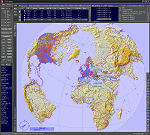
This add-on is an EXE application for Microsoft Flight Simulator and a DLL module for all other simulators. The DLL variant is activated via hotkeys or the simulator menu add-ons or plugins. Window size and layout are configurable for one or more screens. To avoid dazzling, the brightness of the entire application is customizable. Primarily it is a flight management system (FMS) with automatic control from start to landing. This also includes the observance of SID, STAR and Approaches in unmatched quality. The flight plan required for the FMS can be created manually or automatically, interactive changes and additions during the flight are possible. The basis of the flight planner is the 3D world map and the search function for airfields and navigation aids. The FMS by FSTramp relies on the autopilot of the aircraft. In case of incompatibility, the autopilot integrated in FSTramp will be used. This allows FSTramp to control almost all aircraft from airport to airport. The altitude profile of the flight plan, SID, STAR and approach is taken into account. This means that FSTramp extends the often incomplete airport procedures to and from the runway so that they can be flown completely automatically. During the fully automatic flight, the autopilot values ​​for HDG, ALT, VSPEED, SPD and MACH can be manually overridden. This is e.g. useful for being able to react to the instructions of the tower in the final approach without completely stopping the automatic flight. The rotating or north pointing 3D world map with numeric display of the terrain elevation under the mouse arrow is another special feature. It does not need an internet but is synthesized from included height profiles of the globe. The Data of continents, mountains and rivers are included in the setup. Airspaces, Airways, Waypoints and SID, STAR and Approaches are also included in the setup, but can be updated by installing additional AIRAC cycles. Airfields and navigation stations are taken from the simulator. NVIDIA: If the frame rate of the simulator drops sharply about 20 seconds after FSTramp's visibility, the power management of the GPU slows down prematurely. In the NVIDIA Control Panel, change the 'Manage 3D settings - Power management mode' option to 'Adaptive'.
| Filename: | FSTramp_v884_for_Prepart3D_26_MSFS_FSXSE_XPlane_Wi.zip |
| License: | Shareware, time limited |
| Added: | 7th July 2023, 04:35:26 |
| Downloads: | 43 |
| Author: | Helge Schroeder |
| Size: | 358.21 MB |
| Category: Flight Simulator X - Utilities | |
| FSTramp v8.84 for MSFS, FSX(-SE), Prepart3D, X-Plane (Win) |
|
Images related to this file:
File Description:
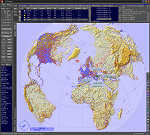
This add-on is an EXE application for Microsoft Flight Simulator and a DLL module for all other simulators. The DLL variant is activated via hotkeys or the simulator menu add-ons or plugins. Window size and layout are configurable for one or more screens. To avoid dazzling, the brightness of the entire application is customizable. Primarily it is a flight management system (FMS) with automatic control from start to landing. This also includes the observance of SID, STAR and Approaches in unmatched quality. The flight plan required for the FMS can be created manually or automatically, interactive changes and additions during the flight are possible. The basis of the flight planner is the 3D world map and the search function for airfields and navigation aids. The FMS by FSTramp relies on the autopilot of the aircraft. In case of incompatibility, the autopilot integrated in FSTramp will be used. This allows FSTramp to control almost all aircraft from airport to airport. The altitude profile of the flight plan, SID, STAR and approach is taken into account. This means that FSTramp extends the often incomplete airport procedures to and from the runway so that they can be flown completely automatically. During the fully automatic flight, the autopilot values ​​for HDG, ALT, VSPEED, SPD and MACH can be manually overridden. This is e.g. useful for being able to react to the instructions of the tower in the final approach without completely stopping the automatic flight. The rotating or north pointing 3D world map with numeric display of the terrain elevation under the mouse arrow is another special feature. It does not need an internet but is synthesized from included height profiles of the globe. The Data of continents, mountains and rivers are included in the setup. Airspaces, Airways, Waypoints and SID, STAR and Approaches are also included in the setup, but can be updated by installing additional AIRAC cycles. Airfields and navigation stations are taken from the simulator. NVIDIA: If the frame rate of the simulator drops sharply about 20 seconds after FSTramp's visibility, the power management of the GPU slows down prematurely. In the NVIDIA Control Panel, change the 'Manage 3D settings - Power management mode' option to 'Adaptive'.
| Filename: | FSTramp_v884_for_MSFS_FSXSE_Prepart3D_XPlane_Win.zip |
| License: | Shareware, time limited |
| Added: | 7th July 2023, 04:35:43 |
| Downloads: | 130 |
| Author: | Helge Schroeder |
| Size: | 358.21 MB |
| Category: Flight Simulator X - Aircraft Repaints, Textures and Modifications | |
| Tradewinds Airways Canadair CL-44 1977 |
|
Images related to this file:
File Description:

This is a repaint of the Canadair CL-44 in Tradewinds Airways colors. You need the freeware Canadair CL-44 by Mike Stone. Tradewinds was a British air cargo company. In November 1968, Transglobe Airways ceased operations, leaving a fleet of Canadair CL-44s lease-purchased from Seaboard World Airlines in limbo. Later in the month, Bobwood was formed to takeover the aircraft lease. Bobwood's name was changed to Tradewind Airways in January 1969 and all three ex-Transglobe Airways CL-44s were transferred over to the new company. Due to Seaboard World Airlines (a U.S. Cargo airline) having a large interest in Tradewinds, the British Government would not issue a license. Thus, in April, a British group was put together to take over the company. Consequently, a route network was developed primarily to Africa and North America in 1971–1976. Also in 1972, the carrier began flying from London Heathrow, often on all-cargo subcontracts for foreign airlines. In January 1977, Tradewinds became a wholly owned subsidiary of the multinational Lonrho Group. They received the 707-320Cs soon after. In 1978–1979, Tradewinds offered scheduled jet freight services from London to points in Africa, USA, and Canada. Unfortunately, in January 1986, Tradewinds ceased operations, citing overcapacity, undercutting by competing charter services, and stringent new noise abatement rules as cause of the demise. Its assetts were purchased by Tal Air, a British business travel airline, and tried to revive Tradewinds with freight services to Africa and the Middle East, however it was not to be, and they finally shut down for good in 1990.
Textures are 32bit bmp. This aircraft was tested on FSX-SE. It should work on FSX and FS2004.
*This is strictly an FS2004 model. However, I used it on FSX-SE by replacing the FS2004 panel and gauges with an FSX 2D panel, and it worked well. I have included two internet links for users of FSX, who wish to fly the aircraft, with easy instructions on how to go about replacing the FS2004 panels with FSX ones.
| Filename: | Tradewinds_Airways_Canadair_CL44_1977.zip |
| License: | Freeware |
| Added: | 24th January 2019, 05:08:24 |
| Downloads: | 74 |
| Author: | Ted Giana |
| Size: | 711.33 KB |
| Category: Flight Simulator X - Aircraft Repaints, Textures and Modifications | |
| Canadian Airlines Airbus A380 |
|
Images related to this file:
File Description:

This is a repaint for Project Airbus' Airbus A380 in a fictional Canadian Airlines livery. Includes base model, high-quality textures, and updated VC.
*Mask Options*
This livery also includes cockpit window "Mask Options". Please see the included readme in the .zip file for instructions for applying these options.
Canadian Airlines never flew the A380, as by the time the company was absorbed by Air Canada in 1999, the aircraft did not exist. The largest aircraft flown by Canadian Airlines was the Boeing 747-427. However, in our new universe, Canadian Airlines has taken delivery of one single Airbus A380, available to fly any route of your choice. It flies under the registration C-CSPN and the tail number 383.
*Livery Info*
Upon its founding in 1987, Canadian Airlines revealed its new livery using the colours light grey, dark grey, navy blue, and red. The paint scheme was an adaptation of the recently introduced livery from its predecessor Canadian Pacific Airlines. The lower half of the aircraft's body was navy blue, topped with light grey and red stripes, while the tail was blue, with approximately one-third taken up by the carrier's new logo. The new Canadian Airlines logo was a combination of Canadian Pacific's five grey stripes, representing the five continents served by the carrier. Over these stripes was a thick, bright red chevron. The chevron was a simplification of the Pacific Western Airlines logo. The chevron was placed over the stripes, which then represented "Wings over 5 continents". It was also an ingenious and subtle way to represent the takeover of CP by PWA. The same logo, in a square form, became a clever alternative to a true bilingual name on the fuselage replacing the French "e", and the third "a" in English (Canadian/Canadien).
Model by The Project Airbus Team Textures by Julian Flight - March 31st, 2024 Virtual Cockpit by Thomas Ruth Virtual Cockpit updated by Chris Evans and Louis Quintero
| Filename: | Canadian_Airlines_Airbus_A380.zip |
| License: | Freeware, limited distribution |
| Added: | 5th April 2024, 17:19:08 |
| Downloads: | 53 |
| Author: | Julian Flight |
| Size: | 65.85 MB |
| Category: Flight Simulator X - Aircraft Repaints, Textures and Modifications | |
| Canadian Airlines Boeing 747-8i |
|
Images related to this file:
File Description:

This is a repaint for the amazing SkySpirit 747-8i Series II. It includes the base model, high-quality textures, a VC, and custom ground service vehicles.
Canadian Airlines never flew the 747-8i, as by the time the company was absorbed by Air Canada in 1999 the aircraft did not exist. The largest aircraft flown by Canadian Airlines was the Boeing 747-427. However, in our new universe, Canadian Airlines has taken delivery of one single Boeing 747-8i, available to fly any route of your choice. It flies under the registration C-FCDN and the tail number 848.
The Rhys T. Eyton Memorial 747-8i
Canadian Airlines named all of their 747's, and this one is no different. Like the real-life 747-427 flown under registration C-FGHZ, this aircraft honors the late Rhys T. Eyton, Canadian Airlines CEO between 1989 and 1995. Rhys was a pioneer in Canadian Aviation. He passed away in 2023.
Livery Info
Upon its founding in 1987, Canadian Airlines revealed its new livery using the colours light grey, dark grey, navy blue, and red. The paint scheme was an adaptation of the recently introduced livery from its predecessor Canadian Pacific Airlines. The lower half of the aircraft's body was navy blue, topped with light grey and red stripes, while the tail was blue, with approximately one-third taken up by the carrier's new logo. The new Canadian Airlines logo was a combination of Canadian Pacific's five grey stripes, representing the five continents served by the carrier. Over these stripes was a thick, bright red chevron. The chevron was a simplification of the Pacific Western Airlines logo. The chevron was placed over the stripes, which then represented "Wings over 5 continents". It was also an ingenious and subtle way to represent the takeover of CP by PWA. The same logo, in a square form, became a clever alternative to a true bilingual name on the fuselage replacing the French "e", and the third "a" in English (Canadian/Canadien).
| Filename: | Canadian_Airlines_Boeing_7478i.zip |
| License: | Freeware, limited distribution |
| Added: | 20th April 2024, 21:55:57 |
| Downloads: | 65 |
| Author: | Julian Flight |
| Size: | 65.56 MB |
| Category: Flight Simulator X - Aircraft Repaints, Textures and Modifications | |
| Consolidated PBY Catalina C-FCRR |
|
Images related to this file:
File Description:

This folder contains a repaint for the Aerosoft PBY Catalina for FSX. It is shown here as C-FCRR, with Air France colors. Built by Boeing of Canada at Vancouver, it became RCAF Canso 9767 on March 4, 1943, and was allocated to Squadron 162, coded S, at Reykjavik, Iceland. In 1944, piloted by Flying Officers Thomas Charles Cooke and Eric Walter Wiskin, 9767 sank the German U-boat U-342 off the coast of Iceland on April 17. The amphibian was removed from the military service on April 1, 1946. The same year it was sold to Canadian Pacific Airlines, registered CF-CRR and assigned fleet number 233 (later 933), it was operated until 1959, thereafter by Northland Airlines (1960-1968), Midwest Airlines (1969-1970), and Ilford Riverton until 1973. The registration was changed to C-FCRR when Avalon Aviation acquired it as a water bomber in 1977, listed as Tanker number 791.
In 1995 the aircraft was bought by Powell Eorp. Of Parry Sound, Ontario, subsequently it was owned by the Canadian Air Legend. The French pilot Franklin Devaux bought C-FCRR in 1995 and converted it to a flying television studio, it was based at Le Bourget, Paris, France. During 1996 C-FCRR was the star of monthly French television programme Operation Okavango, while in September 1998 it was the eye catcher of the three-week Champs-Elysees (Paris) static air show. The following October the aircraft started an 8,078 mls (13,000 km) trip to Chile via Dakar (Senegal) and Natal (Brazil) to commemorate early Air France South Atlantic mail service, returning to France in June 1999. On January 19, 2002 the aircraft was stored at Orly Airport, Paris, and has not flown since. Its Canadian registration was cancelled on October 7, 2005. At present it seems to be registered as N9767, and in airworthy condition again. Here's a youtube movie on this aircraft: http://www.youtube.com/watch?v=s6jyzV8Gawc. Repaint by Jan Kees Blom, based on the repaint kit by Aerosoft.
| Filename: | Consolidated_PBY_Catalina_CFCRR.zip |
| License: | Freeware, limited distribution |
| Added: | 26th September 2010, 11:33:47 |
| Downloads: | 1,200 |
| Author: | Jan Kees Blom |
| Size: | 9.83 MB |


© 2001-2026 AVSIM Online
All Rights Reserved
Privacy Policy |