
Where Flight Simulation Enthusiasts Gather from Around the World!
AVSIM Library - Search Results

| Category: Flight Simulator X - Utilities | |
| FSX Logbook Recovery |

|
File Description:
This utility can be used to try to fix an FSX logbook that doesn't get appended with new entries anymore. If it succeeds in removing a corrupt entry you can write back the logbook, but only after a backup of the original has been made. Updated version that handles entries with multiple landings better. (Previous version had 931 downloads).
| Filename: | FSX_Logbook_Recovery.zip |
| License: | Freeware |
| Added: | 20th February 2007, 18:51:54 |
| Downloads: | 18,167 |
| Author: | Daniel van Os |
| Size: | 229.77 KB |
| Category: Flight Simulator X - Utilities | |
| FsRaas V2.0 (Runway Awareness and Advisory System for FSX/FS9) |
|
Images related to this file:
File Description:
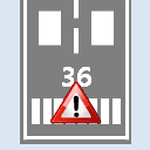
To watch FsRaas video demo, please visit "youtu.be/wDlIMjAUn0s" and "youtu.be/dUH7gAj24MY". It simulates Honeywell SmartRunway/SmartLanding system. RAAS provides crew members with information concerning the aircraft's position relative to an airport's runway during taxi, takeoff, final approach, landing and rollout to improve situational awareness and reduce the likelihood of a runway incursion. From FsRaas 1.1, 8 functions are added (Extended Hold On Runway, Short Runway Takeoff, Short Runway Landing, Distance Remaining in Meters, Landing Flaps, Too High, Too Fast, Unstable), and some other functions are upgraded. Thanks for so many feedbacks from FsRaas users! Works with both FSX and FS2004.
| Filename: | FsRaas_V20_Runway_Awareness_and_Advisory_System_fo.zip |
| License: | Freeware |
| Added: | 17th June 2012, 06:36:15 |
| Downloads: | 12,814 |
| Author: | Dongjin Shin |
| Size: | 6.26 MB |
| Category: Flight Simulator X - Utilities | |
| Intelligence Cabin Announcements (ICA) V 1.0 |
|
File Description:
ICA is a bilingual tool (German-English) for FSX with intelligent cabin announcements, depending on the flight situation. It works internally FSX in window mode or full screen mode and can always be turned on or off without restarting the simulator. In addition to the cabin crew announcements, it includes an automatic turbulence detection and adds a sound to the FSX during the turbulence.
Sounds are included: Welcome, Pushback Delay, Climb, Cruise, Descent, Final, Turbulence.
No gauges needed, mo external program.
Only FSX with FSUIPC (registered)
| Filename: | Intelligence_Cabin_Announcements_ICA_V_10.zip |
| License: | Freeware |
| Added: | 29th June 2011, 00:44:07 |
| Downloads: | 5,670 |
| Author: | Rainer Kunst |
| Size: | 5.69 MB |
| Category: Flight Simulator X - Utilities | |
| Quick Replay FSX v1.1 |
|
Images related to this file:
File Description:
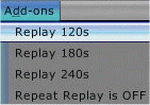
Sick of using your keyboard to change the 60 second default replay value to something longer?
This Add On provides menu options for 120, 180 and 240 second replays so that you can activate your desired replay quickly and without the keyboard.
Also allows controller buttons to trigger your favorite replay duration.
Richard Barry. November 2014
| Filename: | Quick_Replay_FSX_v11.zip |
| License: | Freeware |
| Added: | 10th November 2014, 18:37:32 |
| Downloads: | 204 |
| Author: | Richard Barry |
| Size: | 199.08 KB |
| Category: Flight Simulator X - Utilities | |
| HUD Parameters for FSX |
|
Images related to this file:
File Description:
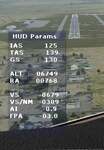
HUD_Parameters.lua is a Lua script that displays flight parameters in a small text window that pops up when the script is selected by an assigned key or button if the aircraft is in the air.
Parameters displayed are:
• Indicated Airspeed (IAS. Kts)
• True Airspeed (TAS, Kts)
• Ground Speed (GS, Kts)
• Mach# (when above a user settable altitude, currently 25000ft)
• Altitude (ALT, ft)
• Radio Altitude (RA, ft)
• Vertical Speed (VS, ft/min)
• Vertical Speed per Nautical Mile (VS/NM, ft/NM)
• Attitude Indicator pitch (AI, degrees)
• Flight Path Angle (FPA, degrees)
The top of the script contains user settable values for the size and location of the display, the altitude above which the a/c Mach# will be displayed (default is 25000ft), the data update interval in milliseconds (default is 2000),
and whether or not data is to be logged in HUD_Parameters.log (default is 0, off). These values can be set using a text editor like NotePad.
A registered copy of FSUIPC is required to execute the Lua script. Simply copy the script to the Modules folder of FSX and use FSUIPC4 to assign a key, button or switch to toggle the script on and off.
The script turns off if the aircraft is on the ground.
Al Klayton
| Filename: | HUD_Parameters_for_FSX.zip |
| License: | Freeware |
| Added: | 29th July 2017, 07:15:25 |
| Downloads: | 476 |
| Author: | Al Klayton |
| Size: | 16.82 KB |
| Category: Flight Simulator X - Utilities | |
| TweakFS Utility Collection for FSX |
|
Images related to this file:
File Description:
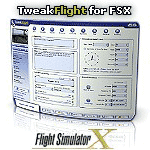
The TweakFS Utility Collection for FSX includes the following: TweakFlight for FSX (Flight File Editor), TweakFPS for FSX (Scenery Mode Editor), TweakLoad for FSX (Aircraft Loading Editor), TweakAircraft for FSX (Aircraft Config File Editor) and the TweakFS Explorer (File Manager for FSX). As a group these five unique applications each have a different scope and purpose, but come with a consistent look and feel. Between them they can handle well over 1000 settings and variables in FSX. They make fine-tuning your fsx.CFG, Aircraft.CFG and FLT (saved flight) files a breeze, providing functionality, speed and ease of use that goes well beyond what can be done by manually editing the files. All the tools are designed with one important principle in mind - a one-click "restore from backup" function. This means an adjustment can be applied with complete impunity and there is always the "bailout" option if there are any "funnies", the one justifiable concern that holds many back from making changes to their FS setup. All come as free 30-Day demos.
| Filename: | TweakFS_Utility_Collection_for_FSX.zip |
| License: | Shareware, time limited |
| Added: | 5th March 2010, 10:51:29 |
| Downloads: | 2,106 |
| Author: | TweakFS (Fermin Fernandez) |
| Size: | 44.1 MB |
| Category: Flight Simulator X - Utilities | |
| Graphic Realism and FSX Optimization |
|
File Description:
The add-ons configuration step by step
Not configured FSX is a pain in the neck for many people. A small number of fps and frequent CTD (crash to desktop) can be extremely annoying or even depressing to some users. A lot of you probably came to a conclusion that it was going to be a losing battle and you gave up after a few fruitless days or you spent money on the FSPS-XTREME FSX PC V2 program, which can automatically do practically everything for us. But what's the point of spending money on something that we can do by ourselves with the help of this handbook?
I myself was dealing with the FSX platform three times before I gave up FS9. Microsoft gave out the engine to us, but in order to make sense, our passion involves radical tuning of the device. On the ground of one's own experience and thousands of hours devoted by people to diving into the core of the platform, I'll present a way of installation, add-ons selection and their configuration starting from the installation of the system. Having done the procedures described below, FSX will look beautiful and it'll work smoothly even with challenging sceneries. The entirety is based on quite a popular hardware configuration, which will let us use 85% of the graphic potential of Microsoft Flight Simulator X. We want t to achieve the goal of minimum 25 fps in VC B738 PMDG NGX, with challenging sceneries, flying in the window mode. For the mode the full screen efficiency should reach 33 fps.
In this handbook, I'm neither going to describe each and every change made in cfg nor explain what the alterations are to conduce. You will be given a simple and ready recipe which I use myself. I can't guarantee a 100% satisfaction for the poorer equipment computers. I can assure you, however, that FSX will definitely work so much better and playing with FSX sliders or with the size of textures in REX you will be able to obtain the desired effect.
| Filename: | Graphic_Realism_and_FSX_Optimization.zip |
| License: | Freeware, limited distribution |
| Added: | 15th November 2013, 20:33:26 |
| Downloads: | 5,748 |
| Author: | Grzegorz Trzoch |
| Size: | 3.96 MB |
| Category: Flight Simulator X - Utilities | |
| FSX Registry Utility |
|
File Description:
The FSX Registry Utility has been designed to help sort out FSX registry problems and avoid the need to re-install FSX, such as when manually copying a FSX installation to another drive or when the registry entry goes missing for any reason. Many FSX applications and their installers depend on knowing the path to the fsx.exe file as reported in the Windows Registry. But what if the registry entry has been corrupted or deleted when reinstalling Windows? Manually copying the FSX folder to another folder or drive will also invalidate the registry entry. This may in some cases prevent an FSX add-on from working correctly (i.e. it cannot find FSX on your system). The FSX Reg Utility was prepared especially for users with custom setups or who manually copied the FSX installation to another folder or drive and reformatted their drives, but want to retain their FSX installation with all its add-ons. Using this utility may avoid the need to reinstall FSX and allows you to restore the path in the registry quickly and easily in the case that you are not confident editing the Registry yourself.
| Filename: | FSX_Registry_Utility.zip |
| License: | Freeware |
| Added: | 14th December 2007, 02:07:26 |
| Downloads: | 4,584 |
| Author: | TweakFS (Fermin Fernandez) |
| Size: | 821.44 KB |
| Category: Flight Simulator X - Utilities | |
| GroundAssist 23.8.1 |
|
Images related to this file:
File Description:
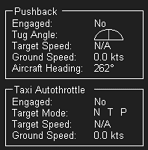
Supports FSX, FSX:SE, and P3D v3 through v6.
Detailed user manual included.
Contains two functions that are useful for ground-based operations:
* Pushback. Allows user to control a pushback tug, and receive visual feedback regarding speed and turn direction.
Optional animated tug model, including GSX models if installed.
Optional use of a controller axis to drive the tug.
* Taxi Autothrottle. Works similar to an in-flight autothrottle, but meant for taxiing.
No more fiddling with throttle controls to find that sweet spot!
Throttle levers are uniformly and smoothly operated.
No more fiddling with throttle controls to ensure uniform thrust!
| Filename: | GroundAssist_2381.zip |
| License: | Freeware, limited distribution |
| Added: | 3rd August 2023, 19:01:33 |
| Downloads: | 188 |
| Author: | William Ruppel |
| Size: | 47.95 MB |
| Category: Flight Simulator X - Utilities | |
| FSTimeSync |
|
Images related to this file:
File Description:

Easily sync your flight simulator time to your computer's clock at the click of a button.
| Filename: | FSTimeSync.zip |
| License: | Freeware |
| Added: | 31st March 2018, 03:21:32 |
| Downloads: | 332 |
| Author: | George Peppard |
| Size: | 144.23 KB |


© 2001-2026 AVSIM Online
All Rights Reserved
Privacy Policy |