
Where Flight Simulation Enthusiasts Gather from Around the World!
AVSIM Library - Search Results

| Category: Flight Simulator X - Utilities | |
| Seasonal Textures Manager ** New Updated Version ** |

|
Images related to this file:
File Description:

FSX Seasonal Textures Manager allows you to change scenery seasonal textures. Made to help freeware scenery makers to offer some easy way for seasonal textures changing to their products. Please read the readme and the license information. This file supersedes a previous version.
| Filename: | Seasonal_Textures_Manager___New_Updated_Version_.zip |
| License: | Freeware, limited distribution |
| Added: | 27th September 2014, 13:48:47 |
| Downloads: | 443 |
| Author: | Robert Kupis |
| Size: | 511.29 KB |
| Category: Flight Simulator X - Utilities | |
| Boeing 737-800 NGX Fuel Planner 1 |
|
Images related to this file:
File Description:
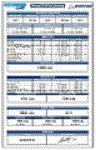
This fuel planner was created from data collected by kACARS_free during flights test, and from the PMDG's tutorial, the result is approximate but corresponds to consumption relative with the consumption of the NGX.
Small modification of the first version and you have now two sheets, pounds and kilogramme.
| Filename: | Boeing_737800_NGX_Fuel_Planner_1.zip |
| License: | Freeware |
| Added: | 6th February 2013, 12:26:34 |
| Downloads: | 6,192 |
| Author: | Frederic Furst |
| Size: | 106.35 KB |
| Category: Flight Simulator X - Utilities | |
| Autothumbnail v2 |
|
File Description:
Autothumbnail is a simple tool to quickly create a thumbnail for the current aircraft.
The thumbnail is immediately visible in the aircraft selection menu. No need to find image, resize or copy it.
This release fix a bug with empty texture names.
Requires .NET framework 2.0
| Filename: | Autothumbnail_v2.zip |
| License: | Freeware |
| Added: | 13th March 2007, 01:15:58 |
| Downloads: | 14,261 |
| Author: | Lamont Clark (lc0277) |
| Size: | 186.71 KB |
| Category: Flight Simulator X - Utilities | |
| Autothumbnail v2 - Fix for Windows 7 |
|
File Description:
Fix for Autothumbnail V2 - to make it work on Windows 7 and Windows Vista Systems.
| Filename: | Autothumbnail_v2__Fix_for_Windows_7.zip |
| License: | Freeware |
| Added: | 1st May 2012, 19:53:36 |
| Downloads: | 2,592 |
| Author: | Trevor Clarkson, Lamont Clark |
| Size: | 12.04 KB |
| Category: Flight Simulator X - Utilities | |
| Increased visibility of ground marks (taxi & runway lines) |
|
File Description:
Are you tired of not being able to distinguish the ground markings correctly? Well now, and without losing the effect of reality, lines can be seen better, even at night. The holding point, runway headers, white lines and header numbering are reinforced, even so that with the light of the aircraft and the airport itself they can be visible from your cockpit.
| Filename: | Increased_visibility_of_ground_marks_taxi__runway_.zip |
| License: | Freeware |
| Added: | 10th January 2021, 21:38:46 |
| Downloads: | 397 |
| Author: | Cristóbal Laje Ros |
| Size: | 6.17 MB |
| Category: Flight Simulator X - Utilities | |
| FS-Butler |
|
File Description:
The paperless cockpit - features of FS-Butler: Management of maps, information, files, etc. The documents are sorted into the following categories: General, Airport, Aircraft. A viewer is integrated for the *.Bmp and *.Jpg. You may input NAV/COM/ADF/SQUAWK/COURSE values quickly via the keyboard to type and send it to FSX via FSUIPC (freeware version).
| Filename: | FSButler.zip |
| License: | Freeware |
| Added: | 23rd February 2012, 15:47:54 |
| Downloads: | 629 |
| Author: | Juergen Beisler |
| Size: | 4.99 MB |
| Category: Flight Simulator X - Utilities | |
| Boeing 737 Dispatch sheet v 4.9.5 |
|
Images related to this file:
File Description:
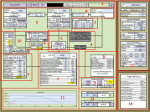
The 737 Dispatch sheet is a comprehensive dispatcher, fuel planner and performance calculator in Excel 2007 and above. It is designed to be used with the PMDG NGX and its ranges of engine and weight variants and other options such as Short Field Package and winglets. Calculations are based on many available optional user inputs such as selected Cost Index, weather information, altitudes en route, altitude steps, passenger load, luggage, and many other factors that impacts fuel usage and aircraft performance. The calculations include takeoff and landing weights as well as estimated flight time, cruise speeds and more. The build in airport and runway database helps you find all the information you would need to plan your flight including takeoff performance settings, engine derates, assumed temperatures, landing configuration, landing and takeoff speeds, and more. This updated version includes a unit change feature for baro settings similar to the distance and weight unit selectors as well as a few other corrections and additions.
| Filename: | Boeing_737_Dispatch_sheet_v_495.zip |
| License: | Freeware |
| Added: | 28th October 2013, 16:32:56 |
| Downloads: | 9,153 |
| Author: | Lasse Kronborg |
| Size: | 8.63 MB |
| Category: Flight Simulator X - Utilities | |
| EnbSeries Mod File |
|
Images related to this file:
File Description:
This is my rendition of the popular EnbSeries mod. This file will make subtle enhancements to the way FSX appears. Instructions and comparison screen shots are all included.
As a bonus I have included a modified water constants .xml as well.
| Filename: | EnbSeries_Mod_File.zip |
| License: | Freeware |
| Added: | 20th May 2013, 05:34:44 |
| Downloads: | 2,038 |
| Author: | Bill Honcoop |
| Size: | 3.17 MB |
| Category: Flight Simulator X - Utilities | |
| Light Bloom Plugin |
|
Images related to this file:
File Description:
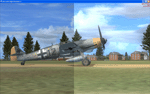
FSX supports light bloom, but the effect reduces framerates. In 2008, Boris Vorontsov developed a small freeware plugin, ENBSeries, which produces a similar effect, with little or no effect on framerates. This plugin has been discussed extensively on AVSIM and other flight sim forums. The purpose of this package is (a) to help distribute Vorontsov's plugin and (b) to make it easy for flight simmers to get started and enjoy what Vorontsov has given us. The trickiest part of (b) is adjusting the various parameters for Flight Simluator. You're welcome to play with this yourself, but most people are going to be happy with the settings provided here, courtesy of Orbx founder John "Koorby" Venema.
| Filename: | Light_Bloom_Plugin.zip |
| License: | Freeware |
| Added: | 8th April 2010, 15:56:09 |
| Downloads: | 3,763 |
| Author: | Boris Vorontsov |
| Size: | 342.21 KB |
| Category: Flight Simulator X - Utilities | |
| Quick Reference Chart for Flying Aircraft |
|
File Description:
This is an easy to read Excel spreadsheet to be used as a quick reference chart for flying your aircraft:
(A-320) (A-330-200) (717-200) (737-500) (737-800) (747-400) (757-200) (CRJ-200) (EMB-145) (EMB-170)
The chart eliminates the need to memorize each aircraft's specifications needed for flying. The following fields are provided:
[Aircraft Type & Equipment Code]
[Passenger Seating]
[All Flap Settings which include Takeoff & Landing]
[Maximum Speed for Gear Down]
[Range & Maximum Altitudes]
[V1 VR V2]
[Climb & Descent Rates]
[Max Speed Based on Altitude]
[Cruise Speed]
[Max Fuel]
[Approach Settings]
[Max Fuel]
[Zero & Gross Wt]
[Forward & Aft Cargo Space]
| Filename: | Quick_Reference_Chart__for_Flying_Aircraft.zip |
| License: | Freeware |
| Added: | 4th February 2012, 17:44:44 |
| Downloads: | 1,451 |
| Author: | William R Ayers |
| Size: | 14.86 KB |


© 2001-2026 AVSIM Online
All Rights Reserved
Privacy Policy |