
Where Flight Simulation Enthusiasts Gather from Around the World!
AVSIM Library - Search Results

| Category: Flight Simulator X - Utilities | |
| Default Boeing 747 Selective Fuel Transfer |

|
File Description:
Default FSX B747 Selective Fuel Transfer Utility
I have written this little utility to aid with the fuel transfer problems in the Default FSX B747 model. As you know the fuel feeds from the Port Main tank only and when empty that's it unless one transfers manually from the "Fuel and Payload" configurer or selects "Unlimited Fuel".
On boot up the utility defaults fuel transfer to 'Auto' where feed starts at the Center 2 tank as well as the Port and Stbd Tip tanks. As they empty feed progresses to the Aux tanks then to the Mains and Center tanks. One can feed from an individual tank if they wish to balance the aircraft or whatever just by clicking on the tank. There are indicators to help with this including CofG and Balance.
Also displayed are a number of flight indications.
| Filename: | Default_Boeing_747_Selective_Fuel_Transfer.zip |
| License: | Freeware |
| Added: | 20th January 2010, 10:18:28 |
| Downloads: | 577 |
| Author: | Bruce Denner |
| Size: | 6.02 KB |
| Category: Flight Simulator X - Utilities | |
| Logitech G940 Lighting Control Software |
|
Images related to this file:
File Description:
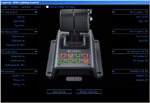
G940 Lighting Control Software for Flight Simulator X and Flight Simulator X: Accelerator
Introduction
G940 Lighting control Software lets you assign any of 28 Flight Simulator X events to the
eight panel buttons on the Logitech Flight System G940 Throttle. The events supported
are:
Fire on Engine 1, Fire on Engine 2, Fire on Engine 3, Fire on Engine 4, Damage Status Engine 1, Damage Status Engine 2, Damage Status Engine 3, Damage Status Engine 4, APU on Fire, Fuel Status, Avionics Master On/Off, Autopilot Master On/Off, Autopilot Flight Director On/Off, Flaps Up/Down, Spoiler Armed, Gear Up/Down, Exit open/Closed, Canopy Open/Closed, Tail Hook Up/ Down, Structure Iced, , Pitot Heater On/Off, Engine Anti Ice on/off, Pitot Iced, APU on/off, No Smoking on/off, Seatbelts On/Off, Nosewheel locked, Smoke On/Off, Set button Off, Set button Green, Set button Amber, Set button Red.
Buttons assigned to an event will change color when the event occurs. For example, if
Gear Up/Down is assigned. The button will light green when the gear are down and
locked. While the gear are in transition, the light is amber, and changes to red when the
gear are fully retracted.
| Filename: | Logitech_G940_Lighting_Control_Software.zip |
| License: | Freeware |
| Added: | 12th January 2010, 01:07:45 |
| Downloads: | 639 |
| Author: | Timo Hollwedel |
| Size: | 766.86 KB |
| Category: Flight Simulator X - Utilities | |
| FSCheckride |
|
Images related to this file:
File Description:
FSCheckride allows users to create and run feature-rich multiple choice exams in FSX and FS9.
FSCheckride was reviewed by Avsim and received a Gold Star award.
FSCheckride was formally a payware add-on produced by FS2Crew. However, FS2Crew has decided to give the product out for free a gift to the Flightsim community for all the support it has received over the years.
We are hoping that users will create their own tests and distribute them freely in the community.
Review Available @ http://www.avsim.com/pages/0108/CATIII/FSCheckride.htm)
| Filename: | FSCheckride.zip |
| License: | Freeware |
| Added: | 12th December 2009, 15:46:54 |
| Downloads: | 1,727 |
| Author: | FS2Crew |
| Size: | 19.93 MB |
| Category: Flight Simulator X - Utilities | |
| FSX IFR Waypoints for Plan-G |
|
File Description:
A set of files containing the default FSX IFR waypoints. These files may be imported into the user waypoint database component of Plan-G, a freeware flight planner/tracker for FS9/FSX. As Plan-G is currently designed as a VFR flight planner, ATS routes are not supported.
| Filename: | FSX_IFR_Waypoints_for_PlanG.zip |
| License: | Freeware, limited distribution |
| Added: | 17th December 2009, 23:25:19 |
| Downloads: | 745 |
| Author: | Scott Smart |
| Size: | 1.57 MB |
| Category: Flight Simulator X - Utilities | |
| WidevieW X version 3.2 |
|
Images related to this file:
File Description:

WidevieW can be used to create simulator cockpits with panoramic scenery views on multiple monitors, with customizable view angles, using networked computers (over a LAN). There is no limit on how many computers can be connected and an high speed transfer protocol working inside the network keeps all the views perfectly synchronized throughout ground operations and flight.
| Filename: | WidevieW_X_version_32.zip |
| License: | Shareware, time limited |
| Added: | 26th February 2010, 11:14:22 |
| Downloads: | 1,961 |
| Author: | Luciano Napolitano |
| Size: | 3.1 MB |
| Category: Flight Simulator X - Utilities | |
| Widetraffic X version 1.3 |
|
Images related to this file:
File Description:
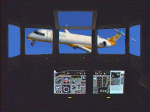
Widetraffic lets multiplayer and AI traffic synchronization throughout the LAN (networked computers), useful when Flight Simulator is used on multiple computers via WidevieW. Using Widetraffic, the same airplanes fly at the same time and same place on every computer of the network, making the panoramic view created by WidevieW more realistic and immersive.
| Filename: | Widetraffic_X_version_13.zip |
| License: | Shareware, time limited |
| Added: | 26th February 2010, 23:20:22 |
| Downloads: | 494 |
| Author: | Luciano Napolitano |
| Size: | 2.05 MB |
| Category: Flight Simulator X - Utilities | |
| FSX Log book editor 0.2 |
|
File Description:
This is an editor for FSX log book files. It can modify flight times, destination or landing airports and comments recorded for each flight in the logbook. You can export your logbook to CSV (Microsoft Excel) or HTML. It can also import the contents of your FS9 logbook.
This release adds new import/export features and a new gui to edit more informations contained in the logbook.
Requires Java Runtime Environment.
| Filename: | FSX_Log_book_editor_02.zip |
| License: | Freeware |
| Added: | 6th November 2006, 16:37:29 |
| Downloads: | 6,544 |
| Author: | Lamont Clark (lc0277) |
| Size: | 84.66 KB |
| Category: Flight Simulator X - Utilities | |
| 737 800 NGX fuel planner 1.2 |
|
Images related to this file:
File Description:
CREATION
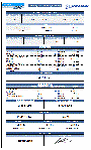
This fuel planner was made from datas collected by kACARS_free during flights test, and from the PMDG's tutorial, the result is approximate but corresponds relatively well to the consumption of the NGX.
OPERATION
You only have to fill the departure's ICAO - the distance until the arrival - the arrival's ICAO - the distance to the alternate airport - the ICAO of alternate.
You can change :
- APU time,
- taxi departure time,
- taxi arrival time,
- CDB fuel,
- holding fuel
You can also fill the adjustement's datas to the wind :
- average route,
- wind direction,
- wind speed.
If you have headwind, the fuel planner takes it into consideration, but not the tailwind, because the wind can be lower than expected!
If you have any question, ask me:
[email protected]
Changelog :
V1.1
- add fuel planner in kgs
v1.2
- add wind adjustment
- adjust enroute consumption
| Filename: | 737_800_NGX_fuel_planner_12.zip |
| License: | Freeware |
| Added: | 17th March 2013, 10:10:42 |
| Downloads: | 8,889 |
| Author: | Frederic FURST |
| Size: | 107.27 KB |
| Category: Flight Simulator X - Utilities | |
| PMDG 737 NGX Fuel Planner Excel Sheet |
|
File Description:
PMDG NGX Fuel Planner
Just add your Values in the yellow fields. The results are shown in the Blue an the green fields. The Calculator is based on the NGX Tutorial with the FMC Fuel Prediction. Made this for myself and i'm not a professional pilot, so i'm pretty sure it isn't perfect but worked always fine for me.
Any suggestions can be sent on [email protected]
Have Fun, Kevin Kergen.
| Filename: | PMDG_737_NGX_Fuel_Planner_Excel_Sheet.zip |
| License: | Freeware |
| Added: | 10th November 2015, 15:32:28 |
| Downloads: | 1,251 |
| Author: | Kevin Kergen |
| Size: | 10.82 KB |
| Category: Flight Simulator X - Utilities | |
| FS Scenery Manager X v1.5 |
|
File Description:
FS Scenery Manager X is a little tool to manage easily sceneries of FSX. The main function is the possibility to classify scenery into folders, for a simplified management of several sceneries in one click. Moreover you can add more than one scenery with the scan function. Version 1.5 is compliant with Windows 7 and has the same functionalities that the FS Scenery Manager V1.8 for FS2004. For more details see the pdf in the zip file.
| Filename: | FS_Scenery_Manager_X_v15.zip |
| License: | Freeware, limited distribution |
| Added: | 12th January 2014, 22:15:25 |
| Downloads: | 1,249 |
| Author: | FSTools |
| Size: | 156.97 KB |


© 2001-2026 AVSIM Online
All Rights Reserved
Privacy Policy |