
Where Flight Simulation Enthusiasts Gather from Around the World!
AVSIM Library - Search Results

| Category: Flight Simulator X - Gauges | |
| Altitude Alert for Captain Sim B707-300 |

|
File Description:
This is a 2D Altitude Alert gauge for Captain Sim's B707 family.
Just set the desired altitude then close the altitude alert gauge. The gauge does not need to be visible to operate properly.
It uses the middle marker light as a visual indicator when you're approaching the set altitude including the alert warning sound.
| Filename: | Altitude_Alert_for_Captain_Sim_B707300.zip |
| License: | Freeware, limited distribution |
| Added: | 23rd July 2017, 07:48:52 |
| Downloads: | 427 |
| Author: | Paul Tally |
| Size: | 265.83 KB |
| Category: Flight Simulator X - Gauges | |
| Advanced Radar System 4 (ARS4) |
|
Images related to this file:
File Description:
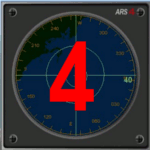
This gauge has been developed for FSX Flight Simulator SP1 or SP2. It
has also been tested with Microsoft Acceleration also, but compatibility is not guaranteed by the author.
This new Advanced Radar System (ARS 4) includes significant new features,
functions and displays for FSX AI traffic. The new key features are:
1)AI traffic display for air targets and boat/ship targets.
2)Auto landing on carrier if the carrier is part of the scenery MECOPS.
3)Allows switching between air target display and boat target display.
4) Provides for air and boat display to optionally insert airport and/or basic terrain display on the screen.
5)Different screen presentations for air and boat targets.
6)Simplified installation procedure.
7)The A2A re-fuel function remains the same as in the ARS2 version.
8)The auto tracking function remains the same as well as in the ARS2 version.
All displays for air, or boat/ship traffic, can be selected in a range of 5, 10, 20, and 40 miles.
For installation and additional information look at the ARS4 documentation inside the zip file. For copyrights and credits please look at the documentation for this gauge.
| Filename: | Advanced_Radar_System_4__ARS4.zip |
| License: | Freeware |
| Added: | 5th March 2013, 15:53:52 |
| Downloads: | 3,809 |
| Author: | Dietmar Loleit |
| Size: | 1.18 MB |
| Category: Flight Simulator X - Gauges | |
| Radio Altimeter / GPWS Boeing 737 |
|
Images related to this file:
File Description:
This one corrects the radio altimeter reading of each TDS Boeing 737 aircraft, so as to display actuall radio altitude and with the correct increase - decrease sequence. With this package you are provided with an accurate Ground Proximity Warning System (GPWS) which includes Radio Altitude callouts.
| Filename: | Radio_Altimeter__GPWS_Boeing_737.zip |
| License: | Freeware |
| Added: | 21st June 2015, 15:41:18 |
| Downloads: | 1,403 |
| Author: | Dimitrios Moschos |
| Size: | 334.51 KB |
| Category: Flight Simulator X - Gauges | |
| B737-800 EICAS FSX model for Saitek Pro Flight Instrument Panel |
|
Images related to this file:
File Description:
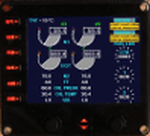
This other version of the B737-800 EICAS is the exact replica of the gauge provided with FSX and adapted for the FIP. I created this version just to test the possibility to use circular images as for the N1, EGT and fuel gauges. Not so easy but time is the main factor for success. It comes in two versions, one that shows the fuel flow (to be multiplied by 1000 like the FSX gauge) and the fuel tanks in pounds. The second version shows the fuel flow (no multiplier) and the fuel tanks in gallons.
The gauge provides TAT, N1, EGT, N2, Fuel flow, oil pressure, oil temperature, engine vibration, center, right and left fuel tanks quantity. Additionally it provides the possibility to move the N1 green bug (unfortunately decimal for autopilot values is not available for FSX). Two warnings for each engine also appear: start valve open and low oil pressure.
| Filename: | B737800_EICAS_FSX_model_for_Saitek_Pro_Flight_Inst.zip |
| License: | Freeware |
| Added: | 9th July 2013, 01:51:10 |
| Downloads: | 718 |
| Author: | Philippe Verhaege |
| Size: | 148.59 KB |
| Category: Flight Simulator X - Gauges | |
| 737 EICAS and 777 EICAS, PFD, and Nav Glass Instruments for FSX Default Aircraft |
|
Images related to this file:
File Description:
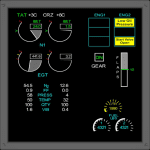
CrgSim is a networked system of 737 and 777 glass instruments for default FSX turbine aircraft. It has drivers for the GoFlight EFIS and MCP Pro and for the OpenCockpits EFIS through their IOCP server. A sample SIOC file for CrgSim EFIS values is included. CrgSim is generally compatible with any software that access and/or modify standard flight variables on the default FSX aircraft. AA flight plan manager is included that can import flight plans in standard FSX format. VNAV and LNAV buttons are active to turn on activate the flight plans and allow unattended flying.
The Nav Display will display active AI aircraft with the range of the nav display (up to 80 NM).
| Filename: | 737_EICAS_and_777_EICAS_PFD_and_Nav_Glass_Instrume.zip |
| License: | Check within download |
| Added: | 24th February 2014, 00:12:15 |
| Downloads: | 1,972 |
| Author: | Kapock Cavanaugh |
| Size: | 103.32 MB |
| Category: Flight Simulator X - Gauges | |
| Majestic Software Dash 8 Q400 - Exits Control Gauge |
|
Images related to this file:
File Description:
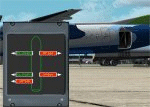
As the result of a request I made a small gauge to control the exits of the Majestic Q400, the gauge itself controls all the exits independently of each other with the exception of the two right hand doors which are both linked together using a single command.
This is a totally unofficial modification to Majestic Software's incredible Q400 so please although you should now have any issues with the gauge please contact myself if you should and I will try my best to help if I can.
| Filename: | Majestic_Software_Dash_8_Q400__Exits_Control_Gauge.zip |
| License: | Freeware |
| Added: | 4th October 2013, 02:29:16 |
| Downloads: | 3,212 |
| Author: | Jim Hodkinson |
| Size: | 409.39 KB |
| Category: Flight Simulator X - Gauges | |
| Boeing 737-200/Adv APU and Ground Power Mod |
|
Images related to this file:
File Description:
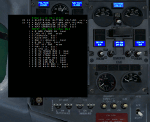
This gauge corrects the APU and ground power battery charging issues for Captain Sim's B737-200/ADV. A test gauge is also included.
| Filename: | Boeing_737200Adv_APU_and_Ground_Power_Mod.zip |
| License: | Freeware, limited distribution |
| Added: | 12th January 2013, 22:19:17 |
| Downloads: | 1,157 |
| Author: | Paul Tally |
| Size: | 62.45 KB |
| Category: Flight Simulator X - Gauges | |
| BeThere! |
|
File Description:
This package contains the BeThere! gauge. It lets you pause the flight simulator once the aircraft reaches a certain position.
This is useful for long range flights where the pilot wants to leave the flight sim unattended. The procedure is to either load an FS flightplan, switch the navigation mode of the autopilot to GPS and engage the autopilot. Or - with advanced aircraft add-ons - a flightplan is loaded into the FMC and the LNAV mode is set to let the aircraft automatically follow the track. Anyway, the problem is, that the pilot doesn't want to miss the top of descent. So the pilot has to check the computer regularily in order to be there when it becomes interesting again. Or, and that's the idea of this package, the flight sim is automatically paused at a safe position/distance.
Read more about this gauge, how to install and use it, in the readme.txt file included in the package.
| Filename: | BeThere.zip |
| License: | Freeware |
| Added: | 8th February 2007, 15:40:29 |
| Downloads: | 3,404 |
| Author: | Thilo Arndt |
| Size: | 44.46 KB |
| Category: Flight Simulator X - Gauges | |
| TCAS and Traffic Display Gauge V2.0 |
|
Images related to this file:
File Description:
This TCAS and Traffic Display Gauge Version 2.0 includes significant improvements from V1.0. It has been developed for the FSX Flight Simulator SP1/2 also. It should also work with Acceleration.The functionality for the TCAS part is based on general specs for commercial aircrafts. It does not provide in detail the function for a specific aircraft model. It is a generic gauge, and can be simple added to any aircraft as a standalone popup window.
In addition the gauge provides a AI traffic display in the ranges of 10,20, and 40 miles.Within this display mode, no TCAS rules are valid, which means all AI aircraft are displayed independent of any altitude or distance.
Improvements in V2.0 are: 1: Full TCAS and traffic display capability is provided even though your aircraft is on the ground. Only the trigger of the alarm/warn sound and the blinking lamp display willbe blocked. 2: An AI HDG pointer will be displayed. It shows in which direction the AI is moving. 3: A bearing pointer has been introduced. It allows the pilot to point to a specific AI.4: The AI additional text info display follows the structure of an ATC text.5:The AI additional text can be selected individually per AI with a mouse click.
6: Each AI display contains a ID index number (0 � 20).7: The design of the TCAS and Traffic Display Box has been updated.8: Increased the number of AIs displayed on the screen in display mode.
For installation and functional description look at the doc inside the ZIp.
CREDIT goes to :
Stefan Schneider for his support on special XML issues and TCAS functionality.
Bob Familton for his review of the documentation and testing for SP1 FSX.
Doug Dawson for his dsd-XML-sound interface in order to generate the sounds.
| Filename: | TCAS_and_Traffic_Display_Gauge_V20.zip |
| License: | Freeware |
| Added: | 25th October 2010, 13:37:36 |
| Downloads: | 3,750 |
| Author: | Dietmar Loleit |
| Size: | 981.32 KB |
| Category: Flight Simulator X - Gauges | |
| V-One Gauge for B737-200/Adv/C/F v1.8 Update (Captain Sim 737) |
|
Images related to this file:
File Description:

V-ONE NEW FEATURES:
- All voice call-out sounds replaced.
- Captain Sim sound module used for all sounds.
- Appropriate labels are displayed when selecting specific display toggles.
- Set flap position with mouse wheel while in 'Current Flaps' display.
- Adjust trim with mouse wheel while in 'Current Trim' display.
- Maximum Continuous Thrust EPR calculated for climb with de-rate option setting (0.0 to -0.15)
- Cruise EPR hold with +/-0.001 adjustments.
- Cruise IAS hold with +/-1 knot adjustments.
- V1, Vr and V2 Datacard calculations display instantaneously when flap lever is set.
- Flap call-out during descent will repeat for flap positions 5 through 40.
- MCT drives EPR bugs while using MCT climb control.
- EPR bugs follow EPR set-point.
- Vref select toggle 15, 30, 40 (30 default)
- Automatic setting of weight, (LB/KG), pressure (inMg/MB) and temperature (F/C) based on FSX units.
- Maximum Continuous Thrust display (MCT)
- Wind display / Maneuvering Speed display.
- Altitude call-out gauge included (optional install).
| Filename: | VOne_Gauge_for_B737200AdvCF_v18_Update_Captain_Sim.zip |
| License: | Freeware, limited distribution |
| Added: | 13th August 2017, 21:22:13 |
| Downloads: | 2,573 |
| Author: | Paul Tally |
| Size: | 4.95 MB |


© 2001-2026 AVSIM Online
All Rights Reserved
Privacy Policy |