
Where Flight Simulation Enthusiasts Gather from Around the World!
AVSIM Library - Search Results

| Category: Flight Simulator X - Utilities | |
| NumberPad Control Move Aircraft Utility |

|
File Description:
NpCmoveAircraft is a Lua script in the Numberpad Control family of FSX scripts that can be used to move an aircraft to a new position. Each step includes prompts for the required input and format. User inputs include the DISTANCE to move (NMs), the DIRECTION to move (degrees magnetic), the desired aircraft ALTITUDE (ft), the desired aircraft HEADING (degrees magnetic), and the desired aircraft IAS (Kts) along with the LANDING GEAR POSITION -- up (u), down (d) or fixed (f). Or for any of the five inputs the user can simply enter a carriage return (Enter key) to signify NO CHANGE for that particular entry.
Prior to the move the aircraft can be on the ground or in the air. So, for example, NpCmoveAircraft can be used to simply turn an a/c around, to move it to the other end of a runway, to re-position it for another approach after landing, to jump ahead in cruise, to catch up to another a/c, etc. NpCmoveAircraft works with default FSX aircraft and many add-on aircraft that adhere to the standard FSUIPC offsets.
A registered copy of FSUIPC is required to execute the NpCmoveAircraft Lua script. Simply copy the script to the Modules folder of FSX and assign a ‘hot key’, button or switch to activate the script.
Al Klayton
[email protected]
| Filename: | NumberPad_Control_Move_Aircraft_Utility.zip |
| License: | Freeware |
| Added: | 21st February 2017, 21:30:01 |
| Downloads: | 147 |
| Author: | Al Klayton |
| Size: | 3.92 KB |
| Category: Flight Simulator 2002 - Miscellaneous Files | |
| ATC Control Minipanel (Reworked Default) |
|
File Description:
This minipanel allow to just click with the mouse instead of pressing the keys to control all those ATC functions in FS2002.
Reworked from the default MiniCP ATC minipanel, changed buttons layout and i also added the "missing" 0 (zero) key.
You MUST download the program MiniCP(MiniControlPanel) by FsAvionics
Available from AVSIM.com.
| Filename: | ATC_Control_Minipanel_Reworked_Default.zip |
| License: | Freeware |
| Added: | 26th December 2002, 18:53:34 |
| Downloads: | 747 |
| Author: | François RONCHI |
| Size: | 3.01 KB |
| Category: Flight Simulator 2002 - Miscellaneous Files | |
| How To Control The Concorde |
|
File Description:
Today it is the last flight of the Air France Concorde.
With this occasion, I wished to offer to the flightsimmers
the documentation which makes it possible to continue to during
this legend. Thanks to flightsimmulators. This files contain two documents (french & English). Work with all concorde models.
| Filename: | How_To_Control_The_Concorde.zip |
| License: | Freeware |
| Added: | 1st June 2003, 00:49:02 |
| Downloads: | 2,017 |
| Author: | Arnaud Quenechdu |
| Size: | 15.08 KB |
| Category: Strike Fighters: Project 1 - Mods, Utilities and Patches | |
| SFP1 CH Flight Control Assignments |
|
File Description:
For those of you who do not have the time to create one, or want a place to start, here are my assignments for my CH 568 Combat Stick, CH Pro Throttle, and CH pedals (all USB). Copy this ini file to your C:Program FilesStrategy FirstStrike FightersControls folder, then choose it under your control assignments. I imagine this set-up will be able to cross-over to any other CH flight stick or throttle with minimual adjustment. Once again, I hope this helps.
| Filename: | SFP1_CH_Flight_Control_Assignments.zip |
| License: | Freeware |
| Added: | 4th December 2003, 05:37:06 |
| Downloads: | 184 |
| Author: | Eric Bates |
| Size: | 1.9 KB |
| Category: Flight Simulator 2004 - Gauges | |
| Harrier VSTOL/Effects Control Gauges |
|
File Description:
This archive contains addon's for Adam Preece' GR.7 Harrier aircraft, which IMHO is
the best visual Harrier model available at this time:
1. New flight dynamics, seperately animated nozzles and flaps, and a VSTOL control
gauge, enabling a stable VSTOL operation (vertical landing/takeoff) with auto-pitch
control, whilst maintaining realistic normal-flight characteristics.
2. A set of gauge-controlled effects, like engine heat/smoke (backwards or downwards,
depending on nozzles position), a visible/audible cannon, and wing vapor / wingtip
vortex effects.
And more ....A real must-try for Harrier fans. See included README for further details.
| Filename: | Harrier_VSTOLEffects_Control_Gauges.zip |
| License: | Freeware, limited distribution |
| Added: | 30th June 2004, 05:02:39 |
| Downloads: | 3,633 |
| Author: | Rob Barendregt |
| Size: | 78.65 KB |
| Category: Flight Simulator 2004 - Gauges | |
| Virtual Control Panel, VCP-Gauge |
|
File Description:
changing the views via the keypad annoyed me so much, that I decided to create a special gauge with realistic viewpoints out of the cabin - so called "wingviews". The VCP gauge can adapted to every panel as it can be dragged easily by mouse to a free place on the panel. An adaption to planes with virtual cockpits as FS9-default Panel are impossible.
You can see a demo video of the VCP gauge here - it shows the adaption of the gauge to POSKY´s A340:
http://www.buechiland.de/video/app_a340.wmv
| Filename: | Virtual_Control_Panel_VCPGauge.zip |
| License: | Freeware |
| Added: | 5th November 2004, 13:56:29 |
| Downloads: | 5,272 |
| Author: | Sebastian Büchner |
| Size: | 491.44 KB |
| Category: Flight Simulator X - Utilities | |
| Logitech G940 Lighting Control Software |
|
Images related to this file:
File Description:
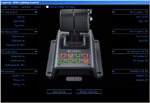
G940 Lighting Control Software for Flight Simulator X and Flight Simulator X: Accelerator
Introduction
G940 Lighting control Software lets you assign any of 28 Flight Simulator X events to the
eight panel buttons on the Logitech Flight System G940 Throttle. The events supported
are:
Fire on Engine 1, Fire on Engine 2, Fire on Engine 3, Fire on Engine 4, Damage Status Engine 1, Damage Status Engine 2, Damage Status Engine 3, Damage Status Engine 4, APU on Fire, Fuel Status, Avionics Master On/Off, Autopilot Master On/Off, Autopilot Flight Director On/Off, Flaps Up/Down, Spoiler Armed, Gear Up/Down, Exit open/Closed, Canopy Open/Closed, Tail Hook Up/ Down, Structure Iced, , Pitot Heater On/Off, Engine Anti Ice on/off, Pitot Iced, APU on/off, No Smoking on/off, Seatbelts On/Off, Nosewheel locked, Smoke On/Off, Set button Off, Set button Green, Set button Amber, Set button Red.
Buttons assigned to an event will change color when the event occurs. For example, if
Gear Up/Down is assigned. The button will light green when the gear are down and
locked. While the gear are in transition, the light is amber, and changes to red when the
gear are fully retracted.
| Filename: | Logitech_G940_Lighting_Control_Software.zip |
| License: | Freeware |
| Added: | 12th January 2010, 01:07:45 |
| Downloads: | 639 |
| Author: | Timo Hollwedel |
| Size: | 766.86 KB |
| Category: Flight Simulator 2004 - Gauges | |
| XML War Emergeny Power Control |
|
File Description:
XML_WEP Guage Public Release v1.0
This C Gauge will enable you to turn on and off WEP (War Emergency Power) with an XML Gauge, a feature MS seems to have forgotten about in FS9.
| Filename: | XML_War_Emergeny_Power_Control.zip |
| License: | Freeware |
| Added: | 17th July 2005, 05:34:08 |
| Downloads: | 940 |
| Author: | Bill Leaming |
| Size: | 28.95 KB |
| Category: Flight Simulator X - Scenery | |
| Christchurch Airport (NZCH) Control Tower |
|
File Description:
Christchurch Airport (NZCH) Control Tower v 1.0 for FSX/P3D - FREEWARE ONLY.
Scenery of the Christchurch airport control tower which opened in 2009. Features high quality 2048 textures and a nice night effect. Works great with Orbx NZSI.
The file contains everything you need. Simply unzip, add to your scenery library and enjoy!
| Filename: | Christchurch_Airport_NZCH_Control_Tower.zip |
| License: | Freeware |
| Added: | 19th February 2016, 23:05:13 |
| Downloads: | 852 |
| Author: | Jack Cheng |
| Size: | 5.02 MB |
| Category: Flight Simulator 2002 - Gauges | |
| Flame & Afterburner Effect Control Gauge |
|
File Description:
This gauge automatically switches on/off the flame and
afterburner effects used in some jets, when the engine(s)
are running resp. when the throttle position is > 90%.
It requires adding the gauge to your panel.cfg, and
changing/adding some lines in the aircraft.cfg LIGHTS section.
The Readme includes examples for Dino Cattaneo's F14B and
Peter Davies' SU27, but it can be used in any 1/2 engine
military jet that has no afterburner effect built in it's model.
| Filename: | Flame__Afterburner_Effect_Control_Gauge.zip |
| License: | Freeware, limited distribution |
| Added: | 20th April 2003, 01:14:17 |
| Downloads: | 4,718 |
| Author: | Rob Barendregt |
| Size: | 4.89 KB |


© 2001-2026 AVSIM Online
All Rights Reserved
Privacy Policy |